Somewhere around 2021, Google quietly started grading websites on how they feel to use, not just what they say, and gave the grading system a name that sounds like something you'd get at a car inspection: Core Web Vitals. I get asked "is my site fast enough?" almost as often as I get asked what a website should cost — and the honest answer is almost always "you don't know, because you tested it on your office wifi, on your own laptop, which is the one device on earth guaranteed to make it look fine." Let's actually measure it properly, in plain English, no developer decoder ring required.
The short version
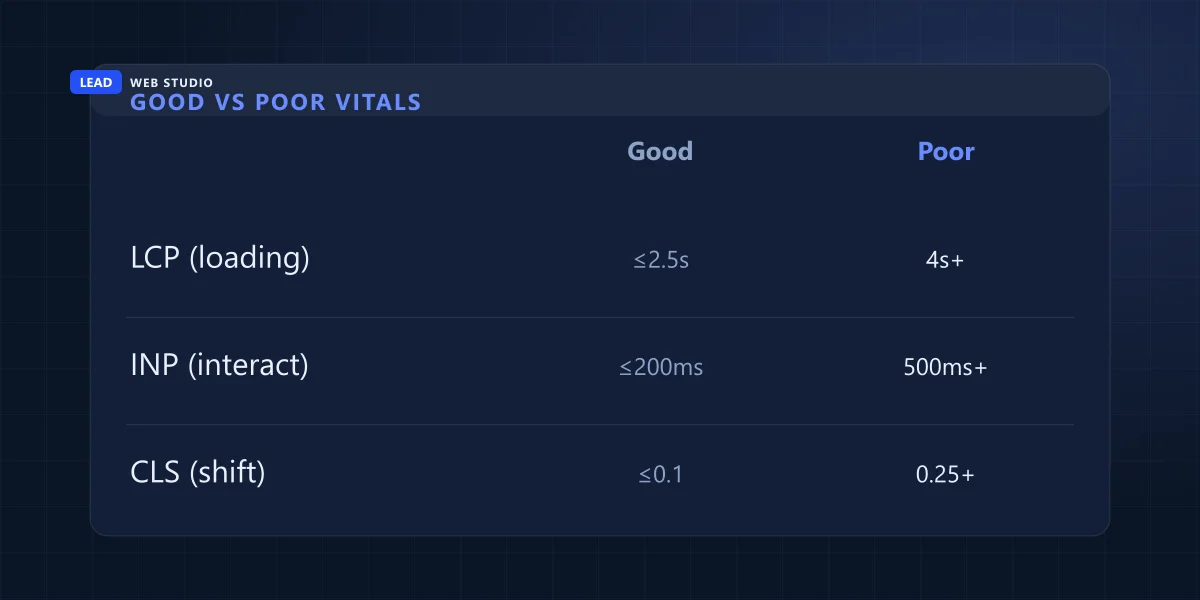
- Google's bar for "good": Largest Contentful Paint under 2.5 seconds, Interaction to Next Paint under 200 milliseconds, Cumulative Layout Shift under 0.1 — measured on a real phone, not your desk.
- This isn't just a Google thing. Vodafone measured an 8% sales lift from a 31% LCP improvement in a real, published A/B test — case study here.
- The fixes that actually matter are almost always the same five things, and none of them require a redesign — see the checklist below.
- Test your own site free, right now, at PageSpeed Insights — check Mobile, not Desktop.
How fast should your website actually load?
Google's own bar for "good" is a Largest Contentful Paint (LCP) under 2.5 seconds, an Interaction to Next Paint (INP) under 200 milliseconds, and a Cumulative Layout Shift (CLS) under 0.1 — all measured on real visitors' phones on real mobile connections, not your fast office wifi. Stay under those three numbers and you're genuinely fine. Drift above them and you're quietly losing people who never complain — they just close the tab.
Notice what's missing from that answer: a single "load time" number. That's the old way of thinking about speed, and it's not how Google — or your actual customers — experience a page anymore. Nobody sits there with a stopwatch. They notice when the page feels like it's fighting them: the headline pops in late, the "Book Now" button jumps three inches right as their thumb lands on it, a tap does nothing for half a second. That's what these three numbers are actually measuring.
What is a Core Web Vital, in plain English?
Three separate measurements, each catching a different way a page can feel broken even when it "technically" loaded. Here's what each one is really watching, straight from Google's own definition:
| Metric | What it actually measures | Good |
|---|---|---|
| LCP Largest Contentful Paint | How long until the biggest visible thing — usually your hero image or headline — actually shows up | ≤ 2.5s |
| INP Interaction to Next Paint | How long the page takes to visibly respond after someone taps a button or a link | ≤ 200ms |
| CLS Cumulative Layout Shift | How much stuff jumps around while the page is still loading in — that button that moves right as you tap it | ≤ 0.1 |
Google scores you at the 75th percentile of real visits — meaning three out of every four of your actual visitors need to land inside those numbers, not just your best-case test on a fresh browser tab. That's a meaningfully higher bar than most small business sites are hitting, and most owners have simply never checked.
Why does this actually matter for a small business — not just for Google?
Speed matters more for your bank account than it does for your ranking. A slow site loses real customers before Google is even in the picture: people bounce, forms go unfilled, calls don't happen — and none of that shows up as an error message anywhere. It just shows up as fewer leads, month after month, with no obvious cause.
The clearest proof of this isn't a theory, it's a real published test. Vodafone New Zealand ran a genuine A/B experiment on a live landing page — one version optimized for Core Web Vitals, one not — and the version with a 31% better LCP produced 8% more sales, plus a 15% lift in lead-to-visit rate and an 11% lift in cart-to-visit rate. That's not a marketing claim, it's a documented Google/Vodafone case study, and it's the exact reason I treat page speed as a revenue project, not a technical nice-to-have, on every site I build.
Nobody ever emails you to say your site felt slow. They just don't call — and you never find out why the phone stopped ringing after month two.
How do I actually test my site's speed, for free?
Google's own free tool, PageSpeed Insights, tests your live page the same way Google itself measures it — no plugin, no signup, no cost. Here's the order I actually run it in with clients:
- Go to pagespeed.web.dev and paste in your homepage URL.
- Test your busiest inner page too — people land all over your site from search and social, not just the homepage.
- Click into the Mobile tab specifically. That's the number Google actually uses to rank you, and it's almost always worse than Desktop.
- Scroll past the big 0-100 score and read the Diagnostics section — that's the actual to-do list, in order of impact.
- Fix one thing, re-test, then fix the next. Changing five things at once means you never learn which one actually helped.
The fixes that actually move the needle
I've audited enough small-business sites to know it's almost always the same handful of culprits, in roughly this order of impact:
- Compress and convert images to WebP. A phone photo straight off an iPhone can be 4-8MB. Compressed and resized to its actual display size, the same image is often under 100KB with no visible quality loss — this alone fixes more LCP problems than anything else on this list.
- Preload the hero image instead of lazy-loading it. Lazy-loading is great for images further down the page, but if your hero image is lazy-loaded too, you've told the browser to deliberately delay the exact thing LCP is measuring. The hero gets
fetchpriority="high", everything below the fold getsloading="lazy". - Defer non-critical JavaScript. Chat widgets, review-badge scripts, carousel sliders — load them after the page is interactive, not before, so they stop blocking the content your visitor actually came for.
- Preload your fonts and set font-display: swap. Without this, text can either stay invisible until the font arrives, or flash from a fallback font to your real one — both count against you.
- Get off $3/month shared hosting. On cheap shared hosting your site sits on a server with hundreds of unrelated sites, and when one of them gets a traffic spike, everyone else's response time pays for it. This is the fix nobody wants to hear because it's the least glamorous, and it's often the one with the biggest floor-raising effect.

Common speed killers I see on small-business sites
Most of the sites I audit for speed have two or three of these stacked on top of each other — which is exactly why the score feels so bad even though no single thing looks broken.
| What's slowing you down | What it actually costs you | The fix |
|---|---|---|
| Full-size phone photos used as-is | Multi-second LCP on mobile | Compress + resize to real display width |
| Hero image set to lazy-load | LCP deliberately delayed | fetchpriority="high" on the hero only |
| A pile of third-party widgets | Slow INP, blocked rendering | Defer until after page is interactive |
| Web fonts with no preload | Invisible or flashing text | Preload + font-display: swap |
| $3/mo shared hosting | Everything slow, worse at peak times | Proper hosting built for the traffic you actually get |
Does site speed actually affect your Google ranking?
Yes, but modestly — Core Web Vitals is one signal among many in Google's algorithm, not a knockout blow that will bury a genuinely great page over a fraction of a second. The bigger effect is indirect and, honestly, worse: a slow site loses visitors before Google even finishes judging your content, and every other ranking signal that depends on people sticking around — time on page, return visits, conversions — quietly suffers right along with it. I go deeper on the full ranking picture in how to get found on Google; speed is the foundation the rest of that stands on, not a separate checkbox.
It's also one of the real, measurable reasons a properly hand-coded site tends to outrun a bloated page-builder build — fewer layers between your content and the browser means less to slow down. I laid out that whole trade-off honestly in custom-coded vs. WordPress, including where WordPress is still the right call.
If you only do one thing this week: run your homepage and your busiest inner page through PageSpeed Insights on the Mobile tab, and read the Diagnostics list. That fifteen minutes tells you more about where you're actually losing customers than a year of guessing.
Frequently asked questions
How fast should a website load?+
Google's bar for "good" is a Largest Contentful Paint under 2.5 seconds, measured on real visitors' phones. In practical terms, your main content should be visible in under two and a half seconds on an average mobile connection, not your fast office wifi.
What are Core Web Vitals?+
Three measurements Google uses to judge how a page actually feels to use: LCP (how fast the main content appears), INP (how quickly the page responds when you tap something), and CLS (how much the layout jumps around while loading).
Does site speed affect Google rankings?+
Yes, but modestly — it's one ranking signal among many, not a knockout blow. Its bigger effect is indirect: slow sites lose visitors before Google even gets to judge the content, which drags down every other signal that depends on people staying.
How do I test my website's speed for free?+
Use Google's free PageSpeed Insights tool, paste in your URL, and check the Mobile results specifically. Read the Diagnostics section for the specific fixes, not just the headline 0-100 number.
Want your site actually tested properly?
I'll run a real Core Web Vitals audit on your current site and show you exactly what's costing you leads — no jargon, just a straight list of fixes.
Get My Free Quote
120+ sites built and tuned for GTA businesses — I run a real Core Web Vitals check on every one before it ships. Read my full bio · Get in touch