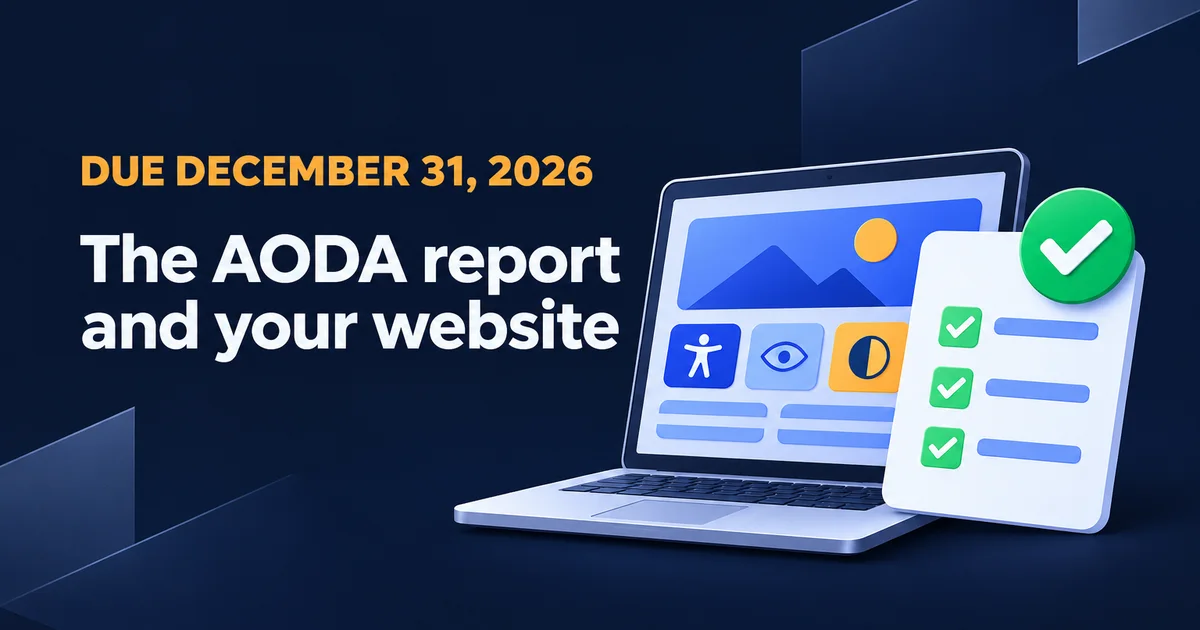
Your bookkeeper emails: the AODA compliance report is due December 31, can the website person confirm the site is fine? The answer hangs on one number, your headcount in Ontario. At 20 to 49 employees, your website isn't on the report. At 50 or more it is, and somebody senior signs under the answer.
The law firm bulletins I read this morning list the website rule and the report rule side by side and leave you to work out how they meet. So I read the regulation, two reports that organizations filed publicly, and ran a scanner over a test page I broke on purpose. I'm a web designer, not a lawyer. Take this to your lawyer as a list of questions, because the signature on that report won't be mine.
Is my website part of the AODA compliance report?
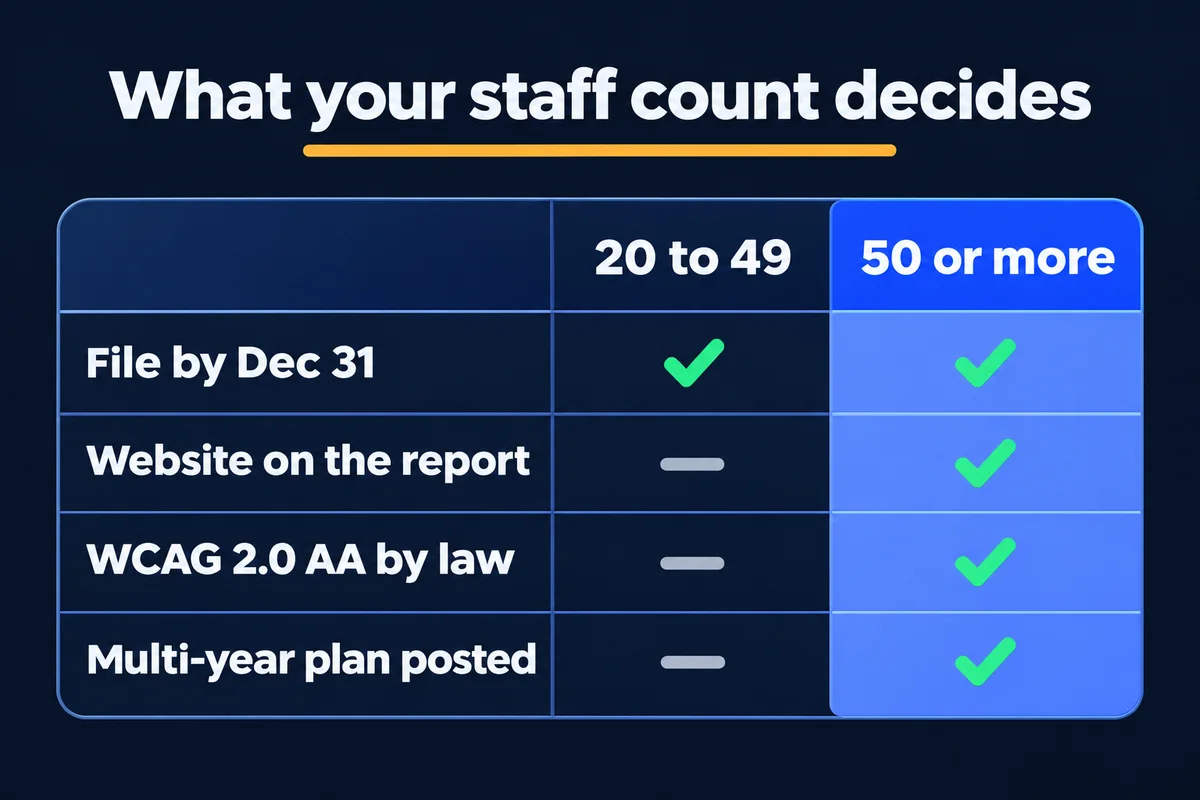
Only with 50 or more employees in Ontario. Section 86.1 of the regulation lets organizations with 20 to 49 employees report on customer service alone. Under 20, you file nothing. At 50 or more, you report on the whole regulation, which includes whether your public website meets WCAG 2.0 Level AA.
| Employees in Ontario | 1 to 19 | 20 to 49 | 50 or more |
|---|---|---|---|
| File a report by Dec 31, 2026 | No | Yes | Yes |
| What the report covers | Nothing to file | Customer service | All the standards |
| Public website must meet WCAG 2.0 AA | No | No | Yes |
| Multi-year plan posted on your website | No | No | Yes |
| Accessible formats when someone asks | Yes | Yes | Yes |
Count full-time, part-time, seasonal and contract workers. Leave out staff outside Ontario, volunteers and independent contractors. That's Ontario's own counting rule, and it gets interesting for a landscaper with 15 people in January and 55 in July. If that's you, the ministry's line is 1-866-515-2025, and I'd ask them before guessing.
What does the AODA report ask about your website?
It asks whether your sites meet WCAG 2.0 Level AA, as a yes or no, and leaves a comments box. The wording has moved between filing years. A 2023 report had two website questions of their own, while a 2025 public sector report rolled them into one question on the whole communications standard.
The Act says filed reports must be available to the public, which is how I got to read these. I've put the wording in my own words:
LCBO report, 2023, over 50 employees
Question 5
Do you have a website you control, meaning you can add, remove or change what's on it?
A site your agency built counts. So does anything you can log into and edit.
Question 5.a
Do all your public sites meet WCAG 2.0 AA, apart from live captions and pre-recorded audio descriptions? List them in the comments.
"All" is the word that should worry you.
A provincial agency's report, 2025, public sector form
One question per standard
Do you meet all the requirements of the information and communications standards?
The website isn't named here, so it's easy to tick past it.
If you answer No
Tick what falls short: feedback, formats on request, WCAG 2.0 and a few others. Add details in the comments.
This agency ticked No and WCAG, and pointed to a dated compliance plan.
Neither of these is the 2026 business form, so open your own copy in the portal and read it before you answer.
Two details deserve your attention. The 2023 form wanted the "complete names and addresses of your publicly available web content", including social media pages and apps. The LCBO's list ran past 20 entries. Yours may be five, and I promise one of them is a 2019 spring promotion landing page nobody has opened since. The other detail is control: section 14 reaches sites you control directly or through a contract that lets you modify them, which is one more reason to read what a web design contract should say about who holds the keys.
Ontario's filing page doesn't say what follows a No. Section 37 of the Act does make false or misleading information in a report an offence, so a Yes based on a hunch is the answer I'd take to a lawyer first.
I planted 18 faults on a test page and ran a scanner over it
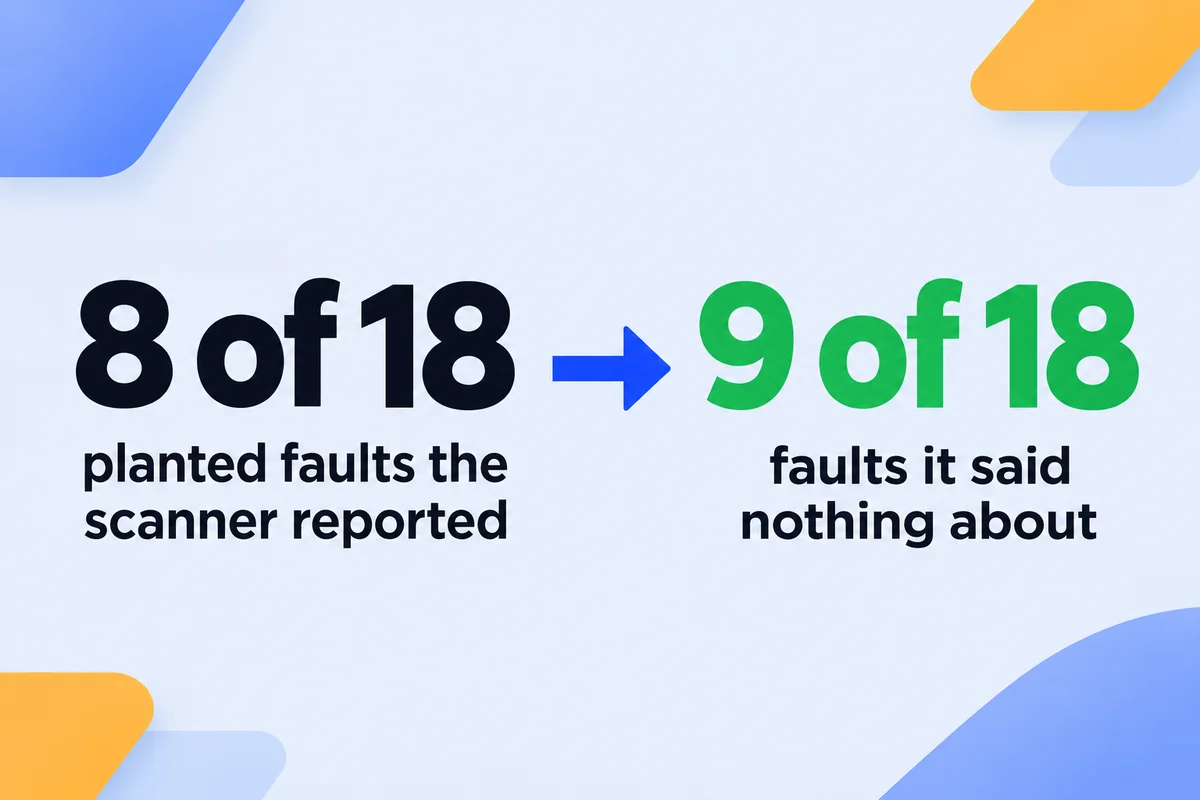
The first thing most people do is run a free scan, and I run one too on pages I publish. So I built a local test page with 18 known WCAG 2.0 faults and ran axe-core 4.13, the engine behind the impact ratings in Google's Lighthouse score. It reported 8, flagged 1 for a person to review and stayed silent on 9. The number after each fault is its WCAG success criterion.
Reported as a violation (8)
- Photo with no alt text at all (1.1.1)
- Pale grey text on white (1.4.3)
- Form field with no name of any kind (4.1.2)
- Icon button with no name (4.1.2)
- Forced tab order on one link (2.4.3)
- No page language (3.1.1)
- No page title (2.4.2)
- Phone zoom turned off (1.4.4)
Said nothing about (9)
- A crew photo with the alt text "IMG_2291" (1.1.1)
- Email field with a placeholder and no label (1.3.1)
- Three links that all say "click here" (2.4.4)
- Menu a keyboard can't reach (2.1.1)
- Focus outline removed (2.4.7)
- Big bold text posing as a heading (1.3.1)
- Form error shown only in red (1.4.1)
- Slider with no pause button (2.2.2)
- Price list inside a picture (1.4.5)
The one flagged for review was a video with no captions: the tool can't tell whether it has speech. My first run reported all 18, and a perfect score from a robot deserves suspicion. One rule about page landmarks was firing on everything because my test page had no main area. I fixed the page and got the numbers above.
Read this for what it is. The 18 are my own list, on one page, against one tool, so 44% isn't a figure for scanners in general. What it does show is the kind of fault that slips through: a menu nobody can open from a keyboard hurts a real customer, and the scanner never mentioned it.
The ten-minute walk I'd do before anyone signs
Do this on your home page, one service page and the contact page, then write down the date and what you found. Ontario tells you to pair automated checks with assistive technology and feedback from people with disabilities, and to keep a record of your fixes.
- Put the mouse aside and press Tab from the top of the page. You should see a marker move through the links in reading order.
- Open every menu and reach the contact form using the keyboard only. If you get stuck in a popup, a visitor does too.
- Send the form empty. The error has to say in words what's wrong, since a red border tells a colour-blind visitor nothing.
- Click the word above each form field. The cursor should jump into that field, and if it doesn't, the label isn't connected.
- Press Ctrl and plus until the browser says 200%. Nothing should be cut off or sit on top of something else.
- Turn on the screen reader your computer already has, Narrator on Windows or VoiceOver on a Mac, and listen to your home page for one minute. You'll learn a lot about your photo captions, some of it funny.
That walk tells you whether to worry. It doesn't replace a review of every page. When you need one to hand to the signer, my AODA website accessibility audit is $299, covers WCAG 2.1 AA page by page, which contains all of 2.0 AA, and the fee is credited toward the fixes.
WCAG 2.0 or 2.2? Read the regulation, not the sales page
Some scanner vendors' guides say the AODA requires WCAG 2.2. The regulation, which I read today at its 29 October 2026 currency date, defines the guidelines as the December 2008 recommendation of WCAG 2.0. Gowling WLG expects a move to 2.2 by 2027, and that's the reason to test against a newer version if you're building now. The answer on your 2026 report is about 2.0. A website redesign brings its own wrinkle: section 14 treats a significant refresh on your existing domain as a new website.
How big are the AODA fines, really?
Administrative penalties for a corporation run from $500 to $15,000 on the regulation's table. The famous $100,000 a day is a ceiling: a penalty can only turn daily when both the impact and your history rank as major. Court fines are separate, and false information in a report can reach the same daily maximum.
| Your history | Minor impact | Moderate impact | Major impact |
|---|---|---|---|
| Up to 1 earlier contravention | $500 | $1,000 | $2,000 |
| 2 to 5 | $2,500 | $5,000 | $10,000 |
| 6 or more | $5,000 | $10,000 | $15,000, can turn daily |
History counts over two reporting cycles. The regulation ranks an administrative slip as minor and anything touching health or safety as major, and a director makes the call. Individuals and unincorporated organizations have their own table in Schedule 2. I'm not telling you this so you can budget for a fine. I'm telling you because a scary number makes people buy a compliance badge in a panic, and a badge won't answer question 5.a.
Eight weeks, working back from December 31
December 31 is a Thursday, and I wouldn't plan on finding your signer at a desk that day. Gowling also warns that the portal can get congested near the deadline. This is the calendar I would use with 50 or more employees. At 20 to 49, you can skip the website rows.
- Count your staff, find your nine-digit business number on a tax return, and name the certifier and a primary contact. Create the portal account.
- List every site, landing page, social page and app, with who can edit each one.
- Run a scan and the keyboard walk on each kind of page. Save the results with the date.
- Get the fixes done, or put what's left into a written plan with dates, so the signer knows which answer is true.
- Test again and hand the signer one page: what was checked, what was fixed, what's still open.
- File. A confirmation email with a number goes to the certifier and the primary contact. Keep it.
Under 50 staff: two small things your site can still do this week
Below 50 there's no WCAG rule for your site, but sections 11 and 12 apply to every obligated organization, however small. If you take feedback, it has to work for people with disabilities. You also have to tell the public that accessible formats are available, and provide them on request at no more than your regular cost.
The contact page is the natural home for both. A plain sentence covers the notice: "Need this information in another format, such as large print? Call or email us and we'll work out what suits you." Have your lawyer look it over while they're reading your privacy policy. And the pale grey text from my test deserves fixing at any headcount, since nobody phones a business whose number they can't read.
Short answers on the AODA report and your website
Do I file an AODA report with fewer than 20 employees?+
No. Section 86.1 of the regulation exempts businesses and non-profits with fewer than 20 employees from filing. The rest of the law still applies to you, including feedback that works for people with disabilities and accessible formats when someone asks.
Does a small business website have to meet WCAG in Ontario?+
The WCAG rule in section 14 binds businesses and non-profits with 50 or more employees in Ontario. Below that, the regulation doesn't set a technical standard for your website. You still have to provide your information in an accessible format when someone asks for it.
Who signs the AODA compliance report?+
For a company, a director, a senior officer or another responsible person with authority to bind the organization, under section 15 of the Act. Ontario calls this person the certifier. Your web designer can't sign it, and neither can an outside firm that scanned the site.
Is it WCAG 2.0 or WCAG 2.2 for the AODA?+
WCAG 2.0 Level AA, leaving out live captions and pre-recorded audio descriptions. Section 14 defines the guidelines as the December 2008 recommendation. A law firm expects a move to 2.2 by 2027, but the text I read on 3 November 2026 still says 2.0.
Does a free accessibility scanner prove my site complies?+
No. On my test page with 18 planted faults, axe-core reported 8, flagged 1 for a person to check and said nothing about 9. Ontario's own page tells you to combine automated checks with assistive technology and feedback from people with disabilities.
Sources, read on 3 November 2026: Ontario, O. Reg. 191/11, Integrated Accessibility Standards (sections 2, 11, 12, 14, 83, 86.1 and Schedule 3; e-Laws currency date 29 October 2026) and Accessibility for Ontarians with Disabilities Act, 2005 (sections 14, 15, 37); ontario.ca pages linked above, updated 19 February, 16 June and 21 September 2026; McCarthy Tétrault and Gowling WLG on the 2026 deadline. Test figures: my own local page with planted faults, axe-core 4.13.0, 3 November 2026. This article is general information from a web designer, not legal advice.
Someone at your company has to sign this by December 31
Send me your website address and tell me your headcount. I'll tell you whether the site is on your report, and what I'd test first. Upkeep after that lives under website maintenance and support.
Get My Free Quote
I hand-code websites for service businesses around the GTA, and I read the regulation before I tell an owner what it says. Read my full bio · Get in touch