Soccer Academy Website Design in Etobicoke
I build websites for soccer academies, youth clubs and training programs in Etobicoke — organised around the three things that decide a registration: the age band, the field, and the next start date. My anchor project is UFootball Soccer Academy, a youth club based here in Etobicoke, so this exact brief has already been solved once.
A parent's visit is short. Age group, location and the next start date settle it. Everything else on the page — the philosophy, the history, the crest — is waiting its turn.
Short answer
Lead Web Studio builds websites for soccer academies and youth sports clubs in Etobicoke — hand-coded, mobile-first, and structured as one page per program and per training location rather than a single "Programs" list. A build costs $899–$2,999 one-time and goes live in 5–7 days once your schedules and photos are ready. The real anchor client is ufootballsc.com, based here in Etobicoke.
What does a soccer academy website have to answer before a parent registers?
Three things, in this order: which age groups you take, where you actually train, and when the next session starts. A parent settles all three before reading a word about coaching philosophy. Put them in the first screen, then make registering possible on a phone in under two minutes — that is the whole job.
Nearly every academy site I look at inverts that order. It opens with the club's story, hides the schedule in a downloadable PDF, and describes its locations as "Toronto and the GTA". The registration then sits behind an email address. Each of those is a place a parent stops, and none of them is a design problem — they are decisions about what goes on the page first. The same discipline applies whether I am building for a club, a medical clinic or a restaurant: name the thing the visitor came for before anything you would rather talk about.
Four Tabs Open, One Registration
A parent rarely compares academies carefully. They open several, eliminate most of them in seconds on two criteria, and finish with the one that let them.
Round of four · how they arrive
The cut · what eliminates you
The final · who gets the registration
This is the general pattern in how families shop for a program, not measured data from any one club.
Built for a real Etobicoke youth club
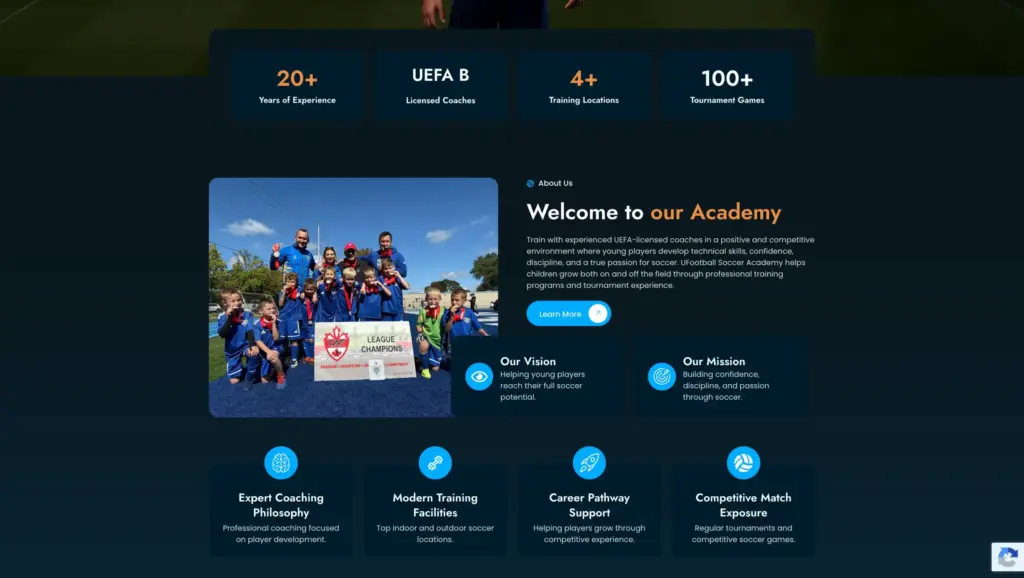
UFootball Soccer Academy needed a site parents could use, not a brochure about the club. I built structured program pages that put schedules, age groups and academy locations in a scannable layout, gave the coaching staff real pages of their own, and added an integrated registration and contact system so families can join a program or book a trial session without phoning anyone. Local SEO and Google Maps integration went in from the first line of code, so "soccer academy near me" searches land on the right page rather than the homepage.

Every Age Band Is a Different Sale
A club treats these as one program list. A parent only ever reads one line of it — theirs.
The parent's real question is whether their child will cry and want to leave. This page needs session length, group size, what a first session looks like, and what happens if it does not work out — not a development pathway.
Here parents start comparing. How many players per coach, is it the same coach every week, how much of the hour is actually spent with a ball. Answer those three on the page and you have answered most of the phone calls.
Recreational and competitive part ways at this age, and families are deciding which side they are on. The page has to be plain about the standard the group plays at, the time commitment and the tryout dates — vagueness here loses both audiences.
The player reads this page too, not only the parent. Coaching background and what a season actually contains matter more than the club's founding story, and showcase or scholarship questions belong here rather than on the homepage.
A separate audience with separate habits: they register themselves, they book late, and they want the schedule far more than the story. Giving them their own page keeps them out of the way of the parents, and vice versa.
Ontario Soccer, the provincial governing body, organises youth play by birth year rather than school grade. Print the birth years next to the U-numbers on your pages — plenty of parents translate one into the other wrong.
Each Program Is Answering a Different Question
| Program | What the Parent Is Actually Asking | Page I'd Build |
|---|---|---|
| House league / recreational | "Is this for a kid who just wants to play with friends?" | A plain program page: age bands, weekly time, session length, full season cost |
| Competitive / rep tryouts | "What standard is this, and when are the tryouts?" | A tryout page with the dates, what to bring and what happens after |
| March Break & summer camps | "Which weeks, what hours, and is there early drop-off?" | A camp page per break, with the weeks as a table and one booking button |
| Private & small-group training | "Can we book a few sessions to work on one thing?" | A session-based page naming the coach, the focus and a short booking form |
| Goalkeeper & position-specific | "Does anyone here actually train keepers?" | A specialist page naming the coach and what a session covers |
| Adult & drop-in | "Can I play, or is this only for kids?" | A drop-in page that is mostly schedule, with a no-commitment signup |
Registration is the page that pays for the site
Everything else on an academy website exists to get a parent to this one form. On the build for this club, joining a program, booking a trial session and reaching a coach all happen online, without a phone call — which matters because most of these decisions are made in the evening, after the office has closed. The form is short, it works with a thumb, and the calls to action point at it from every program page rather than sitting alone in the menu.
Booking flows are a specialism of mine in their own right — see the appointment booking case study for the same problem solved elsewhere.
Yellow Cards and Red Cards on an Academy Website
Seven things I find on almost every club site I am asked to look at. The yellow ones cost you sign-ups. The red ones end the visit.
A parent opens it on a phone, pinches to zoom, scrolls sideways, and gives up. A schedule belongs on the page as a table — it is also the only version Google can read.
A parent can tell at a glance whether those are your kids on your field. Photos from your own sessions do work here that no amount of design can substitute for.
Withholding the season fee does not stop the question, it moves it to a phone call — and a good number of parents simply do not make that call.
Six programs on one page means no page ranks for any of them, and a parent has to read all six to find theirs. Split them and each one can answer its own audience properly.
Tiny fields, a date picker that will not cooperate with a thumb, a required field with no explanation. If the form is hard to complete on a phone, it does not get completed later on a laptop — it gets abandoned.
A page still advertising a season that finished in the spring tells a parent the club may no longer be running. It is the cheapest thing on this list to fix and the most commonly left broken.
A lot of parents would rather ask one question out loud than fill in a form. If your number lives at the bottom of the page, that call goes to whoever put theirs at the top.
Etobicoke Is Wider Than a Parent Will Drive
From Long Branch on the lake up to Thistletown north of Highway 401 is roughly fifteen kilometres, and Highway 427 and the 401 slice the district into quadrants that do not talk to each other at 5:30 on a Tuesday. A program twelve minutes away and the same program thirty-five minutes away are not the same product. That makes the field — the actual park, not the word "Etobicoke" — the most important line on a program page, and it is the line most clubs leave out.
Centennial Park, off Rathburn Road near Renforth Drive, is the sports landmark most families in the middle of Etobicoke orient by; a parent in Rexdale is more likely to measure everything from Humber College's North Campus, and one in Markland Wood or Eatonville from Burnhamthorpe Road. Those are the words they type and the pins they look for. Naming your locations properly — with cross-streets, a map and parking notes — gives you a page per field instead of one "Locations" list, and it answers the question a parent was going to ask anyway.
The other thing to say out loud is where your boundary really is. Etobicoke Creek marks the line with Mississauga and means nothing to a nine-year-old's family: households in Markland Wood look at Mississauga clubs as a matter of course, and families in Rexdale look west into Malton and north to Brampton. If your site only claims Etobicoke, you are invisible to half the people who would happily drive to you. Listing the neighbouring areas you genuinely take players from — and the ones you do not — saves everyone a phone call. That is ordinary Etobicoke SEO work, done at write time rather than bolted on afterwards; the same principle runs through every Etobicoke web design project I take.
What a Parent Checks, and Where Most Club Sites Fail
| What They Check | Typical Academy Site | What I Build |
|---|---|---|
| Age groups | Buried in a PDF or a social post | Named in the first screen, with a page per band |
| Where you train | "Toronto & the GTA" | The actual parks, with cross-streets and a map |
| Cost | "Contact us for pricing" | The season fee, what it includes and what it does not |
| Next start date | Last season's dates, never updated | A dated block that is part of the page, not an image |
| Coaches | One group photo | A short page each: background, age groups, licence where they hold one |
| Registration | An email address, or a form that fails on a phone | A form completed on a phone in under two minutes |
A Complete Website for a Growing Club
Design & Experience
A clean, energetic design that parents and players both read easily.
- Structured program & coaching pages
- Schedules, age groups and locations in scannable layouts
- Mobile-first responsive design
- Fast loading on every device
- Clear calls to action on every program page
Growth & Functionality
Everything a club needs to turn a search into a registered player.
- Online registration & trial session booking
- Interactive contact forms
- Local SEO for "soccer academy" searches
- Google Maps & location integration
- SEO-optimized structure from day one
"A club spends the winter arguing about its crest and its mission statement. The parent who decides in March needs one birth year, one park and one working form." — Liubomyr Lukaniuk, on building soccer academy websites
Which Package Fits a Soccer Academy
| Package | Best for | What's included |
|---|---|---|
| Starter — $899 | Up to 10 pages | Core program pages, coaches, locations, registration form, basic local SEO |
| Full Site — $1,499 | A larger build | A page per program and per training location, camps, deeper local SEO |
| Advanced — $2,999 | Custom functionality involved | Online payment, season and roster structure, unlimited pages, priority support |
One-time pricing, quoted in writing before I start. Google Business Profile setup or optimisation is separate, from $149 — see full pricing.
Soccer Academy Website FAQ, Etobicoke
Have you built a soccer academy website before?+
Yes. I designed and built the website for UFootball Soccer Academy, a youth club based here in Etobicoke — program pages carrying schedules, age groups and training locations, an integrated registration and trial-booking system, and local SEO for "soccer academy near me" searches.
How long does a soccer academy website take to build?+
About 5 to 7 days once your programs, schedules and photos are ready. The slow part is rarely the build — it is settling what each program is called, which age bands it covers and what it costs for the season.
Can parents register and book a trial online?+
Yes, registration and trial-session booking are part of a standard build. Taking payment online is the step that moves a project into the $2,999 tier, because it needs a payment provider, a refund policy and a season and roster structure behind the form.
Do you build a separate page for each program and location?+
Yes, and it matters more in youth sports than in most fields. Parents search by age group and by the park they already drive to. One page per program and per training location matches how they search and gives you distinct pages to rank instead of one list.
What does a soccer academy website cost?+
$899 one-time for up to 10 pages, $1,499 for a larger build with separate program and location pages, $2,999 where custom functionality such as online payment is involved. One payment, fixed in writing before work starts. See my website design packages.

10+ years designing SEO-ready websites for local businesses and clubs, including a youth soccer academy in Etobicoke. About the studio · Get in touch
Need a website for your club, academy or team?
I'll build a fast site that answers the age group, the field and the start date before a parent has to ask. Packages from $899.