To see visitors from ChatGPT in Google Analytics, open the Traffic acquisition report and look for the row called AI Assistant. GA4 now sorts clicks from ChatGPT and similar assistants into that row by itself, no setup needed. Treat the number as a floor, though. Some AI clicks arrive without a label and get filed under Direct or Organic Search instead.
I pulled this exact report for my own site this morning, because owners keep asking me about the new row like it's a spot on an X-ray. It isn't. On leadlls.com it counted 85 visits in four months, which is about the traffic a decent hardware store flyer gets in a weekend. Still, the visits were real people, five of them sent me a form, and the pages they landed on surprised me.
Where to find it in GA4
In the left menu of Google Analytics, follow this path. The table opens grouped by channel, and AI Assistant is a row like Organic Search or Direct. If the row isn't there, no assistant has sent you a visit in the dates you picked.
- Reports
- Acquisition
- Traffic acquisition
- AI Assistant row
Then click the small plus sign above the first column and add Session source / medium. Now every row tells you which assistant it was: on my site, chatgpt.com / ai-assistant and perplexity.ai / ai-assistant. Set the date range to the last three or four months. A single week of AI visits on a small site is usually zero or one, and you'll learn nothing from it.
If you've never trusted the numbers in that dashboard, you're half right. I checked a month of mine against the server's own log in the three Google Analytics numbers I distrust, and the same caution applies to this row.
What four months of AI visits looked like on my site
From 1 July to 27 October 2026, Google Analytics recorded 2,248 visits to leadlls.com. The AI Assistant row holds 85 of them, 3.8%. Eighty came from ChatGPT and five from Perplexity. Here's the whole split in one bar:
2,248 visits to leadlls.com, by channel
- Direct 1,694
- Organic Search 216
- Referral 153
- AI Assistant 85
- Social, ads, unassigned 100
The count matters less than how the visitors behaved. GA4 calls a visit "engaged" when it lasts over ten seconds, opens a second page or ends in a key event. My key event is a sent contact form. This is the same four months, channel by channel:
| Channel | Visits | Engaged | Avg. time | Sent a form |
|---|---|---|---|---|
| Organic Search | 216 | 71% | 4 min 54 s | 9.3% |
| Referral | 153 | 63% | 3 min 0 s | 5.9% |
| AI Assistant | 85 | 52% | 4 min 31 s | 4.7% |
| Direct | 1,694 | 17% | 1 min 0 s | 1.2% |
So the AI visitors read for a long time and a few of them got in touch, but Google search still beats them on every line except raw curiosity. Two more things stood out. Of the 85, 63 were on a desktop and only 22 on a phone, the reverse of my search traffic. And 61 were first visits, so ChatGPT was introducing people to me, not bringing back old visitors.
The pages ChatGPT sent people to
I expected the blog. ChatGPT mostly sent people to proof: the pages that show finished websites. More than a third of the 85 visits landed on a project page in my portfolio. These are the landing pages with three visits or more:
- Home page9
- No landing page recorded9
- Case study: a psychotherapy practice website6
- Contact page4
- Case study: an art gallery website4
- Projects overview3
- Case study: a soccer academy website3
My reading of it: people ask an assistant "who builds websites for a therapy practice in Toronto" and the assistant links the page that answers it with a real example. The blog posts got one or two visits each. If you want to see what that kind of page looks like, my website projects are the pages in that list. The four visits straight to the contact page are the clearest sign of all: someone had already decided before they clicked.
Who the channel counts, and where the other AI clicks go
The AI Assistant row only catches a click that arrives with a label saying which site sent it. Google's own channel definitions name the assistants it means:
"sources like ChatGPT, Gemini, Deepseek, Copilot, or Grok"
Google Analytics Help, default channel group
Perplexity isn't on that list, yet all five Perplexity visits on my site were filed as AI Assistant. So the list is a set of examples, not a fence. Everything else that came from AI lands in one of three other rows:
AI Assistant
A click on a link inside ChatGPT or Perplexity in a web browser. All 85 of mine, labelled ai-assistant.
Organic Search
Clicks from Google's AI Overviews and AI Mode. Google files them with ordinary search results, by design, so you can't pull them apart in the standard reports.
Direct
A link opened from an app that sends no label, or one copied from a chat and pasted into a browser. GA4 can't tell these from someone typing your address.
Referral
Older visits. My one ChatGPT visit in January 2026 sits there as chatgpt.com / referral, because the AI Assistant row didn't exist yet and GA4 doesn't relabel the past.
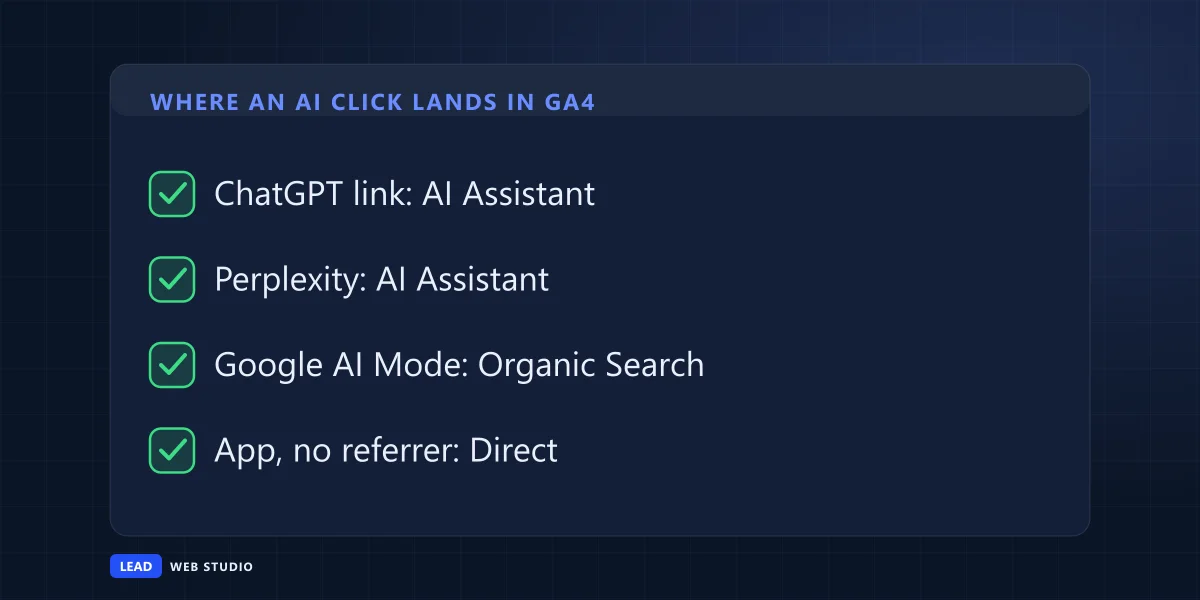
Direct is the honest blind spot. Mine holds 1,694 visits with a 17% engagement rate, a drawer where everything without a label ends up, from bookmarks to bots. Some AI visits are surely in there, and no setting will fish them out. If you're curious which machines read your site before anyone clicks, I counted them in who is crawling my website.
Should you build your own AI channel?
For most small businesses, no. The built-in row already catches the main assistants, and on a site with a few visits a week a custom setup changes the number by one or two. Build one only when Session source / medium shows an AI site sitting under Referral or Unassigned, which happens with old dates and less common assistants.
If you do, Google's help page on custom channel groups sets the rules. You need the Editor role on the property. A standard property gets two custom groups on top of the default one. The group applies to your reports retroactively, so it can pull that January visit out of Referral. And order matters: GA4 puts a visit in the first channel whose rule it matches, so your AI channel goes above Referral. The rule itself is Source, matches regex, with a short list like chatgpt\.com|perplexity\.ai|gemini\.google\.com|copilot\.microsoft\.com|claude\.ai. Keep it to full domain names. A loose word like "gpt" will happily swallow unrelated sites, and then you're reporting a spreadsheet of nonsense with great confidence.
A monthly note worth keeping
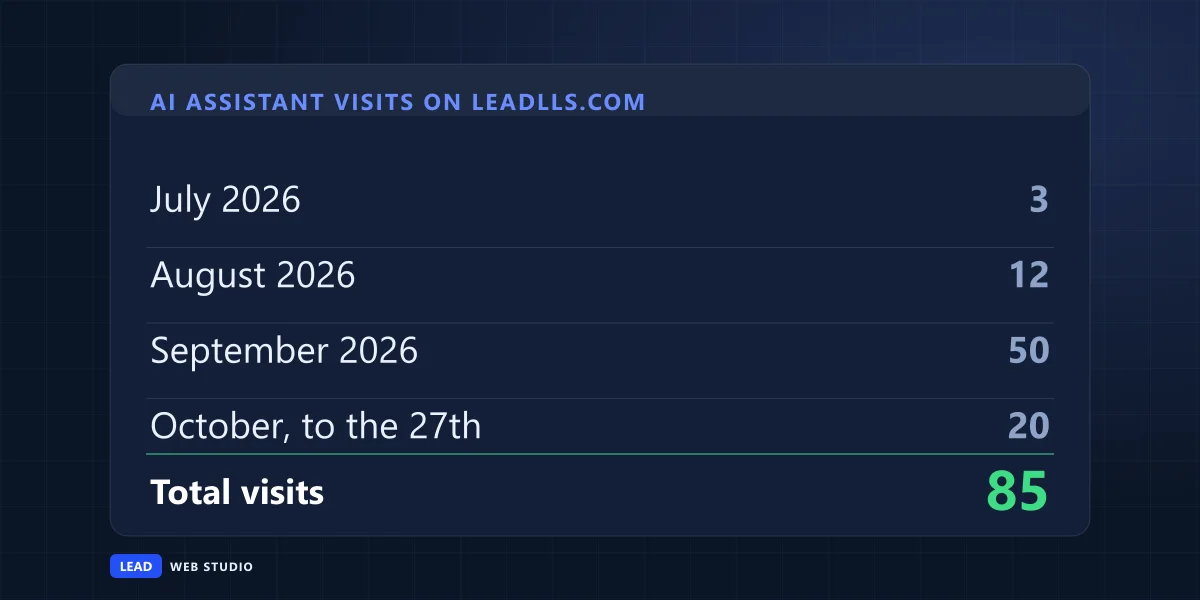
One number a month beats one dashboard a year. On the first of each month I write down the AI Assistant visits and their share of all visits. These are mine so far:
| Month | All visits | AI Assistant | Share |
|---|---|---|---|
| July | 451 | 3 | 0.7% |
| August | 481 | 12 | 2.5% |
| September | 635 | 50 | 7.9% |
| October, to the 27th | 677 | 20 | 3.0% |
September jumped and October fell back, and I can't tell you why from analytics alone. That's the point of writing it down: with numbers this small, one good month looks like a trend and one quiet month looks like a disaster. Four months in, all I can honestly say is that AI assistants send a few percent of my visits. What gets a page quoted in the first place is a separate job, and I wrote up how I write content that Google and ChatGPT actually quote.
Questions owners ask me about AI traffic
Does the AI Assistant channel count visits from Google's AI Overviews?+
No. Google's own channel definitions put clicks from AI Overviews and AI Mode under Organic Search, together with ordinary search results. There is no separate line for them in the standard reports, so a visit from an AI Overview looks the same as any other Google visit.
Why is my AI Assistant channel empty?+
Either no assistant has linked to your site yet, or the people who clicked came through an app that sends no referrer, which GA4 files under Direct. Check the date range first: the channel does not relabel old visits, so a range that starts in spring shows little.
Is AI traffic worth more than Google traffic?+
Not on my site, so far. From July to October 2026, 4.7% of AI Assistant visits ended with a sent form, against 9.3% for Organic Search. AI visitors stayed long and read project pages, but Google search still brought more visits and a higher share of leads.
Do I need Google Tag Manager to see ChatGPT visits?+
No. The AI Assistant channel works with the standard GA4 tag. If your site already shows visits in Google Analytics, the channel appears in the Traffic acquisition report by itself as soon as an assistant sends you a visit.
Can I see what ChatGPT said about my business?+
Not in Google Analytics. GA4 only records the visit after someone clicks a link. The answer itself, and every time an assistant mentioned you without a click, never reaches your analytics. The only way to read it is to ask the assistant the questions your customers ask.
Sources, read on 28 October 2026: Google Analytics Help on the default channel group for the AI Assistant definition and where AI Overviews are filed; Google Analytics Help on custom channel groups for the Editor role, the two-group limit, retroactive use and channel order. Every visit count, rate and landing page above comes from the Google Analytics property of leadlls.com, read through Google's reporting API on 28 October 2026.
Want to know what your own analytics says?
Send me your address and I'll tell you which channels bring you visits that turn into calls and forms. Reading the numbers is part of my SEO work for local businesses, and of website maintenance and support for the sites I look after.
Get My Free Quote
I build websites in hand-written code for service businesses around Toronto, and I read their Google Analytics with the owners so the numbers mean something. Read my full bio · Get in touch