
When you're moving your business to a new address, edit the address on the Google profile you already have, on the first day you're open at the new place, and change your website a few days before that. Most businesses keep their reviews that way. Restaurants, hotels and entertainment venues are the exception: Google's policy sends them down a different road.
Moving is the one week a year when nobody has time to think about Google Maps. Boxes, the landlord, the internet installer who said "between 8 and 6". Then a month later a regular customer calls from the old parking lot, looking at a "For lease" sign, because Maps sent them there with total confidence. The fix takes an hour or two of work, spread over about six weeks. The order matters more than the effort.
Edit the address or start a new Google profile?
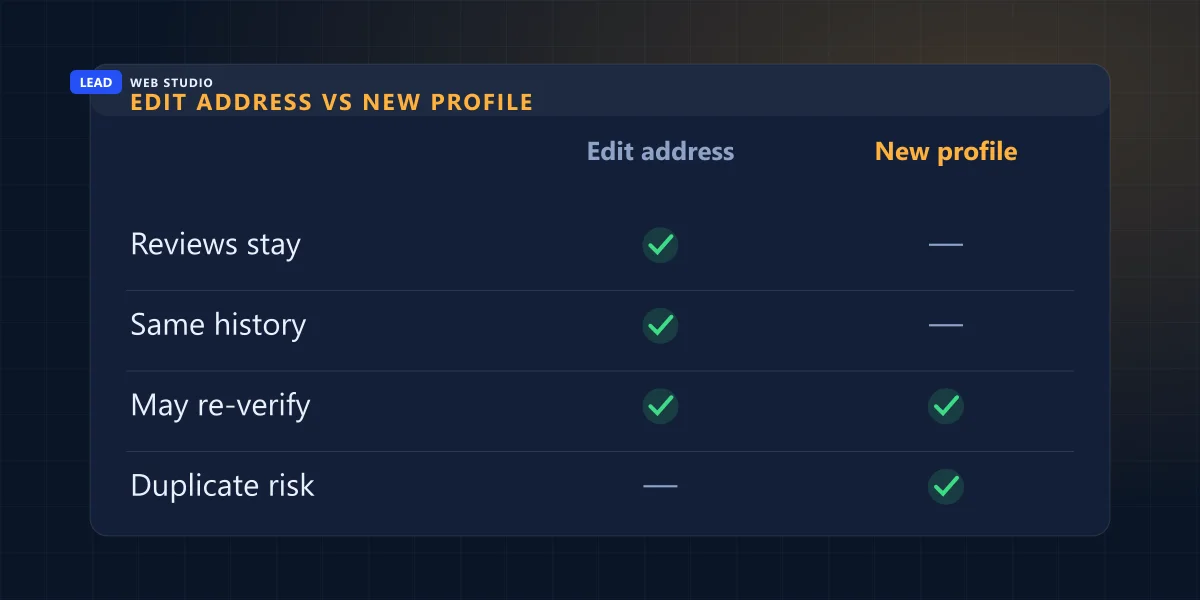
Edit the profile you already have. Google's pages on reviews and on duplicates both tell you not to create a new profile because you moved, and say the reviews follow the business when the name stays the same. The exception is a business people visit for the place itself, like a restaurant, a hotel or a venue: Google rejects location edits for those.
Edit the address in place
Offices, shops, clinics, trades, studios, service-area businesses
- Same profile, same reviews, same photos you uploaded, same history.
- Google may ask you to verify again at the new address, so plan to be reachable there.
- Keep the business name exactly as it is. A name change on the same day makes it look like a different business.
Close the old one, add a new one
Dining, lodging and entertainment venues, where the place is the product
- Mark the old profile as permanently closed, then add the new location as a new profile and verify it.
- Never reopen the closed profile later "to fix it". Google's reopen page says to add a new business instead.
- Ask Google support, in writing, to move your reviews to the new profile.
Why the two roads? Because Google's help centre says both. I read its five relevant pages side by side this morning, and they don't fully agree with each other. The table lists what each one says, so you can check the wording yourself instead of trusting a blog post, including this one:
| Google's page | What it says about a move | Fits |
|---|---|---|
| Resolve duplicate profiles | If the business relocates, don't create a new profile; update the existing one with the new address. | Most businesses |
| Move your reviews across profiles | Don't create a new profile because of a change in location. Same name at a new address: reviews transfer automatically, though maybe not for hotels, golf courses or scenic attractions. | Most businesses |
| Edit your Business Profile | Moving after the profile is verified means you must verify again. | Everyone who edits |
| Overview of profile policies | Location edits are rejected for dining, lodging and entertainment venues. A relocated business must mark the old profile permanently closed and create a new one. | Venues, and Google's strictest reading |
| Mark your business as reopened | A profile closed because of a location change must not be reopened; add a new business, verify it, contact Google to move reviews. | Anyone already on the second road |
My reading: the edit-in-place pages are the ones written for an ordinary business, and the policy page's hard line about closing is aimed at venues, where a new address really is a different experience. If you run a dental office or a plumbing company, edit. If you run a restaurant and your edit gets rejected, that's the policy working as written, and you're on the second road. Whichever road you take, never run the old and the new profile side by side, which is how most of the cases in my guide to merging a duplicate Google listing start.
When to change what: a calendar around move day
Your website goes first, a few days before the move, because Google and directory editors compare what you submit with what your site says. Google changes on the day you're actually open at the new place. Everything else follows once Google shows the new address. The order, counted from move day:
-
4 weeks before
Make the list while you still remember the old place
- Search your business name plus the old street name and write down every site that shows it.
- Find the logins: Google profile, Apple Business Connect, Bing Places, Facebook, every directory you claimed. A missing login takes weeks to recover, so start now.
- Look up the new address on Google Maps. Check that the pin lands on your building, and note any old business still listed there.
-
The week before
Prepare the website change and the proof
- Have the website edits ready: footer, contact page, map, schema, page titles. They go live two or three days before you open.
- Order the outside sign so it's up on day one. If Google asks for proof, a photo of permanent signage is what it wants to see.
- Port your phone number to the new place instead of getting a new one.
-
Move day: first day open
Change the Google profile, and nothing else on it
- In your profile: Edit profile, then Location, then Business location. Enter the new address and save.
- Check the pin, and drag it onto your door if it landed on the road or the neighbour's roof.
- Leave the name, category and phone alone until the address change is live.
-
Days 1 to 10
Answer Google, then wait
- If Google asks you to verify again, do it straight away, and keep the phone on the profile answered by a person.
- Google says most edits show in about 10 minutes and some take up to 30 days. Don't resubmit the same edit every morning.
-
Weeks 2 to 6
Everything else, from the list you made
- Apple Business Connect and Bing Places first: they feed Apple Maps on every iPhone and the maps in Bing search.
- Then Facebook, Yelp and the industry and city directories you actually use.
- Upload new photos of the outside and the entrance to your Google profile, so people recognise the place from the parking lot.
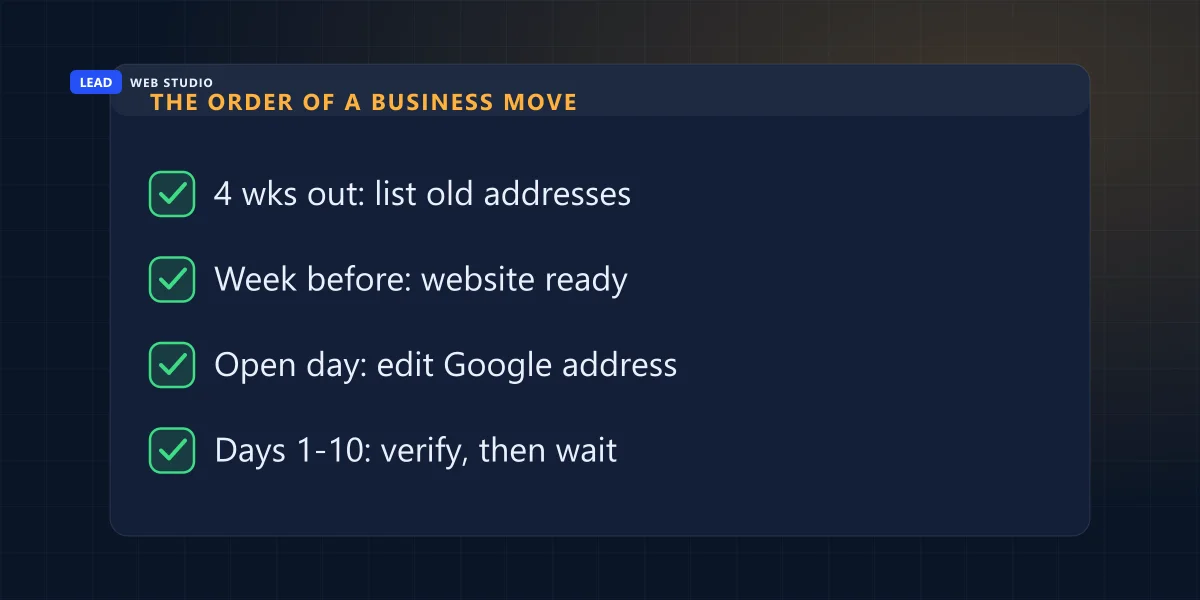
The single most common mistake is doing step three in week one. You sign the lease, feel organised, and change Google the same afternoon. Now the profile sends customers to an empty unit that still smells of paint, and if Google asks you to verify, nobody is there to get the mail.
Where your old address is hiding
In more places than the footer. On your website alone the address usually sits in five or six spots, and some of them, like the code that tells Google your business details, aren't visible on the page at all. I look in three groups:
On your website
- The footer and the contact page, plus any "visit us" block on the home page.
- The embedded Google map and every "Get directions" link, which often point at the old coordinates.
- The schema code in the page source, which holds the address separately from the visible text.
- Page titles and headings that name the old neighbourhood.
- PDF price lists, quote templates and invoice footers.
On Google
- The business location in your profile, and its pin.
- The service area, if your move changes where you'll drive.
- Photos: the old storefront picture is now misleading. Replace it.
- Posts or offers that say "visit us at".
- Your Google Ads location assets, if you advertise.
Everywhere else
- Apple Business Connect and Bing Places.
- Facebook, Instagram bio, LinkedIn page.
- Directories and your industry association listing.
- Email signatures, for every person in the company.
- Your licence or registration, where the law requires it.
Which directories are worth logging in to at all is a separate question, and I've answered it for Canadian businesses in which local directories are worth claiming. For a move, you only need to fix the ones that already show you. Creating new ones at the same time just gives you more places to get wrong.
On a hand-coded site the address often lives in one settings file and shows up everywhere from there. On a WordPress site it's typically typed into the footer widget, the contact page, the theme options and an SEO plugin separately. Search the whole site for the old street name before you call it done.
Will moving change where you show up on the map?
It can. Google says local results rest mainly on relevance, distance and popularity, and distance means how far the business is from the person searching, so a new address changes who sees you. Moving down the street changes almost nothing. Moving across the city swaps one group of nearby searchers for another, and moving to a new town starts the map part of local search largely over.
| How far you move | Who sees you on the map | Worth doing |
|---|---|---|
| Same street or plaza | Practically the same people | Edit, check the pin, carry on |
| Same neighbourhood | Mostly the same, shifted a few blocks | Update the neighbourhood named on your website |
| Across the city | A different set of nearby searchers | Rewrite the service area and the area pages on your site |
| A new town | New searchers, new competitors | Treat the website's local pages as new work |
Reviews, photos and the profile's history travel with you when you edit in place, and that's the part that would take years to rebuild. Where you rank for "near me" searches in the first weeks depends on the competitors around the new address, and nobody can promise you a position there. If you want someone to watch the profile through the move, that's part of what my Google Maps management plans cover.
Moving a home-based service business
If you visit customers and your address is hidden on the profile, you still have one. Google uses it to verify the business, and changing it can trigger verification again, the same as for a shop. Your customers never see it, but the profile still depends on it.
Three things change for a service-area business that moves house. The hidden address, which you update on the day you live there. The service area, which you redraw around where you'll actually drive from now on, not where you used to. And any page on your website that says "based in" the old town. What stays: the profile, the reviews, the name and the phone number, as long as you don't touch them in the same week.
What goes wrong in the first month, and the fix
Most problems after a move are leftovers: an old pin, an old listing, an old record somewhere Google reads from. They look alarming and are usually ten-minute fixes once you know which one you're looking at.
| What you see | Usual cause | What to do |
|---|---|---|
| Maps sends people to the building next door | The pin landed on the wrong spot | Edit the location and drag the pin onto your entrance |
| A second card for your business appears at the new address | Someone added the place, or a new profile was created by mistake | Don't verify it. In Maps, use Suggest an edit, Place closed or not here, Duplicate of another place |
| The previous tenant's business shows at your new address | Their profile was never closed | In Maps: Suggest an edit, Place closed or not here, Moved to a new location, or Permanently closed |
| Your edit sits "under review" for days | Google is checking the change, sometimes with verification | Wait it out, don't resubmit, and keep your website showing the new address |
| The old address keeps coming back | A directory or a Maps user still feeds the old one | Fix the source you find; check your profile's edit history |
That last row deserves a second look, because anyone can suggest an edit to your listing and Google sometimes accepts it. If the old address returns without you touching anything, start with how to find out who changed your Google listing, which walks through where those edits come from.
Questions owners ask me about moving
Will I lose my Google reviews if I move my business?+
Not if you edit the address on the profile you already have and keep the same business name. Google's review help page says it moves the reviews to the new location automatically in that case. Hotels, golf courses and scenic attractions are the stated exceptions.
Can I change my Google address before I move in?+
Don't. The profile has to describe where customers can reach you today, and Google may ask you to verify again at the new address. Make the change on the first day you're actually open there, with the sign up and someone able to answer the phone.
Should I put a 'we have moved' notice on my website?+
Yes, for a few months. A short line near the top of the home page and contact page with the new address and the date you moved helps customers who saved the old one. Take it down once the calls asking where you went have stopped.
Do I need a new phone number when I move?+
No, and keeping the old one is the easiest part of the move to get right. Port the number to the new location or the new provider instead of replacing it. A new number means one more detail to change in every directory, on top of the address.
My business moved years ago and the old address still shows up. Is it too late?+
No. Search for your business name with the old street name, list every page that still shows it, and fix the ones you control first: your website, your Google profile, Apple and Bing. Then work through the directories you can log in to.
Sources, read on 24 October 2026: Google Business Profile Help, Resolve duplicate profiles, Move your reviews across Business Profiles, Edit your Business Profile, Overview of Google Business Profile policies, Mark your business as reopened, Manage your business address and Tips to improve your local ranking; Google Maps Help, Mark a place reopened or closed.
Moving soon?
Send me your website address, the old address and the new one. I'll tell you where the old one shows up on your site and on Google, and what the plans on my pricing page would cover.
Get My Free Quote
I build websites for service businesses in the GTA and set up and look after their Google profiles, so an address change touches both halves of my week. Read my full bio · Get in touch