A customer phones on Tuesday to say they drove over on Sunday and you were closed. You were not closed. You have never been closed on a Sunday. So you search your own name, and there it is in grey letters under your business hours: Sunday — Closed. You did not type that. Somebody else did, Google published it, and nobody phoned you either. This is the part of a Google Business Profile that nobody mentions during setup: your listing is not a page you own outright. It is a public record that you happen to be the main editor of.
The short version
- Anyone can suggest an edit. Google's own Maps help page lists what is on the menu: "Place name," "Category," "Location," "Hours," "Phone number," "Website," and "Place closed or not here."
- Google will also change things on its own, on reports from third parties: "If we receive reports that your business info isn't accurate, we might update your profile."
- You are told twice — a notification, and an alert in the "Edit profile" section. Both are easy to miss, and one of them is a setting people switch off.
- Speed cuts both ways. Edits "usually take up to 10 minutes to review, but sometimes it can take up to 30 days" — including your correction.
- The worst edit is not deletion, it is a closed label. Google says "temporarily-closed businesses can rank after open businesses."
- Google will not tell you who did it. No help page names the contributor, and there is no history tab that does either.
- Never fix it by building a second profile. That converts one bad edit into a suspension.
I set up and look after Google profiles for GTA businesses, so I see this from the inside more often than I would like. It is almost never a dramatic attack. It is usually a stranger being helpful and wrong, an old phone number resurfacing from somewhere, or a category quietly swapped for one that sounds similar and costs you half your searches. What makes it expensive is not the edit. It is the three weeks before anyone notices.
Can someone really change my Google listing without asking me?
Yes. Google Maps puts a Suggest an edit control on every place, including yours, and it is open to any signed-in user. The suggestion goes to Google for review, not to you. If Google accepts it, the change is simply live on your profile, and the first you hear about it is a notification you may or may not still receive.
Google's instructions to the public are three lines long: "Search for a place or select it on the map. Select Suggest an edit and then an attribute." The Google Maps help page for editing place information then lists the attributes on offer — "Place name," "Category," "Location," "Hours," "Phone number," "Website," and "Place closed or not here" — plus a long tail of service options, accessibility details, dining options, amenities and payment options. Google notes the feature "is only available in certain countries and regions", so it is not universal — the way to find out whether it is live on your listing is to look at your own listing, which you should be doing anyway.
There is a second route, and this is the one that surprises owners most, because no human has to touch anything. Google's page on what happens to your Business Profile edits says it plainly: "If we receive reports that your business info isn't accurate, we might update your profile. If this happens, you'll get a notification and find an alert in the 'Edit profile' section of your Business Profile."
Read that once more. Reports, plural, from people who are not you, can move information on a listing you verified. That is not a bug or a loophole — it is the designed behaviour of a directory that has to stay accurate when a business closes without telling anyone. It just means the accuracy of your listing is a thing you maintain, not a thing you finish.
Why would a stranger bother editing my listing?
Mostly for points. Google's Local Guides programme pays contributors in a scoring system, and edits are worth real progress in it: 5 points for a place edit, 15 for adding a place, badges and perks stacked on top. Most bad edits are volume, not malice. Deliberate sabotage exists, it is rarer, and Google's policies name it explicitly.
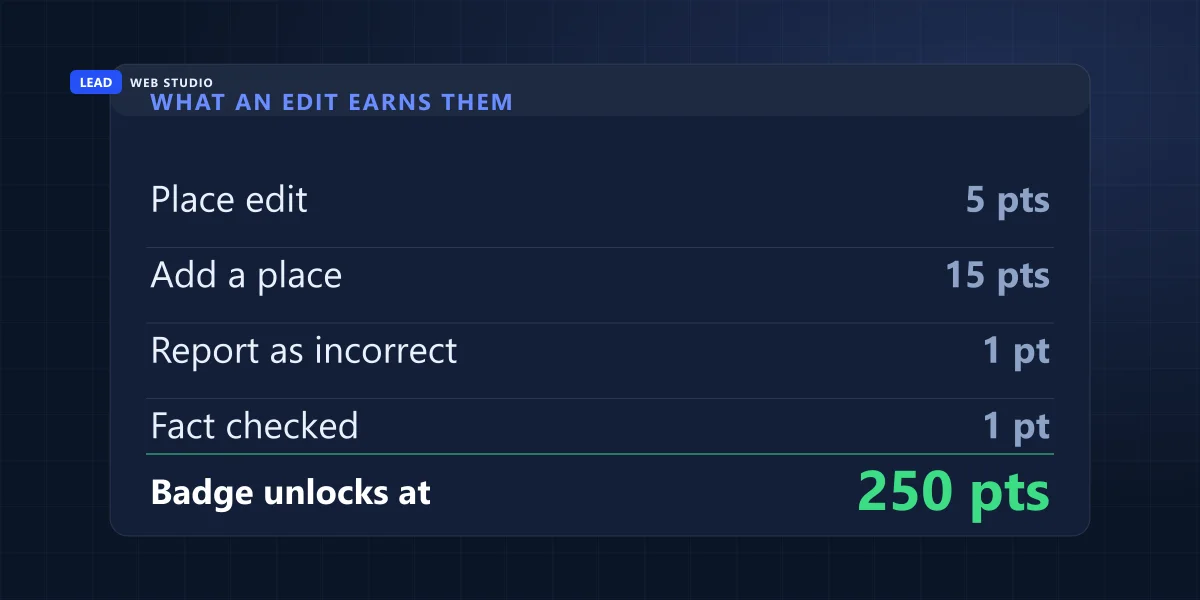
The numbers above come straight from Google's Local Guides points and levels page: "5 points per edit", "15 points per place added", "1 point per item reported incorrect", with Level 4 and the first public badge arriving at 250 points. That badge is not nothing — Google says it "helps your contributions to places get noticed". So there is a standing, officially sanctioned incentive for enthusiastic people to edit thousands of places they have never visited. Plenty of them are excellent at it. Some of them will walk past a door that shut early on a quiet Tuesday and helpfully correct your hours.
Then there is the small share that is done on purpose. Google's prohibited and restricted content policy for Maps has two clauses written for exactly this, and it is worth knowing they exist. Under Fake Engagement: "Post content on a competitor's place or business to undermine that business' or product's reputation." Under Defacement & Mischief: "Editing information about a place to make it inappropriate or low quality, as a prank or to express your social or political views."
Both are banned. Neither is prevented. The policy is enforced on content after it exists, which is a perfectly reasonable way to run a directory of that size, and a completely useless comfort on the Sunday your hours are wrong. Nothing stands between that button and your phone number except a review process you cannot see.
What can actually be changed, and what does each one cost me?
Seven fields carry almost all of the damage. The pattern is worth internalising: the fields that look trivial on screen are the ones that quietly break how customers reach you, while the field that looks catastrophic — a closed label — is usually the easiest to fix. Here is what each edit means in practice.
| What gets edited | What it can be changed to | What it costs you in the real world |
|---|---|---|
| Hours | Closed on a day you are open | Nobody calls to check. They read "Closed" and pick the next result |
| Phone number | One digit out, or a different line entirely | Calls stop and no report tells you why — your traffic looks normal |
| Website | An old domain, or nothing at all | You keep the visibility and lose the clicks it was earning |
| Location pin | Dragged to the wrong lot or unit | People arrive at the wrong door, and some of them review you about it |
| Business name | A former trading name, or extra keywords | Your name stops matching your site and citations — which is itself a suspension risk |
| Category | Something adjacent that sounds close enough | You disappear from the searches you were built to win |
| "Place closed or not here" | Temporarily or permanently closed | The listing survives, the ranking does not |
The phone number row is the one I would tattoo on something. A wrong number produces no error, no bounce, no alert and no dip in any metric you look at. Traffic holds. Impressions hold. The phone just stops, and every explanation you reach for — the season, the economy, the competitor who started advertising — is more plausible than the truth.
Search your own business name once a month in a private window, and read the phone number out loud digit by digit.
How would I even know something changed?
Three ways, and all three are easy to miss. Google sends a notification, drops an alert into the "Edit profile" section of your profile, and shows the new information to every customer who searches. The notification is the one people turn off during setup. The alert lives on a screen most owners rarely open. The third way is a phone call from someone who drove over.
Start with the notification, because it is the only part of this you can control. Google's notification settings page gives the path as "Go to your Business Profile. Select More and then Notifications", and lists five categories:
| Notification category | Google's description | Leave it on? |
|---|---|---|
| Account updates | "changes to your Google Account or Business Profile" | Yes — this is the one that matters here |
| Business info alerts | "Reminders to keep your business info up to date" | Yes |
| Customer activity | "Alerts when customers leave new reviews or add photos" | Yes, for a different reason |
| Bookings and requests | "Get notified when customers book appointments" | Only if you take bookings through Google |
| Features and tips | "Announcements about new features and suggestions" | This is the noisy one people mute — and they usually mute the rest with it |
Google adds a useful caveat: "Even if you turn off some notifications, you may still get important updates from Google." Helpful, but it does not say which ones, so it is not something to build a routine on.
The bigger problem is that three completely different events look identical from where you sit — your listing says something you did not write. They need different responses:
- A stranger's suggestion that Google accepted. Your fix is to edit it back, and then to check again in a week in case the same source pushes it again.
- Google's own update from reports. Same fix, but this is the one that leaves an alert in "Edit profile", so look there before you assume a person did it.
- Your own edit that was rejected. Google lists "Not approved: Google might not approve changes if it can't confirm its accuracy." The old value comes back and it looks exactly like someone undid your work. Nobody did.
That third case fools people constantly, and it sends them off hunting a saboteur who does not exist. Check your edit status before you build a theory. It is the same discipline as any other broken-thing problem: read the log before you name a cause, which is half of what I argue in why your website is getting no traffic.
The 90-second check that catches all of it
Four steps, once a month, no tools and no login required for the important half. The whole point is to see your listing the way a stranger does rather than the way an owner does — because the owner view shows you your intentions, and the public view shows you the reality.
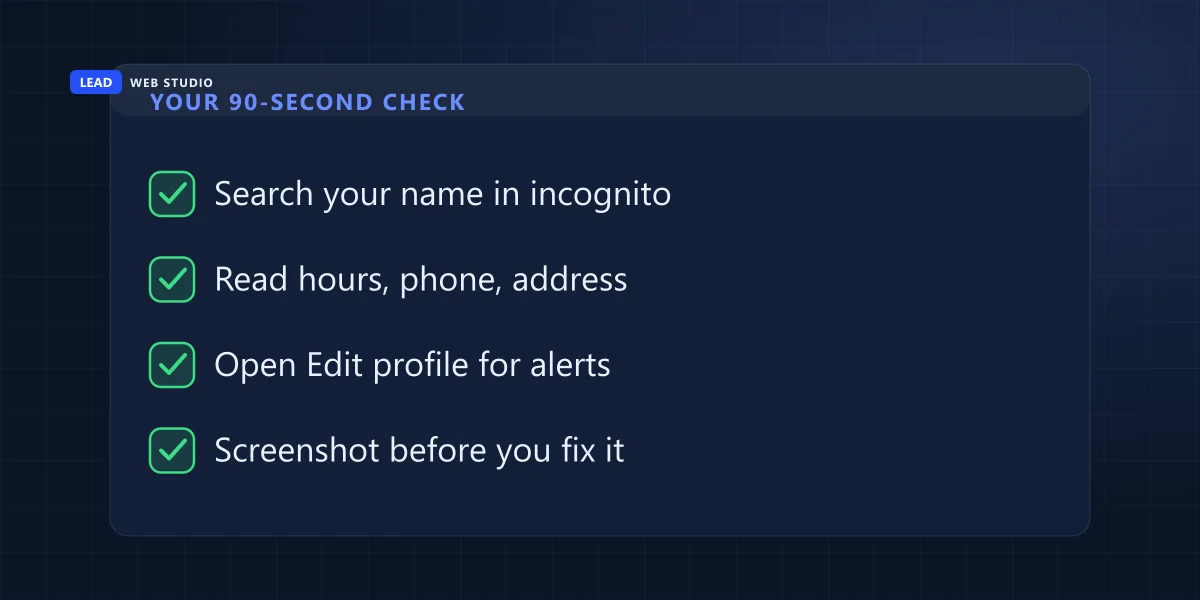
- Search your business name in a private window. Signed in, Google shows you the owner's view with your own pending edits folded in. Signed out, you get the listing your customers get. Those are not always the same thing, and the difference is the whole exercise.
- Read the five lines out loud — name, address, phone, website, hours. Out loud matters. Your eyes will happily skim past a phone number that is one digit wrong because they already know what it should say.
- Open your profile and go to Edit profile. This is where Google puts the alert when it has changed something on reports. It takes ten seconds and almost nobody does it.
- Screenshot before you touch anything. If this turns into a pattern, or into an argument with a competitor, the dated before-and-after is the only record you will ever have. Google is not going to produce one for you.
Frequency: monthly is fine for most businesses. Weekly for a month after you have had one bad edit, because sources that push wrong data tend to push it more than once. And always before a long weekend, because holiday hours are the field where being wrong costs the most and the field you are least likely to have looked at recently.
Someone marked us permanently closed. How do I undo it?
You reopen it yourself, from your own profile. It is an hours setting, not a support ticket, which is worth knowing before you spend an afternoon hunting for a contact form. Google's steps: go to your Business Profile, select Edit profile then Hours, then next to "Hours" select Edit and Open with main hours, tick each day you are open, set the times and save.
There is one exception, and taking the wrong branch here creates a much bigger mess. Google's page on marking a business reopened says: "If your business was marked permanently closed as part of a location or name change, do not reopen the business. Instead, add a new business." That new profile "must be verified", and if you want your existing reviews carried across, Google says to contact them for help. So before you reopen anything, work out which of the two situations you are actually in.
Now the part that changes how urgently you should treat this. A closed label does not delete you. Google's page on marking a business closed notes that a permanently closed "Business Profile may still appear on Search and Maps for users who search for it. It clearly shows that your business is closed." And for temporary closures it states outright that "temporarily-closed businesses can rank after open businesses."
That is the real injury, and it is quieter than deletion. You are not gone. You are still there, still findable by name, ranked behind everybody who is open — which for a service business means behind everybody, because the people searching "emergency plumber near me" are not scrolling to check whether you have reopened. If you want the longer version of how that ranking picture works, I go through it in how to show up for "near me" searches.
One more piece of timing you need before you panic. Google says edits "usually take up to 10 minutes to review, but sometimes it can take up to 30 days", with three possible states: "Accepted", "Not approved", and "Pending". That range applies to your correction too. Fix it early in the day, screenshot what you submitted, and go back and confirm — do not assume it went through because you clicked save.
Can I find out who did it?
No, and I would rather say that plainly than sell you a trick that does not exist. Google's help pages describe the edit, the review, the notification and the alert in detail. Not one of them names the person who suggested it. There is no author line on an accepted edit, no history panel that lists contributors, and no form that asks.
I checked for this specifically before writing it, because it is the first thing every owner asks and the internet is full of confident answers. The silence in the documentation is the answer. Treat anyone who offers to identify the editor for a fee the same way you would treat anyone selling a guaranteed ranking.
What you can do instead is build the record Google will not. Dated screenshots of each change, a note of what it was before, and the date you fixed it. One bad edit is noise. The same field changing back four times in six weeks is a pattern, and a pattern is something you can take to Google support, to a lawyer, or to a business association with a straight face. The identity was never going to be the useful part anyway — the frequency is.
The one thing to do today: open a private browsing window, search your business name, and read the phone number and today's hours out loud. Ninety seconds. If they are right, you have lost ninety seconds. If they are wrong, you have just found out why the phone has been quiet, and you would not have found out any other way.
Two things not to do, however tempting
Both of these feel like decisive action, and both of them turn a problem you could have fixed in an afternoon into one that needs Google's permission to fix at all.
- Do not create a second profile. When your listing looks broken, building a fresh one feels like starting clean. It is not. It is a duplicate listing, duplicates are a classic suspension trigger, and Google explicitly says not to create a new profile for the same business while an appeal is in progress. If it has already gone that far, the recovery path is in what to do when your Google Business Profile is suspended.
- Do not get into an edit war. Changing your name, address and category five times in an hour is exactly what an unstable or misrepresented listing looks like to a review system. Make the correction once, cleanly, then wait out the review window before touching anything else.
How do I make this harder to happen again?
You cannot remove the Suggest an edit button — it is Google's product, not your page. What you can do is shrink the window between a bad edit going live and you noticing, and give Google fewer reasons to believe a stranger's version over yours. Five things, none of which take an afternoon.
- Point the notifications at a mailbox somebody actually reads. Not the Gmail address the guy who set it up in 2019 used. If nobody has logged into that account since, you are running blind by default.
- Make your own data agree with itself. Name, address and phone identical on your website, your footer, your contact page and your listing. If your own pages already disagree with each other, you have no reference copy — and when something changes on Google you will not be able to tell which version was the right one.
- Add a second manager. A profile tied to one person's personal Google account is one holiday, one phone upgrade or one departing employee away from nobody being able to fix anything. The same logic as everything else on the access checklist for staff joining and leaving.
- Keep your correct data written down somewhere. A plain note with name, address, phone, website, categories, hours and holiday hours. When you need to restore it you want to copy and paste, not remember. The same note is what you will paste into your Apple Maps and Bing listings, which are sitting there filled in by a data broker until somebody claims them.
- Put the check in a routine that survives you being busy. Monthly, in the calendar, or handed to whoever already looks after the profile. That is a real part of what Google Maps management is for — not posting for the sake of posting, but noticing.
And if you have never had the listing set up properly in the first place — verified, categorised, complete — the defence starts there, because a half-finished profile gives you nothing to notice a change against. That groundwork is what Google Maps setup covers, and why it matters at all is in do you need a Google Business Profile.
Frequently asked questions
Can someone change my Google Business Profile without telling me?+
Yes. Google Maps offers a "Suggest an edit" control on every place, and its help page lists what can be changed: place name, category, location, hours, phone number, website, and whether the place is closed. The suggestion goes to Google for review, not to you, and if it is accepted the change appears on your profile.
How do I find out who edited my Google listing?+
You cannot. Google's help pages describe the edit, the review, the notification and the alert in the "Edit profile" section — but none of them names the contributor. There is no author line on an accepted edit and no history tab that shows one. Keep dated screenshots instead, because a repeated pattern is the only evidence available to you.
How long does it take for a corrected edit to go live?+
Google says edits "usually take up to 10 minutes to review, but sometimes it can take up to 30 days". That range applies to your correction as well as to the edit that caused the problem, so fix it early in the day, screenshot the result, and check again rather than assuming it went through.
Someone marked my business permanently closed. How do I reopen it?+
You reopen it yourself from the profile: go to your Business Profile, select "Edit profile" then "Hours", and next to "Hours" select "Edit" then "Open with main hours", tick the days you are open and save. The exception is a closure that was part of a location or name change, where Google says not to reopen but to "add a new business" instead.
Does a closed label remove my listing from Google?+
No, and that is the problem. Google says a permanently closed "Business Profile may still appear on Search and Maps for users who search for it", clearly showing that the business is closed. For temporary closures Google states that "temporarily-closed businesses can rank after open businesses". The damage is demotion and lost calls, not deletion.
Why would a stranger edit my business listing at all?+
Usually points rather than malice. Google's Local Guides programme awards "5 points per edit" and "15 points per place added", with the first badge at 250 points, so high-volume contributors edit constantly and are sometimes wrong. Deliberate sabotage exists too, and Google's contribution policies prohibit posting content "on a competitor's place or business to undermine that business".
Sources, all quoted above and worth reading yourself: Google's help pages on editing place information in Google Maps, what happens to your Business Profile edits, managing your notifications, marking your business as closed and marking it as reopened; the Local Guides points, levels & badging page; and the Maps prohibited & restricted content policy.
Want someone to notice before your customers do?
Send me your business name and I'll check the live listing the way a customer sees it — hours, phone, website, categories, pin — and tell you what is wrong with it. Free, nothing to sign. If it is clean, you get to stop wondering. If it isn't, you find out today rather than after a slow month. See what ongoing Google Maps management covers, what a proper Google Maps setup involves, how it fits with SEO, or what any of it costs on the pricing page.
Get My Free Quote
10+ years building websites and looking after Google profiles for GTA trades, clinics and service businesses — which means getting the occasional Monday phone call that starts "Google says we're closed". Read my full bio · Get in touch