When a website is not getting traffic, the owner usually suspects Google. There is no phone number at Google for that complaint, and you don't need one: the causes I find are on the site itself or in how it's measured — a leftover noindex line from the developer's staging server, forty pages that look like one page, keywords written the way the business talks instead of the way customers search, or an analytics tag that a cookie banner switched off. Below is the order I check them in, with the Search Console numbers that tell you which one is yours — including my own site's, which shows the "Google sees it, nobody clicks" problem in plain view.
The short version
- 96.55% of all pages in Ahrefs' index get zero traffic from Google (Ahrefs, 2023) — you're not uniquely cursed, but that's not an excuse to stay in that group.
- Zero impressions and zero clicks are different problems. Search Console's Performance report tells you which one you have: not shown at all, or shown on page three where nobody clicks.
- The first thing I check is whether the page was ever indexed at all — a leftover noindex tag or a robots.txt rule stops everything else from mattering.
- A brand-new site can legitimately take weeks to months to be fully evaluated — before assuming the worst, run a free website audit.
- Traffic that used to be fine and dropped is a different, more urgent diagnosis than a site that's never had any.
- Sometimes the website is fine and Google Analytics is the thing lying to you — rule that out before touching your SEO.
Why is my website getting no traffic?
It comes down to one of six things, and I check them in this order: the page was never indexed, it's too new to have earned trust yet, it duplicates other pages so Google won't pick it, it targets keywords nobody actually searches, something recently broke a site that used to rank, or your analytics — not your traffic — is the thing that's actually broken.
Does Google not show my site, or does nobody click it?
Open Search Console's Performance report and read impressions next to average position. Zero impressions means Google isn't showing the site at all — start at Step 1 below. Plenty of impressions at position 21 or worse means you are shown on page three and lower, where almost nobody clicks. That is a ranking problem, not an indexing one.
The table below is how I read that report before touching anything. Each row points at the step further down that fixes it, so you can skip the ones that aren't yours.
| What Performance shows | What it means | Go to |
|---|---|---|
| 0 impressions on the page | Google isn't showing it for anything — not indexed, or nobody searches its words | Step 1, then Step 4 |
| Impressions, average position 21+ | Shown on page three or lower; nearly nobody scrolls that far | Step 3 and Step 4 |
| Impressions at position 1–10, almost no clicks | Shown, but not chosen — a weak title, or a map pack or ads sitting above you | Rewrite the title and description |
| Impressions dropped the same week across the whole site | Something changed across the whole site | Step 5 |
| Clicks in Search Console, near zero in GA4 | The visitors are real; the measuring is broken | Step 6 |
Here is what the second row looks like on a real site — mine. For 27 June to 24 September 2026, leadlls.com collected 38,729 impressions on the searches Search Console names. 80.6% of them, 31,226, sat at position 21 or lower, and they produced 2 clicks. The 2,876 impressions in positions 1–10 produced 6. Google is showing the site plenty; it is showing most of it too far down to be clicked, and no amount of re-checking the indexing report would change that. (The same property reports an average position of 35.5 for those 90 days, which hides every page-one row in this table — here is why that average misleads.)
| Position | Impressions | Share | Clicks |
|---|---|---|---|
| 1–3 | 1,369 | 3.5% | 3 |
| 4–10 | 1,507 | 3.9% | 3 |
| 11–20 | 4,627 | 11.9% | 0 |
| 21–50 | 24,147 | 62.3% | 2 |
| 51 and lower | 7,079 | 18.3% | 0 |
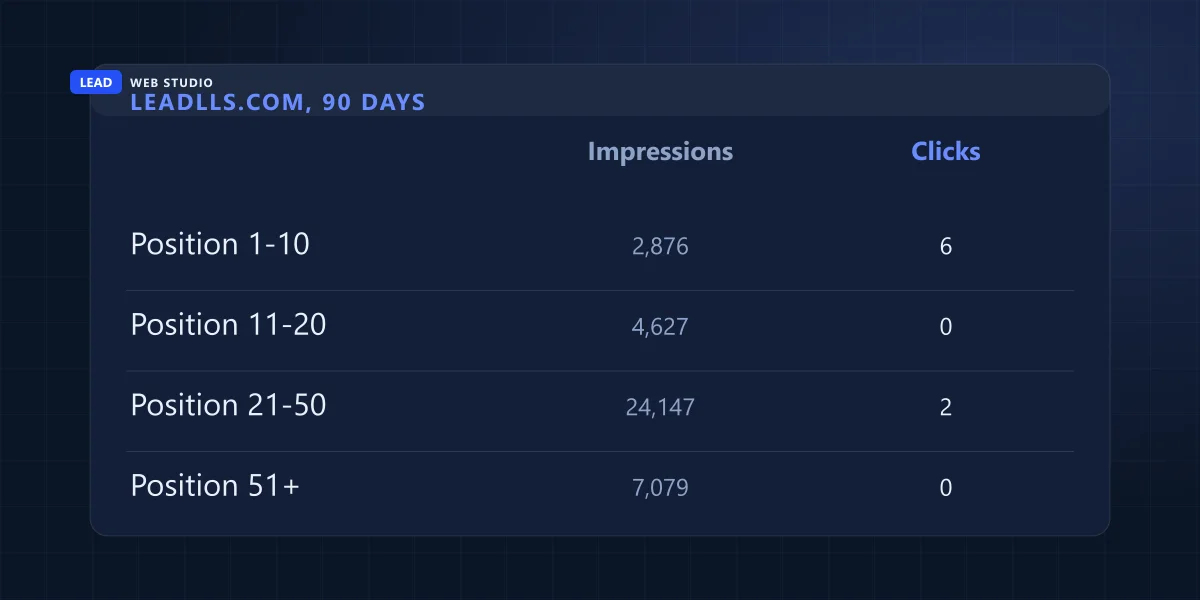
Measured read-only in Search Console on 27 September 2026, by page and query. Search Console hides rare searches from the query view, so the page view of the same 90 days shows more impressions in total (49,013); the split by position only exists for the searches it names.
How common is a website with no traffic?
Ahrefs pulled roughly 14 billion pages from its index in 2023 and found that 96.55% of them get zero organic traffic from Google, and another 1.94% get between one and ten visits a month. The reasons Ahrefs lists for that zero include pages with no backlinks and pages written for a topic nobody searches.
So a quiet site is the normal result of publishing a page and waiting, which is worth knowing before you conclude Google has singled you out. It is also why "wait longer" stops being a plan once a site is past its first few months and still passes Step 1 below.
Step 1: Is your site actually indexed?
Search site:yourdomain.com in Google right now. If nothing comes up — or only a handful of pages show when you have dozens — your site isn't indexed, and no amount of content or SEO work matters until that's fixed. For the exact reason, open Google Search Console, go to Page Indexing, and read the status next to each URL. Google's documentation lists more than a dozen statuses; these five are the ones that explain a site with no traffic, and I check every one of them before I look at anything else:
| What Search Console says | What it actually means | The fix |
|---|---|---|
| Crawled - currently not indexed | Google fetched the page and left it out; Google says it "may or may not be indexed in the future" | Add real, unique substance — Google itself says there is no need to resubmit |
| Discovered - currently not indexed | Google knows the URL exists but hasn't crawled it yet | Link to it from pages that are indexed, and give it time |
| Duplicate without user-selected canonical | The page looks like another one on your site and doesn't say which is the main version | Set explicit canonical tags and differentiate the content |
| URL marked 'noindex' | A meta tag or HTTP header is telling Google to skip the page | Remove it — check for leftover staging/dev code first |
| URL blocked by robots.txt | Your own robots.txt file is turning crawlers away | Edit robots.txt to allow the page |
Source: Google's Page Indexing report documentation, status names as written there on 27 September 2026. Three of the five are things you (or a past developer) did to your own site, not something Google did to you.
The 10-minute self-check before you touch anything else
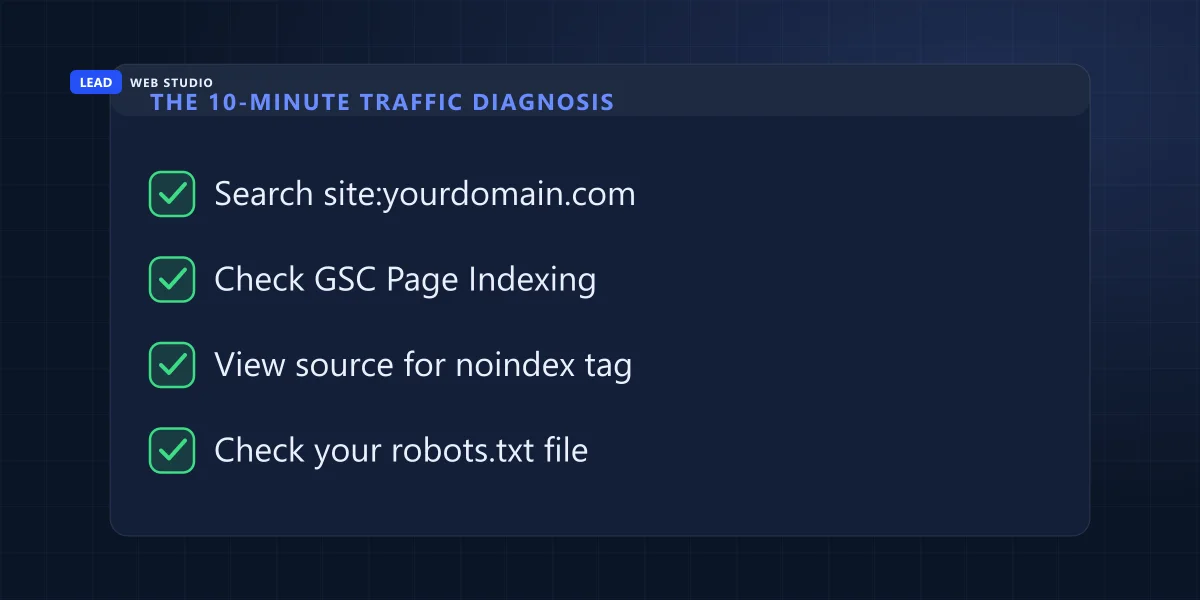
Before you rewrite a single page or panic-buy an SEO package, run this. It takes about ten minutes and costs nothing:
- Search
site:yourdomain.comin Google and count what shows up against what you actually have. - Open Google Search Console → Page Indexing and read the status for your homepage and top pages.
- Right-click your homepage → View Page Source → search for the word "noindex". It should not be there.
- Visit
yourdomain.com/robots.txtdirectly and make sure it isn't disallowing the pages you want found.
On my own site, 31,226 impressions at position 21 or lower produced 2 clicks in 90 days. Being indexed only gets you counted; the clicks start around page one.
The quick self-diagnosis
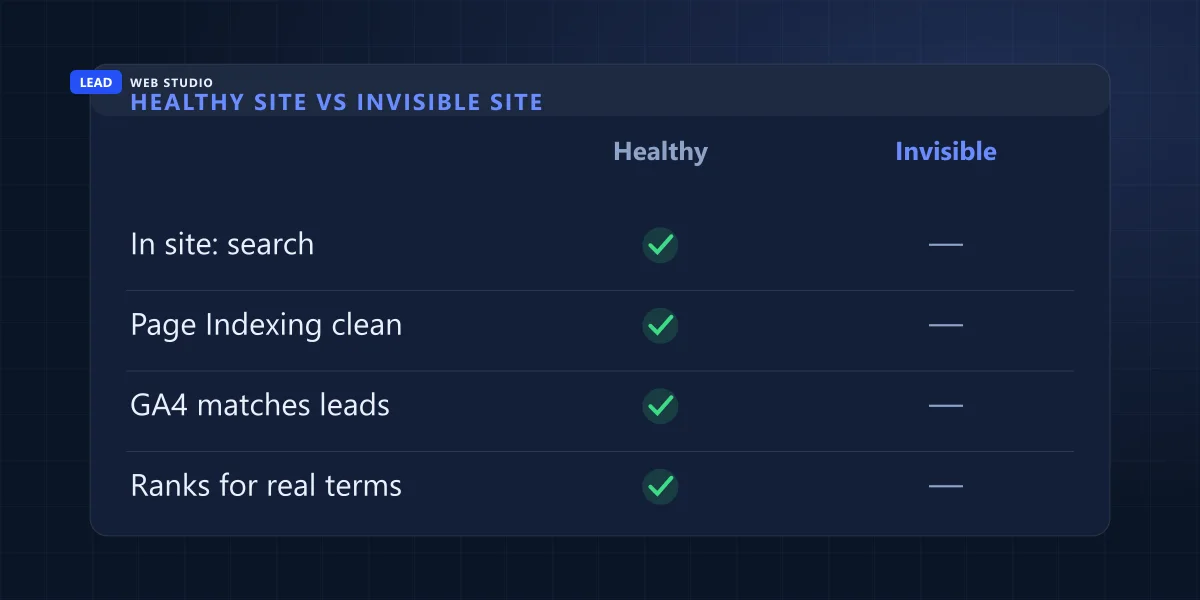
Before the deeper causes below, here's the fast version — tick these off and you already know roughly where your problem lives:
| Check | Healthy site | Invisible site |
|---|---|---|
| site: search shows your pages | Yes | No |
| Search Console Page Indexing is clean | Yes | No |
| Analytics roughly matches real calls/leads | Yes | No |
| You rank for terms people actually type | Yes | No |
Step 2: Is it just too new to have earned trust yet?
Google has never confirmed a formal "new site penalty," but it is upfront that a brand-new domain starts with zero history — no backlinks, no click data, no track record with real users — and building that record takes real time. In my own experience, a new page usually settles into the index within a couple of weeks; a whole new domain earning meaningful organic rankings is more realistically a matter of months, not days. If your site is under three months old and otherwise passes Step 1, the honest answer is "keep doing the work and give it time," not "something is broken."
Step 3: Are you invisible because every page looks the same?
This is the quiet killer for template-heavy sites — a page for every city, every product, every service, each one built from the same skeleton with a few words swapped. To a reader that looks organized. To Google it can look like the same page published forty times, and per the table above, duplicate content without a clear canonical is one of the top reasons pages sit unindexed. The fix isn't fewer pages — it's making each one genuinely earn its own existence: a real difference in the content, not just the place-name in the heading. If that's the shape of your site, it's worth reading how local SEO actually differentiates location pages instead of cloning them.
Step 4: Are you ranking fine — for a keyword nobody searches?
This one feels like winning while producing exactly zero clicks. A business ranks #1 for a phrase that perfectly describes what they do in their own words — and nobody on earth searches it that way. The reverse happens too: you rank badly for the phrasing people do use, which is why it pays to check who is beating you on each individual search rather than on your industry as a whole. Search Console will not separate those two cases for you — a page with zero impressions looks identical whether nobody searches the phrase or you are simply too far down to be counted.
| What the business assumes people search | What people actually type |
|---|---|
| "Artisanal small-batch hand-poured soy candles" | "candle shop near me" |
| "22 years of master electrical craftsmanship" | "emergency electrician toronto" |
| Their own business name, assumed to already be known | "[service] + [city]" |
Nobody searches in brochure language. If your content only uses the words you'd use to describe yourself at a networking event, you can rank perfectly and still get zero real traffic, because you never wrote down the words your actual customer types into the search bar.
Step 5: Did your traffic used to be fine, and then it wasn't?
This is a different diagnosis than a site that's never had traffic, and it deserves urgency. Check, in order: did you recently redesign or migrate domains (I cover the real SEO risk of that in when a redesign is worth it); does Search Console's Manual Actions report show anything; and does the drop line up with a confirmed update on Google's own Search Status Dashboard. A sudden cliff has a specific trigger — it's rarely "SEO just stopped working."
Before any of that, find out whether it's one page or the whole site. In Performance, set the range to the last three months, add a Page filter for the URL, and compare its impressions chart with the chart for the whole site. This guide is my own example: it earned 69 impressions in the week of 3 August 2026, then 17, then between 0 and 8 a week from mid-August — while leadlls.com as a whole went from 2,249 impressions that same first week to 9,355 in the week of 31 August. A page falling while its site grows points at the page — what it says and what now outranks it — not at a penalty or an algorithm update against the site. So the page got rewritten, which is the version you're reading.
Step 6: Is your traffic real, but your analytics is lying to you?
Before you conclude the website has a marketing problem, rule out a measurement problem. A cookie-consent banner that blocks your tracking tag until a visitor clicks accept, an ad blocker, a misfired event, or an accidentally narrow filter can all make Google Analytics report near-zero while real people are actually landing on your site and calling you. Cross-check against Search Console's Performance report — it counts impressions and clicks independently of whatever's happening in your GA4 setup — and against your own contact-form log or call history. If the phone is ringing but the dashboard says zero, you don't have a traffic problem; you have a broken dashboard.
If you only do one thing this week: search site:yourdomain.com, then open Search Console's Page Indexing and Performance reports. Between them they tell you which of the six checks is yours, and both are free. If the answer is "indexed but buried", read what internal links did and did not do on my own site before you start adding them everywhere. Want the whole site checked properly? Run the free website audit — it covers indexing, speed and the other on-page basics in about 60 seconds.
Frequently asked questions
Why does my website get impressions but no clicks?+
Usually because it is shown too far down. In Search Console, read the average position next to the impressions: at position 21 or worse you are on page three or lower, where almost nobody clicks. On my own site, 31,226 impressions at those positions produced 2 clicks in 90 days. That needs ranking work, not indexing work.
How do I know if a traffic drop is one page or my whole site?+
In the Search Console Performance report, filter to the page and compare its weekly impressions with the whole site over the same weeks. If the page falls while the site holds or grows, the cause is on that page: its content, its title, or what now outranks it. If everything falls in the same week, check Manual Actions and the Search Status Dashboard.
Why does my website get zero traffic even though it's live and I've shared it?+
Sharing a link on social media doesn't make Google index it. The most common cause of persistent zero traffic is a page that was never indexed at all — often a leftover noindex tag from development, or a robots.txt file blocking crawlers. Check Search Console's Page Indexing report before assuming an SEO problem.
How do I check if Google has actually indexed my website?+
Search site:yourdomain.com in Google. If nothing shows up, or far fewer pages than you actually have, your site isn't fully indexed. For the exact reason, open Google Search Console, go to Page Indexing, and read the specific status Google gives for each URL.
How long does it take for a new website to start getting organic traffic?+
Google has never confirmed a formal waiting period, but a brand-new domain has no history — no backlinks, no click data, no track record — and building that takes real time. In practice, expect weeks before new pages settle into the index and months before organic rankings meaningfully compound.
Why did my website's traffic suddenly drop to zero?+
A sudden drop is a different diagnosis than traffic that was never there. Check for a recent redesign or domain migration, a manual action in Search Console, or timing against a known Google algorithm update on Google's Search Status Dashboard, in that order.
Can Google Analytics show 0 visitors when people are actually visiting?+
Yes. A cookie-consent banner blocking the tag before consent, an ad blocker, a misconfigured event, or an accidental filter can all make GA4 undercount real visits. Cross-check against Search Console's Performance report or your own contact-form log before concluding traffic is really zero.
Want someone to actually diagnose it for you?
I'll check indexing, speed, keywords and analytics on your real site — not a generic checklist — and tell you exactly which of these six it is. Free to start.
Get My Free Diagnosis
10+ years diagnosing why GTA business websites don't show up on Google — and fixing it. Read my full bio · Get in touch