You search your own business name the way a customer would, and the map card that has been sitting there for four years is gone. No pin, no phone number, no photos, no reviews. Sign in and there is a banner instead of a dashboard. Your Google Business Profile has been suspended, and nobody sent you a warning email you can point to. The next twenty minutes matter more than the next two weeks, because almost everyone reaches for the same two moves — appeal immediately, or quietly build a fresh listing — and those are the exact two things Google's own help pages tell you not to do first.
The short version
- An appeal is a re-review of your profile as it stands right now. Google's instruction before you appeal is one line: "Make sure your profile follows all the guidelines." Fix first, appeal second.
- Do not build a replacement listing. "Do not create a new Business Profile for the same business while your appeal is under review."
- One appeal at a time. "Do not submit multiple appeals for the same issue before receiving a decision."
- Work out what's actually suspended — one profile, or your whole account. They are appealed in two different places.
- The evidence form runs on a 60-minute clock once you open it. Have the documents on your desktop before you start.
- Decisions take up to 5 business days, and the status sits in the appeals tool where you can watch it.
- A denial isn't the end — Google will consider an additional review with evidence you didn't send the first time.
I set up and manage Google profiles for trades, clinics and service businesses around the GTA, which means I get the "we've disappeared off the map" phone call fairly regularly. It is a genuinely bad morning. It is also, most of the time, fixable — as long as the first hour is spent reading rather than clicking. Everything below is pulled from Google's own published pages, quoted so you can check me, because this is a subject where the internet is full of confident advice from people selling a $900 "reinstatement service".
What does "suspended" actually mean?
It means the profile has been removed from public view and locked from your side. Google's help page describes three consequences and no more: "The public can't go to the profile", "The owner and managers can't act on the profile", and third, "The owner and managers can ask us to reinstate the profile. We reinstate both the profile and its owner and managers." Your listing hasn't been deleted from the internet — it has been pulled out of Maps and Search and taken away from you pending a review.
The word "suspended" gets used for at least five different situations, and they are not all appealed the same way. This is worth two minutes, because appealing the wrong thing in the wrong place is how people lose a week.
| What you're seeing | What it's called | Where it gets appealed |
|---|---|---|
| One profile is gone from Maps and Search, and you can't edit it | Suspended or disabled profile | The Business Profile appeals tool |
| Every profile you manage went dark at the same time | Account restriction | Your "My accounts" page — not the appeals tool |
| Profile is live, but your change to the name, category, address, phone or website never appeared | Rejected business information edit | Appeals tool (options differ in the UK and EEA) |
| A photo, video or post was pulled but the profile is fine | Restricted media | Appeals tool, where available in your country |
| A review vanished | Review removal decision | Appeals tool, where available in your country |
The second row is the one that catches agencies and multi-location owners. Google is explicit that "Your account may be restricted when you violate our policy. As a result of an account restriction, the Business Profiles you manage are suspended" — and the fix lives somewhere else entirely: "To lift the restriction, you can provide a reason and submit an appeal for your account on your My accounts page."
There is a related quirk worth knowing before you panic. If the account that got removed was an owner, Google says "We remove all the locations owned by that user," and if that account is reinstated, "we also reinstate the owned locations." If it was only a manager — a marketing agency, a former employee — the wording is different: "We suspend the manager on the accounts that they manage. It doesn't affect the locations." So before you assume your business is in trouble, check whose Google account actually triggered this. Sometimes the answer is that somebody else's account is the problem and your listing was collateral.
Why the first thing to do is not to appeal
Because the appeal is not a conversation with a human who wants your side of the story. It is a re-review of the profile exactly as it stands at that moment. Google's own instruction under the heading "Before you submit an appeal" is a single sentence: "Make sure your profile follows all the guidelines." If the thing that got you suspended is still sitting in the name field, you are asking a reviewer to look at it again.
That matters more than it sounds, because you do not get unlimited attempts. Google asks you not to stack requests: "Do not submit multiple appeals for the same issue before receiving a decision." Treat your first appeal as the one that counts and spend the time in front of it, not behind it.
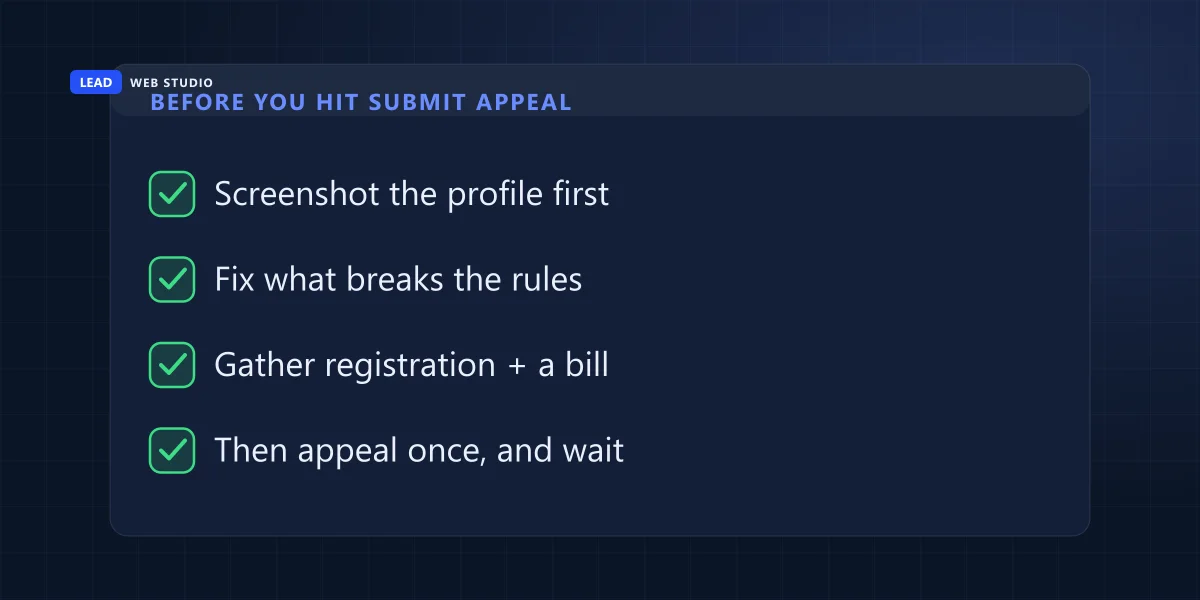
- Screenshot everything before you change a thing. The profile as it looks now, the suspension notice, the name, the address, the categories, the hours. If a reviewer later asks what the listing said, you want a record rather than a memory.
- Read your profile against the guidelines and fix what's broken. The three sections below cover the fields that account for most of it.
- Assemble the evidence documents on your desktop — before you go anywhere near the form. There is a timer, and it is short.
- Then, and only then, submit. Opening the appeals tool to read why you were suspended costs nothing and is worth doing first — the irreversible click is Submit Appeal, and you only get one.
Why did Google suspend my Business Profile?
Nine times out of ten it is a field, not an action. Something in the name, the address or the category doesn't match what Google's guidelines allow, and a review — automated or triggered by a competitor's edit — caught it. Google puts the consequence plainly: it "reserves the right to suspend access to Business Profiles on Google or other Google Services to individuals or businesses that violate these guidelines."
The single most common culprit is the business name. Owners treat it as a headline; Google treats it as an identity field. Here is what its guidelines actually permit, quoted:
| What people put in the name | Allowed? | Google's own wording |
|---|---|---|
| Your real-world name | Yes | The name "as consistently used on your storefront and stationery" |
| LLC, Ltd, Inc | Yes, with proof | Permitted with "real-world proof" such as signage |
| "Toronto", "Scarborough", any city | No | "Location information" is on the not-allowed list |
| "24/7", "Emergency" | No | "Business hours information" and "Service or product information" |
| A slogan, "#1", "Best in the GTA" | No | "Marketing taglines" |
| Your phone number or web address | No | "Phone numbers or website URL's" |
Fully capitalised words are on that banned list too, which surprises people whose legal name genuinely is in caps on the incorporation paperwork. The rule of thumb that keeps you out of trouble: if a stranger photographed your sign, would the words on your profile match the words on the photo? If not, that gap is your suspension.
The second culprit is the address, and it is the one that is hardest to hear, because the fix sometimes means admitting you are not eligible for the listing you had. Google's position on where a business may claim a location is unusually specific:
| Your setup | Eligible? | Google's own wording |
|---|---|---|
| A storefront customers walk into | Yes | A business that "has a physical location that customers can visit" |
| You travel to customers, no shopfront | Yes — one profile | "you're allowed one service-area Business Profile" |
| A desk in a co-working space | Only with signage | Not allowed "unless that office maintains clear signage, receives customers at the location during business hours, and is staffed during business hours by your business staff" |
| A virtual office or mail-forwarding address | No | "that location isn't eligible for a Business Profile" |
| A PO box | No | "P.O. boxes or mailboxes located at remote locations aren't acceptable" |
Categories are the quieter third. Google asks you to "use as few categories as possible to describe your overall core business" and to pick ones "as specific as possible, but representative of your main business" — which is the opposite of the strategy most people are sold, where you tick every category that looks vaguely relevant to catch more searches. If your profile has nine categories and you do one thing, trim it before you appeal. For the full prevention checklist, including the setup mistakes that cause this in the first place, I wrote that up separately in whether you need a Google Business Profile and how to set one up without getting suspended.
The appeal reviewer isn't reading your explanation. They're looking at your profile. Change the profile, then write the explanation.
What evidence do I need, and what is the 60-minute trap?
Google accepts documents that prove the business exists where you say it does: "Official business registration, A business license, Tax certificates, Utility bills for the business such as: Electricity, Phone, Water, Internet." They should carry the same business name and the same address as the profile. The trap is not what you send — it's when you go looking for it.
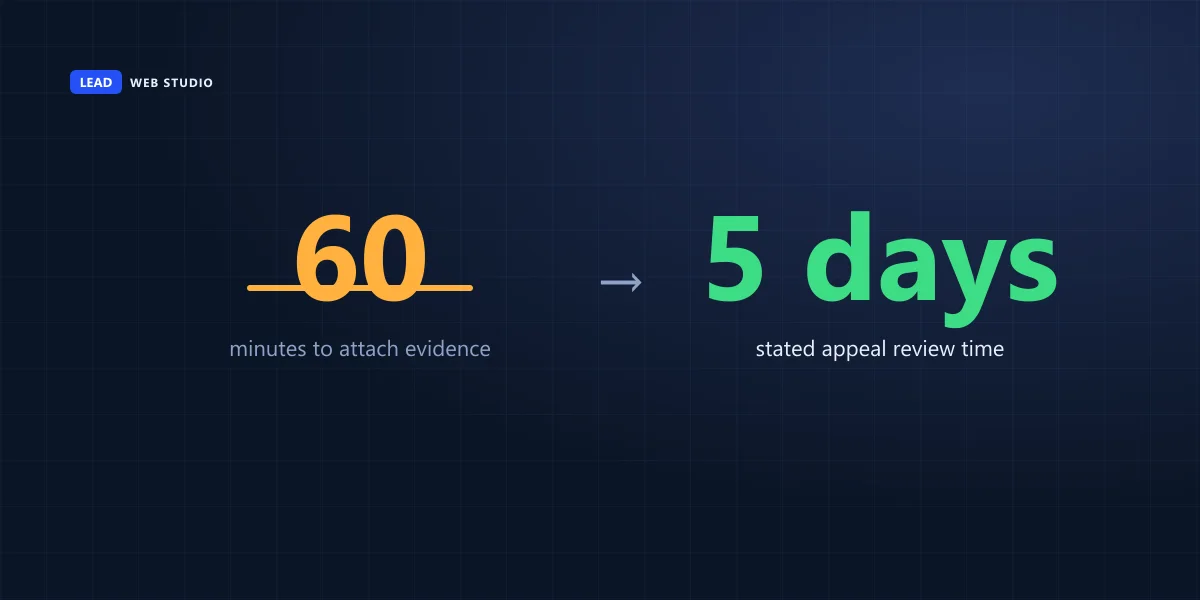
The evidence form is a separate step that opens after you submit the appeal, and it is on a timer: "Once you open the evidence form, you must submit it within 60 minutes or it won't be attached to your appeal." Sixty minutes is plenty if the files are already on your desktop and nothing at all if you are still hunting for last year's hydro bill in a filing cabinet. So do it in this order:
- Before you open anything: put your registration or incorporation document, one recent utility bill, and any licence your trade requires into one folder, as PDFs or clear photos.
- Check the name and address on each one against what the profile says. A bill in a director's personal name at a home address, for a profile listing a shop, will not help you.
- Add anything that proves the place is real and staffed — a photo of the signage, of the unit door with its number, of the reception desk. If the suspension is about a co-working desk or a shared unit, this is the part that decides it.
- Only now open the appeals tool, submit the appeal, then open the evidence form and upload.
Managing more than a handful of locations changes the mechanics: Google's instructions for appealing more than ten profiles say to "attach a spreadsheet that includes the evidence and Business Profile ID for each profile" rather than repeating the process by hand.
Where is the Google Business Profile appeals tool, and how do I check my appeal status?
The appeals tool is not in your Business Profile dashboard. It lives on Google's support site, at support.google.com/business/?p=manage_appeals, signed in with the account attached to the profile. Open it, pick the profile, and the status sits on the right: Submitted, Approved, Not Approved, Can't be appealed, or Eligible for appeal.
That is the address Google itself links to, and it will bounce you to a longer one beginning support.google.com/business/workflow/ with a session number on the end. That is normal. Bookmark the short one; the long one is tied to that session and is not worth saving.
Here is the reason to open the tool early rather than last: it tells you why. Google lists what is on that screen — "The restricted profile", "The reason for the moderation action", and "A link to the violated policy". That last item is a link to the specific rule, not a category of rule. It is the difference between fixing the one field that got you suspended and rewriting the whole profile on a hunch, which is what I usually find people doing by the time they call me.
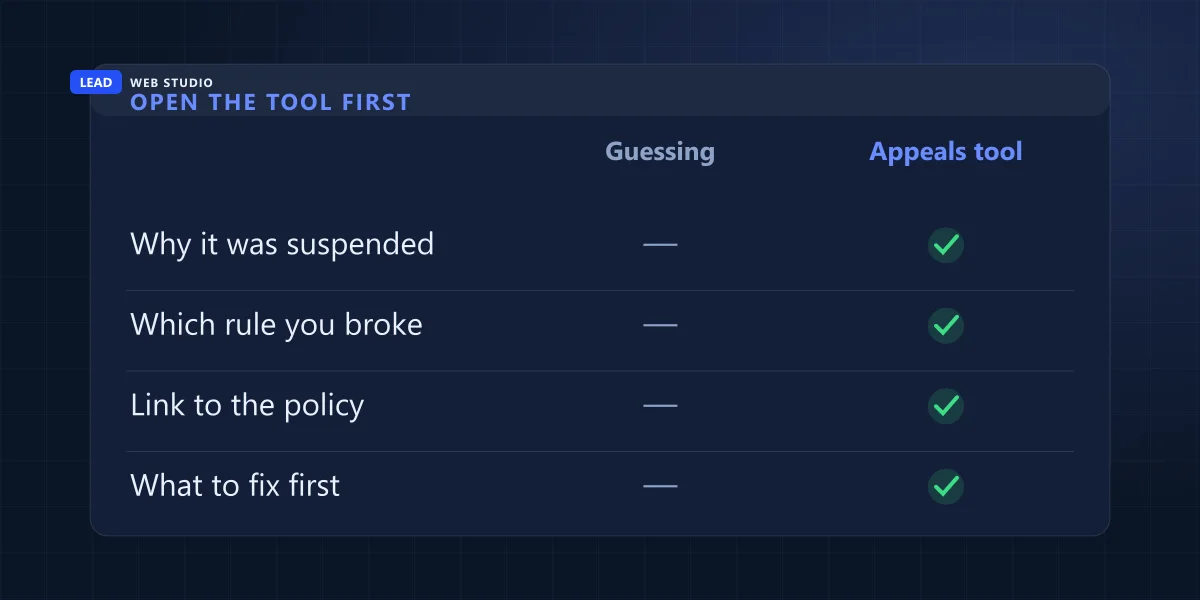
And opening the tool is not appealing. Nothing leaves your hands until you select Submit Appeal at the bottom right, which Google's own steps put at the end of the flow, after the screen that shows you the reason. So: read, fix, then submit — all from the same page, in that order.
| Status in the tool | What it means | What to do about it |
|---|---|---|
| Submitted | It is in the queue | Wait. Do not send a second appeal for the same issue |
| Approved | The profile is coming back | Re-check the name, address and categories the day it returns |
| Not Approved | Refused on the profile as it stood | Ask for an additional review — with evidence you did not send the first time |
| Can't be appealed | The tool has nothing to act on for this account | Check which Google account you are in, then whether it is the account rather than the profile that is restricted |
| Eligible for appeal | You have not submitted yet | Fix the profile first, then submit once |
"Can't be appealed" is the status people read as a refusal, and it is not one. Google's own note on it is almost gentle: you "might get a message that states there's no moderated content or restricted access to appeal", and if you believe that is wrong, its team "can confirm whether you're eligible for any new appeals". The two explanations I actually run into are duller than a refusal: you are signed in with the wrong Google account, or what is restricted is the account rather than the profile, which is the second row of the triage table above and gets appealed somewhere else entirely.
One more thing, because it sends people in circles: there is no separate reinstatement form. People go looking for one because Google uses both words for the same thing. The suspension page opens with "If you believe your profile should be reinstated, you can submit an appeal", the flow itself says to "Select the Business Profile that you want to reinstate", and the denial section then calls that same submission "your reinstatement request". That is one tool and one submission under three names. If some page offers you a "GMB reinstatement form" that isn't this one, check whose form it actually is before you type your business details into it.
If you manage more than ten profiles, the status display has a trap in it. Google warns that "the status will only change for the profile you selected. The status of the other profiles you appealed won't be updated on the tool", and that you "will only receive one email notification with an appeal decision for the profile you selected in the tool". So a screen full of unchanged statuses after a bulk appeal is not evidence that nothing happened.
How long does a Google Business Profile appeal take?
Google's stated window is short: "Appeal reviews and decisions can take up to 5 business days." You do not have to guess where you stand while you wait — the tool carries a live status for every submission, which is the table in the section above, and Google says it will "send you an email with a decision" as well. Five business days with a weekend in the middle is a full calendar week, which is worth saying out loud to whoever is asking you hourly whether it is back yet.
While the clock runs, resist the two temptations. Do not open a second appeal for the same issue. And do not create a replacement listing, however tempting it looks when the phone stops ringing — Google's wording is direct: "Do not create a new Business Profile for the same business while your appeal is under review." A duplicate is itself a guideline violation, so the usual result is two problems instead of one, and the reviews that lived on the original profile do not migrate to the new one.
My appeal was denied. Is that actually the end?
No. Google keeps a second stage in reserve and says so: "Only if your reinstatement request is denied, we may be able to do an additional review to prove your eligibility." The important half of that sentence follows it — "You can provide additional evidence that wasn't added with your original appeal."
Which tells you what the second attempt should look like. Re-sending the same three documents with a longer, more indignant note is not an additional review; it is the same appeal wearing a hat. Go and get something you did not have the first time: the lease with your business name on it, a licence from your municipality, a dated photo of the signage on the door, a utility account in the company's name. If you are in the European Economic Area, Google notes you "may have additional redress options" beyond its own process.
And if the honest answer is that the profile was never eligible — a virtual office, a PO box, a service-area business claiming an address it doesn't staff — then the way back is a correct listing rather than a better argument. That is a rebuild, not an appeal, and it is worth doing properly the first time. It's the work behind my Google Maps setup service, and the reason ongoing Google Maps management exists at all: most suspensions arrive months after somebody made a small edit nobody was watching.
What happens to my reviews and photos?
Google's help pages do not say. The page that describes a removed profile lists three effects — the public can't reach it, the owners and managers can't act on it, and a reinstatement hands back the profile and its managers together — and is silent on reviews and photos in all three. I am not going to fill that silence with a promise I can't back, and neither should anyone charging you for a reinstatement. If only a handful of reviews are missing and the profile itself is fine, that is a different problem entirely — see Google reviews not showing.
What follows from the silence is a practical instruction: get a copy now, not later. Screenshot the review list. Save the star rating and the count. Download the photos you uploaded, especially anything a photographer took that only exists on that profile. If the profile comes back with everything intact, you have wasted twenty minutes. If it doesn't, you have the only surviving record of four years of customer feedback — and the text of those reviews is worth having anyway for your website. That's the same argument I make in how to get more Google reviews and reply to them: reviews you have a copy of keep working for you in more than one place.
What do I do about leads while I'm invisible?
Keep selling through the channel nobody can suspend. Your website is a separate property from your Business Profile — different product, different index, different rules — so it stays in ordinary Google results while the map pin is gone. For the week or two you are waiting, it is the whole shopfront, and it is worth pointing everything at it.
The one thing to do today: open your own website on your phone and try to hire yourself. Can you find the phone number without scrolling? Does the contact form actually send? If the answer is "I'm not sure", fix that before the appeal, because it is the only lead route you fully control this week — and if you'd like a second pair of eyes on it, send me the address and I'll tell you what I find, free.
Three things that genuinely help in the meantime, and none of them cost money. Tell your regulars directly — an email or a text saying "our Google listing is temporarily down, here's our number" costs nothing and keeps repeat work flowing. Make sure the phone number on the website is the same one that was on the profile, because customers who saved it will still use it. And if you run any paid search, point it at the website rather than the map pack. What I'd avoid is buying a guaranteed reinstatement: the decision is Google's, made against its own guidelines, and nobody outside Google can promise the outcome. What a competent person can do is find the violation and fix it properly — which is a fee for work, not for a result. Google itself says it "will never try to convince you to pay to maintain your Business Profile", verification and reinstatement included, so any message that says otherwise belongs in the two-minute scam-email check. If organic search is where you need to make up ground, that's SEO work on the site itself, and the pricing page says what that costs without a discovery call.
Frequently asked questions
How long does a Google Business Profile appeal take?+
Google states that "appeal reviews and decisions can take up to 5 business days". You can watch the outcome in the appeals tool itself, where the status reads Submitted, Approved, Not Approved, Can't be appealed, or Eligible for appeal. Sending a second appeal for the same issue while the first is open is specifically discouraged.
Can I just create a new Google Business Profile instead of appealing?+
No. Google's help page says plainly: "Do not create a new Business Profile for the same business while your appeal is under review." A duplicate is itself a guideline breach, so it usually adds a second problem to the one you already have — and it can cost you the reviews attached to the original profile.
Why was my Google Business Profile suspended when I did nothing wrong?+
Most suspensions trace back to something in the profile rather than something you did that day. Common triggers are extra words in the business name, an address Google doesn't accept such as a virtual office or a PO box, a co-working desk without signage and staffed hours, or an edit that pushed the profile out of line with the guidelines.
What evidence should I attach to a Business Profile appeal?+
Google lists official business registration, a business licence, tax certificates and utility bills for the business — electricity, phone, water or internet. The documents should carry the same business name and address as the profile. Gather them before you open the form: once the evidence form is open you have 60 minutes to submit it.
My Business Profile appeal was denied. Is that the end?+
No. Google's page says that "only if your reinstatement request is denied, we may be able to do an additional review", and that you can provide additional evidence that wasn't added with your original appeal. Businesses in the European Economic Area may have further redress options beyond Google's own process.
Where is the Google Business Profile appeals tool?+
It is on Google's support site rather than in your Business Profile dashboard, at support.google.com/business/?p=manage_appeals, opened while signed in to the Google account attached to the profile. The screen shows the restricted profile, the reason for the moderation action and a link to the violated policy. Nothing is submitted until you select Submit Appeal at the bottom right.
How do I check the status of my Google Business Profile appeal?+
Open the appeals tool signed in to the account attached to the profile, select the Business Profile you appealed, and the status appears on the right. It reads Submitted, Approved, Not Approved, Can't be appealed, or Eligible for appeal. Google also emails the decision. If you appealed more than ten profiles at once, only the one you selected in the tool updates.
Is there a separate Google Business Profile reinstatement form?+
No. The appeal and the reinstatement request are the same submission under two names. Google's suspension page tells you to submit an appeal if you believe the profile should be reinstated, the appeals flow asks you to select the profile you want to reinstate, and the denial section then calls it your reinstatement request. There is one tool, and it is the appeals tool.
Do my Google reviews come back after a suspension?+
Google's help page describes three consequences of a profile being removed: the public can't go to it, the owner and managers can't act on it, and a reinstatement restores the profile together with its owner and managers. It says nothing about reviews either way. Because nobody outside Google can promise you an answer, save a copy of your reviews now rather than after.
Sources, all quoted above and worth reading yourself: Google's Fix suspended or disabled profiles, Appeal Business Profile content & profile restrictions, and the guidelines for representing your business on Google.
Suspended, and not sure which rule you broke?
Send me your business name and address and I'll go through the profile against Google's guidelines and tell you what I'd change before you appeal — no charge, nothing to sign. If it turns out the listing was never eligible in the first place, I'll say that too, because it's cheaper to hear now than after a denial. Setting profiles up correctly and watching them afterwards is what Google Maps management is; the pricing page has the numbers.
Get My Free Quote
10+ years building websites and local SEO for GTA trades, clinics and service businesses — including the "we've vanished off the map" phone calls that come with managing other people's Google profiles. Read my full bio · Get in touch