
Your domain is expiring. Your Google listing is unverified and will be removed. Your website is not indexed in the major search engines. There is an invoice attached for a directory listing you do not remember ordering. Four different website scam emails, four different senders, all arriving with the same tone of official inconvenience — and all asking a business owner to make a payment decision about something technical they were never taught to check. The instinct is to ask "is this a scam?" That is a reasonable question and it is the wrong first cut, because the messages that separate people from the most money are the ones where the honest answer is no, it isn't.
The short version
- There are three buckets, not two. Invented, true-but-free, and true-and-actually-owed. Bucket two is where people get caught, because "am I being lied to?" comes back clean.
- Every genuine claim about your business points at a record you can open yourself. Your domain's WHOIS record. Your own Google Business Profile. Your browser's padlock. Name that record before you read another word of the email.
- Google's own documentation says the quiet part out loud: "Be wary of SEO firms and web consultants or agencies that email you out of the blue," and "No one can guarantee a #1 ranking on Google."
- Google will never charge you to verify or reinstate a Business Profile. That is Google's wording, not mine.
- A domain "renewal" notice from a company you don't pay is a transfer form. One free setting on your domain makes it impossible.
- Do not adopt a blanket delete rule. Two of these categories can be genuine, and one of them can arrive with a deadline attached.
- Report it either way — the Canadian Anti-Fraud Centre wants the report whether or not you lost money.
I register domains, set up business email and manage Google Business Profiles for businesses around Toronto, so a decent share of these land in my inbox on behalf of clients, and the rest get forwarded to me with "is this real?" in the subject line. What follows is the order I check them in. It takes about two minutes per message and it does not require you to know anything about DNS.
Are these emails about my website scams?
Some are. But sorting them into "scam" and "real" misses the category that costs the most. Plenty of these messages describe something that is genuinely true about your website or your listing, and then charge you a recurring fee for a fix that is either free or already included in what you pay someone else. Nothing in them is a lie, which is exactly why they work.
So use three buckets instead:
| Bucket | Typical message | Is the claim true? | What it actually costs you |
|---|---|---|---|
| 1. Invented | "Your listing will be removed in 24 hours unless you verify." "Your SSL has expired." | No | The payment, and whatever they do with the card afterwards |
| 2. True, but free | "Your profile is missing hours." "You have 14 broken links." "Your domain expires." | Yes | A monthly fee for something you could have done yourself, or a supplier swap you didn't intend |
| 3. True and owed | A genuine renewal from your actual registrar. A copyright claim naming one specific image. | Yes | Nothing, if you pay it. Real money if you decided all of these were junk |
Bucket one is the one every consumer-protection article covers, and it is the least dangerous of the three, because a careful person catches it. Bucket two survives the "is this a lie?" test intact. Bucket three is the reason you cannot solve any of this with a filter rule.
The two-minute check that works on all of them
Every legitimate claim about your business points at a record you already have the right to open — without clicking anything in the message. So do not evaluate the email. Identify the record it is making a claim about, open that record yourself, and compare. If there is no such record, the claim was the product.
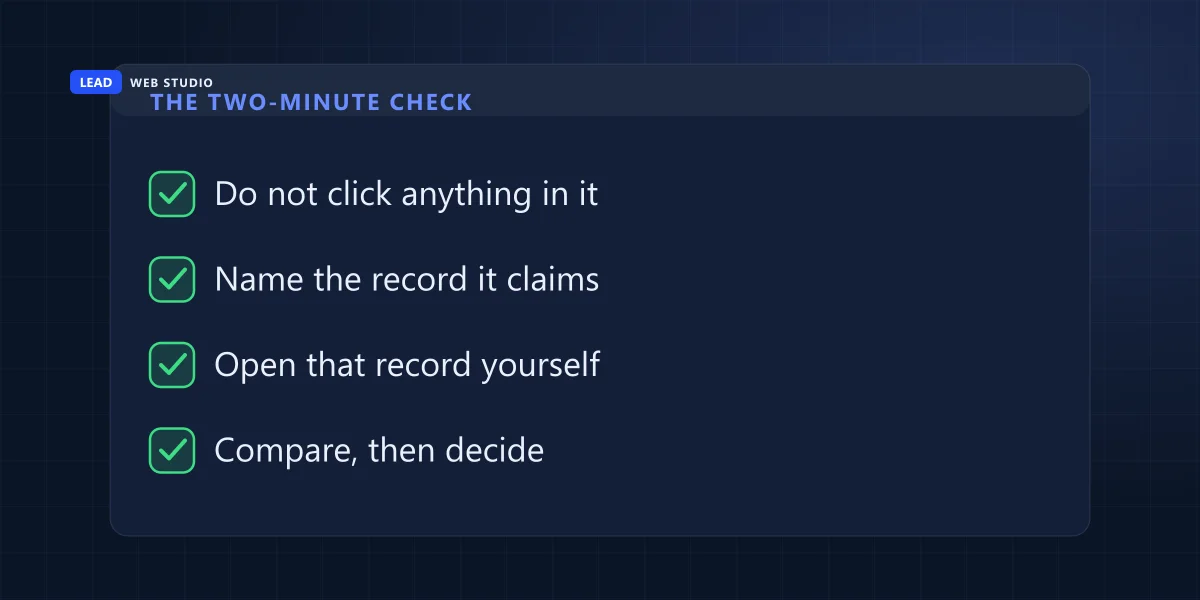
That is not my invention. It is the exact instruction the Government of Canada gives about the equivalent scam in trademarks. The Canadian Intellectual Property Office's IP Scam Awareness Zone tells businesses to verify the correspondence in CIPO's official records, and states plainly: "If the correspondence does not appear there, it may not be legitimate." Every claim in this article has an equivalent record. Here they are.
| What the message claims | The record that would prove it | Where you open it, free |
|---|---|---|
| Your domain is expiring / must be renewed | The public registry record for your domain | CIRA's WHOIS for .ca; ICANN Lookup for .com and most others |
| Your Google listing is unverified / will be removed | Your own Business Profile, signed in | Search your business name while signed in to the Google account that owns it |
| Your SSL certificate has expired | The certificate your browser is already reading | The padlock in your own address bar, on your own site |
| Your site is not indexed / has errors | Google Search Console for your property | Your own Search Console account — or a site: search for your domain |
| You owe for a directory listing or advertisement | Your own purchase order or supplier list | Your accounting software. If it isn't there, you didn't buy it |
Two rules make this actually work. First, never navigate from the message — type the address yourself or use a bookmark, because a link that lands on a convincing copy of a login page turns a two-minute check into a much longer week. Second, if you cannot name the record, stop. "Your online presence has been flagged" points at nothing. There is no registry of flagged online presences, which is why the sentence can be written without risk.
A real notice is always a description of a record. If nobody can tell you which record, then the notice is not describing anything.
Domain expiration notices: the one that costs the most
A notice arrives that looks like a renewal invoice for your domain. Complete it and you have not renewed anything — you have authorised a transfer of your domain to a different registrar, usually at a much higher price. It goes by the name domain slamming, and the reason it is a transfer rather than a theft is that you signed it.
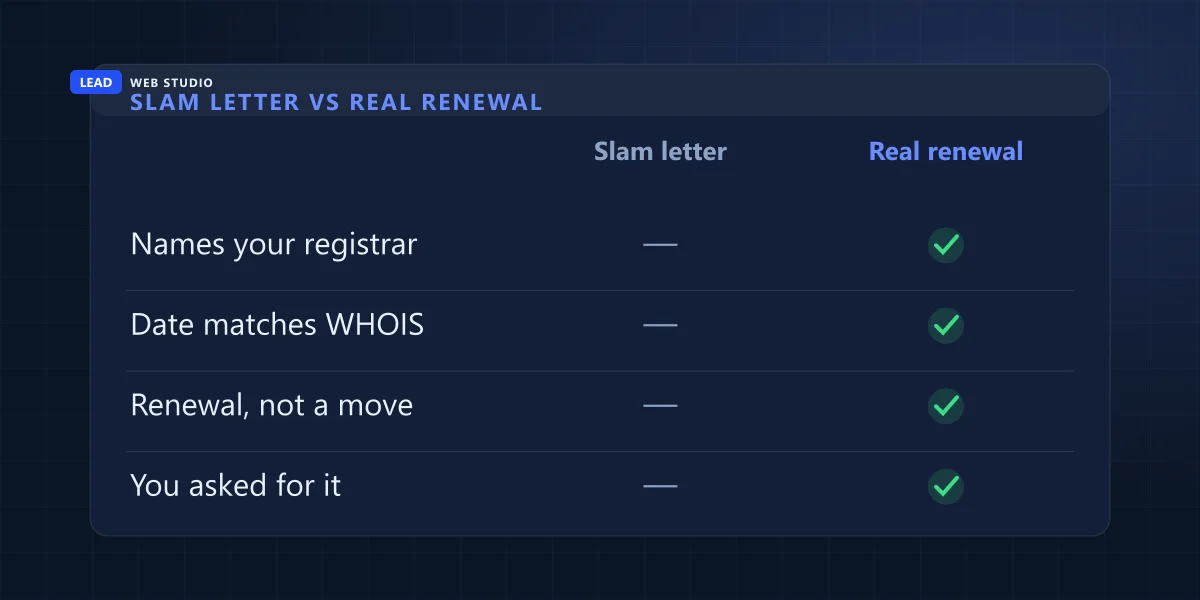
Your defence is a public record. Every domain has one, and it names the company you actually pay and the real expiry date. CIRA, the organisation that runs .ca, describes WHOIS as "an online directory service that allows people to look up information about domain names in Canada." For .com and most other endings, ICANN Lookup does the same job. Neither needs an account.
Here is my own, looked up while writing this, so you know exactly what you are looking for:
| Field in the public record for leadlls.com | What it says |
|---|---|
| Registrar | NameCheap, Inc. — the company I actually pay |
| Expiration date | 2027-11-07 — over a year away |
| Domain status | clientTransferProhibited |
Those three lines answer the notice completely. If a renewal demand does not come from Namecheap, or claims a date that is not November 2027, I know what it is without reading the rest. And the third line is the part almost nobody turns on. ICANN's own page on domain status codes describes clientTransferProhibited as a code that "tells your domain's registry to reject requests to transfer the domain from your current registrar to another," which "will help prevent unauthorized transfers resulting from hijacking and/or fraud." The same page recommends it directly: asking your registrar to enact status restrictions "can help to prevent unauthorized transfers, deletions, or updates to your domain."
It is a checkbox in your registrar's control panel, it costs nothing, and with it on, a slamming letter cannot work even if somebody in your office fills it in. If you are choosing or moving a domain right now, I went through what a domain should actually cost and how people lose one they paid for separately — the short version is that a normal .ca or .com renewal is $20–35 CAD a year, so a three-figure "renewal" is its own answer.
"Your Google listing will be removed unless you pay"
This one arrives by phone as often as by email, usually with a recorded voice and a countdown. It is worth knowing exactly what Google says, because the wording is unusually blunt for a help page and you can quote it back at anyone who argues.
Google's page on protecting your Google Business Profile has a section headed "Beware of Google impersonation scams." It says: "Beware of phone calls, e-mails, or text messages from people who offer to help with your Business Profile in exchange for money," notes that people may claim to be Google support or Google employees, and states that "Google doesn't charge for this service." It then draws two lines that settle most of these calls on the spot — "Google will never ask for One Time Password (OTP) or Personal Identification Number (PIN)" and "Google will never try to convince you to pay to maintain your Business Profile," which it says explicitly includes having your profile verified or reinstated.
The nuance that trips people up: Google does place automated calls to businesses, about things like checking your information on Maps or confirming prices and availability. So "Google never calls" is not true and telling people that just teaches them to distrust a real call. The test is what the call asks for. Google's page on fraudulent calls and texts puts it as a single sentence about legitimate calls: "You won't be asked to sign up for a service, pay money, or give personal info." Anything that asks for one of those three is not the automated system.
The genuinely free version of what these callers sell is: sign in, look at your profile, fill in what is missing. If your profile really has been suspended, that is a specific process with its own rules and no fee — I wrote up what actually gets a suspended profile reinstated. And if you are still deciding whether the listing is worth your time at all, here is the honest case for having one. Paying an ongoing fee for the work is a legitimate choice — it is what Google Maps management is — but it is a choice about your time, never a ransom on the listing itself.
SEO cold emails: what Google itself says about them
"We ran an audit of your website and found 27 critical errors." "You are not listed in the major search engines." "We can guarantee page one." These are not usually fraud in the criminal sense. They are sales letters with a manufactured trigger, and the trigger is often technically true and completely unimportant.
You do not have to take my word on any of it, because Google publishes its own guidance on hiring an SEO and it reads like a list of these emails. From Google's documentation, verbatim:
- "No one can guarantee a #1 ranking on Google. Beware of SEOs that claim to guarantee rankings, allege a 'special relationship' with Google, or advertise a 'priority submit' to Google."
- "Google never accepts money to include or rank sites in our search results, and it costs nothing to appear in our organic search results."
- "Be wary of SEO firms and web consultants or agencies that email you out of the blue."
- "Be careful if a company is secretive or won't clearly explain what they intend to do."
- "Avoid SEOs that talk about link popularity schemes or submitting your site to thousands of search engines. These are typically useless exercises."
Google's page even reproduces the archetype of the genre — a message it says it receives, opening "Dear google.com, I visited your website and noticed that you are not listed in most of the major search engines and directories..." Addressed, that is, to Google. That is the level of targeting behind a lot of them.
The reason "we found 27 errors" lands is that it is usually true. Every website carries a list of technical imperfections, and a crawler will produce one for any URL you point it at — including sites that already rank first for everything their owner cares about. The number is not evidence of a problem, it is evidence that a crawler was run. If you want to know whether your search visibility is actually going anywhere, the honest measure is your own traffic and rankings over months, which I laid out in how to tell whether your SEO is working. Real SEO work is worth paying for. It just never begins with a stranger's error count.
The one thing to do today, whether or not anything is wrong: open your registrar's control panel and check that your domain's transfer lock is on, and that the renewal card on file has not expired. Two minutes. The first setting makes an entire category of these letters harmless, and the second prevents the only domain expiry email that is ever genuinely urgent.
Invoices for things you never ordered
This is the oldest one in the set and it is not about websites at all, which is why it slips past the person watching for website scams. The Competition Bureau documents it in The Little Black Book of Scams under business scams, and the description is worth reading slowly: a fraudster "sends your company a proposal for a listing or advertisement in a magazine, journal or business directory," and then "the accounting department will receive and pay the bill, unaware that your company never actually ordered or authorized the service."
The version of this that costs the most is the one aimed at your customers rather than at you, with your own name on it — if that has already happened, go straight to what to do when a customer pays a fake invoice, because the first hour matters more than anything on this page.
Note where the failure happens. Not with the owner, who would have said no. With whoever pays the bills, who has no way to know the difference between an invoice for a service and an invoice for an idea. The Bureau's own advice is administrative rather than technical — keep an approved supplier list, restrict who may authorise a purchase, and examine invoices carefully, because "Fraudsters will use company names or logos similar to those of known businesses." Its list of business scams also covers callers claiming your first-aid kits need replacing or your health and safety training needs updating, and office supplies that arrive unrequested with a bill behind them. Same shape, different costume. And the Bureau is clear that size is no protection: "Organizations of any size can still be duped by clever frauds."
The web version of this one is a line item on a hosting or maintenance invoice for something that does not exist as a product — "domain management", "SEO submission", "security suite". Not fraud, exactly, but the same money moving for the same reason. It is a close cousin of what I described in how hosting checkouts quietly bill you $400 a year, where nobody lies to you either.
The ones that are actually real
If you take one thing from this article, please do not let it be "delete everything." A blanket rule feels safe and it will eventually eat something with a deadline on it. Four messages in this general shape are usually genuine:
- A renewal from the registrar the public record names. Domains do expire, and a lapsed domain takes your website and your email with it. Check the record, then pay it.
- A failed-payment notice from a supplier you actually use. A card that expired on a hosting or email account will take a site or a mailbox down, and that warning is real. Verify it by logging in to that account directly, never through the email.
- A copyright claim naming one specific image on one specific page. These are real, they are common, and they come with timelines. I went through how to tell a genuine image claim from an invented one, because the two look nothing alike once you know what to compare.
- A notice from your host about a compromised file or an abuse report. Annoying, usually accurate, and worth acting on the same day.
The thing that makes all four safe to handle is the same two-minute check. You are not deciding whether to trust the sender. You are opening the record and reading it yourself.
Four things not to do
- Do not click the link, even to "have a look." The whole point of the check is that you go to the record by your own route. A convincing login page is cheap to build and it is the second half of most of these.
- Do not reply asking to be removed. You cannot unsubscribe from something you never subscribed to, and an unsubscribe link in an unsolicited message is a promise from a stranger. Mark it as spam instead — that at least trains a filter that is working for you.
- Do not pay a small amount to make it stop. Read what the small amount actually buys first — if there is a recurring term inside it, paying once is you agreeing to it, and cancelling later is a conversation with the people who sent you this.
- Do not hand the whole problem to whoever built your site without checking your own access. If you cannot log in to your own registrar and your own Google profile today, that is a separate and more serious issue — see who actually owns your website.
Where to report it in Canada
Report it even when nothing was lost, because the volume is what gets these operations looked at. The Canadian Anti-Fraud Centre takes reports online at reportcyberandfraud.canada.ca and by phone on 1-888-495-8501, Monday to Friday, 10 am to 4:45 pm Eastern, and asks for the report whether or not you are a victim. If money actually moved, its instruction is to contact your local police as soon as possible, and then your bank — quickly, because funds still sitting in a receiving account can sometimes be stopped and funds that have moved on generally cannot.
Misleading invoices and fake renewal notices are also squarely within the Competition Bureau's deceptive marketing practices remit. And if the message is impersonating your own business to your customers rather than targeting you, that is a different problem with a different first hour, which I covered in what to do when someone is sending email as your business.
Frequently asked questions
Is an email saying my domain is about to expire a scam?+
Sometimes, and the way to tell takes about a minute. Look up your own domain in a public WHOIS or RDAP record. It names the registrar you actually pay and the real expiry date. If the notice does not come from that registrar, or the date does not match, it is a sales letter dressed as a bill. If both match, it is your renewal.
Will Google ever call or email me asking for money for my Business Profile?+
No. Google's own help page says Google "will never try to convince you to pay to maintain your Business Profile", and that this includes having your profile verified or reinstated. Google does place automated calls about business information, but its page states that on a legitimate call "you won't be asked to sign up for a service, pay money, or give personal info".
Are SEO cold emails legitimate?+
Google's own documentation is unusually direct about this: "Be wary of SEO firms and web consultants or agencies that email you out of the blue." It also states that "no one can guarantee a #1 ranking on Google", and that "Google never accepts money to include or rank sites in our search results". A guaranteed ranking or a paid submission is a claim Google says nobody can make.
How do I check my domain's real expiry date and registrar?+
For a .ca domain, use CIRA's WHOIS lookup, which CIRA describes as "an online directory service that allows people to look up information about domain names in Canada". For .com and most other endings, use ICANN Lookup. Both are free, need no account, and return the registrar of record, the expiry date and the domain's status codes.
What should I do with an invoice for a service I never ordered?+
Do not pay it and do not treat it as urgent. The Competition Bureau describes this pattern in the directory scam, where "the accounting department will receive and pay the bill, unaware that your company never actually ordered or authorized the service". Check it against your own supplier list and your own records first, then keep the invoice as evidence and report it.
Where do I report a website or domain scam in Canada?+
Report it to the Canadian Anti-Fraud Centre at reportcyberandfraud.canada.ca or by phone on 1-888-495-8501, Monday to Friday, 10 am to 4:45 pm Eastern. Report it whether or not you lost money. If money did move, contact your local police as soon as possible, then your bank. Misleading invoices can also be reported to the Competition Bureau.
Sources, all quoted above and worth reading yourself: Google Search Central on hiring an SEO; Google Business Profile Help on protecting your profile and on fraudulent calls and texts; the Competition Bureau's Little Black Book of Scams and its page on deceptive marketing practices; the Canadian Intellectual Property Office's IP Scam Awareness Zone; ICANN's domain status codes and ICANN Lookup; CIRA's WHOIS; and the Canadian Anti-Fraud Centre's reporting page.
Got one of these sitting in your inbox right now?
Forward it to me and I'll tell you which bucket it is, in plain English, with the record I checked. Free, no obligation, and if it turns out to be real I'll say so. Keeping domains, renewals and Google profiles boring and under your own name is part of ongoing website maintenance and support; if you're also planning a new site, here's how I approach web design and what it costs on the pricing page.
Get My Free Quote
10+ years building websites and looking after domains, hosting and Google Business Profiles for GTA trades, clinics and service businesses — which is why "is this email real?" arrives here about as often as "can you change this photo?" Read my full bio · Get in touch