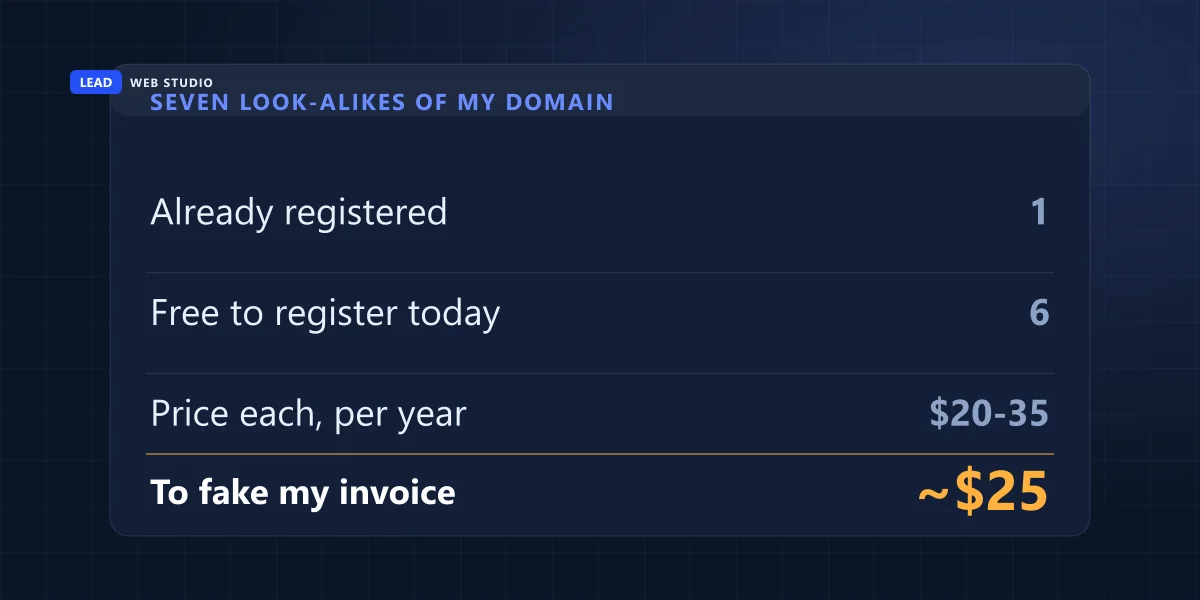
Before writing this I spent ten minutes finding out how hard it would be to send a fake invoice in my own name. I listed seven addresses a customer could mistake for leadlls.com and looked each one up in the public domain registry. Six of the seven were sitting there unregistered. Anyone could have bought one over lunch, put my logo on an invoice, emailed it to a client of mine and typed their own bank account at the bottom. No hacking involved, and nothing on my website would have stopped it.
This article is about what happens after — when the money has already gone to the wrong account and your customer is emailing you about the project as if nothing happened. I build websites for a living. I am not your bank and I am definitely not a lawyer. But I am usually the first person a small business phones when this lands, because it arrived by email and email gets filed under "the website guy". So here is the order I would work through it in, what the Canadian agencies will actually do for you, and the obligation almost nobody knows they have.
The short version
- The first hour is about the money and nothing else. The recall has to be asked for by the bank that sent the payment — so your customer makes that call, not you.
- If it went by Interac e-Transfer and it has landed, assume it is gone. Interac's own FAQ: "once a deposit has been made there is no way to reverse the transaction."
- Report it twice — local police and the Canadian Anti-Fraud Centre, 1-888-495-8501. The CAFC asks for reports "whether you are a victim or not".
- Work out which mailbox leaked before anyone uses the word "your". There are three possibilities and one of them involves nobody's mailbox at all.
- Ask for the original email as an attachment, not a forward. Forwarding destroys the headers, and the headers are the only part that settles the argument.
- If the fraudster was inside your mailbox, this is also a privacy breach. PIPEDA applies to small businesses, and a record of it has to be kept for two years.
- Then change the process, not just the password. A banking change confirmed by phone, on a number you already had, ends this whole category.
What actually happened here?
Somebody read the email thread between you and your customer, waited for a genuine invoice to go out, and sent a near-identical copy with different bank details. That is it. It needs patience and a mail account, not technical skill, and there is nothing you can put on your website that prevents it.
The Canadian Centre for Cyber Security has a name for it. In its baseline threat assessment on cybercrime it calls business email compromise "one of the most financially damaging forms of cybercrime targeting Canadian organizations", and describes it as a scam "in which attackers infiltrate a legitimate corporate email account and use the access to send phony invoices of initial contract payments that trick the business or its clients into wiring money to cybercriminals when they think they're just paying their bills."
The words "or its clients" are doing a lot of work in that sentence, and most write-ups skip them. The victim does not have to be the company that got compromised — it can be that company's customer, which is exactly the situation you are in. That is why the first argument in the thread is almost never about the money. It is about whose mailbox it came out of, and neither side can answer that from memory.
What do I do in the first hour?
Four things, in this order, and all four before anyone writes a careful summary email. Speed is the only variable you still control. The Cyber Centre's own guidance is short about it: "if you suspect money and/or financial information has been transferred, contact the financial institution and the corporate email platform immediately", then "report the incident to the Canadian Anti-Fraud Centre".
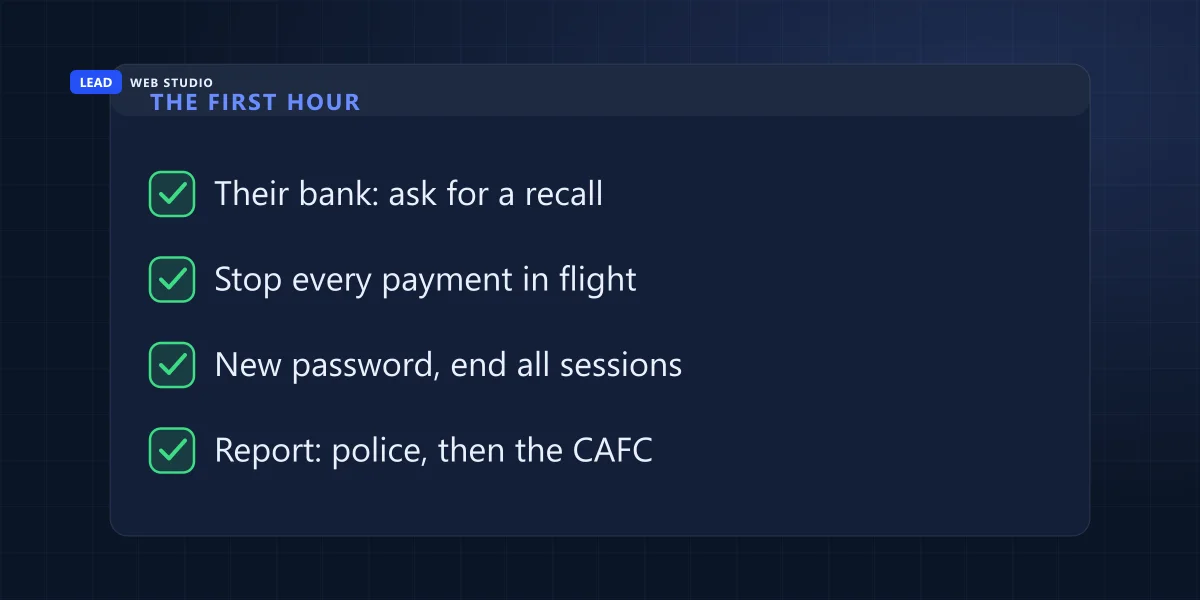
- Your customer phones their own bank's fraud line. Not their branch, not you — the fraud line, and today. The bank that sent the money is the one that has to start any attempt to get it back, so no amount of urgency on your side substitutes for that call.
- Both of you stop everything else in flight. Any other invoice sitting unpaid in either inbox is now suspect. Nothing gets paid until the banking details have been confirmed out loud on a phone number that existed before this week.
- Change the mailbox password and end every active session. On both sides, before you know which one leaked. Then look at the account's recent sign-in list and its forwarding and filter rules, and screenshot what you find before you delete anything.
- Report it — police first, then the CAFC. The Canadian Anti-Fraud Centre says plainly: "if you have been a victim of fraud or cybercrime, please contact your local police as soon as possible." The file number that comes out of that report is the reference every other party will ask you to quote.
Step three is where people quietly destroy their own evidence. A forwarding rule that copies every message from one customer to an outside address is the single most useful thing you can find, and deleting it feels like fixing the problem. Photograph it first, then delete it.
Who do I call, and what can each of them actually do?
Five phone calls, and they do genuinely different jobs. Only one of them can move money. The others exist to create a record, close the hole, or tell you what really happened — which matters more than most people expect, because the record is what the rest of the week runs on.
| Who to call | Who makes the call | What they can actually do |
|---|---|---|
| The customer's bank, fraud line | The customer | Attempt a recall. This is the only call that can bring money back, and it is the only one you cannot make on their behalf |
| Your bank | You | Confirm nothing has been changed on your own account or your payee records. They cannot recall money that never went through them |
| Local police | Whoever lost the money | Take the report and issue a file number. The CAFC tells victims to do this "as soon as possible" |
| Canadian Anti-Fraud Centre 1-888-495-8501 | Both of you | Collect the intelligence. Open Monday to Friday, 10 am to 4:45 pm Eastern. They ask you to report "whether you are a victim or not" |
| Your email provider | You | Show you the account's sign-in history, connected devices and any rule somebody added. This is the evidence, and it does not live forever |
The one people skip is the last one. Google Workspace and Microsoft 365 both keep a sign-in history that an owner can read without help, and that history either clears you or it does not. If you have never opened yours, the two-factor authentication article walks through where it lives.
Will the money come back?
Usually not, and I would rather say that than sell you hope. Recovery happens when the payment is caught in the hours before it is withdrawn, which means the honest answer depends entirely on how quickly your customer got to their bank. Ask immediately, expect nothing, and treat anything recovered as a bonus.
For Interac e-Transfer the answer is already published, and it is not encouraging. Interac's own FAQ answers the question "I need to cancel a transfer, but the recipient has already accepted the deposit" with one sentence: "Unfortunately, once a deposit has been made there is no way to reverse the transaction. You'll have to make arrangements directly with the recipient." The fraudster is not going to make arrangements with anybody.
Nobody can promise you a recall. The only thing still in play is how fast the request gets made — and the person who has to make it is not you.
For scale: the Canadian Anti-Fraud Centre's running counter read, as of 30 June 2026, 15,107 reports processed, 9,935 victims of fraud and $351 million lost — that is six months, and only the incidents somebody actually filed. Divide the two numbers yourself and the average victim is out roughly $35,000. That division is mine, not theirs, and the loss figure is rounded to the million, so treat it as an order of magnitude rather than a precise number.
Whose email was actually broken — mine or theirs?
There are exactly three answers, and they carry completely different consequences. Either the fraudster was reading your customer's mail, or they were reading yours, or they were reading nobody's and simply registered a domain that looks like yours. Do not let anyone in the thread assert one of these before the headers have been read.
| Where it went wrong | What you would see | The check that settles it | Whose problem |
|---|---|---|---|
| Their mailbox | The fake arrives inside a thread only the two of you had. Your sent items are clean. Replies stop reaching you | Their sign-in log and their inbox rules | Theirs to close |
| Your mailbox | Sign-ins from places you have never been, a forwarding rule you did not create, or sent mail you did not send | Your sign-in log, your rules, your sent folder | Yours — and see the next section |
| Neither (look-alike domain) | Nothing is wrong in either account. The customer's copy came from an address one character away from yours | The From and Reply-To in the raw headers | No password fixes it |
To run that check you need the original message, not a forward. Ask your customer to send it as an attachment — in Outlook that is "Forward as attachment", in Gmail it is "Show original" and then "Download Original". A normal forward re-writes the headers with the forwarder's own, which erases the single piece of evidence you asked for. A forwarded copy cannot answer the question no matter how long anyone stares at it, so it is worth asking twice and being slightly annoying about it.
I checked the look-alikes of my own domain. Six of seven were free.
The third row of that table is the one people refuse to believe, so I measured it on myself. On 31 August 2026 I took seven addresses that could pass for leadlls.com and ran a public registry lookup on each — no accounts, no tools you cannot use, just the same record anyone can read. Here is the whole result, including the one that surprised me.
| Domain | The trick | Registered? | Set up for mail? |
|---|---|---|---|
| leadls.com | One letter dropped | Registered since 2021 | No mail server published |
| leadils.com | Capital I for lowercase l | Unregistered | — |
| lead-lls.com | Hyphen inserted | Unregistered | — |
| leadlls.net | Different ending | Unregistered | — |
| leadlls.ca | The Canadian one | Unregistered | — |
| leadllls.com | One letter doubled | Unregistered | — |
| 1eadlls.com | Digit 1 for lowercase l | Unregistered | — |
Six of the seven were unregistered while I was writing this paragraph, at the usual $20–35 CAD a year each. The seventh, leadls.com, has been registered since June 2021 through the registrar Gname.com; it resolves to a web server and publishes no MX record, so it is not set up to receive email today. I am not suggesting its owner has done anything wrong — dropped-letter domains get bought by all sorts of people for all sorts of reasons. The point is narrower and worse: the inventory of addresses that could impersonate my business is mostly unclaimed, and the whole set costs about twenty-five dollars a name.
Now look at it from your customer's side. They see a display name with your company on it, an address that differs by one character in a font where I and l are drawn identically, an invoice that matches the work actually in progress, and a short apology for a change of bank. So "tell your staff to read carefully" does not fix this. The thing they are being asked to notice is a single character, and half the time it is a character that renders the same either way.
This might be a reportable privacy breach, not just a theft
If the fraudster was inside your mailbox, they had access to your customers' personal information, and Canadian law treats that as a separate matter from the money. The Privacy Commissioner's guidance is direct about who is in scope: "Does this apply to small businesses? Yes."
The OPC's guidance on privacy breaches at your business defines one as "a loss, unauthorized access to, use or disclosure of personal information" — unauthorised access is enough, whether or not anything was copied. Three obligations follow, and they are worth knowing before somebody else tells you about them:
- Report the serious ones. You must report a breach where it is "reasonable in the circumstances to believe" it "creates a real risk of significant harm". Significant harm explicitly includes "financial loss", "identity theft" and "damage to reputation or relationships". And size does not get you out of it: "whether a breach of security safeguards affects one person or a 1,000, it will still need to be reported" if your assessment says there is real risk.
- Notify the people affected. Notification has to be "conspicuous", given directly, and "as soon as feasible after you have determined that a breach of security safeguards involving a real risk of significant harm has occurred".
- Keep a record either way. "To put it simply — there must be a record of every breach of security safeguards", and "the law requires you to keep breach records of all breaches of security safeguards for two years". That applies even to the ones you decide are not reportable, and the record should say why you decided that.
Two honest qualifiers. First, the obligation follows control of the information — if the compromise was in your customer's mailbox, the assessment is theirs to make, not yours. Second, the OPC also notes that knowingly contravening those requirements "is an offence" that "could lead to fines", which is precisely the point at which this stops being a conversation with your web designer and becomes one with a lawyer. I am flagging it because it is the obligation that gets discovered last, usually by somebody other than you.
Do this today, whether or not anything has gone wrong: open your email account's security page and look at the sign-in history and the forwarding rules. Not the spam folder — the rules. A rule that quietly copies or archives mail from one customer is how this runs for months without either party noticing, and it takes two minutes to check.
What do I tell the customer?
Write to them the same day, in plain language, and cover exactly three things: what you know, what you do not know yet, and what you have already done. Do not assign blame before the headers have been read, do not promise to absorb the loss before you know what happened, and do not send them a link to reset anything.
Say what your real payment details are and give them a way to confirm it that does not involve email — a phone number they already had, or a page on your own site they can type in themselves. That is one of the reasons this website has a plain Pay Online page: a fixed address a customer can reach without trusting anything that arrived in an inbox.
Then the part almost everyone gets to a week too late. If somebody was reading that thread, assume they read the others. Every open invoice you have sent recently is a candidate for the same treatment, and your other customers do not yet know to look. A three-sentence note to your client list — we are dealing with an email fraud attempt, our banking details have not changed, phone us before paying anything that says they have — costs you nothing and is the only warning that arrives before the next one does.
The four changes that stop the next one
None of these is expensive and only one of them is technical. Between them they close the door on all three versions of the attack, which is more than any amount of staff training does on its own.
- A banking rule that lives outside email. One line on every invoice: our bank details never change by email, and if you receive a message saying they have, phone this number first. Put the same line on your website. It works because it is the one instruction a fraudster cannot edit out of a document you sent last year.
- Two-factor authentication on the mailbox, and a monthly look at the sign-in log. The mailbox is the account everything else resets through — read what happens when you lose the phone with your authenticator on it before you turn it on, not after.
- SPF, DKIM and DMARC on your domain. This kills the version where mail claims to come from your exact address. It does nothing about look-alike domains, because a look-alike is somebody else's domain and can publish perfectly valid records of its own. Start with how to tell which kind of spoofing you have, and then read your own DMARC reports — free, once a month.
- Own the two or three closest look-alikes. You cannot buy them all and you should not try. Buy the ones a customer would misread — the dropped letter, the doubled letter, the .ca if you are on .com — and point them at your real site. Two or three names is under a hundred dollars a year, and it is the cheapest item on this list.
If your email is currently running on the same hosting account as your website, fix that at the same time — with that setup, anything that takes down or takes over the hosting takes your mail with it. I have written about what business email on your own domain really costs and where to put it. Keeping these settings correct as things change is ordinary website maintenance and support work, not a project.
Frequently asked questions
Can the bank get the money back?+
Sometimes, and only if you move within hours. The recall must be requested by the bank that sent the money, so your customer makes that call, not you. If it went by Interac e-Transfer and has landed, Interac's FAQ is blunt: "once a deposit has been made there is no way to reverse the transaction. You'll have to make arrangements directly with the recipient." Ask anyway, immediately — and do not let anybody promise you an outcome.
Does this mean I was hacked?+
Not necessarily. Three things could have happened and only one of them is your mailbox: they were reading your customer's mail, they were reading yours, or they were reading nobody's and simply registered a domain one character away from yours. Get the original message as an attachment rather than a forward — the headers are the only part that answers it, and a forward destroys them.
Should I report it if the amount was small?+
Yes. The Canadian Anti-Fraud Centre asks you to "report the instance of a fraud or cybercrime, whether you are a victim or not", and tells victims to "contact your local police as soon as possible". The CAFC line is 1-888-495-8501, Monday to Friday, 10 am to 4:45 pm Eastern. A police file number is also the first thing a bank or an insurer will ask you for, so getting it early costs you nothing.
Who is responsible for the loss?+
That is a legal question and I am a web designer, so I am not going to pretend. It turns on which side was compromised, what your contract says, and what each business's insurance covers. What I can tell you is that the answer depends on evidence with a shelf life — sign-in logs, forwarding rules and original headers. Preserve all three on day one, before anyone starts arguing about the money.
Will DMARC stop fake invoices?+
It stops one of the three versions. Email authentication tells the world that mail claiming to be from your exact domain is not genuine, and it is worth setting up regardless. It does nothing about a look-alike domain, because that domain is not yours and can publish perfectly valid records of its own. It also does nothing when the fraudster is signed into a real mailbox and sending real mail from it.
How long do I keep the evidence?+
Keep the original .eml files, the sign-in log export and a written timeline for at least two years. If personal information under your control was exposed, PIPEDA requires a record of the breach kept for two years, and the OPC expects it to include the date, the circumstances, the type of information involved and whether you reported and notified. Write it while you remember it, not when someone asks.
Sources, all quoted above: the Canadian Centre for Cyber Security on business email compromise and on responding to a compromised email account; the Canadian Anti-Fraud Centre's reporting page and its running fraud counter (figures as of 30 June 2026); Interac's own FAQ on reversing a deposited e-Transfer; and the Office of the Privacy Commissioner of Canada on privacy breaches at your business. The domain table is my own public registry lookup on leadlls.com and seven look-alikes, run on 31 August 2026; registration status changes, so check it yourself before relying on it. Nothing here is legal advice.
Want to know which look-alikes of your domain are sitting there unregistered?
Send me your domain and I will run the same lookup I ran on my own and tell you what I find, including "nothing worth buying" if that is the answer. Free, no pitch. If your email and your website are tangled together on one hosting account, untangling that is ordinary website maintenance and support work — the pricing page says what everything costs, and a fast, honest website is the part I actually do for a living.
Get My Free Quote
10+ years building websites and looking after the domains, mailboxes and Google profiles behind them for GTA trades, clinics and service businesses — which is why the fraud phone call usually comes to me first. Read my full bio · Get in touch