Somebody — quite possibly me — told you to add rua= to your DMARC record. You did it. Now three or four emails land every morning from Google, Microsoft and a mail server in Germany you have never heard of, each carrying a zip file named something like google.com!yourdomain.ca!1755734400!1755820800.zip. You opened one once, saw a wall of <policy_evaluated>, and built a filter rule that files the lot in a folder you never look at. Fair enough. But there is real information in there, and you can learn to read a DMARC report properly in one sitting — so this guide is that sitting, plus the part almost nobody says out loud: the word fail in that file is usually describing software you are already paying for, not a criminal.
The short version
- One report = one day, one email provider, one of your domains. That's why several arrive daily and why none of them is the whole picture.
- It is an inventory of senders. The file lists every IP address that sent mail claiming to be you, how many messages each sent, and whether SPF and DKIM lined up with your domain. It carries no subject lines, recipients or message content.
- Six fields matter. The rest is bookkeeping — who generated the report, which report ID it is, what timestamp the day started at.
- "Fail" usually means alignment, not forgery. A booking system or newsletter tool sending on your behalf fails DMARC while being entirely legitimate, and the fix is a DNS record, not a lawyer.
- No reports at all is a configuration bug, and the rule that catches people is the external-destination one: sending reports to an address at a different domain needs a
_report._dmarcrecord on that other domain, or receivers throw your request away. - Every guide written before May 2026 is partly wrong. DMARC was re-published as three Standards-Track RFCs that retired
pct,riandrfoutright. - Read them by hand once, then automate. A free weekly digest is the right answer for a small business; a $14-a-month dashboard is not what you need in month one.
What is actually inside a DMARC report?
One report covers one day, one receiving provider, and one of your domains. It is not a delivery log and it is not a security alert. It's a census: every IP address that sent mail claiming to come from your domain, how many messages each one sent, and whether SPF and DKIM lined up with the address your customers actually see.
The file has three parts, in this order. First, who made it — the provider's name, a contact address, a report ID and the exact day it covers, expressed as a start and end timestamp in seconds. Second, the DMARC policy that provider found when it looked up your domain, which is worth checking against what you think you published. Third, one record block for every sending IP address, and that third part is the whole reason the file exists.
The structure is defined in RFC 9990, the aggregate reporting standard published in May 2026. Its own summary of the purpose is refreshingly plain: "Visibility comes in the form of daily (or more frequent) feedback reports that are originated from Mail Receivers and that contain aggregate data on message streams relevant to the Domain Owner." Note the word aggregate. You never see a subject line, a recipient, or the content of anything. That is deliberate, and it is why these reports are safe to receive at a normal mailbox.
Why do I get reports from strangers, and so few of them?
Because reports are generated by whoever receives your mail, not by whoever sends it. Google reports on the messages that reached Gmail. Microsoft reports on what reached Outlook. A hosting company in Frankfurt reports because one of your customers has a mailbox there. Nobody is obliged to report at all, so your coverage is partial by design.
This trips people up in both directions. New senders panic that they only get two reports a day and conclude the setup is broken — it usually isn't; you simply don't send much mail to many different providers. On the other side, Google's own admin documentation warns that the rua option "can potentially result in a high volume of report emails" and that "large organizations might get up to hundreds or even thousands of reports daily." A five-person contractor in Scarborough is not that, and should expect a handful a day rather than a flood — which is precisely why reading them by hand is realistic for you and impossible for the organisation that page was written for.
One practical consequence: because each provider reports only on its own slice, a problem can be invisible for days. If your invoices are failing only at one regional ISP, you will see it in one file out of twenty. That is an argument for skimming all of them rather than opening the biggest one.
I added rua= and nothing arrives. What's wrong?
Four things must all be true before a single report reaches you, and they fail quietly in that order. The record must exist, it must sit at the right hostname, it must contain a rua address, and — the one that catches nearly everybody — if that address is at a different domain than the one being reported on, the other domain has to publish a record giving permission.
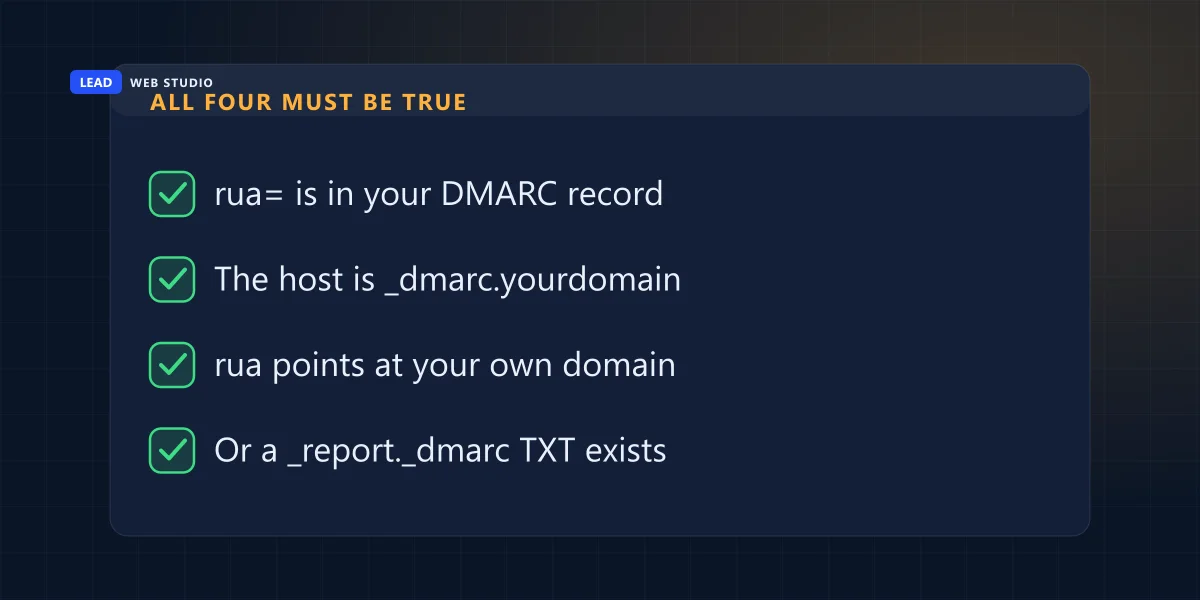
That last rule exists for a good reason. Without it, anyone could publish a DMARC record pointing reports at a victim's mailbox, blast out failing mail, and let the world's mail servers bury that person under reports. RFC 9990 spells the defence out: the receiver takes the host part of your rua address, prepends _report._dmarc, prepends your domain, and looks for a TXT record there containing at least v=DMARC1. If it doesn't find one, the URI "MUST be ignored by the Mail Receiver generating the report."
In plain terms: if your domain is yourbusiness.ca and you set rua=mailto:reports@someagency.com, then someagency.com must publish a TXT record at yourbusiness.ca._report._dmarc.someagency.com. Dedicated report services publish a wildcard record — the spec allows *._report._dmarc.example.com to authorise any domain at once — which is why they never mention this to you. An agency that set the permission up by hand for one client and then reused the same reporting address for the next five has silently broken reporting on five domains, and nothing anywhere reports the failure.
The other three failures are duller and quicker to check. The record lives at _dmarc.yourdomain.ca, not at the root and not at dmarc. without the underscore; some DNS panels append the domain for you and some don't, which is how people end up with _dmarc.yourdomain.ca.yourdomain.ca. v=DMARC1 must be the first tag in the record — the spec is explicit that it "MUST be the first tag in the list." And if you pointed rua at a mailbox that doesn't exist, or one whose spam filter eats machine-generated zip files, the reports are being sent and thrown away at your end.
How do I open one without installing anything?
Start with the filename, because it tells you enough to triage before you open anything. The format is fixed by the standard: receiver, then the domain being reported on, then the start and end of the reporting period as Unix timestamps, separated by exclamation marks. So google.com!yourbusiness.ca!1755734400!1755820800.zip is Google, reporting on yourbusiness.ca, for one 24-hour window. If you have thirty of these, you can sort by name and see instantly which providers report on you and whether any day is missing.
Then unzip it. Some providers send .zip, which every computer opens; others send .gz, which a Mac opens on a double-click and Windows may want a tool such as 7-Zip for. Inside is a single .xml file, and you have three sane ways to read it:
- Drag it into a browser. Chrome, Edge and Firefox all render XML as a collapsible tree. It will warn you the file has no style information — ignore that, it's not an error. For a small business report this is genuinely fine; you're reading maybe fifteen blocks.
- Open it in Excel. Data → Get Data → From File → From XML gives you a real table, one row per sending IP, which is the right shape for eyeballing a month at once. This is the one worth learning if you have more than a handful of senders.
- Paste it into a free web viewer. Convenient, and fine for a report you already understand. Just remember you're handing a third party a list of every IP address that sends mail as your company.
Which fields actually matter?
Six. Everything else in the file is bookkeeping that exists so machines can process reports at scale. Here is the whole working set, with where each one sits in the XML and what you do about it.
| Field | Where it sits | What it tells you | What to do with it |
|---|---|---|---|
source_ip | record → row | The machine that sent mail as you | Look it up. Recognise it or investigate it. |
count | record → row | How many messages from that IP that day | Sets priority. One message is noise; 400 is your mail. |
disposition | row → policy_evaluated | What the receiver actually did: none, quarantine or reject | The only field that describes real-world consequence. |
dkim / spf | row → policy_evaluated | Whether each one aligned with your domain | Two passes means healthy. One pass still delivers. |
header_from | record → identifiers | The domain your recipient saw in the From line | Confirms the report is about the right domain. |
dkim > domain | record → auth_results | Which domain actually signed the message | Names the culprit faster than any IP lookup. |
What you can skip without guilt: report_id, org_name and email (housekeeping), version, extension, and human_result, which is an optional free-text note most providers leave empty. The two date_range timestamps matter only if you're stitching a month together.
One field is worth knowing about even though you'll rarely see it: reason, which appears when a receiver deliberately did something other than what your policy asked. Its permitted values are a short, honest list — local_policy, mailing_list, trusted_forwarder, policy_test_mode and other. If you see mailing_list against a batch of failures, that isn't a fault at all: the receiver worked out the mail travelled through a list that rewrote it, and cut it some slack.
The XML schema has no field for "criminal". A spoofer and your own booking software both arrive as an IP address that failed alignment, described in identical words. Telling them apart is your job, and it takes about a minute per address.
What does "fail" actually mean in a DMARC report?
Most of the time, a legitimate service sending mail on your behalf that hasn't been wired into your DNS properly. DMARC doesn't ask whether SPF and DKIM passed. It asks whether they passed for the domain in the From line your customer sees. That extra condition is called alignment, and it is where honest senders fail. It is also worth knowing what these reports will never show you: mail sent from a domain that merely looks like yours never appears in them at all, which is one of the ways a customer ends up paying a fake invoice while your own reports stay clean.
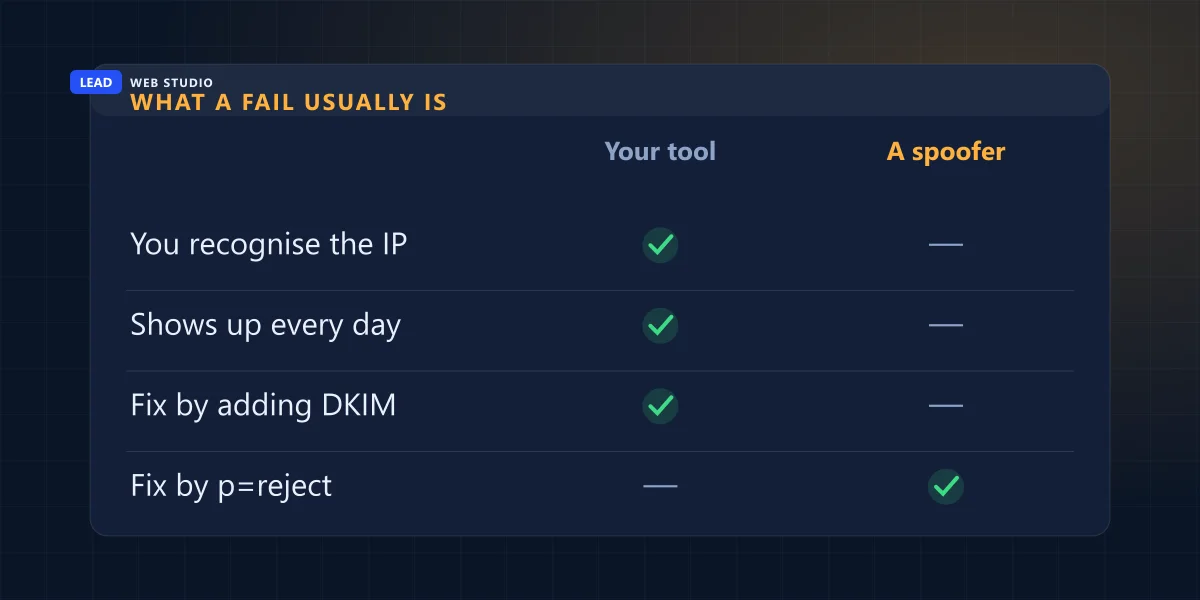
Take a booking system that emails appointment confirmations "from" you. SPF passes, because the message genuinely came from the booking company's servers and their SPF record says so. But SPF is checked against the hidden envelope address, which belongs to mailer.bookingapp.com, while your customer sees you@yourbusiness.ca. Different domains, so no alignment, so DMARC records a fail — for a message that is completely legitimate and that you are paying for. The fix is to publish the DKIM keys that provider hands you, which lets them sign as your domain instead of theirs.
So the triage is three questions, in order:
- Do you recognise the IP? Paste it into any WHOIS lookup. If it comes back as Mailchimp, Squarespace, your CRM, your invoicing app or your own web host, you have found a configuration job, not an incident.
- Does it appear every single day? Your own tools are boringly regular — same IP range, similar volume, every day. Spoofing runs arrive in a burst and vanish. If a burst turns out to be real, the first hour has its own order of operations — and changing your password is not step one.
- What does the DKIM
domainsay? If a message was signed bybookingapp.comrather than your domain, the report has named the service for you and you can stop looking.
What genuine abuse looks like, for contrast: a scatter of IP addresses you cannot place, in countries you don't sell to, sending a few dozen messages each and then never appearing again. That pattern is the one p=reject exists for. Your own misconfigured newsletter tool is not — set that to reject before you fix the DKIM keys and you will block your own customer emails, which is a far more expensive mistake than the one you were trying to prevent. Note which of those two policies you'd actually notice, though: a reject is refused during the SMTP conversation and bounces back to you, while a quarantine is accepted and then filed in a spam folder without a word — and that difference between a bounce and a silent failure is exactly why one of them is easy to catch and the other runs for months.
The ten-minute pass, once a month
You don't need to read every report. You need a routine that catches change. This is the one I run for the sites I look after, and it fits in a coffee break.
- Sort by filename and check the days. Missing days from a provider that usually reports means either you sent them nothing, or something changed at your end.
- Open the largest file. Highest
count= your real mail stream. That block should show both DKIM and SPF aligned and a disposition ofnone. - List every distinct
source_ipfor the month. This is the actual deliverable: a written inventory of everything that sends mail as your company. Nothing else you own produces that list, which is the strongest argument for doing this exercise at least once. - Mark each one known or unknown. Known and failing is a to-do. Unknown and failing is worth ten more minutes. Unknown and passing is the one to look at hardest, because it means something you don't recognise is authenticating as you.
- Check
policy_publishedmatches what you think you published. DNS edits get reverted by hosting migrations more often than anyone admits, and this is the field that tells you.
If step three produces a list you can't explain, that's the point at which sending it to someone is cheaper than staring at it. I do this as part of ongoing website maintenance and support, and it takes me about the same ten minutes — the difference is I've seen the IP ranges before.
What changed in May 2026, and why older guides mislead
DMARC was rewritten. In May 2026 the original 2015 specification, RFC 7489, was replaced by three Standards-Track documents — RFC 9989 for the protocol, RFC 9990 for aggregate reporting and RFC 9991 for failure reporting. It also stopped being merely "Informational" and became a proper standard for the first time in eleven years.
That matters here because tags you will see recommended all over the internet have been formally retired. The IANA registry in RFC 9989 now marks them historic, which is the polite way of saying stop typing them.
| What older guides tell you | Status since May 2026 | What to do instead |
|---|---|---|
Use pct=20 to roll out slowly | Removed — marked historic | Use t=y, which asks receivers to apply one level below your stated policy |
Set ri=86400 for daily reports | Removed — marked historic | Nothing. Daily is what receivers do anyway |
Set rf=afrf for the report format | Removed — marked historic | Nothing. The format is fixed |
Expect forwarded or sampled_out as a reason | Both dropped from the schema | Expect policy_test_mode instead |
| Your organisational domain comes from the Public Suffix List | Replaced by a "DNS Tree Walk" | Nothing to change — but reports now carry a discovery_method field showing which was used |
Two additions are worth knowing. np sets a policy for subdomains that don't exist at all, which is the cheapest anti-spoofing win available — nobody legitimate sends from invoices.yourbusiness.ca if you never created it. And testing now appears inside the report itself, so you can confirm receivers saw your test flag rather than assuming it.
None of this breaks an existing record. A DMARC record with pct=100 still works; the tag is simply ignored now. But if you are writing one today, or checking one a previous developer left behind, the shorter modern record is v=DMARC1; p=none; rua=mailto:you@yourdomain.ca; and nothing else until you have read a month of reports.
When should I stop reading these by hand?
After about a month, or as soon as the file list stops surprising you. Reading reports manually is a learning exercise with a real payoff — you end up with an inventory of your own mail senders — but it is a terrible ongoing habit, because the thing you're watching for is a change on a day you happened not to look.
Free options that do the watching, in the order I'd try them:
- A free digest service. Postmark's DMARC monitoring is a free weekly email — it describes itself as "a free weekly email to help monitor & implement DMARC", arriving Monday mornings with your top ten mail sources. You point
ruaat the address they give you. For most small businesses this is the correct answer and the whole job. - Cloudflare, if your DNS already lives there. DMARC Management is "available to all Cloudflare customers with Cloudflare DNS", including the free plan, and shows which sources pass SPF, DKIM and DMARC. No extra account, no extra bill.
- A paid dashboard. Postmark's own upgrade is $14 a month per domain and adds a web dashboard, full source data and monthly reports. Worth it when you're moving to
p=rejectacross several domains and need history to prove nothing legitimate broke. Not worth it in month one, whatever the sales page implies.
Whichever you pick, publish the DNS record from your own registrar or DNS account rather than an agency's. If the reporting address sits in somebody else's account, the reports stop arriving the day you stop working together, and you will not be told. Same principle as the domain itself: who owns your website covers where each credential should actually live.
The one thing to do today: find your oldest unopened DMARC report, unzip it, and write down every source_ip you see. If any of them is a service you stopped paying for — an old CRM, a departed agency's mail relay, a newsletter tool from three years ago — that is a live door into your brand's reputation and it should be shut this week. If the list means nothing to you, send it to me and I'll tell you plainly what each entry is.
Frequently asked questions
What is a DMARC aggregate report, in plain English?+
It's a daily summary that an email provider sends you about mail claiming to come from your domain. It lists each sending IP address, how many messages it sent, whether SPF and DKIM aligned with your domain, and what the provider did with the mail. It contains no subject lines, recipients or message content.
Why am I not receiving any DMARC reports?+
Usually one of four reasons: there is no rua address in your record, the record is not at _dmarc.yourdomain, the mailbox is filtering the zip attachments, or the rua address belongs to a different domain that has not published the required _report._dmarc TXT record granting permission. RFC 9990 requires receivers to ignore an unverified external address entirely.
Does a DMARC fail mean someone is spoofing my domain?+
Rarely. Most failures at a small business come from legitimate services sending on your behalf — a booking system, a newsletter tool, an invoicing app — whose messages pass SPF for their own domain but not for yours. That is an alignment problem fixed by publishing their DKIM keys in your DNS, not a security incident.
Can I open a DMARC report in Excel?+
Yes. Unzip the file, then in Excel use Data, Get Data, From File, From XML. You get one row per sending IP address with the counts and results as columns, which is the easiest way to review a month at once. A browser also renders the XML as a readable tree if you only need to check one file.
Is the pct tag still valid in a DMARC record?+
No. Since May 2026 the IANA registry marks pct, ri and rf as historic, following the publication of RFC 9989. Existing records containing them still work because receivers ignore unknown tags, but new records should use the t tag for test mode instead of a percentage.
Do I need a paid DMARC dashboard for a small business?+
Not to start. A free weekly digest, such as Postmark's, covers the actual need: knowing when something new begins sending as your domain. Paid tools earn their money when you are enforcing a reject policy across several domains and need historical data to prove nothing legitimate broke.
Want someone to read the reports with you once?
Send me your domain and one of those zip files. I'll tell you what every sending IP is, which ones are failing and why, and whether you're safe to tighten the policy — no charge, nothing to sign. Email authentication is set up properly on every website I build, kept monitored under maintenance & support, and both are priced openly on the pricing page.
Get My Free Quote
10+ years building websites and local SEO for GTA trades, clinics and service businesses — including a great many hours spent working out why somebody's mail is quietly failing. Read my full bio · Get in touch