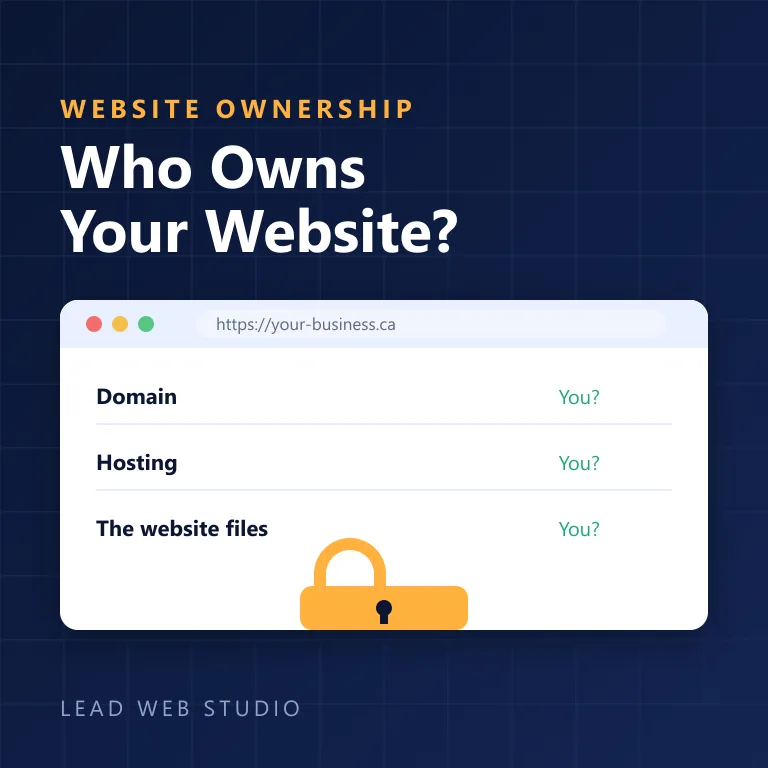
A roofer I know hands out a card with a .ca website on the front and a Gmail address underneath. He isn't careless. Nobody ever told him the two are connected, and the person who built his site five years ago charged him for "email setup" that turned out to be a forwarding rule. Business email on your own domain looks like a five-minute checkbox, and then it quietly becomes the thing you can't move, can't prove and pay for four times over. Yesterday I wrote about form emails disappearing into spam. This is the other half of the same pipe — the address you send from, whose account it lives in, and what it should honestly cost in Canada.
The short version
- An "email domain" is two bills: the domain (about $20–35 CAD a year) plus the mailbox (about CA$110 per person a year). One person, all in: roughly $130–150.
- Forwarding is not email. It receives. It cannot send. Every reply still leaves with your personal address on it.
- The free Gmail workaround leaks. Google's own help page says Outlook recipients see "From yourname@gmail.com on behalf of…".
- Real prices in Canada: Google Workspace Business Starter CA$9.20/user/month, Microsoft 365 Business Basic CA$9.50/user/month.
- You're probably paying per address. Google gives 30 aliases per user free; Microsoft gives a 50 GB shared mailbox with no licence.
- Buy it in your own name. If it sits in your designer's account you can't open a ticket and you can't leave.
- Keep mail away from web hosting so changing host doesn't take ten years of inbox with it.
How much does an email domain cost?
It's two separate bills. The domain is about $20–35 CAD a year for a .ca or a .com. The mailbox on it is a separate subscription: Google lists Workspace Business Starter at CA$9.20 per person per month, Microsoft 365 Business Basic is CA$9.50. For one person that's roughly $130–150 a year, before tax.
Nobody actually sells an "email domain". You can't buy name@yourbusiness.ca as a single product the way you buy a Gmail account. You buy the name from a registrar, then you rent mailboxes on it from a mail provider — and those can be two different companies, which is usually the better arrangement. Here's what the first full year costs one person on each of the realistic setups:
| Setup (one person, one year) | Domain | Mailbox | Total |
|---|---|---|---|
| Domain + Zoho free tier | $20–35 | $0 | $20–35 — webmail only |
| Domain + mailbox on your web hosting | $20–35 | $50–90 | $70–125 |
| Domain + Google Workspace Business Starter | $20–35 | CA$110.40 | about $130–145 |
| Domain + Microsoft 365 Business Basic | $20–35 | CA$114 | about $134–149 |
Add 13% HST in Ontario to every line. The domain figure is the same range I explain in the guide to choosing a domain name, including why the $1 first-year promo renews at around $32. And when I checked Google's Canadian page on 22 September, it was showing the first three months of Business Starter at half price — budget on the full CA$9.20, because that's what month four costs.
Three things inflate this number without belonging in it: a "domain management" fee on top of the renewal, a mailbox bundled into a hosting plan you'd otherwise cancel, and a paid licence for every address instead of every person. That last one is the expensive one, and it has its own section below. If somebody quotes you $400 a year for "email on your domain" for a one-person business, ask them to split the quote into the two lines above. It usually gets cheaper during the conversation.
What does business email on your own domain actually mean?
It means a real mailbox that both receives and sends as name@yourbusiness.ca, hosted by a mail provider you pay directly. Not a forwarding rule. Not a Gmail account with your domain typed into the From box. The test takes ten seconds: send a message to a friend and ask them what address the reply goes to.
That distinction sounds pedantic until you look at what it costs to get wrong. Mail delivery has two completely separate halves — inbound, which is easy and often free, and outbound, which is where authentication, reputation and ownership all live. Most of the setups I inherit solved the easy half and declared victory.
Is email forwarding enough?
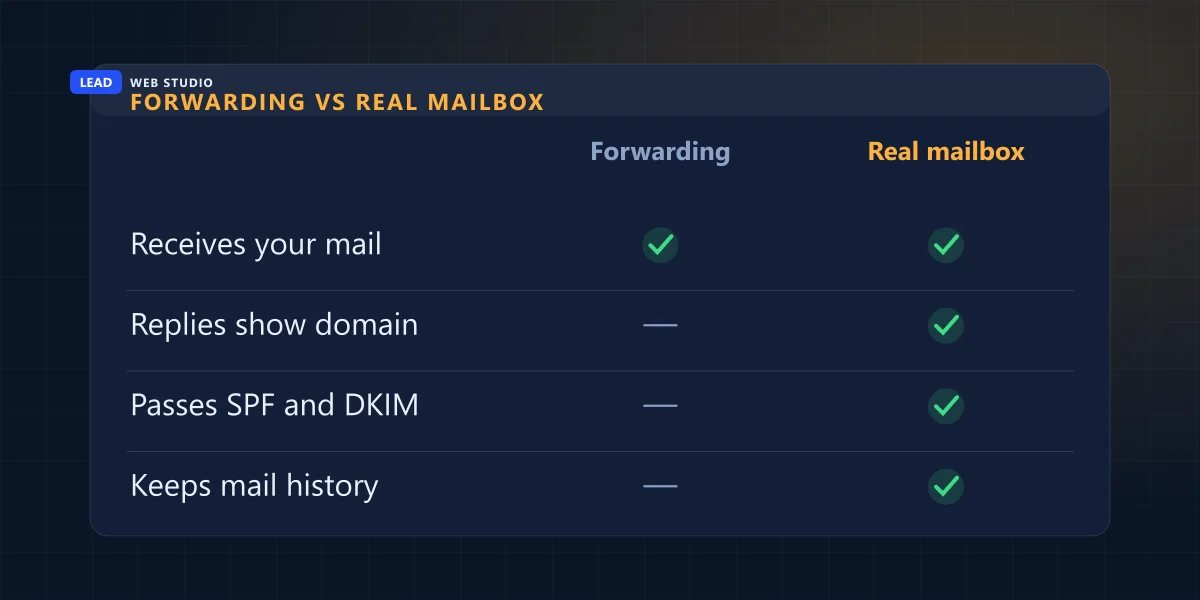
No, and it's the single most common half-finished setup I find. Forwarding takes mail arriving at info@yourbusiness.ca and drops it into a mailbox you already own. Nothing is stored at your domain, nothing can be sent from it, and the moment you hit reply the conversation moves to your personal address and stays there.
Here is the part owners don't see coming: forwarding trains your customers to use the wrong address. They reply to what's in the From line, so within a month or two the business address is a decoration and the real correspondence lives in a personal inbox with your holiday photos.
| What you need it to do | Forwarding only | A real mailbox |
|---|---|---|
| Receive mail at your domain | Yes | Yes |
| Send so replies come back to your domain | No | Yes |
| Pass SPF and DKIM as your own domain | No | Yes |
| Keep the history where you can export it | No — it's in a personal account | Yes |
| Hand over to a staff member cleanly | No | Yes |
Forwarding does have one honest use: catching an address you've retired. Old-info@ pointed at new-info@ for a year while the printed van decals catch up is exactly what it's for. As the whole of your business email, it's a placeholder somebody forgot to replace.
Can I just add my custom address to Gmail for free?
You can, and it half-works, and the half that doesn't is the half your customers see. Gmail's "send mail as" feature lets you put info@yourbusiness.ca in the From box of a free personal account. Google documents what happens next themselves, in their own help page on sending from a different address: recipients using Outlook and similar services see the line "From yourname@gmail.com on behalf of othername@otherdomain.com."
So the free workaround publishes your personal address to every recipient who happens to use Outlook — which, if you sell to other businesses in Canada, is a large share of them. The same page's setup flow does offer the way out: it asks for "the SMTP server … and the username and password on that account", meaning you can route the message through your real mail provider instead of through Gmail's. But if you have a real provider with real SMTP credentials, you already have a real mailbox, and the workaround is moot.
The free version of business email isn't wrong so much as visible. It works perfectly right up to the moment somebody on Outlook reads the line above your message.
There's a second cost that shows up later. A personal Google account belongs to a person, not a company. When that person leaves, or forgets a recovery phone number, or dies — and I have watched a family sit through this — nobody can prove ownership of an inbox that holds every invoice thread the business ever sent.
What does business email actually cost in Canada in 2026?
Less than most people are quoted and more than most people expect. The real ladder has four rungs, and the jump that matters is from "included with hosting" to "a provider you pay directly". Prices below are from each vendor's own Canadian pricing page: Google's re-checked on 22 September 2026, Microsoft's as checked on 14 August 2026.
| Option | What it costs | Who it suits |
|---|---|---|
| Forwarding at your registrar | Usually $0, included | Nobody, as a permanent answer |
| A mailbox on your web hosting | $50–90/yr | One or two addresses, no calendar needed |
| Zoho Mail free tier | $0, up to 5 users, 5 GB each | Webmail only — see the catch below |
| Google Workspace Business Starter | CA$9.20/user/mo, 30 GB pooled | Teams already living in Docs and Drive |
| Microsoft 365 Business Basic | CA$9.50/user/mo, 100 GB mailbox | Teams already living in Outlook and Excel |
Sources, so you can check rather than trust me: Google Workspace Canadian pricing (Business Starter CA$9.20, Standard CA$18.40, Plus CA$28.70 per user per month, as listed on 22 September 2026) and Microsoft's Canadian business comparison page (Business Basic CA$9.50 per user per month paid yearly). The $50–90 a year for a host-provided mailbox is the same range I published in the guide to hosting add-ons, because it's the same line item — just bought deliberately this time instead of pre-ticked in a cart.
The Zoho catch is worth naming, because free tiers are where people get stuck. Zoho's own pricing page lists the free plan at up to 5 users and 5 GB each, and then states plainly: "IMAP/ POP/ Active Sync not included." That means the free tier is webmail and Zoho's own apps only. You cannot put it in Outlook, Apple Mail or your phone's built-in mail app. For a one-person shop who lives in a browser that's genuinely fine. For anyone who expects mail on an iPhone the way they've always had it, it's a wall you hit on day two.
The bill most small businesses don't need to pay
Here's the section that will save you the most money, and it's the one nobody selling you email will lead with. Both major providers charge per person, not per address — and both hand you extra addresses for free. Almost every quote I've reviewed prices them per address anyway.
Google's admin documentation is unambiguous: "You can add up to 30 email aliases for each user at no extra cost." So info@, sales@, accounts@, hello@ and quotes@ can all land in one licensed mailbox for the price of one licence. Microsoft's equivalent is the shared mailbox, and their documentation states it just as plainly: "A shared mailbox can store up to 50 GB of data without assigning a license to it."
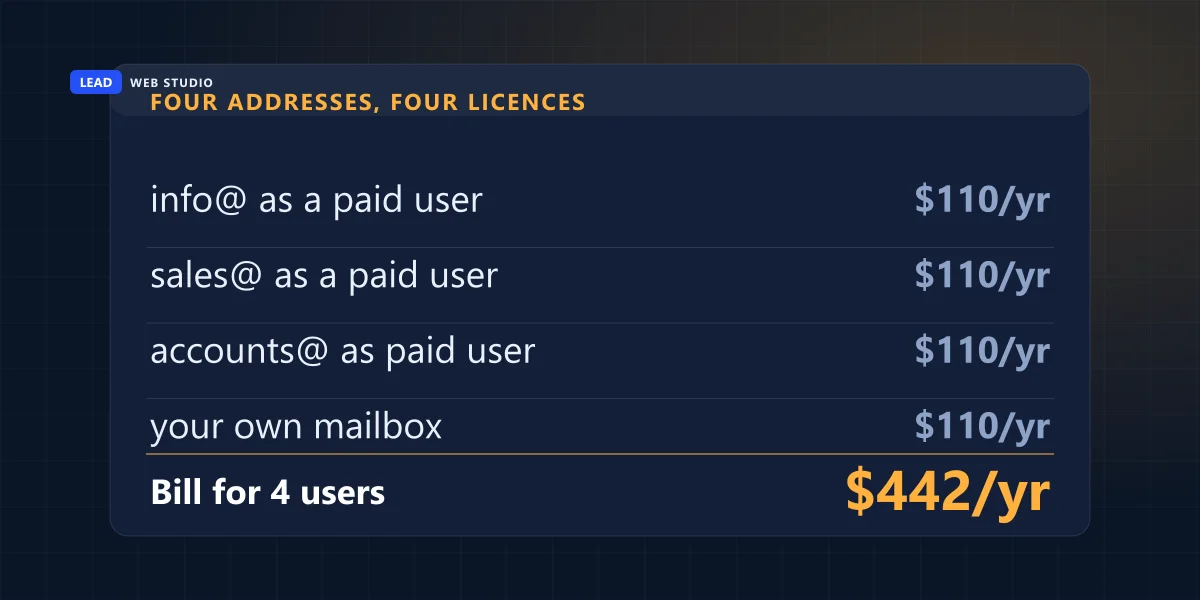
Run the arithmetic on the picture above. Four addresses set up as four Workspace users at CA$9.20 a month is CA$110.40 each per year — CA$441.60 a year in total. One user with three aliases is CA$110.40. Same five addresses, same inbox, CA$331.20 a year saved, and the only thing you gave up is a per-address login nobody was using.
Now the honest limits, because this is a trade-off and not a loophole:
- Aliases share one inbox. If two different people need to answer info@ independently, an alias won't do it — you want a Google Group or a Microsoft shared mailbox instead.
- Microsoft's shared mailbox has real ceilings. Their docs cap it at 50 GB before a licence is required and note that it "supports a maximum of 25 users"; past that they point you at a Microsoft 365 group.
- Everyone who reads a Microsoft shared mailbox still needs their own licence. The shared box is free; the humans are not.
- A real second employee needs a real second licence. Don't share a login to dodge $110 a year — that's how you end up unable to prove who sent what.
The rule I give clients: pay per human, never per address. Buy a licence when a new person needs a private inbox. Add an alias when the business needs a new label on the door.
Who buys it matters more than which one you buy
Pick either Google or Microsoft and you'll be fine — they're both mature, both reliable, and the difference is mostly which office software your staff already know. The decision that actually bites you later is whose account the subscription lives in.
I'll be straight about my own position here, because it's relevant. I resell domains and hosting, and in August I sat down and worked out whether to resell business email too. I decided against it, and the reason is exactly the thing that should worry you: bought through my account, you would not be the provider's customer. You couldn't open a support ticket. You couldn't reset your own password without going through me. Every 11pm mail problem would route through a person who might be asleep. Recurring revenue and recurring responsibility are the same object viewed from two sides, and email is not a thing I want to stand between you and.
So the arrangement I recommend and use: you buy the subscription in your own name, with your own card, and add me as an administrator. I do the setup — MX records, SPF, DKIM, DMARC, migrating the old mail across — as a one-off job. You keep the keys. If we stop working together you remove my admin access in about forty seconds and nothing about your email changes. It's the same ownership principle as owning your domain and hosting, applied to the one account that holds every conversation you've ever had with a customer.
Keep your email away from your web hosting
This is the structural decision most people make by accident. Your domain has separate records for the website and the mail: an A record pointing at whatever server shows your pages, and MX records pointing at whatever server holds your mailboxes. They are allowed to point at completely different companies, and they should.
When email lives on the same hosting account as the website, three ordinary events turn into emergencies:
- You change host. Now moving the site also means moving every mailbox, on the same night, or losing mail in the gap. I've done these migrations and the email half always takes longer than the website half.
- The hosting bill lapses. A missed renewal that would have taken your site offline for a day now takes your inbox offline too — including the renewal reminder.
- A neighbour on the shared server gets compromised. Their spam run damages the IP reputation you're sending from, and your quotes start landing in junk for reasons that have nothing to do with you.
Splitting them costs nothing extra and takes one DNS change. If you're already planning a move, it's the right moment to do both at once — that's part of what a proper website migration covers, and it's cheaper to separate them while everything is already open than to untangle it later.
Setting it up properly: the six steps
This is the order I actually work in. Steps one to four are the same whichever provider you chose; skipping step five is what causes the spam problems I wrote about yesterday.
- Buy the subscription yourself, on your own card, in an account whose recovery phone and email you control. One licence to start.
- Verify the domain and point the MX records at the new provider. Nothing arrives until this is done, and it can take a few hours to propagate.
- Create one mailbox per person, then add the department addresses as aliases — info@, sales@, accounts@ all landing in the mailbox of whoever answers them today.
- Import the old mail before you switch anything off. Both Google and Microsoft have a migration tool. Do it while the old mailbox still works, not after.
- Publish SPF and DKIM, then set a DMARC policy. Your provider gives you the values; they go in DNS. Fifteen minutes, free, and it's the difference between arriving and being filtered — the mechanics are in the guide to form emails going to spam. The DMARC policy does a second job too: at the right setting it is the one thing that stops a stranger sending mail as your exact domain.
- Point the website's contact form at the new mailbox and send one real test through the live form. Not a message you compose in webmail — the actual form, the way a customer would.
Budget an afternoon if you're doing it yourself and you've never touched DNS, or an hour if you've done it before. The part that goes wrong is almost never the mailbox; it's step five, and it goes wrong silently. Take that word literally — a message that never reaches anyone usually produces no bounce at all, so nothing lands in your inbox to tell you, and you find out when a customer mentions months later that they never heard back.
Do this one thing today: open your sent folder and look at the From line on the last message you sent a customer. If it says @gmail.com, @hotmail.com, or your domain with "on behalf of" beside it, you have one of the problems on this page — and it's a job measured in hours, not weeks. Send me your domain and I'll tell you which of the four setups you're on, free.
Frequently asked questions
How much does an email domain cost?+
It is two separate bills. The domain costs about $20 to $35 CAD a year for a .ca or a .com. The mailbox on it is a subscription on top: roughly CA$110 to CA$114 per person per year from Google or Microsoft, or $50 to $90 a year on your web hosting. For one person, expect about $130 to $150 a year before tax.
Is email forwarding the same as having business email on my own domain?+
No. Forwarding only redirects incoming mail to an inbox you already have. It gives you nothing to send from, so every reply leaves with your personal address on it and nothing is stored at your domain. A real mailbox both receives and sends as your domain, and keeps the history where you can take it with you.
Can I just add my custom address to Gmail for free?+
You can, but it leaks. Google's own help page for sending from a different address states that recipients on Outlook and similar services see the line "From yourname@gmail.com on behalf of othername@otherdomain.com". Unless you configure your provider's own SMTP server in that setup, your personal address travels with every message.
How much does business email cost in Canada?+
Google Workspace Business Starter is listed at CA$9.20 per user per month, and Microsoft 365 Business Basic at CA$9.50 per user per month paid yearly. A single mailbox added to your existing web hosting typically runs $50 to $90 a year. Zoho Mail has a free tier for up to five users, with no IMAP or POP access. The domain itself is a separate $20 to $35 CAD a year.
Do I need to pay for a separate account for info@, sales@ and accounts@?+
Usually not. Google Workspace documents that you can add up to 30 email aliases for each user at no extra cost, and Microsoft documents that a shared mailbox can store up to 50 GB of data without assigning a licence to it. Pay per person, not per address. Only buy a second licence when a second human needs their own private inbox.
Should my web designer or host buy the email for me?+
Buy it in your own name and add them as an administrator. If the subscription sits in somebody else's account you aren't the provider's customer, so you can't open a support ticket, can't reset a password without them, and can't leave without their cooperation. It's the same ownership rule that applies to your domain.
Want the email set up properly, in your own account?
I'll do the MX records, SPF, DKIM, DMARC and the migration of your old mail as a one-off job — you buy the subscription, you keep the keys. It's included from day one on every website I build, and covered under ongoing support after that. Straightforward rates are on the pricing page.
Get My Free Quote
10+ years building websites and local SEO for GTA trades, clinics and service businesses — and untangling the email setups they inherited from whoever came before. Read my full bio · Get in touch