A customer forwards you an email. It has your business name at the top, your sign-off at the bottom, and an invoice attached with bank details that are not yours. They want to know whether to pay it. That is the moment most owners discover email spoofing, and it is also the moment most owners do the wrong thing first: they change the mailbox password. In three of the four situations that produce that forwarded email, the password was never the problem and nobody was ever inside the mailbox — so the change accomplishes nothing except signing you out of your own email on every device you own, during the hour you most need to read it.
The short version
- Putting your name on an email requires no access to anything of yours. The From line is typed by the sender, the way a return address is written by hand on an envelope.
- Four different things look identical in the inbox — your exact domain forged, a lookalike domain, just your name in the display field, or a genuinely compromised mailbox. Only the last one is a break-in.
- One email header separates them in about a minute. That check is the whole first hour; the fix depends entirely on the answer.
- DMARC only stops one of the four. DMARC.org: it "is only designed to protect against direct domain spoofing" and "does not address cousin domain attacks".
- If your record says
p=none, it is a smoke alarm with the battery out. You are asking receiving servers to do nothing. - Bounces for mail you never sent are a gift. They are the earliest warning you will ever get, and most people delete them as spam.
- The damage is a redirected payment, not embarrassment. The Canadian Anti-Fraud Centre reported over $68M CAD in spear phishing losses in 2025.
I build websites and look after domains, DNS and business email for businesses around Toronto, so this arrives on my phone as a forwarded screenshot with a question mark after it. What follows is the order I work through it in, and why the order matters: the panic is about the mailbox, the problem is usually not in the mailbox, and the thing that actually costs money — a customer paying an invoice into the wrong account — is running on a clock the whole time.
Does this mean my email account was hacked?
Usually not. Sending a message with your address in the From line takes no password, no access, and no connection to your business whatsoever. Anyone with a mail server can type any address they like into that field. Gmail's own help page treats the classic symptoms as spoofing rather than a break-in, and lists them plainly.
Google's page on someone sending emails from a spoofed address gives the tells: "you get bounce messages for emails that look like they were sent from your account" and "you get a reply to a message you never sent". Notice what both of those describe. Mail is being sent that never touched your account, which is exactly why the evidence arrives sideways, as replies and failures from strangers, instead of appearing in your Sent folder.
That distinction is not academic. It decides your entire first hour. Confirming whether anybody actually got into the mailbox takes about thirty seconds, and it is the last row of the table two sections down. Do that before you touch the password, not after.
What are the four things it could be?
Four separate situations produce a message that looks like it came from you, and every one of them has a different fix. Three need no access to your systems at all. The RCMP's own description of business email compromise names three of these mechanisms directly: a spoofed address with a slight alteration, an account the fraudster genuinely has access to, and a "doppelgänger" domain, which it defines as a "legally registered domain name that has been created by threat actors because it appears to be almost identical to the legitimate domain name."
| What the From address really says | Do they have access to anything of yours? | Can you stop it in your DNS? | What actually works |
|---|---|---|---|
1. you@yourbusiness.ca — your exact domain | No | Yes | SPF, DKIM and DMARC set up properly, then the policy raised to reject |
2. you@yourbusinesss.ca — a domain they registered | No | No | Report it to the registrar's abuse address; warn customers the same day |
3. "Your Business" <kd91x@gmail.com> | No | No | Report the account to whoever runs it; warn customers |
| 4. Your real address, from your real mailbox | Yes — full access | No | Kill any hidden mail rule first, then password, sign out all sessions, turn on 2FA |
Kind 3 is the one people underestimate, because it feels too crude to work. It does work, and the reason is a design decision in every mail app you own: phones and most desktop clients show the display name and hide the address behind it. A message from kd91x@gmail.com arrives on a phone reading simply Your Business, in bold, above the preview text. The mail app is not malfunctioning and nothing has been forged — the sender typed a label, and the phone showed it. The address that would give the game away is one tap further in, and almost nobody takes that tap.
The 60-second check that tells the four apart
Get one full copy of the offending message — forwarded as an attachment if you can, because a plain forward strips the headers — and read four things. Nothing else in the first ten minutes matters. A screenshot is not enough, because a screenshot shows you the display name, which is the one part of an email that is decorative.
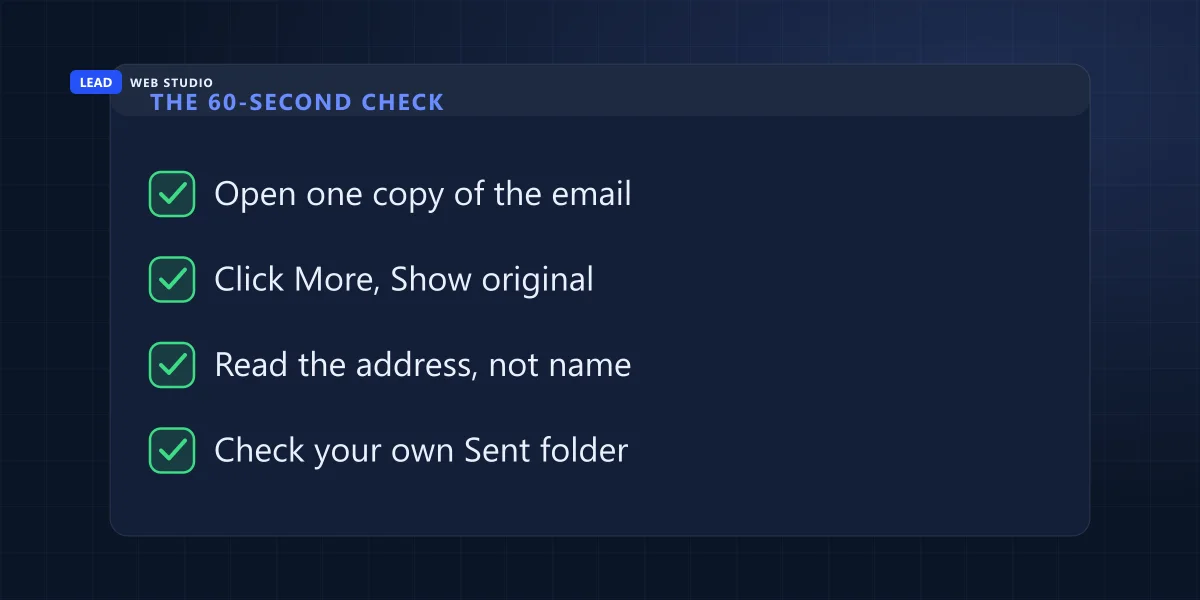
Google's instruction for opening the raw message on a computer is one sentence: "Next to Reply, click More and then Show original. In a new window, the full header shows." On the Gmail app for Android, the authentication check is: open the email, tap View details, then tap View security details. Every other mail client has its own version of the same thing under its own name, usually something with the word "source" or "headers" in it. Here is what to read once it is open.
| What to find | What you are actually reading | What the answer means |
|---|---|---|
From: | Only the part inside the angle brackets. Ignore the friendly name entirely | Exactly your domain → kind 1 or 4. A near-miss you have to squint at → kind 2. Something unrelated → kind 3 |
Authentication-Results: | The spf=, dkim= and dmarc= results, and crucially which domain each one is for | Passes for a domain that is not yours → kind 2 or 3. The fraudster's own domain can pass every check perfectly |
Reply-To: and Return-Path: | Where a reply goes, and where a delivery failure goes | A different address in either line is the mechanism of the scam in one line of text |
| Your own Sent folder and login history | Whether the message exists anywhere on your side | It is there → kind 4, treat it as a break-in now. It is not → it is never kind 4 |
The second row is the one that catches people out, and it is worth slowing down on. A pass is not a compliment. SPF and DKIM answer "did this server have permission to send for the domain it claims", and a fraudster who registered yourbusinesss.ca an hour ago has permission to send for it, because they own it. Their mail can pass every authentication check on the page and still be a fraud. Canada's Cyber Centre says this in its guidance, in its section on the limitations of SPF and DKIM: both "rely on domain names that are hidden from the user and that can differ from the domain that is displayed to the user in an email's From field."
Gmail gives you a shortcut for the quick version. It shows "Mailed by" and "Signed by" under the sender, and per Google, "if you see a question mark next to the sender's name, the message isn't authenticated" — meaning "Gmail doesn't know if the message is coming from the person who appears to be sending it." Useful, but read it the right way round: no question mark tells you a domain was authenticated, not that it was your domain.
A pass in the header does not mean the message is honest. It means the sender proved they own the domain they typed — and a fraud can own its domain outright.
Why the junk in your inbox was trying to warn you
Before the forwarded invoice, there is often an earlier signal, and it looks like garbage. Delivery failure notices for messages you never wrote. Angry replies from people you have never emailed. Both are direct evidence that mail carrying your address is in circulation, and both usually get deleted in a bulk sweep on a Monday.
The mechanism is simple once you see it. When a forged message hits a dead mailbox, the receiving server bounces it back to the address in the From line — which the sender wrote as you. You are the return address on somebody else's envelope, so you get the undeliverable notice for a campaign you were never part of. That is different from your own mail failing to arrive, which is a separate problem with a separate cause and lives in what happens when your email is not delivered.
So the practical habit is small: when a bounce arrives for a message you did not send, do not delete it. Open it, find the original recipient and the date, and keep it. If you later have to explain to a bank, an insurer or the police when this started, that timestamp is the only evidence you will have — and it is free, and it is already sitting in your inbox.
What is actually at stake here
Not your reputation, or not first. The reason someone bothers to impersonate a small business is to change where a payment goes. The Canadian Anti-Fraud Centre describes the pattern as a fraud "where criminals impersonated legitimate contacts and manipulated email communications to provide fraudulent payment instructions", and it publishes what that costs the country.
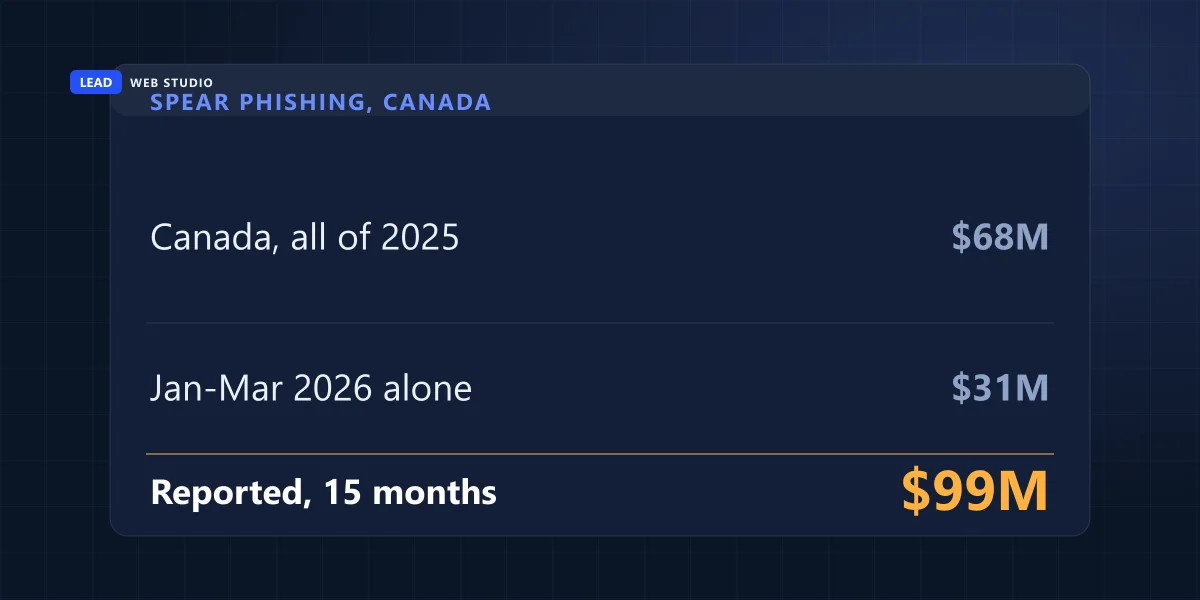
In a May 2026 news release about recovering roughly $3.5 million CAD for one targeted business, the CAFC put the national numbers on the record: "in excess of $68 million CAD in 2025" in spear phishing losses, and "nearly $31 million CAD in losses related to spear phishing frauds" in the first three months of 2026 alone. That is close to $99 million reported across fifteen months, and reported is doing heavy lifting in that sentence — it counts only the businesses that filled in the form afterwards.
Two things follow from that, and they change the order of your first hour. The customer warning is not public relations, it is loss prevention, and it beats every technical fix on urgency. And the CAFC's advice to businesses is not about email at all — it is "independently verify payment instructions before sending funds" and "confirm banking changes using trusted contact information". A phone call to a number you already had defeats this entire category of fraud, which is worth telling your customers in exactly those words.
Kind 1: your exact domain, and the DNS fix that genuinely works
This is the only one of the four you can shut down yourself, and the tool is DMARC. It works by asking receiving mail servers a question SPF and DKIM never ask on their own: did the authentication pass for the domain the human actually sees? If your record then tells them to reject failures, forged mail carrying your exact domain stops being delivered, at their end, without you doing anything else.
First, find out what you already have. Open a command prompt and run one line:
nslookup -type=TXT _dmarc.yourdomain.ca
You get back a single line of text, or nothing at all. Here is what mine returns for leadlls.com, so you know what a real answer looks like: v=DMARC1; p=quarantine; adkim=s; aspf=s. The part that matters is p=. If yours says p=none, read DMARC.org's own description of it and then decide how you feel: "a 'p=none' policy means that the Domain Owner is not asking the Receiver to take action if a DMARC check fails." It reports. It protects nothing. It is also the sensible place to start, which is exactly why domains get stuck on it — nothing breaks, nothing complains, and no reminder ever arrives telling you to move on.
Mine says quarantine rather than reject, and that is deliberate rather than lazy. Canada's Cyber Centre guidance (ITSP.40.065) sets the order in its "Gradually increase enforcement" section: "You should gradually increase the strictness of enforcement for a domain from a baseline of none, through quarantine, to an end state of reject." Its section 2 is blunt about where you are supposed to end up — "for complete protection, you must implement all three protocols and configure them to instruct recipients to reject inauthentic messages" — but the staircase exists for a real reason.
That reason is that every legitimate service sending mail on your behalf has to be wired in before you slam the door: your invoicing app, your booking system, your newsletter tool, the contact form on your own website. Jump straight to reject with one of them unaligned and you will silently destroy your own invoices while congratulating yourself on your security. Reading the reports first is the whole point, and it is a job of about a minute per sending address — I wrote up how to do it without paying for a dashboard in how to read your own DMARC reports. If your website's own contact form is the thing landing in spam, that is the same alignment problem seen from the other side, and it is covered in why contact form emails go to spam.
Kind 2: a lookalike domain, where nothing in your DNS will help
If one of these has already been used to bill one of your customers, that is a faster and more expensive problem — see what to do when a customer pays a fake invoice, where I also publish how many lookalikes of my own domain were sitting there unregistered.
If the address is yourbusinesss.ca or yourbusiness-inc.com, stop looking at your DNS. You cannot publish a record that governs a domain you do not own, and no amount of DMARC hardening touches it. DMARC.org states the limit without hedging: DMARC "is only designed to protect against direct domain spoofing", and "does not address cousin domain attacks (i.e. sending from a domain that looks like the target being abused - e.g. exampl3.com vs. example.com)."
What you have instead is a paperwork path, and it is more real than most people assume. Look the domain up in ICANN Lookup to find its registrar, then send the evidence to that registrar's abuse address. Under ICANN's registrar abuse requirements, an accredited registrar must maintain an abuse contact "including reports of illegal activity", publish an email address for reports "on the home page of the registrar's website", provide "an abuse email address and telephone number in Whois results", and take "reasonable and prompt steps to investigate and respond appropriately to any reports of abuse". Those obligations sit in Section 3.18 of the 2013 Registrar Accreditation Agreement.
Now the part nobody tells you, and it will save you a day of refreshing your inbox. That same page describes a separate contact that must be "monitored 24 hours a day, seven days a week" with reports reviewed "within 24 hours of submission" — and it is for reports "filed by law enforcement or other similar authorities designated by the government". That 24-hour clock is not yours. Your report goes into the ordinary queue with everyone else's. File it properly, attach the full headers, and then go do the thing that actually protects money, which is warning the people being emailed. ICANN itself is not a takedown service either; its complaint form is about a registrar failing its obligations, not about the fraud.
One thing you can do in advance, and only in advance: a name with an obvious near-miss is easier to impersonate than one without. That is a consideration at the point you register, alongside the ones in choosing a domain name you actually own, and it is worth ten minutes then rather than a registrar complaint later.
Kind 3: just your name in the display field
Here the address is honest and only the label is fake — "Your Business Ltd" <kd91x@gmail.com>. There is no DNS lever at all, because no part of your domain is involved. DMARC.org, again, is direct about it: "DMARC protects the domain name in the address part of the From:. It does not protect the display field."
So the response is entirely human. Report the sending account to whoever runs it, since a free mailbox provider can close an account in a way no registrar can close a domain. Then tell your customers the one detail that makes this defeatable: the address is one tap behind the name. In the Gmail app, that is opening the message and tapping View details; every other mail app has the same thing under a slightly different label. It is a two-second habit, and it is the only defence that exists against this one.
This is also the strongest argument for having business email on your own domain rather than a free mailbox. If your customers are used to hearing from a name at a domain that matches your website, a message from a random free address stands out. If they are used to hearing from a free address anyway, a fraudster only has to pick a different free address, and there is nothing to notice.
Kind 4: if they really are in your mailbox
Your Sent folder decides this, and if the messages are there, the tone of the whole hour changes. Now it is a break-in — and here the password finally is the right move, along with signing out every active session, turning on two-step verification, and checking what else uses that mailbox for password resets.
But not first. Microsoft's own remediation playbook for a compromised mailbox lists the recommended actions in a specific order, and the credential reset is number two. Number one is "disable the malicious inbox rule." That ordering is the part almost every consumer-facing article skips, and it is the difference between ending the incident and only interrupting it.
The reason is that a rule survives a password change. Microsoft's guidance on suspicious inbox manipulation rules says attackers "might set up email rules to hide incoming emails in the compromised user mailbox to obscure their malicious activities from the user", and "might also set rules in the compromised user mailbox to delete emails, move the emails into another less noticeable folder (like RSS), or forward mails to an external account." It gives the shopping list too: a rule "might be set to look for keywords like 'invoice,' 'phish,' 'do not reply,' 'suspicious email,' or 'spam,' among others". Microsoft states plainly that such rules "are common during business email compromise (BEC) and phishing campaigns".
Read that as an instruction rather than a threat briefing. Open your mail rules and filters before you do anything else, and look for one that moves, deletes or forwards anything mentioning money. If a rule is quietly deleting the replies, you can change the password every day of the week and the conversation with your customer will still be running where you cannot see it.
Two-step verification is the part that stops this happening again rather than just ending it today, and it is worth doing on the domain registrar and the hosting account at the same time, not just email — the reasoning and the recovery traps are in two-factor authentication for a small business. If a former staff member could still be in the account, that is a different door and it closes with an access checklist for the last day.
What to tell customers, and how to make them believe it is you
There is a trap in this step. You have just discovered that your customers cannot tell your emails from a fraudster's, and your instinct is to email your customers. You are about to add a fifth message to the pile, from the impersonated brand, telling them what to trust. Handled carelessly, that message is indistinguishable from the attack.
Three things fix it. Send from the channel that is not being impersonated where you can — phone the handful of customers with money in flight rather than emailing them. Put the notice on your own website where anyone can go and look at it themselves, at an address you can read out loud over the phone. And state a verification rule rather than a warning: tell them that your banking details never change by email, and that any message saying otherwise should be checked by calling the number they already have for you.
That last line is the one worth writing down, because it also protects you in the other direction. It is the same instruction the CAFC gives businesses — "independently verify payment instructions before sending funds" — and it works whether the fraud is aimed at your customers or at your bookkeeper.
The one thing to do today, whether or not anything is wrong: run nslookup -type=TXT _dmarc.yourdomain.ca and look at the p= value. Nothing at all means anyone can send as you and no one will ever object. p=none means the same thing, with paperwork. Thirty seconds, and it is the single fastest way to find out whether the door is shut.
Four things not to do in the first hour
- Do not change the password before you have read the header. If it turns out to be kind 4, do it immediately — but find that out first, because in the other three cases you have locked yourself out of your own email during the exact hour you need it most.
- Do not jump straight to
p=reject. On a domain whose DMARC reports nobody has ever read, this is the move that stops your own invoices, and you will not get a bounce telling you so. Cyber Centre's staircase from none to quarantine to reject exists precisely to prevent this. - Do not buy the cold email that arrives a week later. Sender blocklists are a real thing, but they list servers and domains that send abusive mail — being impersonated does not put you on one, so there is nothing for a stranger to "remove" you from. Anyone offering that is selling a fix for a problem you do not have, timed to arrive while you are frightened enough not to check — the same two-minute check works on that one too.
- Do not stay quiet to avoid looking unprofessional. The embarrassment lasts a day. A customer who pays a forged invoice because nobody warned them is a much longer conversation, and their money is gone in the meantime.
If you are past the first hour and want the wider version of this — SSL, backups, updates and which security products are worth paying for — it is in website security basics without the scare tactics. And when the person who set your DNS up in the first place has stopped answering, that has its own escalation order.
Where to report it in Canada
Report it even if no money moved, because the report is what lets the pattern be seen. The Canadian Anti-Fraud Centre says to report "whether you are a victim or not", takes reports online at reportcyberandfraud.canada.ca, and by phone on 1-888-495-8501, Monday to Friday, 10 am to 4:45 pm Eastern. If money did move, the CAFC's instruction comes first and is unambiguous: "If you have been a victim of fraud or cybercrime, please contact your local police as soon as possible." Then the bank, immediately. The CAFC's own list of advice to businesses ends with "report suspicious activity immediately", and the reason is mechanical rather than bureaucratic: money sitting in a receiving account can sometimes be frozen, and money that has already moved on generally cannot.
Frequently asked questions
Does email spoofing mean my account was hacked?+
Usually not. Forging the From line takes no access to your mailbox at all, which is why Gmail's own help page lists bounce messages for mail you never sent and replies to messages you never wrote as signs of spoofing rather than signs of a break-in. The one test that settles it is your Sent folder and your login history. If the message is not there, nobody was in your account.
How do I see the real sender of an email?+
In Gmail on a computer, Google's instruction is: next to Reply, click More and then Show original. The full header opens in a new window. On the Gmail Android app you open the email, tap View details, then tap View security details. Read the address inside the angle brackets in the From line and the Authentication-Results line, and ignore the friendly display name completely.
Can DMARC stop someone spoofing my business email?+
Only when they use your exact domain. DMARC.org states that DMARC "is only designed to protect against direct domain spoofing" and that it "does not address cousin domain attacks", meaning lookalike domains. It also states that DMARC "protects the domain name in the address part of the From:. It does not protect the display field", so a faked sender name is outside its reach too.
How do I check what DMARC policy my domain has?+
Open a command prompt and run nslookup -type=TXT _dmarc.yourdomain.ca. The answer is one line of text. If it contains p=none, you are asking receiving mail servers to do nothing about forged mail. DMARC.org puts it plainly: "a 'p=none' policy means that the Domain Owner is not asking the Receiver to take action if a DMARC check fails."
Someone registered a domain that looks like mine. Can I get it taken down?+
You can report it, and no DNS change you make will affect it. ICANN requires accredited registrars to maintain an abuse contact, publish an email address for reports on their home page and provide one in WHOIS results, and to take "reasonable and prompt steps to investigate and respond appropriately to any reports of abuse". Those requirements sit in Section 3.18 of the 2013 Registrar Accreditation Agreement.
Should I tell my customers that someone is emailing them as me?+
Yes, and quickly, because the money is the point. The Canadian Anti-Fraud Centre reported "in excess of $68 million CAD" in spear phishing losses in 2025, in frauds where criminals "impersonated legitimate contacts and manipulated email communications to provide fraudulent payment instructions". Warn them through a channel that is not the impersonated one, and tell them how to verify banking details with you by phone.
Sources, all quoted above and worth reading yourself: Gmail help on spoofed sending addresses, viewing a full email header and checking whether a message is authenticated; the DMARC.org FAQ on what DMARC does and does not cover; the Canadian Centre for Cyber Security's implementation guidance on email domain protection (ITSP.40.065); the RCMP on business email compromise; Microsoft's playbook on suspicious inbox manipulation rules; ICANN's registrar abuse reporting requirements; and the Canadian Anti-Fraud Centre's May 2026 release on payment redirection fraud and its reporting page.
Not sure what your domain is currently telling the world?
Send me your domain name and I'll read its public DNS the way a receiving mail server does — SPF, DKIM, DMARC and what policy you are actually publishing — and tell you in plain English what it lets a stranger do. Free, nothing to sign. If it is locked down, you get to stop worrying about it. If it isn't, better to find out on a quiet Tuesday than from a forwarded invoice. Domains and email are part of ongoing website maintenance and support; if you are also planning a new site, here is how I approach web design and what it costs on the pricing page.
Get My Free Quote
10+ years building websites and looking after domains, DNS and business email for GTA trades, clinics and service businesses — which is why the SPF, DKIM and DMARC records are part of the job here rather than an extra. Read my full bio · Get in touch