It always starts the same quiet way. An email goes unanswered, which is fine, because people get busy. Then a text. Then a phone call that rings out. Two weeks later the website is still sitting there looking perfectly normal, and that is the part that fools everybody: nothing is broken yet, so nothing feels urgent. Then something small needs changing — a phone number, a price, a photo of a van you no longer own — and you find out that the only person who can change it has stopped answering. If your web designer stopped replying, the instinct is to keep chasing them. Don't. There is an order to work in, and the person who has gone quiet is near the bottom of it.
The short version
- Stop chasing them; start with the domain. Whoever can sign into the registrar account can point your website and your email somewhere new within a day, with or without the designer's help.
- Three things you can usually move without them: the domain, the DNS, and where your email is delivered. Two you usually can't: the website files, and a Google Business Profile where they are listed as owner.
- Take a copy of your live site today. It needs no passwords, and a lapsed hosting bill can take the whole thing dark overnight.
- The 60-day locks are real. ICANN's transfer policy freezes a domain for 60 days after registration, after a transfer, and after a registrant change — so check where you stand before you promise anyone a date.
- Never charge back a payment for something you still need. It can cancel the very domain you are trying to rescue, and it removes the last reason for anyone to cooperate.
- Ontario Small Claims goes to $50,000 and costs $108 to file — but for most small sites the arithmetic quietly says "rebuild", not "sue".
My web designer stopped replying — who do I call first?
Not the designer, and not a lawyer. Call your domain registrar: the company your domain name is actually registered with. Whoever can sign into that one account controls where your website and your email get delivered, and can move both within a day. Almost every other problem on your list is downstream of that single login.
I know that feels like the wrong order. The designer is the person who has wronged you, so the designer is the person you want to shout at. But shouting is not a lever, and you are not actually trying to win an argument — you are trying to get a business back online under your own control. Only the second one has a deadline.
Why the domain outranks everything else you are panicking about
A website is four or five separate things, usually bought from different companies, that only look like one thing from the outside. The domain is the address. The DNS is the signpost that says where that address points. The hosting is the building. The files are the furniture inside it. On top of those sit the logins: your CMS, your analytics, your Google listing.
When people say "my designer has my website", what they almost always mean is that the designer has the furniture. That is annoying and it is not fatal. If you control the address and the signpost, you can put new furniture in a new building this week and the public will notice nothing except that the site looks different. If you don't control the address, you have the hard version of this problem — which is the whole reason who actually owns your website is worth reading before you hire anyone, not after.
Who can act without your designer's cooperation?
Three parties can: your domain registrar, your web host, and whoever holds your DNS. Each of them has a formal process for a business proving that an account belongs to it, because this situation is not remotely rare. The designer is the only link in the chain who can simply refuse — which is exactly why they are not the first call.
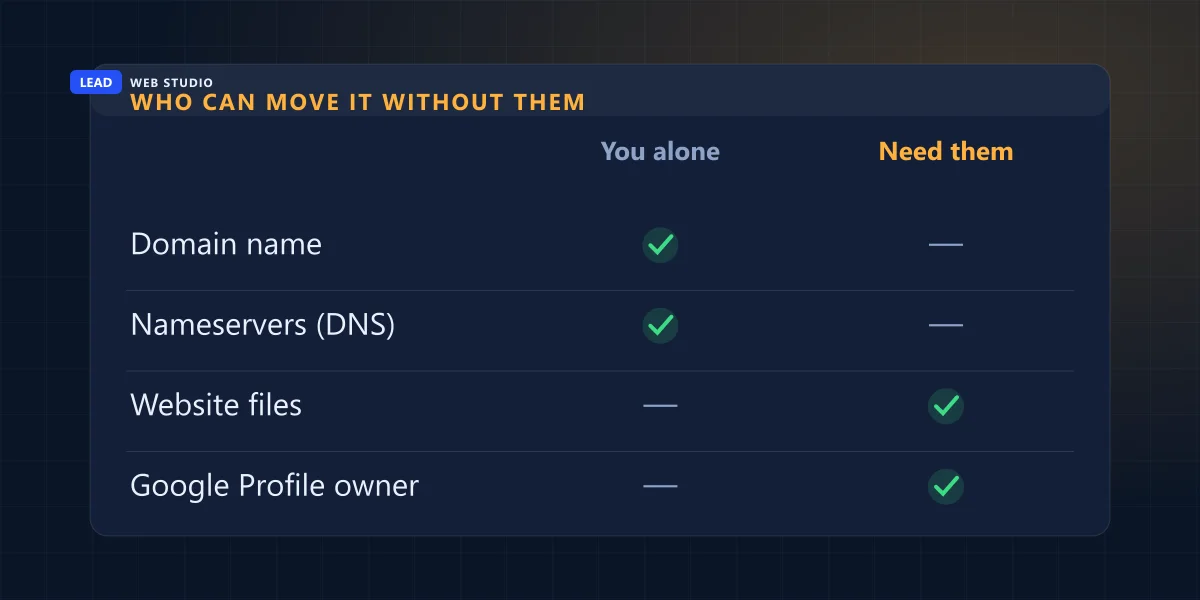
Here is the whole picture, piece by piece, with the honest timeline next to each one:
| The piece | Who really controls it | Move it without them? | Realistic timeline |
|---|---|---|---|
| Domain name | Whoever holds the registrar login | Yes — if you can get into the account or prove it is yours | Same day to a few weeks |
| Nameservers (DNS) | The same registrar login | Yes | Instant to change, up to 24h to spread |
| Where your email lands | DNS — the MX records | Yes, if you hold DNS | Same day as the DNS change |
| Hosting account | Whoever the host bills | Sometimes — with proof of payment | 2–10 business days |
| The website files | Whoever has a copy | No — but you can re-copy the live site | Today |
| Google Business Profile | The primary owner | No — Google will not evict an owner | 3+ days, via an ownership request |
| Analytics & Search Console | The property administrator | No — but you can start a fresh property | Today |
Look at the two grey rows, because they are the ones people find out about last. The files you can work around. The Google listing you often cannot: Google's own page on owners and managers states that a primary owner cannot remove themselves until primary ownership is transferred to someone else. So a designer who ticked "Owner" on your listing three years ago, and who now does not read email, cannot be removed by you, by me, or by anyone except themselves. Your remaining route is an ownership request, which gives them a few days to respond and then escalates — slow, and not guaranteed.
Step one: find out who actually holds your domain
Look your domain up on ICANN Lookup. It tells you the registrar, the creation date and the expiry date even when privacy hides the owner's name. Then try a password reset at that registrar using every email address your business has ever used. Those two free steps answer most of this in about ten minutes.
- Run the lookup and write down three things: the registrar's name, the creation date, and the expiry date. Nothing else on that screen matters yet.
- Try a password reset at that registrar — with every address you have ever used. The old provider's one. The personal Gmail from year one. The address on the invoices. People are frequently locked out of accounts that are already in their name, which is a much better problem than the one they thought they had.
- Search your card and PayPal statements for the registrar's name. The card that pays the renewal is both strong evidence and, very often, the account itself.
- Go back to that expiry date. This is the clock nobody notices. If the designer has stopped answering you, there is a fair chance they have also stopped paying — and once a domain expires and slides into the redemption period, getting it back costs a redemption fee many times a normal renewal. Registrars publish theirs. Look yours up while this is still theoretical.
- Check the nameservers. If they point at a host you recognise and pay, good. If they point somewhere you have never heard of, that is where your website actually lives, and that company is your next phone call.
Step two: build the proof pack before you phone anyone
No registrar or host will hand an account to whoever calls with a convincing story — which is the same protection that is currently infuriating you, working exactly as designed. What moves them is paperwork: business registration, invoices you paid, a card statement showing the renewal, and photo ID in a matching name. Gather all of it before the first call, not during it.
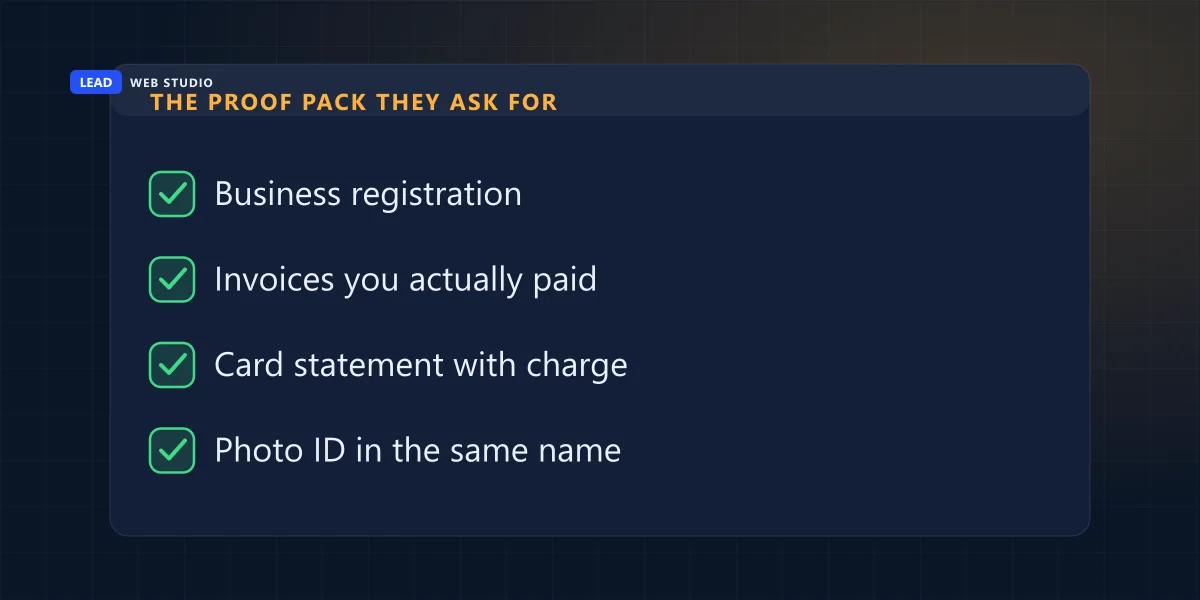
The single most persuasive document in that pile is the card statement, because it is the one piece of paper that ties your money to their account. A support agent cannot verify your feelings about the situation. They can verify a charge. Everything else in the pack exists to establish that the business named on that card is the business you are calling about.
One tone note that genuinely changes outcomes: ask what their verification process is, rather than demanding your domain. The first is a request the agent in front of you is trained and permitted to answer. The second is one they are trained to refuse.
In every one of these I have been called into, the thing that decided the outcome was whose name sat on the registrar account — not who was right.
The 60-day locks nobody warns you about
Even after you win the argument, a domain often cannot move straight away. ICANN's Transfer Policy locks a domain against transfer for 60 days after it is first registered, for 60 days after it moves between registrars, and for 60 days after the registrant contact is changed. That third lock is the one that ambushes people, because it fires at the exact moment you finally get your name onto the account.
Two things worth knowing that most guides skip. First, the registrant-change lock has an opt-out — as Name.com's plain-English summary of the policy puts it, the domain is locked when you change its contact information "unless you specifically opt-out". You have to ask for that at the moment the details change. Asking two days later does not work. Second, these rules are being shortened: in March 2025 ICANN's GNSO Council accepted recommendations to drop the registrant-change lock entirely and cut the others to 720 hours, or 30 days. As I write this in August 2026 that reform is still working its way through implementation and registrars are still enforcing 60 days — so confirm the current position with ICANN's Transfer Policy and your own registrar rather than with a blog post. Including this one.
Copy your website today, before anything else changes
You do not need a single password to take a copy of a website that is publicly online. Save every page, download the images, and write down every URL. Do it today, while the site is still up. A lapsed hosting invoice or one irritated developer can take the whole thing dark overnight, and the content is almost always the part nobody has a backup of.
Three ways to do it, depending on how technical you feel. For a five-page site, your browser's "Save Page As" on each page plus right-click-save on every image is genuinely enough. For anything bigger, a site copier like HTTrack or wget will pull the whole public site down in one go. And if none of that appeals, open every page and paste the text into a document, then save the photos — clumsy, free, and it takes an afternoon that you will be extremely glad you spent.
The part people skip is the URL list, and it is the part that matters most later. Every address on your current site needs to point somewhere sensible on the new one, or you throw away whatever Google rankings you had built up. That mapping is the actual work in any website migration, and it is much easier to write down now, while the old site is still visible, than to reconstruct from memory in three months.
To be clear about what you are copying: your words and your photographs. Whether the underlying code belongs to you depends on what your contract said — the ownership clause is the first thing I cover in what a web design contract should say — and if that question matters to you it is one for a lawyer, not for me. In practice, the content is what owners are most upset about losing, and the content is the part you can rescue this afternoon.
What if you actually owe them money?
Then say so, and pay it. A surprising share of these standoffs are not hostage situations at all — they are an unpaid invoice and a person who has quietly decided to stop working for free. Pay what you genuinely owe, in writing, and ask for the handover in the same message. It is cheaper, faster and less humiliating than everything else on this page.
Be honest with yourself about which situation you are in, because they look identical from the inside and they are not the same thing. An unpaid invoice is a commercial dispute and you may well be in the wrong. A designer who was paid in full and now wants a separate fee to release a domain your business paid to register is doing something else entirely. The first is fixed with a bank transfer. The second is what the rest of this page is for.
And one warning that I would put in flashing letters if the stylesheet allowed it: do not charge back a payment for something you still need. It feels like leverage. It usually costs you the domain. The registrar or host claws the money back from the designer's account, the service can be suspended or cancelled for non-payment — potentially including the domain you are trying to save — and the one human being on earth who could have clicked "approve transfer" now has a fresh, concrete grievance against you. Chargebacks are for services you have already walked away from.
If they genuinely owe you money — a deposit taken, nothing delivered — Ontario's Small Claims Court is the realistic venue. Ontario's own guide puts the limit at $50,000 as of 1 October 2025 (it was $35,000 before that, and half the advice online has not caught up), with a filing fee of $108 for anyone filing fewer than ten claims a year and $308 to set a trial date. Filing is genuinely easy. Collecting from somebody who has already stopped answering their phone is the hard part, and nobody mentions that in the brochure.
When is it cheaper to stop fighting and rebuild?
When the domain is worth less than what recovering it costs you. If the address is your business name, it is three years old and it ranks, fight for it properly. If it is a forgettable string that nobody types, and the site brought in four visitors a month, buy a clean domain and rebuild — and stop paying anybody to argue about twenty dollars' worth of DNS.
| Your situation | Fight for the domain | Rebuild on a new one |
|---|---|---|
| Exact business name, 3+ years old, ranking in Google | Yes — work the registrar process properly | Last resort only |
| Printed on vehicles, signage and 500 business cards | Yes — reprinting costs more than the fight | Count the reprint before you decide |
| Nobody types it; your customers find you on Maps | Rarely worth it | Yes — usually the cheap answer |
| Registered in their name and you have no proof you paid | Realistically, no | Yes |
| Site is live and renewing automatically | Not yet — prepare first | Not yet — you have time, use it |
Run the actual arithmetic before you commit to a fight, because it is often shorter than expected. A new domain is roughly twenty dollars a year. A rebuild costs what a small site costs — the ranges are all published on what a website costs in the GTA and on my pricing page, and I would rather you compare them against the alternative honestly than take my word for it. Set that total against $108 in filing fees plus however many evenings you are prepared to spend on this, and the decision usually makes itself. The one thing I would not do is spend six months in a standoff to keep a domain you never liked.
The two messages to send — and the one that ruins everything
Most of this is decided by tone, not by law. Here are the two I would actually send, in this order, and they are deliberately short.
1. The last message to the designer. One ask, one date, an easy way out for them, no threats you would have to follow through on:
"Hi [name] — I'm not chasing the project, only the accounts. Could you confirm by [date] that you'll release the domain [yourdomain.com] and the hosting login? If something is outstanding on your side, tell me the number and I'll settle it. If I don't hear back by then I'll go to the registrar directly with our proof of payment. No hard feelings either way."
Note what is missing: the word "legal", any capital letters, and any accusation. That message gets replies from people who have ignored four previous emails, because it offers them a way to end the discomfort that does not require admitting anything.
2. The message to the registrar or host. Ask about their process; never demand the asset:
"I'm the owner of [business]. The domain [x] was registered on our behalf by a contractor who is no longer reachable. I can provide our business registration, the invoices we paid, a card statement showing the renewal charged to our card, and photo ID. Could you tell me what your process is for verifying ownership and updating the account contact?"
And the message that ruins everything: the furious one, in capitals, threatening lawyers by the second paragraph. It converts a person who might have clicked a single button into a person who forwards your email to their own solicitor and stops reading anything else you send. Save it. Write it in a draft you never send if it helps — I have written a few of those myself — but do not put it in front of the one human being whose cooperation still shortens this by three months.
Do this one thing today, even if you read nothing else: look your domain up on ICANN Lookup and write down the expiry date. If it is inside the next ninety days and you are not certain who is paying it, that date is the real deadline in this whole situation — everything else can wait, and that cannot. Not sure what you are looking at on that screen? Send me your domain name and I'll tell you plainly what is in your name and what isn't.
Frequently asked questions
My web designer stopped replying — can they hold my website hostage?+
I'm not a lawyer, so take this as practical rather than legal. In practice the question is not what they're allowed to do, it's what they can technically do — and that depends entirely on whose name is on the registrar and hosting accounts. If those are in your name, they can hold very little. If they're in the designer's name, the leverage is real no matter what your contract says.
How do I find out who my domain name is registered with?+
Search your domain on ICANN Lookup. It shows the registrar, the creation date and the expiry date even when privacy hides the registrant's name and email. Once you know the registrar, try a password reset there with every email address your business has ever used — a surprising number of owners are simply locked out of an account that is already theirs.
Can I get my domain back if it's registered in my designer's name?+
Sometimes, and it is slower than a phone call. Registrars have a verification process for exactly this. You'll need documents rather than arguments: business registration, invoices you paid, a card statement showing the renewal charged to your card, and photo ID in a matching name. The card statement is the strongest single item, because it ties your money to their account.
Should I do a chargeback to get my website released?+
Not on anything you still need. The registrar or host reclaims the money from the designer's account, the service can be suspended or cancelled for non-payment — possibly including the domain you're trying to rescue — and the person whose cooperation would end this fastest now has a real grievance against you. Chargebacks are for services you have already walked away from.
How long does it take to move a domain to a new registrar?+
A normal transfer takes about five to seven days once it's approved. The delays are the locks: ICANN's Transfer Policy blocks transfers for 60 days after a domain is registered, after it moves registrars, and after the registrant contact changes. That last lock has an opt-out you must request at the moment the details change, and the rules are due to shorten to 30 days — check your registrar for the current position.
Is it faster to just build a new website on a new domain?+
Often, yes — and it's usually cheaper too. If the domain isn't your business name, isn't printed on anything, and isn't bringing in search traffic, a clean domain plus a rebuild beats a six-month standoff. Copy your text and photos off the live site first, keep a list of every URL, and don't cancel anything until the new site is live.
Not sure what's actually in your name?
Send me your domain and I'll look at what's publicly visible about the registrar, the DNS and the expiry date, then tell you plainly what looks like yours and what doesn't — no charge, nothing to sign. If it turns out things need moving, website migration and ongoing maintenance & support are both priced openly on the pricing page, and a fresh website design is there too if rebuilding turns out to be the cheaper answer.
Get My Free Quote
10+ years building websites and local SEO for GTA trades, clinics and service businesses — and a fair amount of time spent getting owners back into accounts that were set up in somebody else's name. Read my full bio · Get in touch