The message always arrives the same way, and rarely during office hours: the website is down. Four words, no detail. What I send back is never reassurance, it's a question — what does it actually say on the screen? Most of the time, the answer to that question is the diagnosis. Nobody sells you "a website" as one thing. You buy a domain from one company, hosting from a second, the build from a third, and the security certificate arrives from a fourth. Any one of them can take you offline on its own, and each one has a different phone number. This is the ten-minute triage I run before I touch anything.
The short version
- Check it from your phone with Wi-Fi off, first. A good share of the "site is down" reports I get turn out to be one browser, one network, or one stale DNS record.
- The exact error text names the culprit. A certificate warning, a 502 and a "server not found" are three different companies' problems.
- If your email died too, it's the domain. Your site and your mailbox run on the same domain's DNS, so both going quiet at once points at one layer.
- Billing causes more of the outages I'm called about than hackers do. Domain renewals and certificates both stop on a fixed date, and the reminder goes to an inbox nobody reads.
- A short outage costs you nothing with Google. A long one does. Google's own documentation says it removes URLs that persistently return a server error.
- Free uptime monitoring exists — 50 monitors at five-minute checks, no credit card. You want to hear it from a robot, not from a customer.
My website is down — what should I do first?
Open the site on your phone with Wi-Fi switched off, and read the exact error you get, word for word. That single step separates a real outage from a problem on your own network, and the wording tells you which layer failed — domain, server, site, or certificate. Do that before you call anyone.
The reason to resist calling first is practical rather than principled: whoever answers is going to ask you the same question, and "it's down" is not an answer they can work with. Support staff at a hosting company can see their own servers. They cannot see your screen, your browser, or the fact that your office router is still holding an address that changed this morning.
Is the site really down, or is it just down for you?
Test from a second network before you conclude anything. Your phone on mobile data takes a different route and asks a different DNS resolver than your office Wi-Fi does. If the site loads there, it is up, and what's broken is local to you — a cached record, a router, a browser extension, or a DNS change that hasn't reached your network yet.
Here's the order. It takes about ten minutes and you don't need to be technical for any of it.
- Open it on your phone, mobile data only. Turn Wi-Fi off properly — phones love to sneak back onto a known network. Loads fine? The internet is fine, and you have a local problem, not an outage.
- Write down the error exactly as it appears. Including the code in small grey letters underneath, which is the part everyone skips and the part that identifies the layer.
- Try your email. Send yourself a message from a webmail window. If email is dead too, stop looking at the website — you have a domain or DNS problem, and the site is probably sitting there perfectly healthy behind a name that no longer points at it.
- Open your hosting company's status page. Every serious host has one, usually at status.theirname.com. If they already know, you have your answer and there's nothing to report.
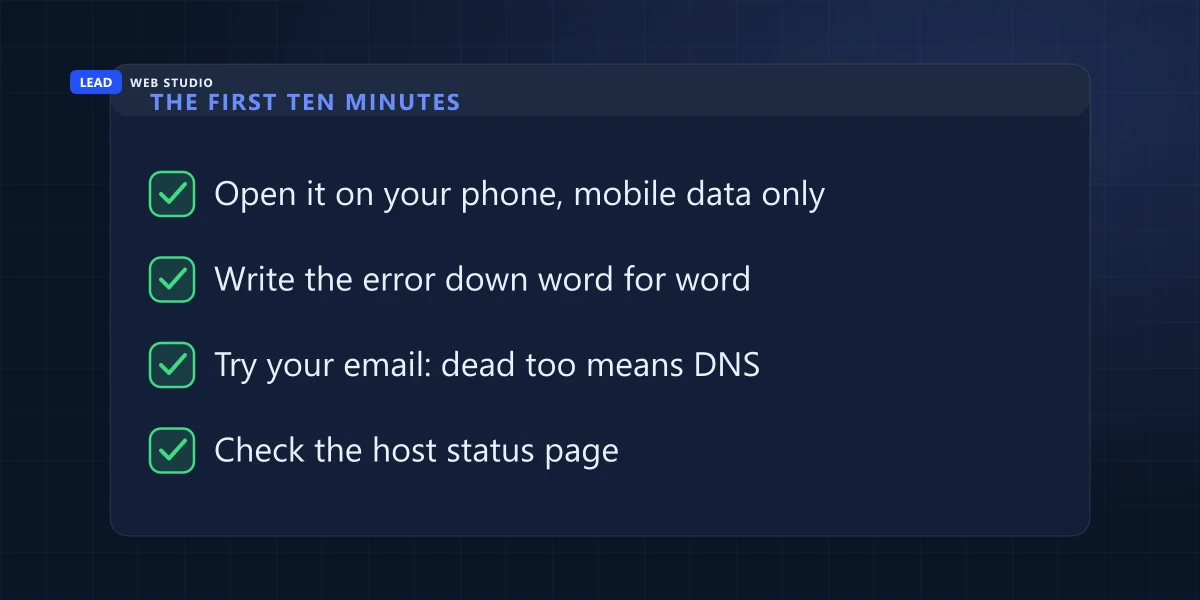
By the end of those four steps you know three things: whether it's really down, which layer broke, and whether anyone already knows about it. That's a far better opening line than "help".
What does the error on the screen actually mean?
Each error points at a different layer. "Server not found" means the domain isn't resolving. A certificate warning means the site is running fine and only its padlock expired. 502 and 503 mean the server answered but the application behind it didn't. A 500 usually means somebody changed something that the site didn't like.
This is the table I wish every business owner had taped inside a cupboard door. The wording varies slightly between browsers, but the codes don't.
| What you see on screen | What actually broke | Who fixes it |
|---|---|---|
| "This site can't be reached" DNS_PROBE_FINISHED_NXDOMAIN | The domain isn't resolving — expired, or its DNS records were changed | Your registrar, or whoever runs your DNS |
| "Your connection is not private" NET::ERR_CERT_DATE_INVALID | The site is up. Its SSL certificate expired | Your host, or whoever installed the certificate |
| 502 Bad Gateway or 504 Gateway Timeout | The server answered, the application behind it didn't | Your hosting company |
| 503 Service Unavailable | The server is deliberately saying "not right now" — maintenance mode or overload | Host or developer, often on purpose |
| 500 Internal Server Error | Something in the site's own code or configuration broke | Whoever made the last change |
| "Error establishing a database connection" | The database is down, or the site can't log into it | Your host — this one is nearly always theirs |
| "This account has been suspended" | Billing. The hosting invoice didn't get paid | You, in the billing panel |
Two of those seven have nothing to do with technology at all. Neither the expired certificate nor the suspended account is a fault — both are dates that passed, and in the outages I actually get called about they come up more often than break-ins do. I've written the fuller version of the billing side in the hosting cart trap, because the same checkout that overcharges you is usually the one holding the card that expired.
Nobody sells you "a website". You buy a domain from one company, hosting from a second, the build from a third, and the certificate arrives from a fourth. Any one of them can take you offline alone.
Who do I call — the host, the registrar or my designer?
Whichever layer the error points at. The registrar owns the domain, your host owns the server, your designer owns the code, and the certificate usually belongs to the host. Calling the wrong one costs you an hour of being told, very politely, that it isn't their side of the fence.
| The layer | What it does | How it looks when it fails |
|---|---|---|
| Domain your registrar | The name people type | "Server not found" — and your email stops too |
| DNS registrar, host or Cloudflare | Points that name at the right server | Works for some people and not others, for hours |
| Hosting your hosting company | Runs the machine your files live on | 502, 504, timeouts, "account suspended" |
| The site itself whoever built or last edited it | The code, database and plugins | 500 error, database error, blank white page |
The email test in step three is the single fastest way to split that table in half. Your website and your mailbox are pointed at their destinations by the same set of DNS records under the same domain. If both went quiet in the same minute, you are looking at the top two rows and there is no point phoning your web designer. If email is flowing normally, the domain is fine and you're in the bottom two.
Knowing which company to call assumes you know who those companies are, which is a surprisingly common gap — plenty of owners have never seen their own registrar's login screen. If that's you, the honest fix is the one I've written about at length in who really owns your website, and it is much easier to sort out on a calm Tuesday than during an outage.
Does being down hurt my Google rankings?
Not for a few hours. Google's crawlers slow down when they hit server errors and ignore whatever the broken page returned, then recover when the site does. What isn't as forgiving is duration — Google states plainly that URLs which keep returning server errors get dropped from the index.
It's worth reading the actual wording rather than the folklore. Google's documentation on HTTP status codes says that "5xx and 429 server errors prompt Google's crawlers to temporarily slow down with crawling" and that "any content Google receives from URLs that return a 5xx status code is ignored". Both of those reverse on their own: "Once the server starts responding with a 2xx status code, Google gradually increases the crawl rate for the site." The sentence to take seriously is the other one — "Google's indexing pipeline removes from the index URLs that persistently return a server error."
So a Saturday afternoon offline is a customer-service problem, not an SEO problem. A fortnight offline is both. And if you're the one taking the site down on purpose — a rebuild, a server move, a shop you're pausing — the status code you serve while it's dark matters more than the design of the page you put up. Google's guidance on pausing an online business is specific: "If you need to urgently disable the site for 1-2 days, then return an informational error page with a 503 HTTP response status code instead of all content", and it warns that "completely closing a site even for just a few weeks can have negative consequences on Google's indexing of your site".
The trap there is the pretty "We'll be back soon!" page, because a page like that normally returns a perfectly healthy 200. Google reads that as: this URL's content is now the words "we'll be back soon". Do that across a whole site for a week and you have asked Google to reindex your business as a holding page. A 503 is the code that means "temporarily unavailable", and crawlers treat it accordingly. If a move is what you're planning, that belongs in the plan from the start — it's part of what a proper website migration is for.
Why did the padlock break on a site nobody touched?
Because certificates expire on a schedule, and the schedule is getting shorter. The free certificates most hosts issue come from Let's Encrypt, and their own documentation is blunt about the numbers: "Our default certificates are valid for 90 days", and "we recommend renewing 90 day certificates every 60 days". That renewal is supposed to happen by itself. When it doesn't, your site throws a full-screen security warning on a date that was set three months earlier.
This is getting less forgiving, not more. The CA/Browser Forum — the industry body where browser makers and certificate authorities agree the rules — passed a ballot in 2025 for the "eventual reduction of maximum validity period from 398 days to 47 days", with the steps "proposed to occur starting in March 2026 and concluding in March 2029". Read that as an owner rather than as an engineer and it says one thing: a certificate that somebody installs by hand will need re-installing several times a year, and the first time that gets missed, the site goes down.
Which turns into a single question worth emailing your host today, and it takes them ten seconds to answer: is my SSL certificate renewing automatically, or does someone have to do it? If the answer is "someone has to do it", find out who that someone thinks they are.
How do I find out before my customers do?
Put a free monitor on it this afternoon. UptimeRobot's free plan covers "50 monitors" at a "5 min. monitoring interval" with no credit card, and the same free tier includes an "SSL & Domain exp. monitor" — which is to say it watches both of the calendar problems from the table above. There are other services that do this; I'm naming that one because the free tier is genuinely usable rather than a trial.
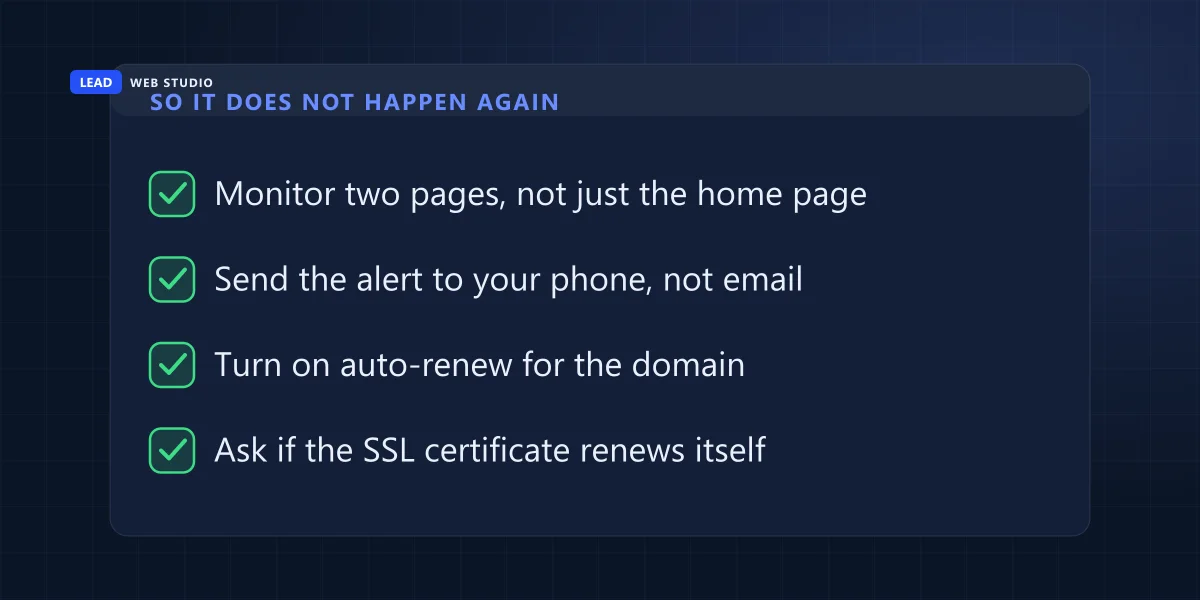
Five things, in the order I'd do them:
- Monitor two pages, not one. The homepage and one page that actually queries the database — a booking page, a shop category, a search result. A cached homepage can look perfectly alive while everything behind it is broken.
- Send the alert somewhere you'll see it. Text or a phone alert, not an email address you read on weekdays. An outage notification sitting unread until Monday has done nothing for you. Keep it off the domain you're monitoring as well — an alert sent to an address on the failing domain can disappear without a bounce, which is how most undelivered mail behaves.
- Turn on auto-renew for the domain, and check the card on file doesn't expire before the domain does. Both of those live in the registrar's own panel, not on your invoice — there's more on that in the domain guide.
- Ask your host whether the certificate auto-renews. In writing, so the answer exists somewhere other than a phone call.
- Find out where the backups are — and whether anyone has ever restored one. In my experience the untested backup is what turns a two-hour outage into a two-day one, because the restore is where you discover the file is incomplete.
The page to write today, while everything works
Outages are stressful mostly because of what you don't know, and every one of those unknowns can be written down in advance on a single sheet of paper. It takes about twenty minutes to fill in, and it's the first thing I ask to see on any site I'm brought in to look after — a plan that only exists in somebody's head is no use to you when that somebody isn't picking up.
- The registrar — company name, the login email, and whose card is on it.
- The host — company, account number, the support URL, and the status page URL.
- Where DNS actually lives. It's often not the registrar. This is the field that wastes the most time in a live outage.
- Who has admin access to the site, and who had it three years ago.
- Backups — what's backed up, how often, where it lands, and the date someone last restored one.
- The certificate — automatic or manual, and issued by whom.
Half of that sheet is really an account-ownership audit, which is the other reason to do it while nothing is on fire. If the recovery email on the registrar account belongs to someone who left in 2021, you'll discover that on the calmest possible day rather than the worst one — the full version of that argument is in two-factor authentication and the lockout nobody plans. And if you'd rather not own this at all, that's exactly what a maintenance plan is: website maintenance is $100 a month here — updates, daily backups, security, uptime monitoring and same-day content edits, month to month.
Do this one thing today: set up a free uptime monitor on your homepage and one page that touches your database, and point the alert at your phone. It takes about ten minutes. If you'd rather someone just did it, send me your website address and I'll tell you what your site currently returns, who your DNS is with and when your certificate expires — free, and it's the first thing I check on any project anyway.
Frequently asked questions
How do I know if my website is down for everyone or just me?+
Open the site on your phone with Wi-Fi switched off. Mobile data uses a different network and a different DNS resolver than your office, so if the site loads there, it's up and the problem is on your side — a cached DNS record, your router, or your browser. If it fails on both, it's genuinely down.
How long can my website be down before it hurts my Google rankings?+
A few hours does no lasting damage. Google's documentation says server errors make its crawlers temporarily slow down, and that crawling recovers once the server responds normally again. The danger is duration: Google also states that its indexing pipeline removes from the index URLs that persistently return a server error, and warns that closing a site even for a few weeks can hurt indexing.
Why does my website work on my phone but not on my computer?+
Almost always DNS or cache. Your phone on mobile data asks a different resolver, so it may already have the new answer while your computer is still holding the old one. It also happens after a DNS change, when different networks update at different speeds. Restart the router, try a private browsing window, and check again in a few hours before escalating.
Who do I call first when my website goes down?+
Whoever owns the layer the error points at. "Server not found" means the domain or DNS, so start with your registrar. A 502, 503 or timeout means the server, so start with your hosting company and their status page. A 500 error or a blank page usually means the site's own code, so start with whoever made the last change.
Can my website go down because I forgot to pay for something?+
Yes, and it's one of the most common causes I see. Three separate bills can take a site offline on their own: the domain renewal, the hosting invoice, and in some setups a paid SSL certificate. Each stops on a fixed date, and the warning email usually goes to whichever address was typed into the account years ago.
What should I do if I'm taking my website down on purpose?+
Return a 503 status code rather than a friendly page that returns a normal 200 response. Google's guidance for pausing an online business says that if you need to urgently disable a site for one to two days, return an informational error page with a 503 status code instead of all content, and that completely closing a site for weeks can harm indexing.
Want someone watching it so you don't have to?
Monitoring, backups and a real person to call are part of ongoing maintenance and support — and they're built in from day one on every site I design and build. Rates for everything are on the pricing page, with no retainer required to ask a question.
Get My Free Quote
10+ years building websites and local SEO for GTA trades, clinics and service businesses — and taking the "it's down" call when one of them stops answering. Read my full bio · Get in touch