A client forwarded me a screenshot last month from one of those automated site-audit tools, "Missing Schema Markup" flagged in angry red under CRITICAL ERRORS, sitting right next to a broken image link like the two were equally catastrophic. He was ready to pay someone $500 to fix it that afternoon. Here's the thing: schema markup (also called structured data) isn't a critical error waiting to sink your site — it's more like your business card not having a QR code on it. Nice to have, occasionally useful, not the reason nobody's calling you back. Let's actually explain what it is, what it does, and — just as important — what it doesn't.
The short version
- Schema markup is extra code (usually JSON-LD) that describes your page's content in a format machines can parse exactly, instead of guessing from the visible text.
- It does not directly boost your Google ranking — Google says so itself. What it does is make you eligible for rich results and give AI tools a clean fact to quote.
- Some types still earn something in the SERP (Article, Product+Review, Breadcrumb); others quietly lost their rich result in 2026 (FAQ, HowTo) but are still worth keeping.
- You can check any page's schema for free in under two minutes with Google's own Rich Results Test.
What is schema markup, in plain English?
Schema markup is a small block of code, invisible to visitors, that labels the parts of your page in a language search engines and AI tools can read with zero ambiguity — "this is an article," "written by this person," "published on this date," "this business is open these hours." Instead of Google's crawler inferring that from your paragraph text (and sometimes getting it wrong), you're handing it the answer directly.
The technical name for the vocabulary is schema.org — a shared standard Google, Bing and Yahoo agreed on years ago so every site could describe itself the same way. Most sites today implement it as JSON-LD: one tidy script tag in the page's <head>, separate from your visible HTML, that reads almost like a little database entry for the page.
Does schema markup boost your Google ranking?
No — not directly, and Google has said this plainly in its own documentation. Structured data doesn't move your position in the results. What it does is make your page eligible for rich results: the enhanced listings with stars, images or extra detail that make a normal blue link more clickable. Better click-through can indirectly help you over time, but that's a side effect, not the mechanism.
| What schema does | What it doesn't do |
|---|---|
| Describes your page in a format machines don't have to guess at | Directly move your ranking position |
| Makes you eligible for rich results — stars, breadcrumbs, dates | Guarantee you'll get the rich result even when it's valid |
| Gives AI answer engines a clean, quotable fact instead of a guess | Fix thin content, a slow site, or no backlinks — it's decoration, not substance |
That last row is the one that trips people up. I've seen sites with flawless schema and nothing worth ranking underneath it. Markup describes your content — it can't improve content that isn't there.
Schema markup doesn't make Google like your page more. It makes Google understand your page correctly. Those are very different jobs, and only one of them is on any ranking algorithm's list of inputs.
What schema types still earn a rich result in 2026?
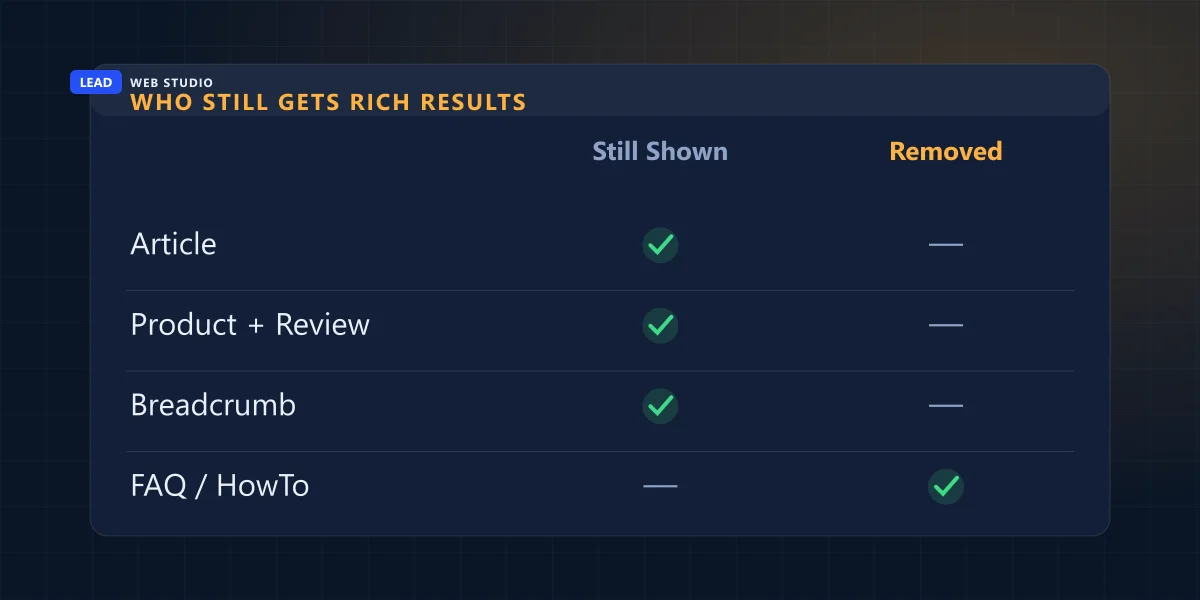
This is the part that actually changed recently, and most "add schema" checklists haven't caught up. Google quietly deprecated FAQ rich results — the expandable question dropdowns you used to see under some search listings — starting May 7, 2026, and pulled the supporting documentation entirely by mid-June. HowTo rich results were phased out earlier the same way. Adding FAQ schema today will not get you that dropdown back, no matter how perfectly formatted it is.
| Schema type | Rich result in 2026? |
|---|---|
| Article / BlogPosting | Yes — still eligible |
| Product + Review / AggregateRating | Yes — star rating shown |
| BreadcrumbList | Yes — folder trail in the snippet |
| FAQPage | No — removed May 2026 |
| HowTo | No — phased out earlier |
So should you rip out your FAQ schema? No — I still add it to every guide on this site, this one included. It stopped earning a search-result dropdown, but Google's own People Also Ask feature and most AI answer engines still read it to find a clean, self-contained answer. The rich result died; the reason to structure your answers didn't.
Which schema type does your page actually need?
Different pages need different schema — pasting one generic block site-wide (which is exactly what a lot of WordPress "SEO" plugins do out of the box) is how you end up with a homepage that's technically marked up as a blog post. Match the type to the job:
| Page type | Schema worth adding | Why |
|---|---|---|
| Homepage | Organization / LocalBusiness | Ties your name, logo, address and social profiles into one identity |
| Blog post or guide | BlogPosting + Person (author) | Establishes who wrote it and when — the first thing an AI model checks for trust |
| Service page | Service / ProfessionalService | Describes exactly what you offer and who it's for |
| Product listing | Product + AggregateRating | Unlocks the star rating under the listing, if the reviews are real |
| Any indexable page | BreadcrumbList | Shows the folder trail instead of a raw URL in the snippet |
The mistake that quietly breaks schema — one number in six places
Here's a confession, in the spirit of this site actually walking its own talk: I once ran an AI-visibility audit on my own site and found llms.txt quietly claiming "29 reviews" while every single page and every schema block on the site said 32. Nobody typed 29 on purpose. It was just an old number, written once, that never got updated when the real count changed.
That's the failure mode nobody warns you about. Your schema can be technically flawless and still work against you if the number inside it doesn't match the number on the visible page, in your llms.txt, in your sitemap, and on your Google Business Profile. When a model or a human sees a business contradict itself across five places, it doesn't average the numbers — it stops trusting all of them, and often quotes a competitor's page instead. Structured data isn't a "set and forget" checkbox. It's a promise that has to stay in sync with everything else on the site.
How to check your schema for free, no developer needed
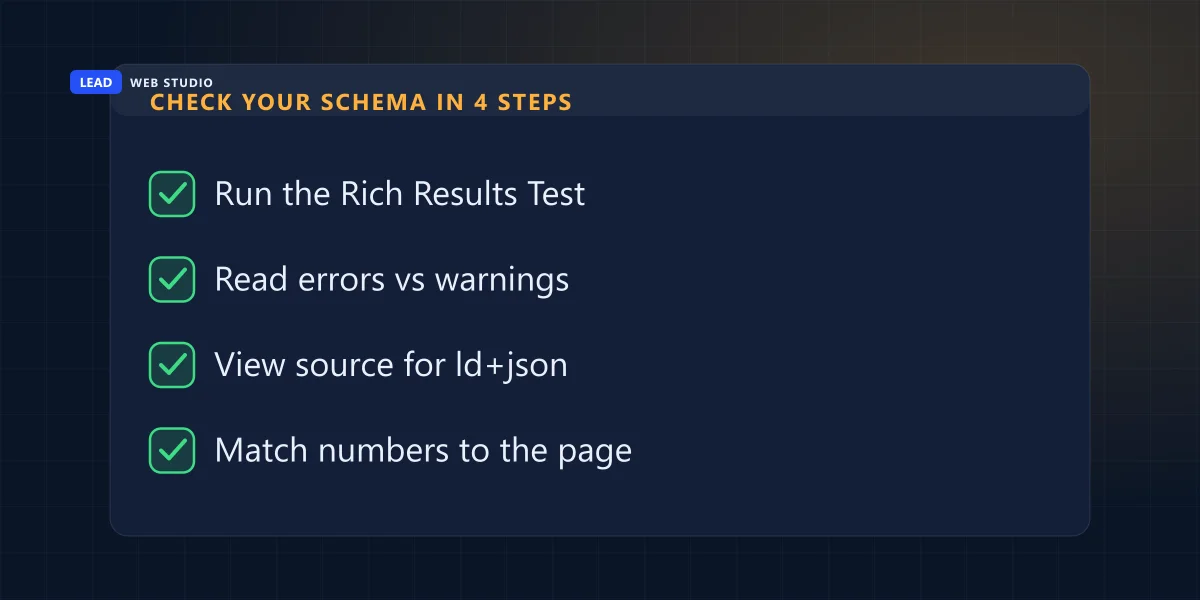
You don't need to read a line of JSON to audit your own site. This takes about two minutes per page:
- Open Google's Rich Results Test and paste in your page's URL.
- Read the result carefully — an error means that whole schema block gets ignored; a warning just means a recommended (not required) field is missing.
- Right-click the page, choose "View Page Source," and search (Ctrl+F) for
ld+jsonto see the raw block Google is reading. - Cross-check every number inside it — review count, price, hours, dates — against what's actually visible on the page. This is the step almost everyone skips.
If step one comes back clean and step four matches, you're in better shape than most of the sites currently paying someone $500 to "fix" a warning that was never going to cost them a single visitor.
Do you need a developer to add schema markup?
It depends entirely on how your site is built. On WordPress, plugins like Yoast or RankMath will auto-generate basic schema for you — convenient, but generic; it's built to apply to every site the plugin has ever touched, not yours specifically, and it's a common source of the exact NAP-mismatch problem above. On a custom-coded site, schema gets hand-written once per page template, which takes more work up front but means every field actually reflects your real business instead of a plugin's best guess. Neither approach is wrong — just know which one you're getting, and check the output either way.
If you only do one thing this week: run your homepage and your best blog post through the Rich Results Test. It's free, it takes two minutes, and it'll tell you more than any red "critical error" badge from a tool trying to sell you a fix.
Frequently asked questions
Is schema markup required for SEO?+
No. Google can rank a page with zero structured data on it. Schema isn't a requirement — it's a translation layer that makes what's already on your page easier to parse correctly.
Will adding schema markup get me a rich result?+
It makes you eligible, not guaranteed. Valid schema is the entry ticket; Google still decides case by case, and for some types (FAQ, HowTo) it has stopped showing rich results at all, regardless of how correct your markup is.
What happens if my schema markup has an error?+
A hard error usually means Google ignores that block and treats the page as if it had no schema — it doesn't penalize the page's ranking. A warning just means a recommended field is missing.
Is schema markup the same thing as my sitemap?+
No. A sitemap lists which URLs exist and roughly how often they change. Schema markup sits inside one page and describes what that specific page is about.
Does ChatGPT or other AI tools actually read my schema?+
AI answer engines crawl the same HTML Google does, and structured data gives them a clean fact to quote instead of guessing from paragraph text. It doesn't guarantee a citation, but it removes one obvious reason not to trust the page.
Not sure your schema is actually helping?
My free website audit checks your structured data alongside everything else — and I only fix what's actually broken, not what an automated tool needed to flag to look thorough.
Get My Free Quote
10+ years writing and auditing structured data for real client sites, not just running a plugin and hoping. Read my full bio · Get in touch