A client forwards me a hosting email about "blocked login attempts" and asks the same question every time: is someone trying to hack my website, or is this just noise? I used to answer from experience. This week I answered it properly — I pulled 97 days of raw access logs off my own server and counted every single request.
453,580 requests reached the server between 14 June and 18 September 2026, from 40,716 different addresses. 159,815 of them were asking for software this site does not have. That is 35% of everything, an average of one probe every 52 seconds, and across 97 days there was not one quiet day. Not one.
That sounds alarming written down. It mostly isn't, and the reason why is the interesting part. This is what the traffic actually consists of, what the bots are really hoping to find, and the one number in my log that changed the way I explain website security to clients.
The short version
- Yes, and it has nothing to do with you. 159,815 probe requests in 97 days, from 6,352 addresses. None of it was aimed at my business.
- They do not check what you run before they knock. My site served no WordPress at all for 72 of those days and still got 17,115 requests for WordPress admin URLs in that stretch alone.
- The biggest single category isn't a break-in attempt. It's 90,597 guesses at backdoor filenames — checking whether someone else already broke in.
- Taking WordPress off the site did not reduce the knocking. 1,242 probes a day before, 1,789 a day after.
- It changed what answered.
POST /xmlrpc.phpwas answered 12,201 times in the first 25 days and 0 times in the next 72. - The genuinely dangerous requests are the boring ones — 1,563 attempts to read
.env,.git/configand an editor's saved SFTP password. - None of this needs a security subscription. A server that simply doesn't have the file answers correctly for free.
Is someone actually trying to hack my website?
Yes — constantly, automatically, and not because of anything you did. Automated scanners work through huge ranges of addresses looking for known software with known holes. On my own site that was 159,815 requests in 97 days from 6,352 separate addresses. Almost none of it succeeds, and none of it is personal.
Here is the whole window in one table. "Probe" here means a request for a path this site has never published, matching a known attack target, that got anything other than a 200 back. My own server's cron jobs, my uptime monitor and my own tooling are excluded, because counting yourself as an attacker is how you end up with a scary number and a wrong story.
| What I counted | 14 Jun – 18 Sep 2026 |
|---|---|
| Requests that reached the server | 453,580 |
| Distinct IP addresses | 40,716 |
| Declared search and AI crawlers | 63,870 |
| Probes for software I don't run | 159,815 (35.2%) |
| Addresses doing the probing | 6,352 |
| Quietest day / busiest day | 245 / 4,331 |
| Days with zero probes | 0 of 97 |
One honest caveat before anyone quotes the 35%: my HTML sits behind a ten-minute cache, so a repeat page view can be served without touching the server that writes this log. Real human reading is undercounted here; the probe numbers are not, because nobody caches a 404. If anything, the share of my traffic that is junk is lower than 35% and the raw probe count is exactly right.
The other thing that jumps out: 4,486 of those 6,352 addresses asked for exactly one thing and were never seen again. 303 of them tried more than a hundred different paths, and the single busiest address worked its way through 1,820. Two completely different behaviours, and only the second one is a scan in any meaningful sense.
What are the bots actually asking for?
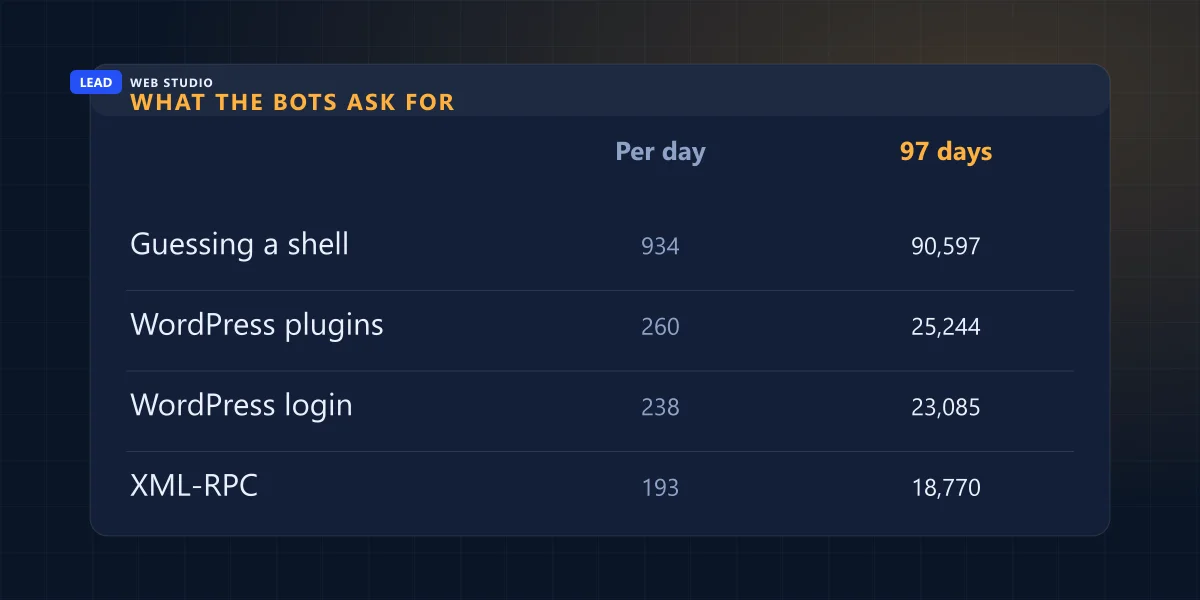
Seven recognisable categories cover almost all of it, and the shape is not what most people expect. The largest group by a wide margin is not a login attempt at all — it is bots guessing filenames, hoping to land on a backdoor script that an earlier attack already installed. Actual password guessing is a distant third.
| What they're asking for | 97 days | Per day | What it would find |
|---|---|---|---|
| Guessing an uploaded shell | 90,597 | 934 | A backdoor left by an earlier hack |
| WordPress core and plugin files | 25,244 | 260 | Your exact version, so it can pick an exploit |
| WordPress login and admin | 23,085 | 238 | A login form to guess passwords at |
| XML-RPC | 18,770 | 193 | Hundreds of password guesses in one request |
| Config and secret files | 1,563 | 16 | Your database and API passwords, in plain text |
| Other known exploits | 304 | 3 | Unpatched frameworks and dashboards |
| Database and admin panels | 252 | 3 | phpMyAdmin, Adminer, an open control panel |
Look at the bottom three rows. Together they are 2,119 requests out of 159,815 — about 1.3%. The genuinely targeted, thinking-attacker stuff is statistically almost absent. What fills a small-business server log is the cheapest possible automation running the same list of guesses at everybody.
Why are they guessing 5,908 different .php filenames?
Because they are not trying to break in. They are checking whether somebody else already did. A successful attack often leaves a small PHP file behind that lets the attacker back in later, and those files have well-known names. Scanners fire thousands of those names at every site, hoping to inherit a door that is already open.
Over 97 days my server was asked for 5,908 different .php filenames, 90,597 times, and every single one returned a 404. The names are strangely human:
/1.php,/222.php,/aa.php,/x.php— whatever the last person typed in a hurry/alfa.php,/xleet.php,/ioxi-o.php— named after the toolkits that install them/adminfuns.php,/ms-edit.php,/wp-conffg.php— deliberate near-misses of real filenames/this_is_a_new_hello_world.php, asked for 522 times — somebody's test file that got into a scanner's word list and will now be requested forever
That last one is my favourite thing in the whole dataset, and it is also the clearest illustration of what this traffic is. Nobody chose my site. A list exists, my address is reachable, and the list gets run. The practical consequence for you is the reassuring one: if there is nothing on your server that was not deliberately put there, 90,597 of these requests are 90,597 404s.
Did taking WordPress off the site make the bots go away?
No — and I have an unusually clean measurement of that, because this domain changed underneath the same address mid-window. For the first 25 days it was still answering as a WordPress site. From 9 July it has been hand-written HTML with no CMS at all. Same domain, same server, same content, two completely different stacks.
The knocking did not care.
| Measured on the same domain | WordPress (25 days) | Hand-coded (72 days) |
|---|---|---|
| Probes per day | 1,242 | 1,789 |
| Seconds between probes | 70 | 48 |
GET /wp-login.php | 1,949 | 3,134 |
POST /wp-login.php (password guesses) | 1,748 | 9 |
POST /xmlrpc.php answered with a 200 | 12,201 | 0 |
POST /xmlrpc.php refused | 5,054 | 13,262 |
Read the last three rows together. The number of hostile requests went up. The number that got a useful answer went to zero. XML-RPC is a legitimate WordPress interface that lets one request carry many login attempts, which is exactly why brute-force tools love it — and for 25 days my server was politely replying to all 12,201 of them.
Two honesty notes so nobody over-reads this. The password-guessing collapse is not purely the stack: 1,506 of those 1,748 POSTs arrived in a single burst on 22 June, and scanners generally stop before POSTing once the GET returns a 404. And the jump from 1,242 to 1,789 probes a day is a filename-guessing campaign that ramped through August and faded again in September. It is one campaign passing through, not a trend to extrapolate from.
So should I move off WordPress?
Not on the strength of this. My log says the bots do not check what you run, which means the stack does not change how often you are knocked on. What it changes is how many things you have that are capable of answering. A maintained, updated WordPress with XML-RPC disabled gets most of that benefit without a rebuild.
The honest version of the trade-off is the one I wrote up in detail when I compared custom-coded sites and WordPress: the deciding question is whether you will be editing the site yourself, not security. Security is downstream of one habit — whether somebody keeps the software current. If nobody does, WordPress becomes a liability. If somebody does, it is fine, and an enormous share of the web runs on it without incident.
What I will say plainly: every plugin you install is one more thing that can answer a stranger. My log has 25,244 requests fishing for plugin files specifically, because knowing your exact plugin version tells a scanner which exploit to load. Every plugin you have stopped using but never deleted is still a file on the server that answers, and still a version number a scanner can read.
Which of these requests would actually ruin your day?
The quiet ones. 1,563 requests over 97 days — sixteen a day, a rounding error in the totals — went looking for configuration files that contain passwords in plain text. Those are the requests that do real damage, because they don't need an exploit. If the file is readable, they just read it.
| Path requested | Times in 97 days | What it hands over if it's there |
|---|---|---|
/.env (plus 20+ variants) | 241 | Database password, mail password, API keys |
/.git/config and /.git/HEAD | 238 | Your whole source history, often with credentials |
/.vscode/sftp.json | 48 | Your server's SFTP login, saved by your editor |
/.aws/credentials | 31 | Cloud account access |
| 307 distinct secret paths in total | 1,563 | Everything above, no exploit required |
That third row is the one that should make any developer sit up. .vscode/sftp.json is a file your code editor writes, containing the host, username and password of the server you deploy to. It has no business being on the server — but it gets uploaded by accident all the time, because a careless sync copies the project folder instead of the site folder. Forty-eight strangers checked mine for it this quarter.
The rule that covers this whole category: anything sitting in your web root is published, whether or not you link to it. That includes backup.zip, db.sql, index.old.html and the .git folder that got dragged along with a deploy.
How would I know if one of them actually got in?
Not from your hosting's "blocked attacks" email, which counts knocking. The authoritative source is the Security issues report in Google Search Console. Google's own documentation says to rely on that report as the source of truth, precisely because a browser warning may or may not reproduce for you depending on context.
Google groups what it finds into three kinds: hacked content, malware and unwanted software, and social engineering. Beyond the report, these are the signals worth knowing, in the order they usually arrive:
- A warning label beside your listing in Google results, or a full red interstitial in the browser.
- Pages you never wrote appearing when you search
site:yourdomain.com— usually pharmacy or streaming spam in a language you don't publish in. - Your host suspends the account or emails about outbound spam. Hosts notice compromised sites through the mail queue long before you notice through the homepage.
- The site behaves differently on a phone than on your desktop, or only for visitors arriving from Google. Redirect hacks hide from the logged-in owner on purpose.
- Your log stops being boring. Probes return 404. A compromised site starts returning 200 to paths you never created — which is why I now read the log instead of guessing.
If one of those is true, the order of operations matters, and it is not "restore the backup". Restoring first destroys the evidence you need — and in Canada, if customer data was reachable, the law has things to say about what you do next, starting with a written record you have to keep for 24 months.
What should I actually do about all this?
Much less than the number 159,815 suggests. My server handled every one of those requests correctly by not having the file, which costs nothing and required no product. The work that matters is unglamorous and mostly free, and it is the same short list whether you run WordPress or hand-written HTML.
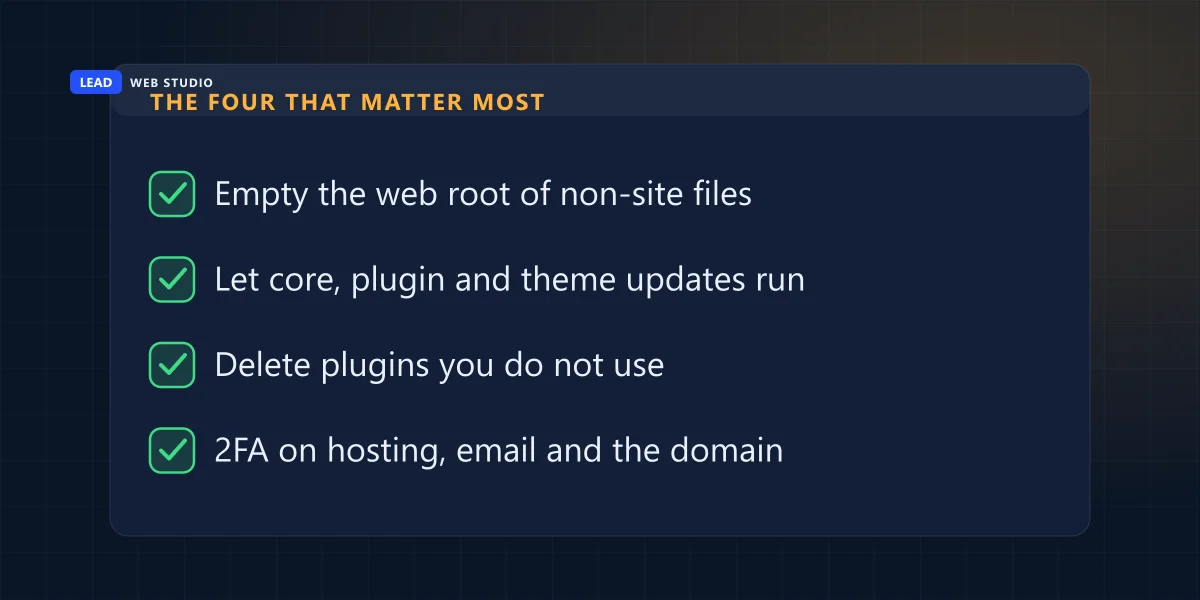
- Take everything out of the web root that isn't the website. Backups, database dumps,
.git, editor config, old copies. This is the single highest-value hour in this article. - Turn on updates and actually let them run. Core, plugins, theme. An abandoned plugin is a scheduled incident.
- Delete plugins you don't use — deactivated is not uninstalled, and the files still answer.
- Disable XML-RPC if nothing you use needs it. That is 18,770 requests a quarter that stop being able to accomplish anything.
- Unique passwords, and two-factor on hosting, email and the domain. In the cleanups I have been called into, a reused password has been the way in more often than any exploit.
- Backups stored somewhere other than the server they back up. A backup on the hacked machine is a souvenir.
- Know who your host is and how to reach them out of hours. Half of a bad day is finding the phone number.
- Check the other sites on the same hosting account. Shared account, shared blast radius — and the second site is always the one nobody looks at.
If you want a second opinion on what your site is currently exposing, the free audit will flag the obvious ones, and the six security basics guide goes through the defensive side properly. If this is a "I'd rather it was somebody's job" situation, that is what ongoing maintenance is for — patching, updates and off-server backups, which is roughly the whole of this article performed by somebody else.
Before you buy anything. Hosting panels love to show a "threats blocked" counter and sell you a plan next to it. That counter is measuring what I measured — mostly 404s, mostly harmless. Nothing on this list needs a subscription, and a firewall in front of an outdated site protects an outdated site. If you'd like me to look at what's actually sitting in your web root before you spend money on it, just ask — and if you're planning a new site anyway, a properly built one starts with a smaller surface by default.
Frequently asked questions
Is someone actually trying to hack my website, or am I being paranoid?+
Both can be true. Automated scanners knock on every website that has a public address, including yours, and they do it constantly. On my own site that came to 159,815 probe requests in 97 days, an average of one every 52 seconds, with no quiet day at all. None of that is aimed at you personally, and almost none of it succeeds. It only becomes your problem if something on your server answers.
Why do bots ask for WordPress files on a site that does not run WordPress?+
Because they never check first. A scanner works from a list of paths and fires the whole list at every address it can reach, then keeps whatever answers. My site served zero WordPress pages for 72 of those 97 days and still received 17,115 requests for WordPress login and admin URLs in that stretch alone. Getting a 404 costs the scanner nothing, so it does not bother looking before it knocks.
Does switching away from WordPress stop the attacks?+
No. The knocking did not change on my site: 1,242 probes a day while it ran WordPress, 1,789 a day after. What changed is what answered. POST requests to xmlrpc.php were answered 12,201 times during the WordPress period and zero times after it. Fewer things that can answer means fewer things that can be broken into — that is the whole benefit, and a maintained WordPress install gets most of it too.
What are bots looking for when they request random .php filenames?+
They are checking whether somebody else already broke in. Files like 1.php, alfa.php or xleet.php are common names for backdoors left behind by earlier attacks. Scanners try thousands of them hoping to find an open door someone else installed. In 97 days my server was asked for 5,908 different .php filenames, 90,597 times in total, and every single request returned a 404.
How do I know if my website has actually been hacked?+
Google Search Console's Security issues report is the authoritative check, and Google says to treat it as the source of truth rather than trying to reproduce a browser warning yourself. Other real signals: a warning label beside your listing in search results, your host suspending the account, pages you never wrote appearing in Google, or your mail suddenly bouncing because the server is sending spam.
Should I buy a security plugin or a firewall subscription because of this?+
Not as a first move. Almost all of this traffic is answered correctly by a server that simply does not have the file being asked for. Spend the money on the boring things first: current software, no leftover files in the web root, strong unique passwords, two-factor on your hosting and email, and backups stored somewhere other than the server being backed up.
How long does Google take to remove a hacked-site warning?+
Google's own documentation says most reconsideration reviews take several days or weeks, and that fixing the problem on only some pages will not earn a partial return to search results. You request the review from the Security issues report after everything is clean, then wait for the email. Resubmitting before you get a decision makes it slower, not faster.
Sources. The traffic figures are my own: the SSL access log for leadlls.com, 14 June to 18 September 2026, 97 full days, 601,275 raw lines, parsed with my own infrastructure (server cron, uptime monitor, internal tooling) excluded. External sources read on 19 September 2026: Search Console Help — Security issues report for the three issue categories, "rely on the Security Issues report as the source of truth", the partial-fix rule and review timing; web.dev — Help, I think I've been hacked for Google's recovery process; Google Search Central — Malware and unwanted software; Google Safe Browsing site status to check any domain yourself; WordPress Developer Resources — XML-RPC; Hardening WordPress; Canadian Centre for Cyber Security — Baseline cyber security controls for small and medium organizations.
Want to know what's actually sitting in your web root?
Send me your domain. I'll tell you what's publicly readable that shouldn't be, what software your site is announcing to every scanner, and what I'd fix first — in plain English, no invoice attached.
Get My Free Quote
10+ years building and maintaining websites for GTA trades, clinics and service businesses — including the cleanup calls nobody advertises. Read my full bio · Get in touch