
Every rebuild leaves bodies behind. Old pages you renamed, pages you merged, pages you deleted because they were embarrassing. I assumed Google tidied them away in a week or two and nobody ever saw them again. Then I actually checked, and found 29 old pages still showing in Google that do not exist on my website at all.
Not one of them is linked from my site. Not one is in my sitemap. I checked all 372 HTML files to be sure. Google is holding these URLs entirely from its own memory — and in six months it put them in front of people 1,920 times.
Here is the part that made me stop and re-run the numbers. My whole site earned 87 clicks in that window. Ten of them went to URLs that do not exist. That is 11.5% of everything I earned, landing on a page I deleted.
The short version
- 29 URLs that are gone from my site still appeared in Search Console over six months: 1,920 impressions and 10 clicks.
- 27 of the 29 redirect correctly to a live page. Two return 404. Doing it right does not make them disappear.
- The handover itself is quick: the renamed URLs went from zero impressions for nine straight weeks to ahead of the old ones in two.
- Search Console's verdict is a snapshot, not the truth. Thirteen of my 29 verdicts disagree with what the site returns today — including one Google calls "Blocked by robots.txt" when nothing is blocked.
- Two dead URLs still earned impressions in the last four weeks, and one of them still earned a click.
Why does Google still show a page I deleted?
Because deleting the page does not delete Google's copy of it. Google finds out the URL is gone the next time it crawls that exact address, and it crawls quiet URLs on its own unhurried schedule. Until that crawl lands, the old address keeps appearing in results, keeps earning impressions, and keeps sending you the occasional click.
That is the whole mechanism, and it explains nearly everything people find confusing about this. You are not being punished. There is no queue you can join. There is a copy of a URL in a very large index, and it will be revisited when it is revisited.
What I found on my own site
Everything below is one measurement of one website: leadlls.com, Search Console page data for 16 March to 14 September 2026, pulled read-only on 15 September 2026 and joined to the files that are actually on the server. Over that window Google reported 307 URLs for my site, 49,568 impressions and 87 clicks. Twenty-nine of those URLs are not pages any more.
Twenty-two of them are old project pages. I used to name each case study after the client — /our-projects/<staircase client>/ — and I renamed them all to describe the work instead, because a client's company name has no business being in my URLs. Those 22 carried 1,796 of the 1,920 impressions and every single one of the 10 clicks.
| URL that no longer exists | Impressions | Clicks | Avg. position |
|---|---|---|---|
/our-projects/<staircase client>/ | 543 | 3 | 11.0 |
/our-projects/<honey farm client>/ | 321 | 1 | 5.9 |
/our-projects/<stucco client>/ | 301 | 2 | 5.0 |
/our-projects/<psychotherapy client>/ | 154 | 1 | 7.0 |
/our-projects/<online store client>/ | 80 | 1 | 11.7 |
Read the third row again. A URL I deleted was sitting at average position 5.0 — first page, above the fold, for six months. Deleted URLs do not quietly sink to position 40 and fade out. The median position across all 29 of mine is 11.0, and 14 of them sat on page one. They keep the position the live page earned, because as far as Google is concerned nothing about that entry has changed yet.
How long does a 301 redirect take to swap in Google?
About two weeks, on my data — but only after Google starts. The 22 renamed project URLs and their replacements make a clean natural experiment, because the old address and the new one are the same page under two names. I pulled both sets week by week.
| Week beginning | Old URLs | Renamed URLs | What is happening |
|---|---|---|---|
| 8 June 2026 | 130 | 0 | Old address doing all the work |
| 15 June 2026 | 150 | 0 | Same |
| 29 June 2026 | 84 | 0 | Ninth week at zero for the new URLs |
| 6 July 2026 | 95 | 24 | Google starts using the new address |
| 13 July 2026 | 32 | 58 | Crossover, one week later |
| 27 July 2026 | 10 | 72 | Handover essentially done |
| 10 August 2026 | 0 | 87 | First week the old URLs earned nothing |
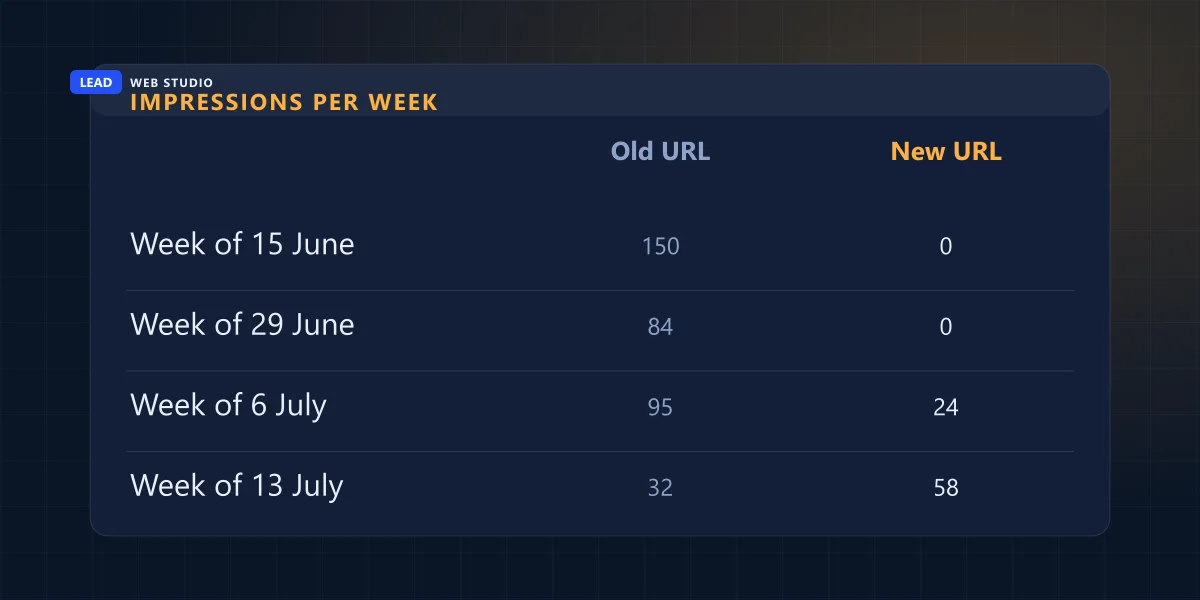
Nine weeks of nothing, then the whole thing turns over in a fortnight. That matches what Google publishes about site moves: "a small to medium-sized website can take a few weeks for most pages to move".
The swap took two weeks. Two months on, two of the ghosts are still filing reports.
One honest limit, because it changes how you should read that table. I cannot prove from my own files the exact day the redirects went in — this repository was moved between folders in August and every timestamp was rewritten, so I am not claiming Google sat on a live redirect for nine weeks. What the data does show is the shape of a handover, and how long the dead URLs go on polluting your reports after it is finished.
Search Console will tell you things that are no longer true
This is the part nobody warns you about. The index status next to a URL is not a live reading. It is what Google found at its last crawl, and Search Console prints that crawl date right beside it. On my 29 retired URLs, 13 verdicts disagree with what my server actually returns today.
| Status | What my site returns today | What Google says today |
|---|---|---|
| 301 redirect to a live page | 27 | 16 |
| Not found (404) | 2 | 2 |
| Crawled — currently not indexed | 0 | 9 |
| Blocked by robots.txt | 0 | 1 |
| Submitted and indexed | 0 | 1 |
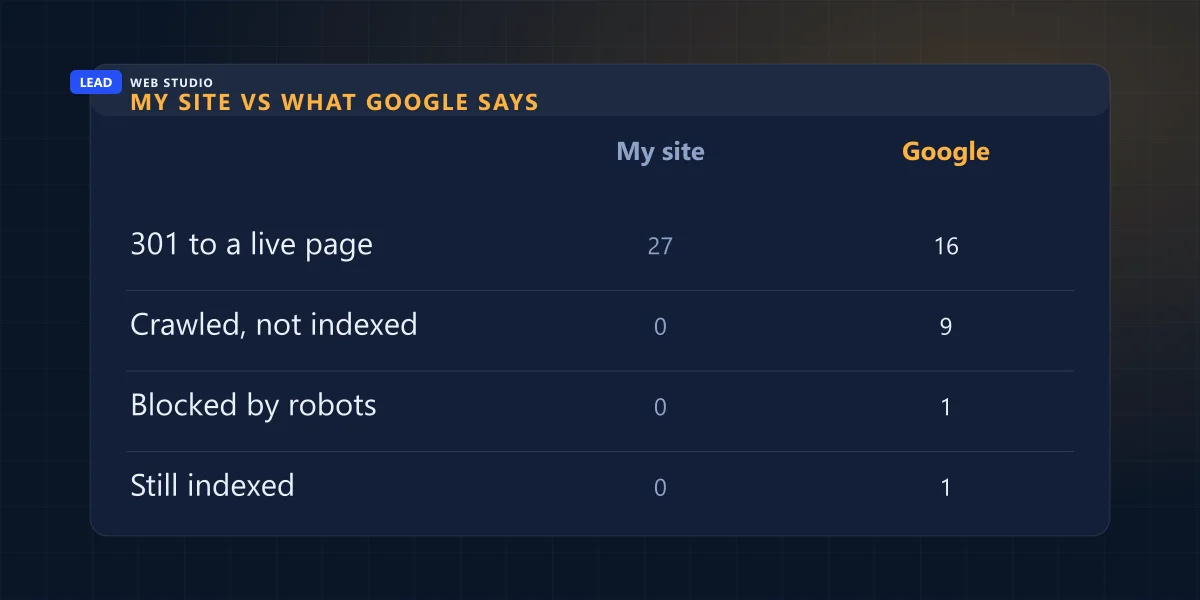
Two of those rows are worth a minute of your life. /our-projects/pro-glass-plus/ is still recorded as "Submitted and indexed", last crawled 4 July, on a URL that has redirected for months. And /innovative-design-solutions-in-toronto/ comes back "Blocked by robots.txt", last crawled 2 July — while my live robots.txt blocks exactly one path, and it is the admin panel.
If I had trusted the dashboard instead of the server, I would have spent an afternoon hunting a robots.txt rule that does not exist. Read the crawl date before you read the verdict. Every time.
And do not "fix" an old URL by blocking it in robots.txt. Google is blunt about this: robots.txt "is not a mechanism for keeping a web page out of Google", and a disallowed page "can still be indexed if linked to from other sites". Worse, blocking the URL stops Google from ever seeing the 404 or the redirect that would have retired it properly. You freeze the ghost in place instead of burying it.
301 or 404 — which one does the old page deserve?
Redirect it if a page on your site answers the same question the old one did. Let it 404 if nothing does. The mistake I see constantly is the middle option: pointing every dead URL at the homepage or a vaguely related hub, which helps nobody and reads to Google as a soft 404.
| Situation | What to do | Why |
|---|---|---|
| You renamed the page | 301 to the new URL | Same content, new address — the cleanest case there is |
| You merged two pages | 301 to the survivor | A redirect is the strongest consolidation signal you can send |
| Service you no longer offer | 301 to the closest real service page | Only if a visitor arriving there would still be helped |
| Nothing on your site replaces it | 404 or 410, and leave it | Honest, and Google drops it on its own schedule |
| Anything at all → homepage | Don't | Treated as a soft 404; the visitor has to start over |
And once a redirect exists, keep it. Google's own advice on site moves is to "keep the redirects for as long as possible, generally at least 1 year", so that links on other people's websites have time to be reassigned. A line in a config file costs you nothing. Delete it in six months and you break every link anyone ever shared.
How to find your own ghost URLs in ten minutes
You need Search Console and a list of the pages that actually exist. No tools, no subscription.
- Search Console → Performance → Pages, date range set to the last 6 months. Export the lot.
- Get your real page list. Your sitemap is the easy version — open
yoursite.com/sitemap.xmland copy the URLs out. - Find the ones in the first list but not the second. Those are your candidates. On my site that was 29 out of 307.
- Open each one in a browser and watch what happens. Does it land somewhere sensible, 404, or dump you on the homepage?
- Run the interesting ones through URL Inspection and read the last crawl date before the verdict. A verdict from four months ago is describing a website that has changed since.
- Fix only the genuinely wrong ones — a redirect that lands nowhere useful, or a page that should have had a replacement and never got one. Then stop. The rest need time, not work.
The last step is the one people skip. I fixed nothing on 27 of my 29, because 27 of them are already correct. There is no button that makes Google forget faster. Every guru who tells you otherwise is selling one, and pressing things at random is how you break a redirect that was already working.
The Removals tool is not a fix either. It hides a URL from results fast, which is exactly what you want for a leaked document and exactly what you do not want for a renamed page — it hides the redirect too. And it wears off: Google says "requests made in the Removals tool last for about 6 months". If the URL still resolves the same way when it expires, you are back where you started, six months older.
Does any of this actually cost you anything?
Two ways, and the second one is the expensive one.
It costs you customers whenever a ghost URL lands somewhere unhelpful. Mine redirect to the right case study, so those 10 clicks arrived where they should have. Had I done the lazy thing and pointed all 22 at my projects page, every one of those people would have arrived at a grid of thumbnails instead of the thing they clicked for.
And it quietly corrupts your reporting. Every one of those 1,920 impressions is in my totals, attached to a URL I cannot open, edit or improve. If you are trying to work out whether your SEO is working — or paying someone for SEO and checking the numbers yourself — or wondering why one page looks like it collapsed, an old URL handing its numbers over to a new one looks exactly like a crash. It is not a crash. It is a rename you forgot about.
My last four weeks say it is not finished either: /our-projects/<online store client>/ collected 6 impressions and a click between 18 August and 14 September, on a URL that has not existed for months. Somebody searched, Google showed them a page I deleted, and they clicked it.
If you are about to rebuild or rename anything, the redirect map is the part that matters most and gets written last. I do it as step one of every website migration, and it is the single cheapest insurance in the job — a text file that keeps every link anyone has ever shared to your business working. If yours was never written, or you have no idea what happened to your old URLs, send me the domain and I will tell you what Google still thinks is there.
Common questions
Why does Google still show a page I deleted?+
Because deleting the page does not delete Google's copy of it. Google only learns the URL is gone the next time it crawls that exact address, and it crawls low-traffic URLs on its own unhurried schedule. Until that crawl happens, the old URL keeps appearing in results and in your reports.
How long does a 301 redirect take to work in Google?+
On my own site the swap took about two weeks. The renamed URLs earned nothing for nine straight weeks, then in the week of 6 July 2026 they took 24 impressions while the old ones still took 95, and a week later the new ones were ahead 58 to 32. Google's own documentation says a small to medium site can take a few weeks for most pages to move.
Should I 301 an old page or let it 404?+
Redirect it only if there is a page on your site that answers the same question. If there genuinely is no replacement, let it return 404 or 410. A redirect to a vaguely related hub, or to your homepage, is treated as a soft 404 and helps nobody.
How long should I keep 301 redirects in place?+
Google's guidance is to keep them for as long as possible, generally at least one year, so that links and signals on other websites have time to be reassigned. Redirect rules cost nothing to keep, so there is rarely a reason to remove one.
Does Search Console show the current status of a URL?+
No. It shows what Google found at its last crawl, and it prints that crawl date next to the verdict. On my 29 retired URLs, 13 verdicts disagreed with what the live site returns today, including one Google calls "Blocked by robots.txt" when my robots.txt blocks nothing of the sort.
Will blocking an old URL in robots.txt remove it from Google?+
No, and it makes things worse. Google states that robots.txt is not a mechanism for keeping a web page out of Google, and that a disallowed page can still be indexed if other sites link to it. Blocking the URL also stops Google from ever seeing the 404 or the redirect that would have retired it properly.
Do old URLs still in Google actually cost me anything?+
They cost you clicks if they land somewhere unhelpful, and they quietly corrupt your reporting. In six months, 11.5% of every click my site earned went to a URL that no longer exists, and one of those URLs collected a click in the last four weeks.
Sources, read in full on 15 September 2026: Google — Site moves with URL changes for the timing of a move and the one-year redirect guidance; Google — Remove a page hosted on your site for the six-month life of a Removals request; Google — Introduction to robots.txt for both quoted sentences. Everything numeric here is my own measurement rather than an industry study: Search Console page data for leadlls.com from 16 March to 14 September 2026, pulled read-only on 15 September 2026 and compared against the files on the server and against what each URL returns live today. Index states come from the URL Inspection API, which is a read — no URL was submitted for indexing, and any URL that could not be read was recorded as unknown rather than counted as missing.

10+ years building websites for GTA trades, clinics and service businesses. I write the scripts that publish and audit them, which is how I end up measuring my own mistakes in public. Read my full bio · Get in touch