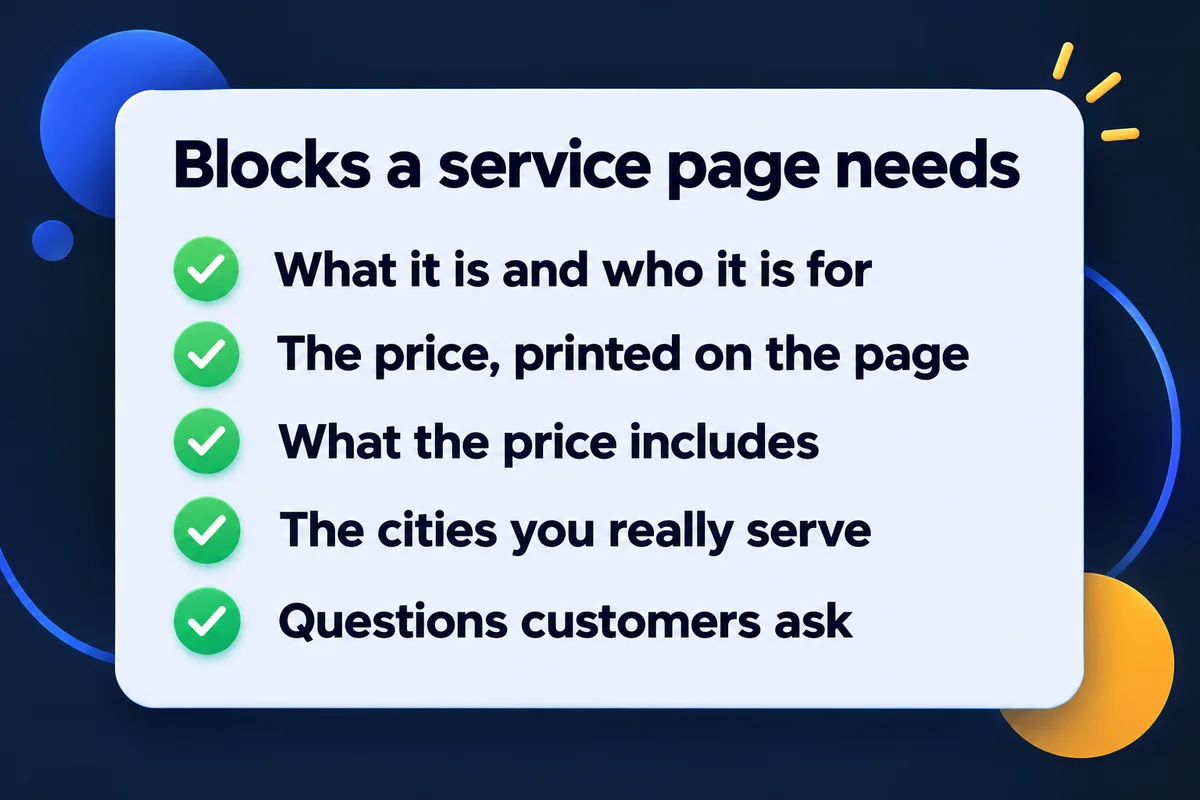
A service page needs to say what the service is and who it's for, print the price, list what that price includes, name the places you actually work, and answer the questions customers ask before they call. That order isn't taste. It's the order of the questions people type into Google before they land on a service page, and I can show you mine.
Most advice on this topic is a list of nine components someone thought up in a meeting. I went the boring way instead: I exported every search that made Google show one of my 8 service pages over the last 28 days, and sorted them by what the person wanted. It took twenty minutes and a cup of coffee, and it settled a few arguments I've been having with clients for years.
What people typed before they reached my service pages
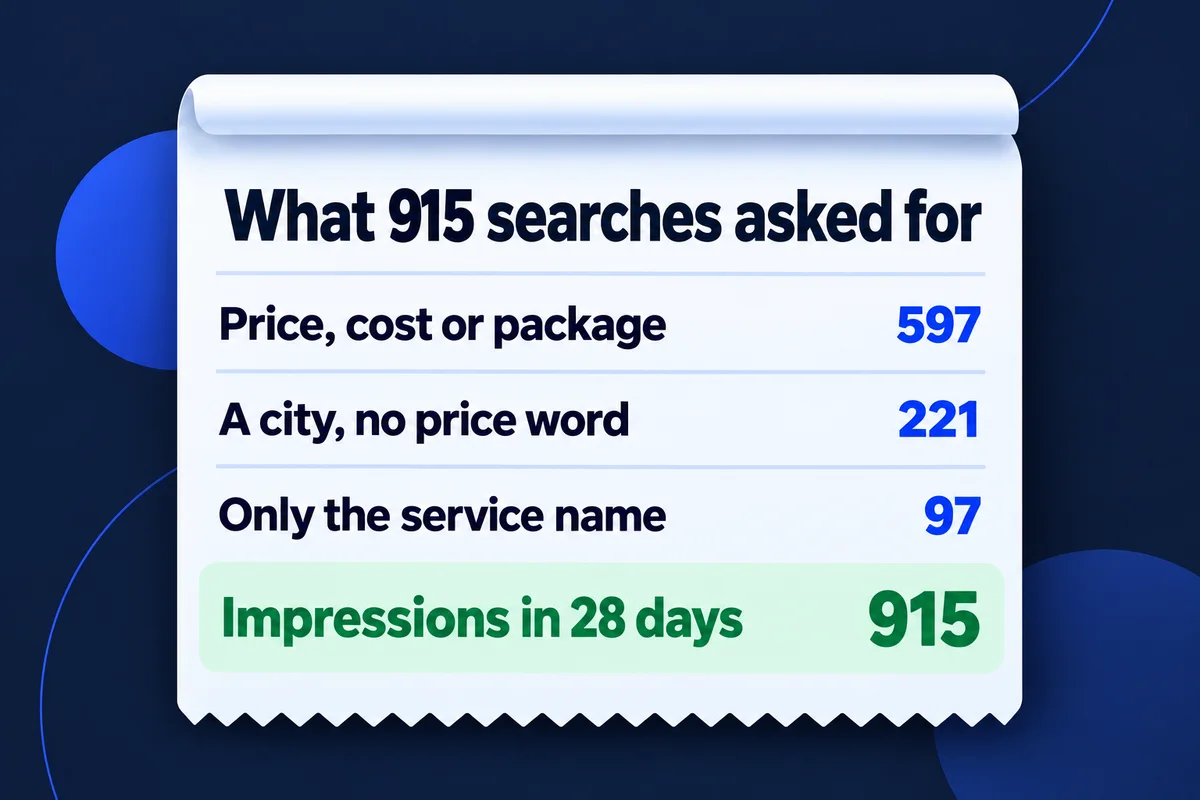
Between 30 September and 27 October 2026, Google showed my service pages for 92 different searches, 915 times in total. I put each search into one of three piles: it mentions money, it names a place but no money, or it's just the name of the service. The split wasn't close.
915 impressions of my 8 service pages, by what the search asked
Here are the eight biggest searches from that list, word for word, with the page Google picked for each. Read the left column and you'll see the whole article in miniature.
| What they typed | Shown | Page Google picked |
|---|---|---|
| seo packages toronto | 93 | SEO |
| web design toronto price | 73 | Web design |
| website maintenance toronto | 70 | Maintenance |
| website maintenance services toronto | 58 | Maintenance |
| google maps management | 39 | Google Maps management |
| seo price toronto | 34 | SEO |
| toronto seo packages | 27 | SEO |
| toronto web design prices | 24 | Web design |
Two things jump out. Nobody typed "innovative digital solutions". And on the SEO page, 399 of its 458 impressions came from searches with a price word in them. People don't search for a service and then wonder about the price later. They search for the price.
Should a service page show the price?
Yes, if you can give a real number or an honest range. Two thirds of the searches that reached my service pages asked about price, often in the first word. A page that hides it answers the one question most visitors came with by saying "call us", and plenty of them go back to Google to find someone who will say a number.
Google says nearly the same thing in its own checklist for helpful pages. Among the warning signs it lists is content that leaves readers feeling they
"need to search again to get better information from other sources"
Google Search Central, creating helpful, reliable, people-first content
So my service pages print the price near the top. This is exactly what each of the three biggest ones shows today, read off the live pages this morning:
SEO
$300, $500 or $1,000 a month, three plans side by side.
Answers "seo packages toronto"
Web design
$899, $1,499 or $2,999 one time, with what each package covers.
Answers "web design toronto price"
Maintenance
$100 a month, one plan, with the daily, weekly and monthly work listed.
Answers "website maintenance toronto"
If your work really can't be priced without seeing it (a roof, a renovation, a lawsuit), print the starting price, the usual range and the two or three things that move it. That's still an answer. I made the longer case for and against, including the times I'd keep a price off, in should you put prices on your website.
Name the places you really work
61 of the 92 searches named a place, and they made up 725 of the 915 impressions. Toronto, mostly, then Mississauga, Markham, Etobicoke and Whitby. People want to know you'll come to them, or at least that you work in their part of the map.
Google also tested my maintenance page on someone searching "dallas website maintenance service" and my SEO page on "seo packages brossard", which is in Quebec. Neither of those people was ever going to hire a North York web designer, and neither page should pretend otherwise. The rule I use:
- Name the cities you actually serve on the service page itself, in a sentence, not in a footer cloud of 40 town names.
- Say how you serve them if it isn't obvious: on site, by video call, or with one price across the whole area.
- Link to one page that lists your full area, like my service areas across the GTA, instead of stamping a city into every heading.
A small aside: 32 of the impressions came from searches in Spanish and Chinese, like "cuánto cuesta hacer una página web en toronto". Toronto is Toronto. If a real share of your customers asks in another language, that's a page worth writing in it, by a person who speaks it.
The blocks, in the order the searches ask for them
Put those piles together and the page almost writes its own outline. Each block below is there because a group of real searches asks for it. If a block answers nobody's question, it's decoration.
| Block | The search it answers | What goes in it |
|---|---|---|
| Heading and first lines | The service name, with or without a city | The service in plain words, who it's for, where. One or two sentences, then the price. |
| Price | price, cost, packages, plans | Real numbers or a range, and whether it's one time or monthly. |
| What's included | packages, plans, "what does it include" | A list a customer could check an invoice against. Not adjectives. |
| Proof | "best", "company", "agency" | Finished work and real reviews, linked to where they came from. |
| How it starts | "services", "company near me" | The first step and how long each stage takes, in days. |
| Area | Every search with a city | The places you serve, in a sentence, and a link to the full list. |
| Questions | The long, odd searches | Questions customers really asked you, answered in two or three sentences each. |
| Next step | Everyone who got this far | One clear way to get in touch, with the phone number written out. |
Notice what isn't in that table: a history of the company, a paragraph about passion, and a stock photo of a handshake. None of the 92 searches asked for them. Your homepage has a different job, and I took that one apart separately in what to put on a service-business homepage.
One page per service, or one page for everything?
One page per service that people search for by its own name. If the searches use different words and lead to different decisions, the services get separate pages. If customers only ever ask for two things together, keep them on one page, because splitting them makes two thin pages instead of one useful one.
My own example is Google Maps. Setting up a profile and looking after one every month sound like the same thing to me. They don't to the people searching: "google maps management" brought 39 impressions on its own, while the setup page came up for searches like "how much does google maps optimization cost for businesses". So there's a page for Google Maps setup and another for management, each with its own price.
Give it its own page when
- people search for it by its own name;
- it has its own price or its own plan;
- a customer can buy it without the other thing.
Keep it on one page when
- nobody searches for the smaller part alone;
- it's a step inside the bigger job;
- a separate page would say three sentences and stop.
To find your own piles, open Search Console, go to Performance, add a filter for the page, and read the Queries tab top to bottom. Search Console only lists searches on pages Google already shows, so a brand-new page will look empty for a few weeks. Ask the person who answers your phone what callers ask first. It's usually the same three questions, and they belong on the page.
Questions owners ask me about service pages
How long should a service page be?+
Long enough to answer the price, what is included, where you work and the questions customers ask, and no longer. On my own pages that comes to roughly 700 to 1,250 words with the tables. A page that runs past that usually repeats itself or explains how the service works inside, which nobody asked.
Should every service have its own page?+
Every service that people search for by its own name should. If the searches for two things use different words and lead to different decisions, they get two pages. If customers only ever ask for them together, one page with both is clearer.
Do I need a page for every city I serve?+
Not to start. Name the cities you really serve on the service page itself first. A separate city page only earns its place when you have something true and specific to say about that city, such as its permit office, its neighbourhoods or work you have done there.
What if my prices depend on the job?+
Print the range and what moves it. A starting price, a typical range and the two or three things that push a job up or down answer the price question honestly. A page that only says contact us for a quote sends the searcher back to Google to find someone who will say a number.
Is a service page the same as a landing page?+
No. A service page is part of the site, linked from the menu, and written to be found in search. A landing page is usually built for one ad or one campaign, often without the menu, so the visitor does one thing. A business with ads often needs both.
Sources, read on 29 October 2026: Google Search Central on creating helpful, reliable, people-first content. Every search, count and share above comes from the Search Console property of leadlls.com, 30 September to 27 October 2026; prices were read on the live service pages of this site on 29 October 2026.
Want your service pages read the same way?
Send me your address and I'll pull the searches that reach your service pages and tell you which questions they leave unanswered. I write and build these pages as part of my website design for local businesses and my local SEO plans.
Get My Free Quote
I build websites in hand-written code for service businesses around Toronto and write their service pages from what their customers actually search. Read my full bio · Get in touch