Your front desk can book a new patient during one short phone call. Your website should be just as quick, and on many clinic sites it means a new tab, a booking site that looks like someone else's and a guess about which service to pick. I opened 22 clinic home pages around the GTA this morning to see how they hand a patient over to their booking software, and the differences are bigger than the software names suggest.
How does online booking work on a clinic website?
On almost every small clinic site, the calendar doesn't live on the website at all. It lives in the clinic's practice software, such as Jane, and the website carries a Book button that opens it. Your job is choosing where that button sits, where it lands and whether you can see the bookings it brings.
The software decides what a patient can book, when and with whom. The website decides whether a patient finds the button and lands somewhere useful. The 21 home pages I could read used five different setups, and one more page wouldn't open for me:
Book button opens the clinic's Jane booking site straight from the home page.
Button goes to a page of the clinic's own site, and the Jane link sits on that page. On one of them it's the Contact page.
Booking stays on the clinic's own address with other software: one calendar built into the page, one booking page from another software company, two chains with their own booking flow.
Button opens a pop-up form asking for a free consultation instead of a time slot.
No booking link on the home page at all, although the clinic has a Jane booking site that links back to it.
Didn't load for me: a bot check stopped the page before it showed anything, so it's not counted.
A word on how I found them, so you don't read too much into the Jane number. I found 16 of the 21 by starting from their Jane booking pages (each one links back to the clinic's own site), and the other 5 from a plain search for clinics with online booking. So this shows how clinics wire booking up, not which software wins in Ontario.
What I counted on 21 clinic home pages
Each page was opened in a real browser at a laptop size, 1366 by 768, with analytics and ad tags blocked so my visit didn't count as theirs. For every Book button I wrote down where it sits, where it goes and how it opens. The clinics are physio, chiropractic, massage, naturopathic and multi-discipline practices in Toronto, North York, Mississauga, Markham and Oakville.
| What I checked | Clinics | Out of |
|---|---|---|
| A Book button shows on the first screen, before any scrolling | 17 | 21 |
| A Book button sits in the header or menu | 17 | 21 |
| No tap-to-call phone link anywhere on the home page | 6 | 21 |
| Jane link opens in a new tab | 9 | 12 |
| Every Jane link lands on the booking site's front page | 7 | 12 |
| At least one link goes deeper, to a location or a practitioner | 5 | 12 |
| Booking calendar shown inside the clinic's own page | 1 | 21 |
The first two lines are good news. Most clinics have figured out that the button belongs at the top. The four that didn't put it there were a gym-and-therapy studio whose only booking button was a consultation form far down the page, a naturopath with the button 3,000 pixels down, a wellness clinic whose single Jane link sat below the first screen, and the clinic with no booking link at all. That last site is an older hand-built page with a menu of team, services, policies and contact. Its booking site exists and works, and nothing on the home page leads to it.
The six home pages without a phone link surprised me more. On a laptop that's a small thing. On a phone, a number you can't tap is a number people copy by hand or don't call. Booking online is great, and a fair share of patients will still want to ask a question first.
Where should the Book button send a patient?
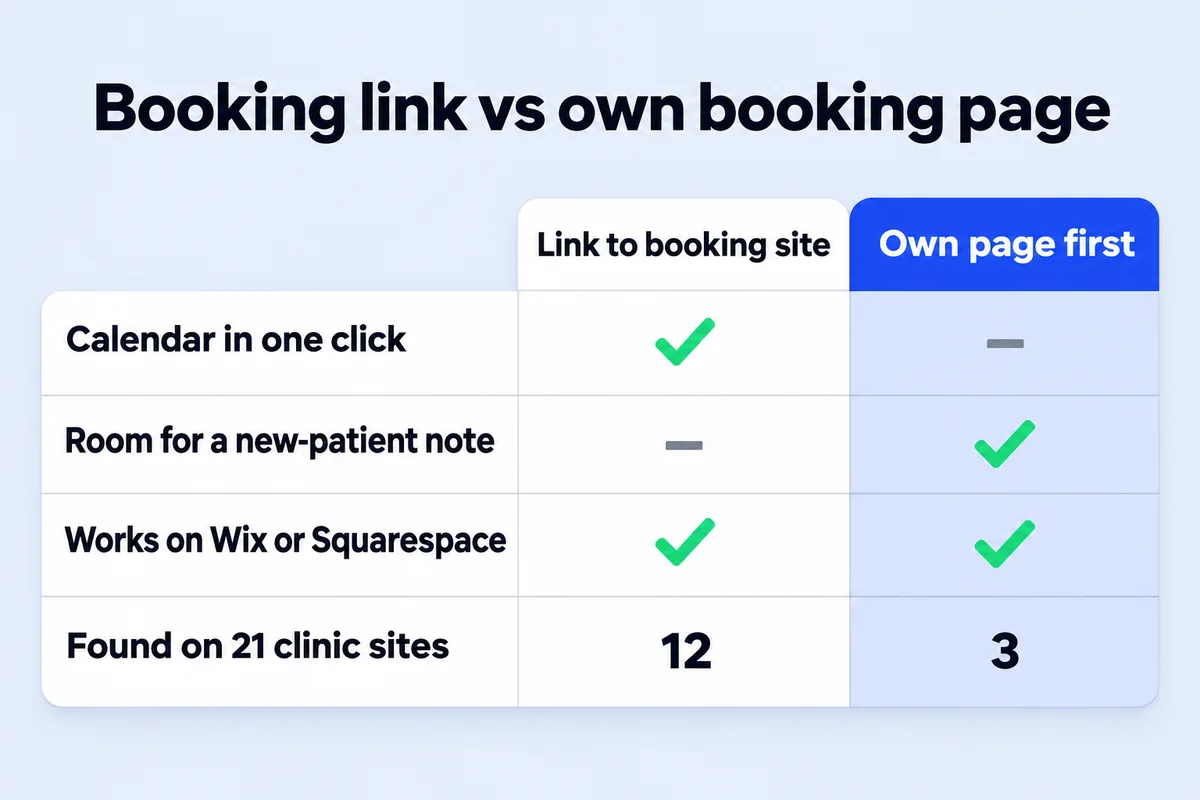
Send a new patient as close to their first appointment as you can. Jane lets you copy a link to the whole booking site, one location, one practitioner or one treatment, and Jane says a treatment link opens that treatment's schedule directly. Seven of the twelve direct-link clinics I read only ever used the front-page link.
The front page isn't wrong. It's just one more decision for a person who has a sore back and a phone in one hand. Jane's help pages describe where each kind of link comes from: a Full Access user finds the main booking URL and the button code under Settings, then Branding, in the section called Online Booking Buttons & URLs, with a drop-down for a location or a staff member. Anyone can also open the booking site, click a practitioner or a treatment, and copy the address from the browser bar.
- Booking site front page
- The patient picks a location, a discipline, a practitioner and a treatment before seeing a time. Fine for the main button in your header, where people already know you.
- One location
- Skips the first choice. Use it on each location page if you have more than one clinic, so nobody books Markham from the Oakville page.
- One discipline
- Jane groups treatments into disciplines, in the order you set. Good for a service page: the physiotherapy page opens physio, not massage.
- One practitioner
- Use it on each team bio. Three of the clinics I read link at least one practitioner this way, so a returning patient goes straight to the person they saw last time.
- One treatment
- The shortest path: the patient lands on the schedule for, say, an initial assessment. Put it on a "New patients start here" button.
If your clinic has several locations, Jane gives a separate link and button for each one, and each practitioner gets a separate one per location too. That's a lot of codes. Keep a short list of which link goes on which page, or someone will paste the North York link on the Mississauga page during a redesign, and nobody will notice for a year.
Should the booking open in a new tab?
Nine of the twelve direct links opened Jane in a new tab, and three opened it in the same tab. I lean towards the same tab on phones, where a new tab is easy to lose and the back button is how people get home. On a laptop a new tab does no harm, because your site is still there when they finish.
What matters more is that the patient knows they're leaving. A booking site with a different logo, colours and fonts feels like a wrong turn. Jane lets you put your logo and brand colours on the booking site, and a minute spent there makes the handover look like one clinic instead of two.
Can I put the booking calendar inside my own page?
With Jane, not in the way most owners picture it. What Jane's guides offer for an outside website is a Book button (as a small block of code to paste) and plain links, and the schedule itself opens on your Jane booking site. Only one clinic of the 21 had a calendar sitting inside its own page, and that was a consultation scheduler, not its practice software.
Jane does sell its own website builder, Jane Websites, at $59 a month, which pulls your services, team bios and booking link from your Jane account and updates them daily. That's a reasonable choice for a clinic that wants a simple site and no web designer at all. If you'd rather own the site and the domain outright, a hand-built site links to Jane the same way and loses nothing in the process.
Not every website builder accepts pasted code, and Jane's guide names Wix and Squarespace as examples. There you use the builder's own button and paste the plain booking URL into it, which works just as well.
How do I know my website brought the booking?
Your website's analytics only sees the click on Book. The booking itself happens on Jane's address, so you need a separate Google Analytics measurement for the booking site, plus an event on Jane's thank-you page. Jane's guide gives the steps, and none of them needs code.
- In Google Analytics, create a property (or a web data stream) for your Jane booking site address. Jane's guide says the booking site needs its own Measurement ID, separate from the one on your main website.
- Copy that Measurement ID into Jane under Settings, then Integrations.
- In Analytics, create an event called appointment_booked that fires when the page address contains "/appointments". Jane says only the thank-you page after a booking has that in its address. Mark it as a key event.
- Set up cross-domain measurement between your site and the booking site, so a booking keeps the source of the visit (Google search, your Maps profile, an ad) instead of looking like it came from your own website.
- Wait a day or two. Jane notes that new event data can take 24 to 48 hours to show up.
If Analytics itself is new to you, my plain guide to Google Analytics for a small business covers the reports worth opening and the ones you can ignore. And whichever way you track it, the privacy policy on your site should say you use Analytics. Jane's guide quotes Google's terms on that point.
A five-minute check of your own home page
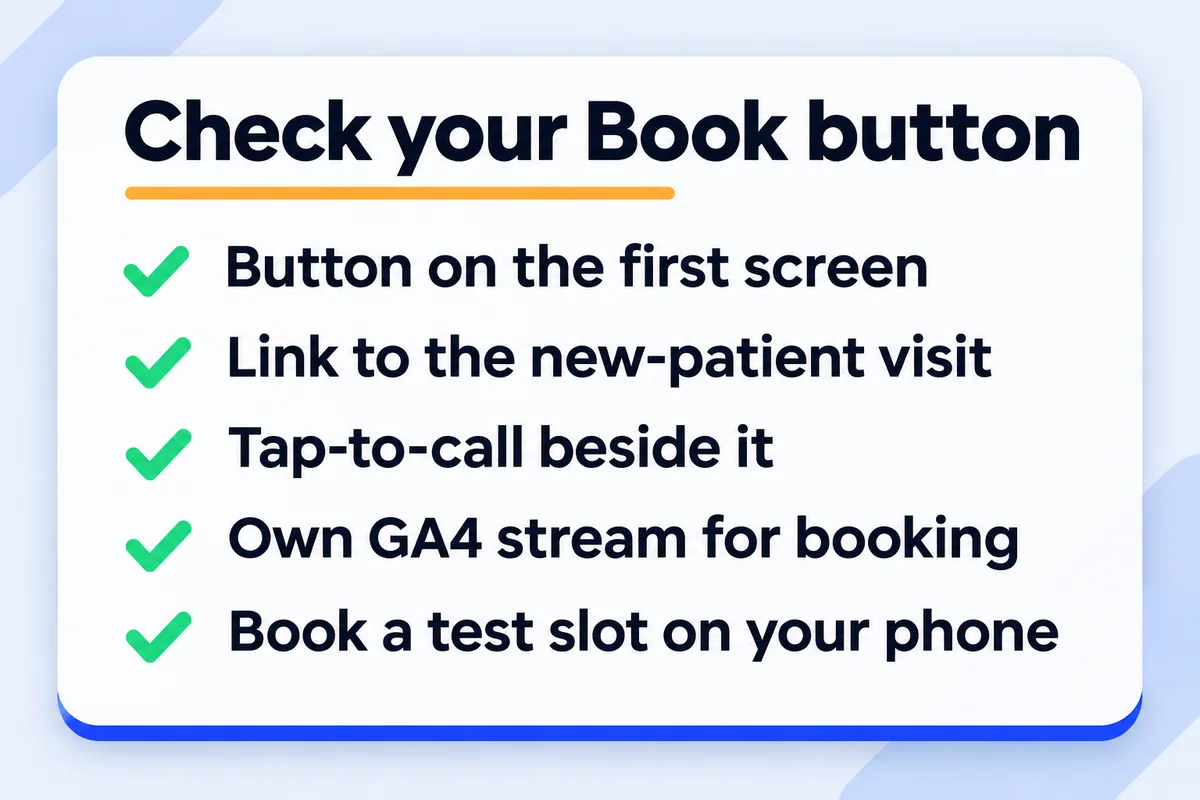
Open your site on your phone, not your laptop, and go through this list. Every item comes from something I saw on at least one of the 21 pages this morning.
- The Book button is visible before you scroll, and it says what happens: "Book online" or "Book an appointment", not a cute phrase about your wellness journey.
- A new patient can reach the first-visit appointment in one tap, from a button of its own.
- Your phone number is a link you can tap, next to the Book button or in the header.
- Each location page and each practitioner bio links to its own booking page, not the front page.
- The booking site carries your logo and colours.
- You've booked a real test slot from your phone in the last month, then cancelled it. Software settings change, and the person who changed them rarely tells the website.
That last one is the check I'd never skip. A Book button pointing at a booking site with online booking switched off still looks fine on the home page, and patients just see no times and leave.
What I build for clinics, and what I leave to the software
I build the website, and the booking stays in the software your front desk already runs. Clinic management software and patient portals aren't something I build; the site links to the booking system you use, with the right link on every page and the tracking set up so you can see which pages bring bookings. You can see how I lay out a physiotherapy clinic website around the College's rules on fees, and how a medical clinic website answers a patient's first questions on the first screen.
Prices are the same as every site I build: $899, $1,499 or $2,999 CAD one time, depending on how many pages, and they're all on the pricing page. If you're still deciding whether your business is a booking business at all, start with my guide on when online booking wins you jobs.
Short answers about booking on a clinic website
Can I embed the Jane schedule on my website?+
Jane's guides offer a Book button you paste as code and plain booking links, and the schedule opens on your Jane booking site. On the 21 clinic sites I read, none showed a Jane calendar inside their own page. Jane's own website builder, Jane Websites, costs $59 a month.
Where do I find my Jane booking link?+
A Full Access user goes to Settings, then Branding, and scrolls to Online Booking Buttons & URLs. The main link is on the right and the button code on the left. Other staff can open the booking site from the menu under their name and copy the address from the browser bar.
Should every Book button go to the same place?+
No. Keep the header button on the booking site's front page, and point location pages, service pages and team bios at their own location, discipline or practitioner link. A new patient button works best when it opens the initial assessment directly.
Does a booking site on another address hurt my SEO?+
Not in any way I'd worry about. Your service pages, location pages and team bios are what rank; the booking site is where people go after they've chosen you. Do make sure your own site holds the real content, so it isn't a thin page with one button.
Can patients book from my Google profile too?+
Yes. Your Google Business Profile can carry your booking link, and Jane has guides on adding it by hand and on its Reserve with Google integration. Use the same new-patient link you use on the website.
Sources, read on 10 November 2026: Jane, How to find your online booking link; Jane, Adding Book Online buttons to your website; Jane, How to simplify online booking for new patients; Jane, Google Analytics; Jane, Jane Websites.
Want a second pair of eyes on your Book button?
Send me your clinic's website and the booking software you use. I'll tell you where each button lands and what I'd change.
Get My Free Quote
I build hand-coded websites for clinics and other small businesses around the GTA, and I book a test slot on every one of them before it goes live. Read my full bio · Get in touch