Every service business in the GTA eventually hears the same pitch: add online booking and your calendar fills itself. It's the one website feature I've talked people out of about as often as I've built it — because a booking button is a promise that you'll turn up at 2pm for a price you already agreed, and plenty of businesses genuinely can't make that promise before they've seen the job. So this page is the honest version. Who it works for, what the real 2026 numbers are, the free Google button almost nobody switches on, and a study of 161,587 patients which found that the wording of the reminder mattered more than the software sending it.
The short version
- One test decides it: are you selling a slot or a quote? Fixed length and fixed price → booking. Everything else → a quote form.
- Trades aren't excluded — they just book the estimate visit, not the job.
- It's cheaper than you think. Square Appointments is free in Canada with reminders included; Calendly is free for one service.
- Your Google Business Profile takes a booking link, so people can book from the map without ever opening your website.
- Reminders cut no-shows — but in a 161,587-person trial, one extra sentence in the text did more than the reminder itself.
- Host the booking page on your own domain, not the vendor's. Same tool, an address you keep.
Do you actually need an online booking system?
Only if a customer can pick a time without you pricing the job first. If your service has a known length and a known price — an appointment, a treatment, a consultation, a class — an online booking system earns its place immediately. If every job needs a look before you can quote it, a calendar will book you into work you then have to cancel.
That's the whole decision, and it has nothing to do with which app you choose. I wrote about the wider question of forms, booking widgets and phone calls and how enquiries get lost between them. This page picks up after you've decided booking is the answer — and helps you find out whether it actually is.
Are you selling a slot, or selling a quote?
A slot is a fixed thing: forty-five minutes, $120, same for everyone who books it. A quote is a conversation about a job nobody has measured yet. Booking software is built for slots. Given a quote business it does something worse than nothing — it takes a commitment on your behalf that you may have to walk back.
| Business | What the customer is buying | What belongs on the site |
|---|---|---|
| Clinic, therapist, tutor, notary | A named appointment at a set time | Booking calendar |
| Salon, barber, detailer, massage | A listed service with a set duration | Booking calendar + deposit |
| Plumber, electrician, HVAC service call | A visit where the price depends on what's found | Book the diagnostic visit only |
| Roofer, landscaper, renovator, painter | A quoted project measured on site | Quote form — not a calendar |
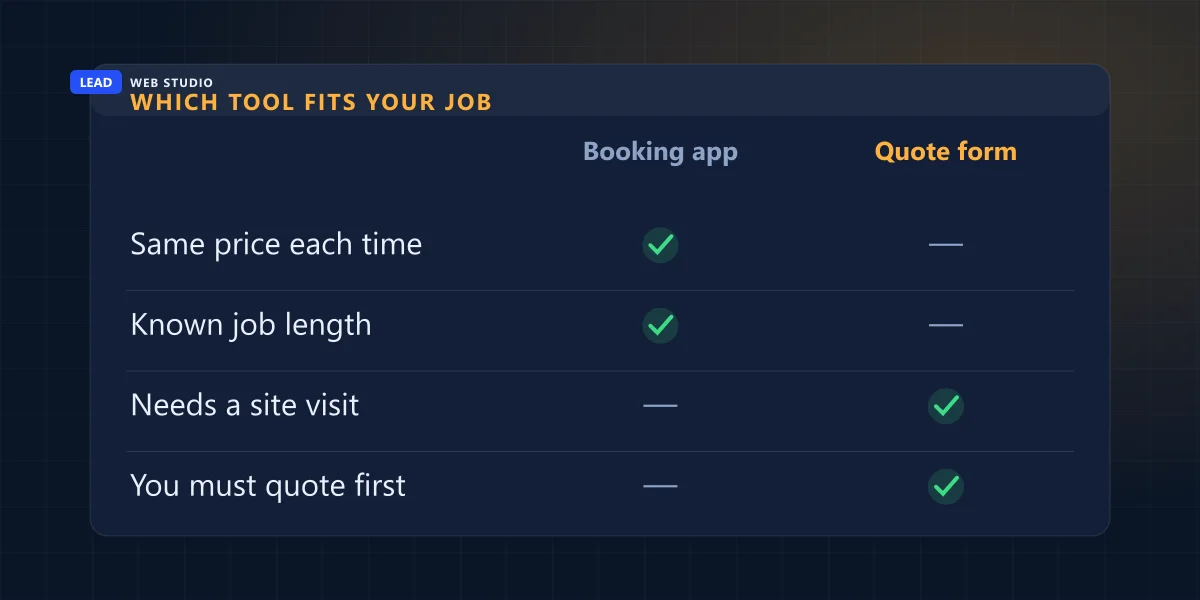
Row three is the one people miss, and it's the most useful idea on this page. A plumber can't book "replace the stack" — but he absolutely can book the ninety minutes where he comes and looks at it. Fixed length, fixed call-out fee, no surprises. That's a slot, and it's the single highest-value thing a trade can put a calendar on. You're not selling the job online. You're selling the appointment where the job gets priced.
The version that goes wrong is the flat "Book Now" button on a renovation site. The customer picks 9am Tuesday for a kitchen you've never seen, you phone to explain it doesn't work that way, and the first experience they have of your business is you cancelling on them.
A booking button is a promise to be somewhere at a set time for a price you already agreed. If you can't make that promise before seeing the job, don't put the button on.
What does online booking actually cost in Canada?
Far less than the "we'll build you a custom booking system" quote you may have been handed. Two of the three main tools have a real free tier, and one of them includes automated text reminders at zero dollars a month. For a solo operator with one location, the free plan is very often the entire answer — and I'd rather tell you that than sell you a build you don't need.
| Tool | What it costs | The catch |
|---|---|---|
| Square Appointments | Free plan at $0 — unlimited calendars, text & email reminders. Plus from $35 CAD/mo per location | Card payments run through Square: 2.8% + 30¢ online |
| Calendly | Free for 1 event type and 1 calendar. Standard $10 USD/seat/mo billed yearly | One event type on the free plan means one bookable service |
| Acuity Scheduling | No free plan — 7-day trial, then $16 USD/mo billed yearly ($20 monthly) | Text reminders start on the $27/mo Standard tier |
| Custom-built | Part of a website build | Only worth it when the off-the-shelf tools genuinely can't do the job |
Prices checked on Square's Canadian pricing page, Calendly's pricing page and Acuity's pricing page in August 2026. Note the currencies — Square publishes Canadian dollars, the other two bill in US dollars, which is roughly a third more than the sticker suggests by the time it hits your card.
So here's what a real booking actually costs a one-person business on the free plan: nothing to run, and one card fee if you take payment up front.
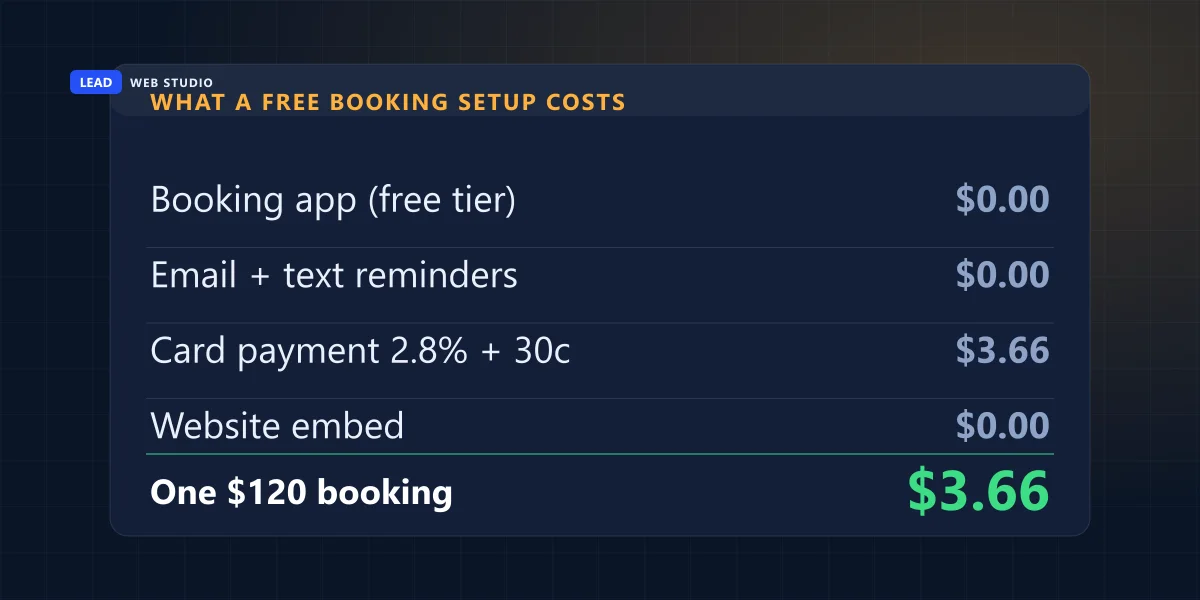
Three dollars and sixty-six cents on a $120 appointment, and the software is free. That's the number to hold in your head the next time somebody quotes you four figures to "build booking functionality." There are real reasons to build custom — memberships, multi-technician routing, tying bookings into an existing system — and I'll happily do that work. But not one of them applies to a solo massage therapist with a Tuesday to fill.
The free "Book online" button most owners never switch on
Your Google Business Profile takes a booking link. That means a "Book online" button can sit right beside your listing in Search and Maps, and the customer books a time without ever landing on your website. Most owners I speak to have no idea the field exists, and it takes about four minutes to fill in.
There are two routes. You can paste the booking URL from any scheduling tool into your profile yourself — Google's own documentation covers adding a "Book an appointment" link and notes you "can also add up to 10 links per category." Or your scheduling tool may be a Reserve with Google partner, in which case connecting the accounts makes the button appear automatically; Google states that "your booking providers will show up on your Business Profile within a week."
- Get the public link to your booking page — the one a stranger can open without logging in. Test it in a private window before you go any further.
- Open your Business Profile on Google Search or Maps and find Bookings under your profile's links.
- Paste the URL and save. If your tool is a Reserve with Google partner, connect it from the tool's side instead and let the button appear on its own.
- Check it a week later on a phone, logged out, as a customer would. If the button isn't there, the link is the first suspect.
This only works if the profile exists and is verified in the first place — I covered that gate in whether you need a Google Business Profile, and what makes a listing rank once it's live in the Google 3-pack playbook. A booking button on a profile nobody finds is a very tidy dead end.
Reminders cut no-shows — the wording does more than the software
Every booking tool sells you automated reminders as the cure for no-shows. They do help. But the most interesting evidence on this doesn't compare "reminder" against "no reminder" at all — it compares reminders against each other, and the gap between two versions of the same text is larger than most people would guess.
In a randomised trial published in PLoS One in 2020, researchers tested eight message variants against a control across 161,587 patients at 14 hospitals and 596 outpatient clinics run by Clalit Health Services in Israel. Everyone got a reminder. The plain one — "this is a reminder for a hospital appointment you have scheduled" — left a no-show rate of 21.1%. The best-performing version added a single sentence, pointing out that not cancelling delays treatment for someone else who needs it. Its no-show rate was 14.2%.
Same software, same send time, same list. One sentence, a third fewer missed appointments.
Now the honest caveat, because I'd rather give you the limits than oversell it: a public hospital appointment in Israel is not a Toronto barbershop, and a free clinic slot behaves differently from a haircut somebody paid a deposit on. Don't expect those exact percentages in your calendar. What transfers is the mechanism — the reminder existing is table stakes, and what it says is the part still sitting on the table unused. Nobody selling booking software leads with that finding, which may have something to do with the fact that editing a sentence costs nothing.
So open your reminder template tonight and give the customer a reason that isn't about you. "Your 2pm is held" is admin. "If you can't make 2pm, tell us and we'll give the slot to someone on the waiting list" is a reason. For a trade: "the truck is booked for your address that morning."
Where the booking page lives matters more than which app you pick
This is the part that gets decided by accident and then can't be undone cheaply. Most tools hand you a hosted page — calendly.com/yourname, yourshop.square.site — and it works instantly, so people use it and move on. Two years later that address is on your business cards, in your Google profile, in your ads and in every text you've sent a customer, and it belongs to someone else. It's the same trap I described in who actually owns your website, just wearing a friendlier badge.
Build a page on your own domain instead — yoursite.com/book/ — and embed the scheduling tool inside it. The URL is yours, it can be indexed and linked to, your analytics see it, and if you switch from Calendly to Square next year, every card, ad and profile link still lands in the right place. You change what's inside the page, not the address of it.
One technical note if you do embed. A booking widget is a third-party script, and third-party scripts are the most common reason a decent page suddenly loads like a bad one — I went through what that costs in Core Web Vitals in plain English. Load the widget when the visitor actually reaches or touches it, not on every page view. It's the same rule I apply to the spam protection on this site's own forms, and it's the difference between a booking page that opens instantly and one people abandon before the calendar paints.
Setting it up properly in one evening
If you've read this far and the slot test says yes, here's the order that avoids the usual mess:
- List your services with a real length and a real price. If you can't write those two numbers down, that service isn't bookable — that one gets a quote form.
- Set your genuine availability, then take 20% of it back. Everyone overestimates. Travel time, notes, running late, lunch. A calendar that books you solid is a calendar you'll start ignoring.
- Decide the deposit question now. A deposit cuts no-shows and costs you some bookings from people who'd have turned up anyway. For a first-time client of a high-value slot it's usually worth it; for a $40 service it usually isn't.
- Rewrite the reminder text before you send a single one. Two sends — a few days out and the day before — and one sentence about what a missed slot costs someone else.
- Put it on your own URL at
/book/, embed the tool there, and link that page from your header and your homepage. - Add the link to your Google Business Profile, then check it a week later from a logged-out phone.
If you only take one thing from this page: don't pay anyone to build booking until a free tool has genuinely run out of road. When it has — multiple staff, memberships, deposits tied into your own system — that's a real website build conversation, and you can see what those cost on the pricing page before you ever speak to me.
Frequently asked questions
Does my business need an online booking system?+
Only if a customer can choose a time without you pricing the job first. Fixed-length, fixed-price services — appointments, consultations, classes, treatments — suit a booking calendar. If every job needs a site visit or an estimate, a quote form is the right tool and a calendar will book you into work you have to cancel.
How much does an online booking system cost in Canada?+
Less than most people expect. Square Appointments has a genuinely free plan in Canada with unlimited calendars and text and email reminders, then $35 CAD per month per location. Calendly is free for one event type and $10 USD per seat per month after that. Acuity has no free plan and starts at $16 USD per month billed annually.
Can customers book me straight from Google without visiting my website?+
Yes. A Google Business Profile accepts a booking link, so a "Book online" button can appear next to your listing in Search and Maps. You can paste the booking URL from any scheduling tool yourself, or connect a Reserve with Google partner. Google says booking providers show up on your profile within a week.
Do automatic reminders really reduce no-shows?+
Reminders help, but their wording does more work than the software. In a randomised trial of 161,587 patients published in PLoS One, every group received a reminder text. The generic version left a 21.1% no-show rate; a version that added one sentence about the cost to other patients brought it down to 14.2%.
Should the booking page sit on my own website or on the booking company's site?+
Put it on your own domain. A page like yoursite.com/book/ can be indexed, linked, tracked and pointed at from ads and your Google profile, and it stays yours if you change scheduling tools. A vendor URL such as calendly.com/yourname builds an address you do not control.
Not sure whether you're a booking business or a quote business?
Tell me what you sell and how you price it, and I'll tell you straight — including when the free tool is all you need.
Get My Free Quote
10+ years building websites for GTA clinics, trades and service businesses — including the booking flows that decide whether an enquiry becomes an appointment. Read my full bio · Get in touch