Your customer signs your estimate on a phone at a hockey game, emails it back, and you start the job. An electronic signature in Ontario holds up for that kind of paperwork. Then the customer disputes the price, and you find out the signature was never the weak part.
I built a free tool for signing a PDF online, and people land on it all month looking for exactly that. So I owed them two things: the Act itself instead of a vendor's summary of it, and a look inside a file signed with my own tool. I'm a web designer, not a lawyer, so read this as what to ask a lawyer, and take anything with real money on it to one.
Are electronic signatures legally binding in Ontario?
Yes, for most business documents. Ontario's Electronic Commerce Act says a legal requirement for a signature is met by an electronic signature, and a contract isn't invalid just because it's electronic. The Act names no product or technology. Some documents sit outside it, and either side can insist on paper.
The definition in section 1 is one sentence long, and most arguments about typed names end here:
An electronic signature is information someone "creates or adopts", for one purpose, "in order to sign", and it sits "in, attached to or associated with" the document.
Creates or adopts
A name you type, a squiggle you draw with a finger, or a saved picture of your signature you reuse.
In order to sign
Purpose is the test. Your name in an email footer sits there on every message you send, so it shows no purpose by itself.
In, attached or associated
On the page, or in the email that carries the file. It doesn't have to be drawn on the PDF.
Clicking counts too. Section 19 lets an offer or an acceptance be made by "touching or clicking on an appropriate icon", and by speaking, which I would not rely on at a job site.
Which document goes where
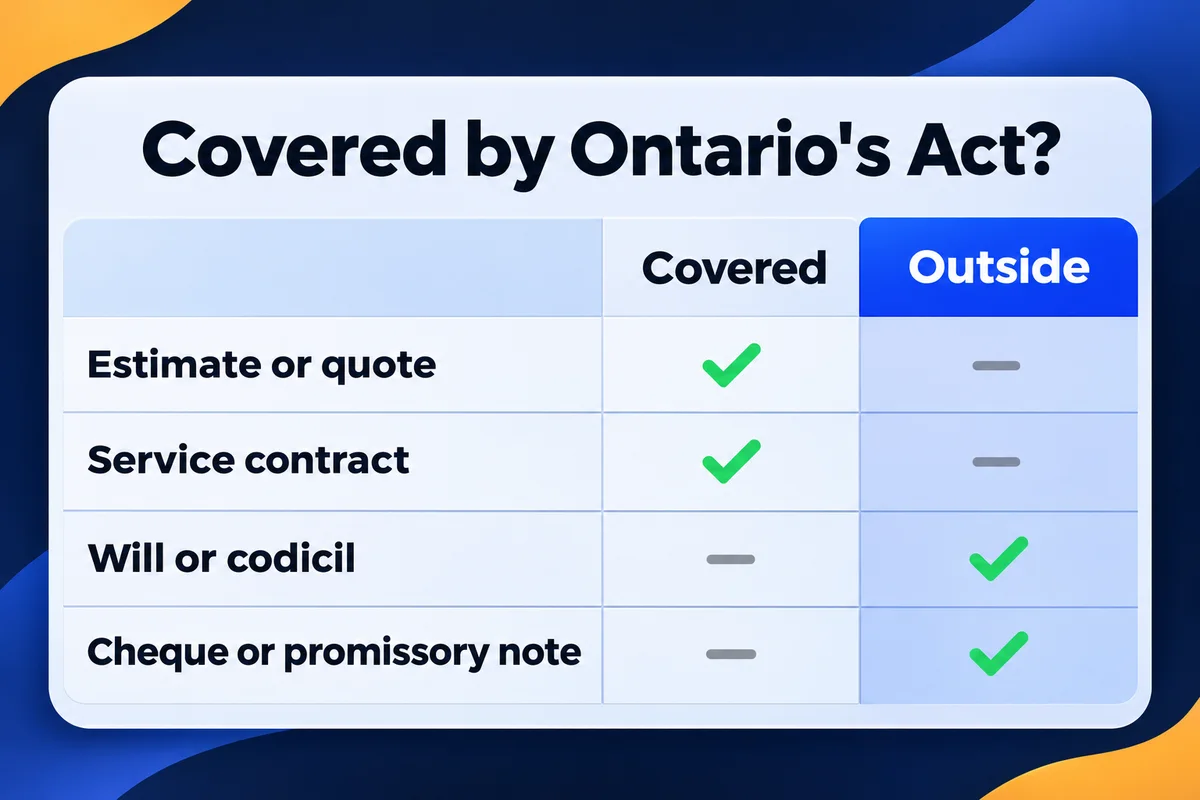
Take the document in your hand and find its lane. The middle lane comes straight from section 31 of the Act. The third lane comes from section 17, section 26 and the rules of whoever is receiving the paper.
The Act covers it
- Estimates and quotes
- Service contracts and work orders
- Change orders on a job
- Supplier and subcontractor agreements
- Non-disclosure agreements
Outside the Act
- Wills and codicils
- Trusts created by a will
- Powers of attorney for money or personal care
- Negotiable instruments, such as cheques and promissory notes
- Documents of title, with an exception for shipping goods
The receiver sets the format
- Forms for a ministry or municipality, such as a permit
- CRA forms, on the CRA's own list
- Lender and insurer paperwork
- Affidavits and anything a notary handles
"Outside the Act" doesn't mean an electronic signature is banned. It means this Act won't rescue you, and that document's own law decides. Davies, a Toronto law firm, makes the same point in its guide. For a will or a power of attorney, I'd stop reading blogs and call a lawyer. Section 31 also lets the province add more documents by regulation, and I didn't go through the regulations.
Be careful with the lists you find online. Vendor pages add divorce papers, adoption, consumer disclosures and notarizations to the "wet ink only" pile. None of those is in section 31. Some have rules of their own elsewhere, which section 26 leaves alone, but a list that mixes them won't tell you which law to read.
The real estate line is out of date too. The first version of the Act excluded documents that create or transfer an interest in land and need registering, including agreements of purchase and sale. The current version marks that item "Repealed". Your brokerage or lawyer can still choose what they'll accept, since nobody can be forced to take an electronic document.
What I found inside a PDF signed with my own tool
A signature from a tool like mine is a picture placed on the page, the same result as printing, signing and scanning. It's a normal PDF that opens anywhere. The proof of who signed and when sits in the email around it, so keep that email with the file.
I made a one-page test estimate this morning: 14 metres of eavestrough, $1,850 plus HST, a made-up job for a made-up customer. I signed it in a real browser on the live tool as "Test Signer". Then I changed the price in a copy with a few lines of code: a white box over the old total, $8,150 typed on top. On screen, you can't see the patch.
| I measured | Blank | Signed | Price changed |
|---|---|---|---|
| File size in bytes | 1,012 | 42,828 | 43,263 |
| Image objects | 0 | 2 | 2 |
| Certificate signature fields | 0 | 0 | 0 |
| Price on screen | $1,850 | $1,850 | $8,150 |
| Prices in the text layer | $1,850 | $1,850 | both |
| Fingerprint, first 8 characters | c4371279 | 18d1a585 | c639e70a |
Signing added about 42 KB: the picture of the signature and its transparency layer, which is why it counts as two objects. The name "Test Signer" isn't stored anywhere as text, because to the file it's a drawing. The browser made no upload while I signed, which matches what the tool page says about files staying on your device.
The last row is the one to remember. A fingerprint here is a SHA-256 hash, a short code calculated from every byte of a file, and changing one digit of a price gives a completely different code. My sloppy edit also left the old $1,850 sitting under the white box, where text search finds it. Don't count on a forger being that sloppy. Count on the copy that already went through email, because the mail server stamped it before anyone had a reason to change it.
Paper has the same problem, by the way. A signature on page 3 says nothing about whether page 2 was swapped. When a deal is big enough that you want identity checks, an audit trail and a tamper seal built in, a certified service such as DocuSign or Adobe Sign is the right tool for that job, and a lender may insist on one.
What to keep so the signature holds up in an argument
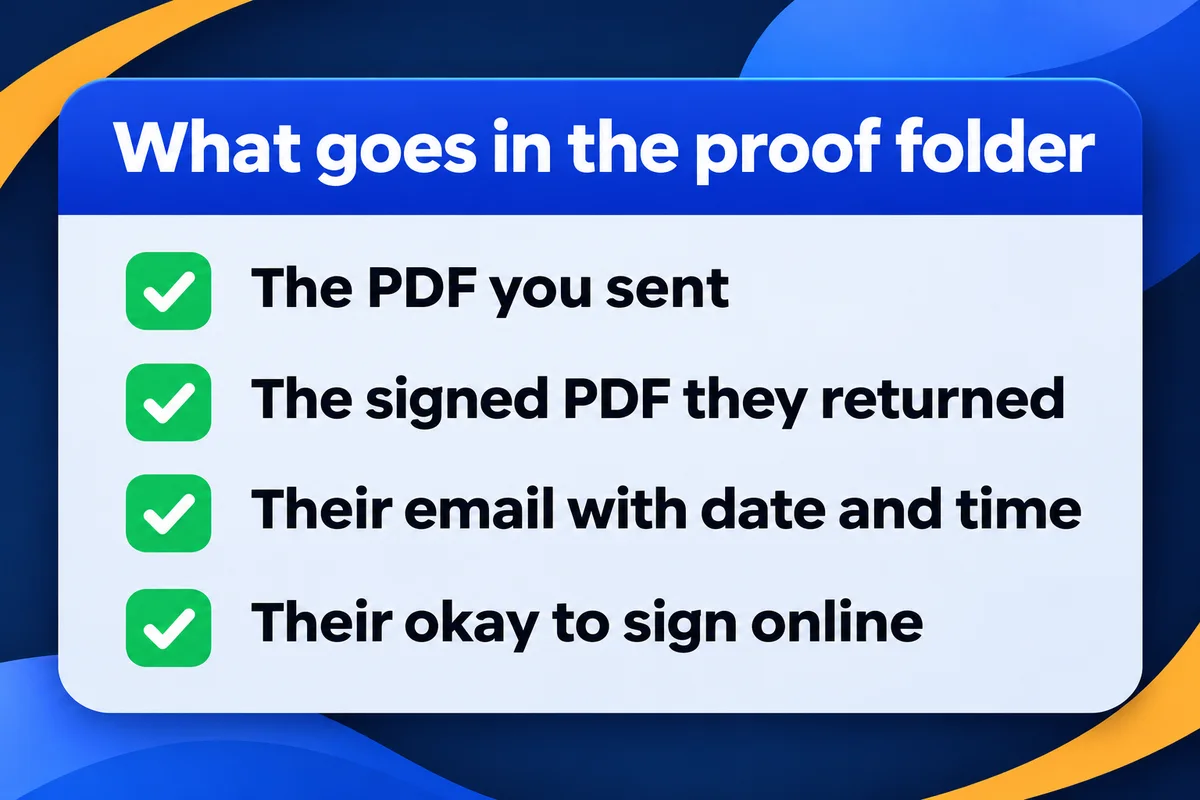
Keep five things: a line saying online signing is fine, the PDF as you emailed it, the signed copy they returned, the email it came in, and the copy you sent back. Together they show who signed, what they saw and when. That takes about a minute per job.
- Put one line on the estimate. Section 3 lets consent be inferred from conduct, but a sentence ends the debate, and Davies recommends a provision like it. Have your lawyer word yours.
"You can sign this estimate online. A signed copy returned by email counts as your signature."
- Email the PDF as an attachment. If a law requires you to give someone a document in writing, section 10 says a file merely sitting on a website hasn't been provided, while email is named as an example of providing it.
- Ask for the reply from the address you've been using with that customer. That address is your evidence of who it was. Send from your own domain as well, since a business email on your own domain reads better in a dispute than a free inbox with a nickname.
- Keep the email, not only the attachment. Where a law makes you retain a document, section 12 asks you to keep what shows its origin, destination, date and time. All four sit in the message itself. Saving the PDF to a folder and deleting the email throws them out.
- Send the signed copy back to the customer the same day. Now two inboxes hold the same file, and either fingerprint can be checked against the other. The customer also has what they need for the record, and section 9 frowns on anything that stops them from printing or saving it.
Those same email threads are also what you'll want if someone later claims your bank details changed. My notes on a customer who paid a fake invoice cover that mess. And if the contract you're signing is for your own website, read what a web design contract should say before you add your name to anything, mine included.
The farmer whose thumbs-up cost him more than $82,000
Saskatchewan gave Canada its favourite contract story. It's useful for owners who run their business by text, as long as you read the whole thing.
March 2021
A grain buyer and a farmer agree by phone on 87 tonnes of flax. The buyer texts a photo of the signed contract: "Please confirm flax contract." The farmer replies with a thumbs-up.
June 2023
No flax arrives. A judge finds the emoji accepted the deal and orders the farmer's company to pay more than $82,000.
December 2024
The Court of Appeal dismisses the appeal, 2 to 1. The emoji was a mark of agreement, and its metadata identified the sender.
What gets left out of the retelling is the context: these two had already made contracts by text, and the court said so when it rejected the argument that every text would become a signature. Saskatchewan's sale of goods law isn't Ontario's Act either. So don't take an emoji as your contract, and be careful what you thumb up.
When the signature is a button on your website
A web designer's footnote, since this is my end of the job. An "I accept" button on a quote page is a valid way to accept under section 19, and an automated form that takes the order counts as what the Act calls an electronic agent. Section 21 has a catch: if a person makes a material mistake with that form, had no chance to fix it, and tells you promptly, the deal isn't enforceable against them. The fix is a review screen before the final button. It's the same thinking I use when I work out how a website should capture leads: show people what they're sending.
Forms for the CRA
The CRA keeps its own list of forms it accepts e-signed, including T183, T183CORP, T2183 and T2200. Older guides call some of these temporary, so read the page itself. The receiving party is expected to verify identity. A form signed remotely has to go back through the person's most recent electronic address or a secured location. Federal law has a term of its own, "secure electronic signature", tied to technology set by regulation, and Part 2 of PIPEDA uses it for specific federal provisions. It isn't a test your eavestrough estimate has to pass.
Questions owners ask me before they sign online
Does a typed name count as a signature in Ontario?+
It can. The Act's definition covers any electronic information a person creates or adopts in order to sign, so a typed name qualifies when the person typed it to sign that document. Typed under an unrelated email, the same name may prove nothing. What you need to show is the purpose.
Can a customer refuse to sign electronically?+
Yes. Section 3 says nobody has to use or accept an electronic document without consent, though consent can be inferred from what the person does. A customer who signs and returns your PDF has shown it. One who asks for paper gets paper.
Do I need a paid e-signature service in Ontario?+
For ordinary paperwork, the Act names no product and no technology. Section 11 only adds reliability tests for documents prescribed by regulation. A paid service earns its fee when a lender or insurer asks for an audit trail, or when the amount is large enough that you want one anyway.
Is a text message or an emoji a signature?+
It was in one Saskatchewan case, where a thumbs-up to a photo of a flax contract was upheld on appeal in a 2 to 1 decision. The court relied on past deals made by text. That is another province's law and one set of facts, so don't build your paperwork on it.
Can a CRA form be signed electronically?+
Some can. The CRA publishes its own list, which includes T183, T183CORP, T2183 and T2200. The party receiving the form is expected to verify identity, and a form signed remotely must come back through the person's latest electronic address or a secured location. Check the list first.
Sources, read on 2 November 2026: Ontario, Electronic Commerce Act, 2000 (e-Laws currency date 28 October 2026) and its version of 2000 to 2013; Canada Revenue Agency, Using electronic signatures; PIPEDA, Part 2; Clayton Utz and Miller Thomson on South West Terminal v Achter Land, 2023 SKKB 116 and 2024 SKCA 115. Test file figures: my own test on the live signing tool, 2 November 2026. This article is general information from a web designer, not legal advice.
Your customers look you up before they sign
If your site is the weak link between the quote and the signature, send me the address and I'll tell you what I'd fix first. I do web design for service businesses across the GTA.
Get My Free Quote
I hand-code websites for service businesses around the GTA, and when a tool of mine touches paperwork, I open the output and read it. Read my full bio · Get in touch