
Leaving Squarespace goes well when you treat it as three jobs in a fixed order: get the content out, keep every old address working, then switch Squarespace off. The export file carries your plain pages and one blog. Everything else is copied by hand or rebuilt, and the subscription is cancelled last, never first.
The call I get usually starts with "I already cancelled." The renewal email arrived, the price went up, someone clicked the button, and now there are a few days of access left and a site that has to live somewhere else by Friday. It can be done that way. It's just the expensive way, because the things Squarespace doesn't export are exactly the things you need the old site open to copy.
Squarespace's own export takes less than most owners expect. Read the list below before anyone touches the billing page, then build the redirect map that keeps Google and your customers off error pages after the move.
What does the Squarespace export file actually contain?
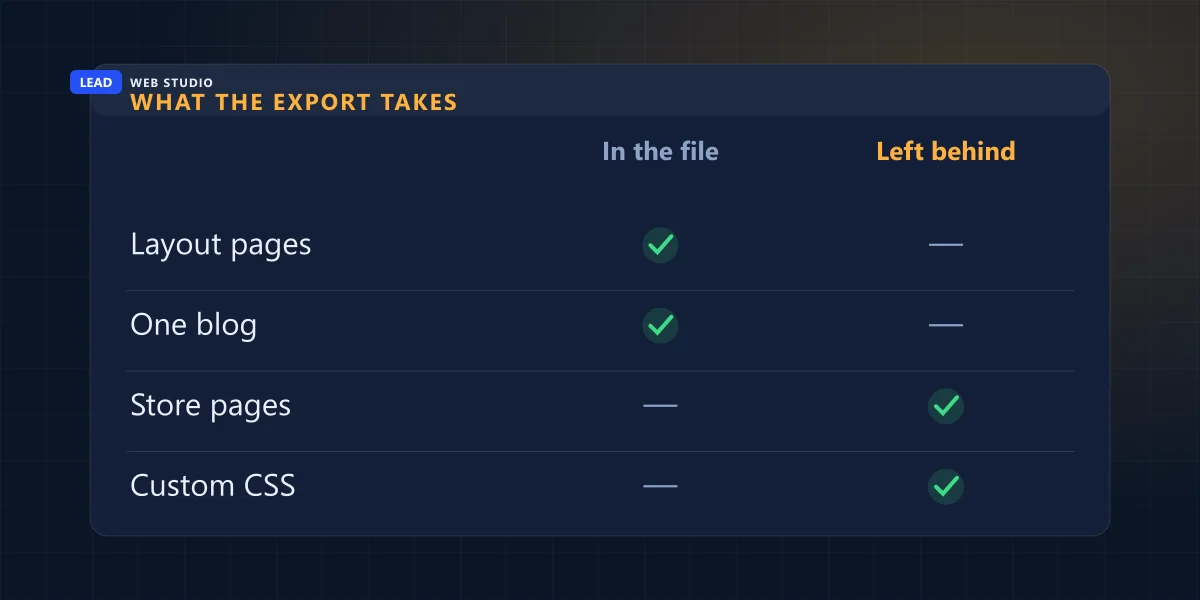
The export is one XML file in WordPress's format. It carries layout pages, text and image blocks and a single blog. Store pages, portfolio pages, index pages, drafts, product, audio and video blocks, style settings and custom CSS stay behind. Images export as links that can stop working after you cancel.
That's from Squarespace's own help page on exporting your site, which I read line by line this morning. Sorted by what happens to each piece, it looks like this:
Layout pages: your home, about, services and contact pages, with their text and image blocks
Comes with youOne blog page and its posts, with up to 1,000 comments per post. If you run two blogs, you pick one
Comes with youText inside embed and Instagram blocks, which Squarespace says exports "with minimum structure"
Comes with youImages inside image blocks: they're in the file as links back to Squarespace's servers
Breaks laterStore pages and product blocks, portfolio, album, cover, index and info pages
Stays behindAudio and video blocks, dropdowns, drafts, and anything in page-specific headers, footers and sidebars
Stays behindThe design: style settings, fonts, colours and every line of custom CSS
Stays behind
Two limits catch people out. You can't export from a trial site at all, and if the site has already expired, Squarespace warns your content may already be deleted. That's the "I already cancelled" problem in one sentence.
"...the image links stop working after you cancel your Squarespace site."
Squarespace help, Exporting your site, on moving images to a self-hosted WordPress site
That line is the reason I check images before anything else. A WordPress import can look perfect for weeks, every photo loading fine, because the photos are still being served by Squarespace. Then the subscription ends and every page goes grey at once. On a hand-coded site I download the original image files and store them on the new host from day one, so there's nothing left pointing back.
Where do I get the full list of my pages?
Open yourdomain.com/sitemap.xml while the Squarespace site is still live and save it. Squarespace builds it automatically, and it lists your public page addresses. It's your starting list for the redirect map, but it leaves some things out, so add those by hand before you move.
Squarespace's page on the sitemap names what it doesn't list. These are the gaps I fill from memory, old emails and the site's own menus:
- Uploaded files
- The PDF price list or the menu you linked from a flyer or a Google profile. It isn't in the sitemap, and someone still has the link.
- Old redirected addresses
- Addresses you already redirected inside Squarespace years ago. They still get visits from old links, and the sitemap doesn't show them.
- Hidden and locked pages
- Disabled pages, password-protected pages and pages hidden from search. Decide for each one whether it moves or is retired.
- Pages inside index pages
- Their separate addresses are left out. Click through each index page on the live site and note them.
If the site has been running a while, Google Search Console is the second source: its Pages report shows addresses Google knows that you may have forgotten. I go through how to read it in what an owner can check in Google Search Console.
Build the redirect map before you move anything
A redirect map is a two-column list: every old Squarespace address on the left, the page on the new site that replaces it on the right. Each pair becomes a permanent 301 redirect on the new server. Written before the move, it's an hour of work. Written after, it's guessing from error reports.
Here's a short example for a made-up renovation company, with the reason for each line. Your own map is longer, but the logic is the same: each old page goes to the one new page that answers the same question, never to the home page by default.
| Old Squarespace address | New address | Why this line |
|---|---|---|
| /about-us | /about/ | Same page, the new site uses a shorter address |
| /services-1 | /services/ | Squarespace added "-1" when a page was duplicated years ago |
| /blog/spring-roof-checklist | /spring-roof-checklist/ | Blog posts move out of the /blog/ folder on the new site |
| /gallery-old | /projects/ | Retired page, sent to the page that replaced it |
| /price-list | /pricing/ | Was already redirected inside Squarespace, so the line has to move with you |
That last row is the one most moves miss. Squarespace keeps its own redirects in a panel called URL mappings, under Developer tools. Those lines work only while the site is on Squarespace. Copy the whole text of that panel into a file before you leave, because the day the domain points elsewhere, every one of them stops.
What the URL mappings panel looks like on Squarespace
/about-us -> /about 301
/price-list -> /pricing 301
The same redirects on the new server (Apache)
Redirect 301 /about-us /about/
Redirect 301 /price-list /pricing/
Squarespace's URL mappings page also says the panel can't redirect image or file addresses, and it holds about 2,500 lines. On your own server there's no such limit, which is why I bring old PDF links back on the new site: either the same file at a path I choose, or a redirect from the old address to the new one.
How long do the redirects stay? Google's site move guidance says "Keep the redirects for as long as possible, generally at least 1 year," and that for a medium-sized site it can take a few weeks before Google shows the new addresses instead of the old ones. I simply never remove them.
In what order should I leave Squarespace?
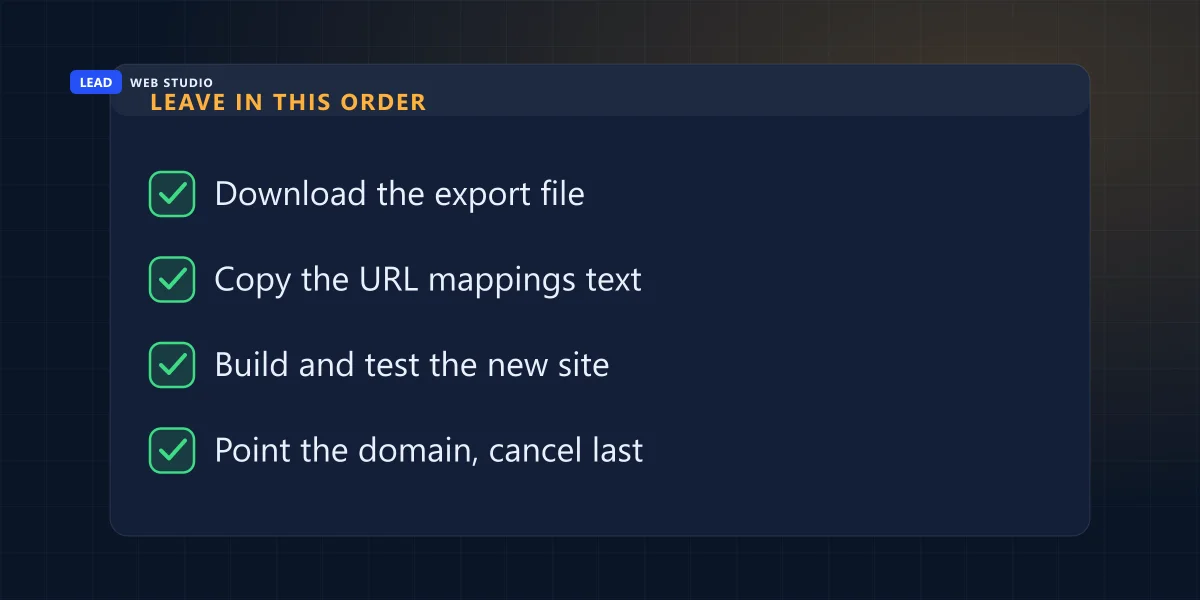
Export and copy everything first, build and test the new site on a temporary address, point the domain, check the live site, and cancel Squarespace last. Each step needs the one before it finished. Doing them out of order is how a business ends up with a working new site and no photos, or a domain that doesn't answer.
Download the export file and save the sitemap
Both come from the live Squarespace site, so they're first while it's still open.
Skip it and you're copying pages by hand from a site with a countdown on it.
Copy the URL mappings text and the DNS records
The redirects you already have, plus the domain's records for email and anything else that uses the domain.
Skip it and old redirects die quietly, or email stops when the domain moves.
Build the new site on a temporary address and test it
Every page from the map exists, every image is stored on the new host, every form reaches a real inbox.
Skip it and customers test the new site for you.
Point the domain at the new site and add the redirects
Then open twenty old addresses from your map in a private window and watch each one land on the right page.
Skip the check and the first 404 report comes from a customer.
Cancel the Squarespace website plan
Only now, with the live site checked. If the domain is registered at Squarespace, it can stay there and keep pointing to the new site.
Do it first and you lose the source you were copying from.
Step 2 is the one I learned the hard way. This month a client's domain left Squarespace while it was still using Squarespace's nameservers, and the moment the transfer completed, those nameservers stopped answering for it. What saved the website and the email was the copy of every DNS record I'd made beforehand. The full story, and how to avoid it, is in moving a domain without the website or email going down.
WordPress, another builder, or a hand-coded site?
The export file is in WordPress's format, but that doesn't decide where you go. It decides how much retyping a WordPress move saves. The real question is who edits the site after the move: if you'll publish articles and change products yourself every week, WordPress makes sense; if the site changes a few times a year, hand-written code is faster and costs less to run.
I've laid out that choice in custom-coded vs WordPress, and the three-year cost of staying on a builder against a site of your own in Wix and Squarespace vs a custom website. For a hand-coded move the export file is still useful: it's a clean copy of every page's text, so nothing gets retyped from screenshots.
If you'd rather hand the whole job over, my website migration service moves a Squarespace site to code you own for $899 up to 20 pages, $1,499 for 20 to 50, and from $2,999 for larger sites, with a 301 redirect for every old address.
Questions owners ask me before leaving Squarespace
Can I export my Squarespace site to WordPress?+
Partly. Squarespace exports layout pages, text and image blocks and one blog to a WordPress XML file. Store pages, portfolio pages, index pages, drafts, product, audio and video blocks, style settings and custom CSS stay behind. The design never moves; it is rebuilt.
Will I lose my Google rankings if I leave Squarespace?+
Nobody can promise positions, and Google says a medium-sized site can take a few weeks before the new addresses replace the old ones in results. What you control is that every old address answers with a 301 to the matching new page, so no link and no search result ends on an error page.
Do my Squarespace images come with the export?+
The image blocks do, but Squarespace warns the images might not migrate to a self-hosted WordPress site, and the image links stop working after you cancel. Check every image is stored on the new host before Squarespace is switched off.
Can I keep my domain at Squarespace and host the site somewhere else?+
Yes. The domain registration and the website are separate things, and the domain's DNS records can point to a site hosted elsewhere. Moving the registration to another company is its own job, best done after the new site is live and checked.
How long should I keep the redirects after leaving Squarespace?+
Google's site move guidance says to keep them as long as possible, generally at least a year. I leave them in place for good: a few lines on the server cost nothing, and old links in emails, flyers and other websites keep working.
Sources, read on 26 October 2026: Squarespace help on exporting your site for what exports, the one-blog limit, trial and expired sites and the image warning; Squarespace help on URL mappings for the redirect format, the 400 KB limit and image and file addresses; Squarespace help on the sitemap for what it leaves out; Google Search Central on site moves with URL changes. The redirect map is an invented example, not a client's site.
Thinking about leaving Squarespace?
Send me your site address before you cancel anything. I'll tell you what the export will carry for your site and roughly how long the redirect map is, and the migration service covers the rest.
Get My Free Quote
I build websites in hand-written code for service businesses around Toronto, and a good share of them arrive from Squarespace, Wix or an old WordPress install with a list of links that must keep working. Read my full bio · Get in touch