
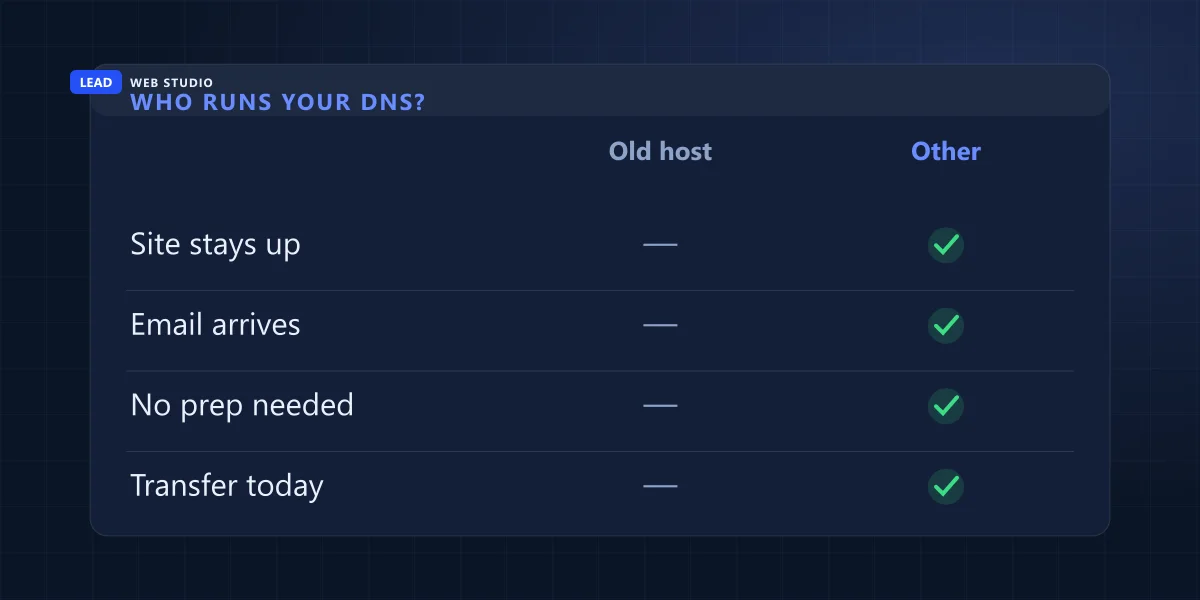
You can transfer a domain to another registrar without your website or email going down, but only if you first check who answers for your domain's DNS. When that's the registrar you're leaving, copy every record somewhere else and switch the nameservers before you start the transfer, not after.
Owners usually move a domain for boring reasons: the renewal price crept up, the account is in a former employee's name, or the registrar keeps phoning with upsells. The transfer itself is paperwork. The part that takes sites offline is a setting most people have never looked at, and it sits with a company they're about to stop paying.
The registrar
Holds your name on the registry and bills you each year. This is the only thing a transfer moves.
The DNS host
Answers the question "where is this website, where does this email go?" thousands of times a day. Often the registrar does this for free, which is the trap.
The website and mail hosts
Store your pages and your inbox. A transfer doesn't touch them, but they're unreachable if nobody answers the DNS question.
Will my website and email go down during a domain transfer?
Not if your DNS is run by someone other than the registrar you're leaving. If it is run by that registrar, expect the old company to stop answering for your domain at the moment the transfer completes, and your site and email go quiet with it. Move the DNS first, wait a day or two, then transfer.
I watched this exact thing happen this month. A client's domain was leaving Squarespace while it still used Squarespace's nameservers. The second the transfer completed, those nameservers started refusing every question about the domain, and public resolvers returned errors instead of an address. There's no grace period and no warning email. What put the website and email back was the copy of every record I had saved before the transfer started, rewritten at the new registrar.
The registrar doesn't do this to punish you. From its point of view, the domain isn't its customer any more, so it has no reason to keep serving records for it. Expecting a company you just left to keep running your DNS for free is a bit like expecting your old landlord to keep forwarding your mail out of kindness. Some do. You don't want your email to depend on it.
How do I find out who runs my DNS?
Look up your domain's nameservers. They're public, and the end of each name tells you which company runs your DNS. If those nameservers belong to the registrar you're leaving, your records will disappear with the transfer, so they need a new home first. If they belong to anyone else, the transfer won't touch them.
It takes two minutes, and you don't need a login:
- Open ICANN's registration data lookup and type your domain without the www.
- Find the "Registrar" line, which names the company you pay, and the "Name Server" lines underneath it.
- Compare the end of the nameservers with the table below. If the company is the same as the registrar, you have work to do before the transfer.
| Nameservers end in | DNS is run by | Leaving that company? |
|---|---|---|
| domaincontrol.com | GoDaddy | Move the DNS first. |
| registrar-servers.com | Namecheap | Move the DNS first. |
| googledomains.com | Google Domains, now Squarespace | Move the DNS first. This is the case from this month. |
| wixdns.net | Wix | Move the DNS first, and plan for the website moving too. |
| ns.cloudflare.com | Cloudflare | Only if Cloudflare is also your registrar. Otherwise nothing changes. |
| Your web host's own name | Your hosting company | Nothing changes, as long as you keep paying the host. |
If you see a name you don't recognise, it often belongs to the web host or the developer who built the site. Ask them before you touch anything. And if the registrar account is in somebody else's name, that's a separate problem to solve first; who actually owns your website covers how to get it into your own.

The records to copy before you change anything
Moving the DNS means recreating every record at the new DNS host, then switching the nameservers to it. Most hosts offer to scan your old records automatically. The scan finds the common ones and quietly misses the rest, so compare it line by line against the old panel. For a typical small business, this is what's in there and what a customer notices when one goes missing:
- A and AAAA
- Point your domain at the server with your website. Missing, and the site doesn't load at all.
- CNAME
- Point names like www, or a booking tool's subdomain, at another address. Missing, and "www.yourname.ca" fails while the bare name works, which is very confusing to diagnose over the phone.
- MX
- Tell other mail servers where your inbox lives. Missing, and customer emails bounce back to the sender, usually without you ever knowing they tried.
- TXT for SPF, DKIM and DMARC
- Prove your emails really come from you. Missing, and your quotes and invoices start landing in spam. More on these in setting up business email on your own domain.
- Other TXT
- Verification codes for Google Search Console, Microsoft 365 and similar. Missing, and those services may decide you no longer own the domain.
Take a screenshot of the old DNS panel as well, before you switch anything. If a record goes missing three days later, the screenshot is the only place it still exists.
How long does a domain transfer take?
For .com, .net and other generic domains, up to five calendar days once you've started it. ICANN's rules give the old registrar five days to respond, and silence counts as approval. Many registrars let you approve the transfer yourself by email, which can finish it within the hour. Moving the DNS beforehand adds a day or two.
Laid out as a calendar, a careful transfer looks like this:
Two days before
Look up the nameservers. If they belong to the old registrar, copy every record to a new DNS host, compare line by line, and switch the nameservers at the old registrar.
The day before
Check that the site and email work through the new DNS host: send yourself an email from outside, load the site on your phone's mobile data. Make sure the contact email on the domain is one you can open, and not an address on the domain you're moving.
Transfer day, morning
At the old registrar, turn off the transfer lock and ask for the authorization code (also called the EPP code or auth code). The registrar has to give it to you within five calendar days if you can't generate it yourself.
Transfer day, an hour later
Start the transfer at the new registrar, paste the code, pay. Watch your inbox, and the spam folder, for an approval email from the old registrar.
Within five days
The transfer completes, either because you approved it or because the five days ran out. Your nameservers should carry over unchanged. Check that they did.
The day after
Turn the transfer lock back on at the new registrar, set auto-renew and a card that won't expire before the renewal, and load the site and send a test email once more.
One owner-friendly trick: switch the nameservers a full week early if you can. Changes to nameservers can take up to a day to reach everyone, and the week gives you time to notice a missing record while the old panel still exists to copy from.
When will a domain transfer be refused?
Most refusals come from a 60-day lock: within 60 days of registering the domain, within 60 days of a previous transfer, or within 60 days of changing the owner's name, organisation or email. Expired domains, disputed ones and those under a court order are refused too. Check the dates before you plan the move.
| The situation | What happens |
|---|---|
| Domain registered less than 60 days ago | The old registrar may refuse. Wait it out. |
| Domain transferred less than 60 days ago | The old registrar may refuse. Wait it out. |
| Owner's name, organisation or email changed in the last 60 days | The registrar must refuse, unless you opted out of this lock before making the change. Many registrars offer that opt-out as a checkbox. |
| Domain already expired and in its redemption period | Transfers are blocked. Renew it where it is first; what to do when a domain expires covers the stages. |
| An ownership dispute, a court order or a domain dispute case | The registrar must refuse until it's settled. |
Notice what isn't on the list: the registrar disliking that you're leaving. Under the ICANN Transfer Policy, a registrar may refuse only for the specific reasons it names. A sales rep who tells you the domain "can't be moved" without giving one of them is selling, not explaining. Canadian .ca domains follow their own registry's rules rather than ICANN's, so check those numbers with your registrar.
Do I lose the time I already paid for when I transfer?
Usually not. For .com, a completed transfer adds one year to the existing expiry date, and the new registrar's transfer fee pays for that year. The remaining time carries over. The exceptions: the total can't exceed ten years, and a transfer soon after an automatic renewal cancels that renewal's year instead.
A worked example
The rule comes from the .com registry specification: on a successful transfer, the registration is extended by one year, up to ten years in total. The catch sits in the 45 days after an expiry date. If the old registrar auto-renewed the domain and you transfer away within that window, the auto-renewed year is cancelled and only the transfer's year is added. You don't end up with less time than you paid for in total, but you may pay the old registrar's renewal and then see it reversed, so it's simpler to transfer more than two weeks before the expiry date.
If you're moving the website to a new host at the same time, do it as a separate step, on a separate day. Changing the registrar, the DNS and the server in one afternoon means that when something breaks, you have three suspects instead of one. The website migration service is how I handle the server side of a move without losing search rankings.
Questions owners ask me about moving a domain
Does transferring a domain affect my Google rankings?+
No. Google ranks pages at an address, and a registrar transfer leaves the address, the content and the server exactly as they were. Rankings only suffer if the site stops loading because the DNS went missing, which is the problem this guide exists to prevent.
Will my SSL certificate stop working after a transfer?+
No, as long as the site keeps loading. The certificate lives on the server that hosts your website, not at the registrar. If your DNS records come across intact, the padlock stays.
Where do I get the authorization code?+
In the domain settings at your current registrar, usually under a name like transfer code, EPP code or auth code. Some show it on screen, some email it to the domain's contact address. If you can't generate it yourself, ICANN's policy gives the registrar five calendar days to provide it.
Can I transfer a domain that expires next week?+
Usually yes, as long as it hasn't expired yet and none of the 60-day locks apply. It's tight, though. If anything stalls, renew it where it is first and transfer a few weeks later; the transfer still adds its year on top.
Should I move the domain and the email in the same week?+
Only if you have to. Each change is easier to check alone. Move the DNS, confirm email still arrives, transfer the registrar, confirm again, and only then change email providers if that was part of the plan.
Sources, read on 17 October 2026: ICANN Transfer Policy for the five-day approval, the authorization code deadline, the refusal reasons and the 60-day locks; ICANN's FAQs for registrants; the .com registry functional specifications for the added year, the ten-year cap and the auto-renew grace period. The Squarespace case is a transfer I handled in October 2026.
Planning to move your domain?
Send me the domain name and where you want it to go. I'll look up who runs your DNS today and tell you what to copy before you start. Ongoing care of the domain, the DNS and the site is part of website maintenance and support.
Get My Free Quote
I build websites for service businesses around Toronto, and I look after the dull parts that keep them online: hosting, renewals and DNS. Read my full bio · Get in touch