Most of the business owners I work with have a Google Search Console account somewhere — usually set up by whoever built the site, and often still in that person's name. Hardly any of them open it, and the ones who do tend to close it again within a minute, because the first thing it shows you is a graph with four numbers on top and no explanation of what any of them mean. Then somebody quotes one of those numbers at you — "you're at position 39" — and it sounds like a diagnosis. It isn't. It's an average of 831 things, most of which you never wanted in the first place. I know the exact figure because I opened my own property while writing this, and I'm going to publish all of it, including the parts I'd rather not.
The short version
- It's free, it's yours, and it should be in your name — not your web designer's. Google's advice is to check it "around once every month", not daily.
- Impressions are not visitors. Google counts one "whether or not the item is scrolled into view". You can collect thousands from the bottom of page four.
- Your average position is nearly meaningless. Mine says 39.3. That number mostly measures how much rubbish you rank for, not how you're doing.
- Your query list will not add up to your totals. That's deliberate — Google removes rare searches for privacy. On my site the gap was about 30%.
- "Position 1, zero clicks" is usually not a broken title. Google only counts a click that leaves Google, so calls and directions from your map card are invisible here.
- Page Indexing is the one report where a bad number is genuinely bad — and even there, Google says there's "no need to resubmit this URL".
- Ten minutes a month is the whole job. Four screens, in a fixed order, which is the last section of this guide.
This guide is about reading the tool, not about fixing your rankings. If your problem is that nothing is happening at all, I wrote the diagnostic version of that separately in why your website gets zero traffic. If your problem is that you're paying someone and can't tell whether they're doing anything, that's how to tell if your SEO is working. This one is the layer underneath both: what the screen in front of you actually says.
What is Google Search Console, and do I need one?
It's a free Google account that shows you how your site behaves in search — which terms you appeared for, how often, and which of your pages Google has actually kept. Google calls it "a tool from Google that can help anyone with a website to understand how they are performing on Google Search". Yes, you need one. Nothing else can show you Google's own numbers for your own site.
Two things make it different from Google Analytics, and both matter. Analytics watches people who are already on your website. Search Console watches what happened before they got there — including all the times they didn't come. And Search Console is the only channel where Google tells you something directly: this page is indexed, this one isn't, and here's the word it used for why.
The setup is one job: prove you own the domain. Google's own getting-started page lists "Verify site ownership" as step one, and the rest of its checklist is short — make sure Google can find your pages, consider submitting a sitemap, monitor performance. If somebody built your site, they may have verified it under their own account. That is worth ten seconds of your attention right now, because years of history live in that property and it does not come with you if you leave. The wider version of that argument is who actually owns your website.
Before anything else: open Search Console, go to Settings → Users and permissions, and confirm your own email address is listed as Owner. Not "Full user". Owner. If your agency's address is the owner and yours isn't there at all, fix that this week — it's the single hardest thing to recover later, and it costs nothing today.
What do clicks, impressions, CTR and position actually count?
Four numbers sit across the top of the Performance report, and three of them are routinely misread. Clicks are visits from Google. Impressions are appearances, not eyeballs. CTR is simply one divided by the other. Position is one blended average across everything you appear for, and it is the number people panic about for the least reason.
Here is what Google's own documentation says each one counts, and the misreading that goes with it:
| Number | What Google says it counts | What people think it means |
|---|---|---|
| Clicks | "Any click that sends the user to a page outside of Google Search, Discover, or News" | Roughly right — this one is honest. It's visits that came from Google. |
| Impressions | "An impression is counted whenever an item appears in the current page of results, whether or not the item is scrolled into view" | "People saw us 15,000 times." They did not. A result on the bottom half of page four counts the same as one at the top. |
| CTR | "The click count divided by the impression count" | "Our headline is bad." Only meaningful if you were somewhere a person could realistically click. |
| Position | "The average position of the topmost result from your site" | "We rank 39th." You don't rank anywhere in particular — it's one blended figure across every term you touch. |
That impressions definition is the one worth reading twice. It is not a measure of attention. It's a measure of eligibility — how often Google was willing to put you on a page somebody loaded. Useful, but it is not an audience, and any report that presents impressions as reach is flattering you. The opposite row is worth understanding too: a page with zero impressions was never even eligible, and on my own site 70 of those pages turned out to be perfectly indexed.
Google also warns, in plain words, that this data will not match what you see when you search for yourself: "Even if a query appears in your list, you might not see your site in results if you run the same query in Google Search." Your results are shaped by your location, your device and your own search history. Checking your ranking by Googling yourself is the least reliable measurement available to you, and it is the one almost everyone uses.
Why is my average position 39 when I'm on page one for my own name?
Because the average is dragged down by the enormous number of terms you barely rank for. Over 28 days my site appeared for 831 different search terms. Sixty-three of them sat in positions 1–3. Four hundred and eleven sat between 21 and 50 — page three and beyond — and those carried far more impressions than the good ones. The average is 39.3, and it describes almost nothing.
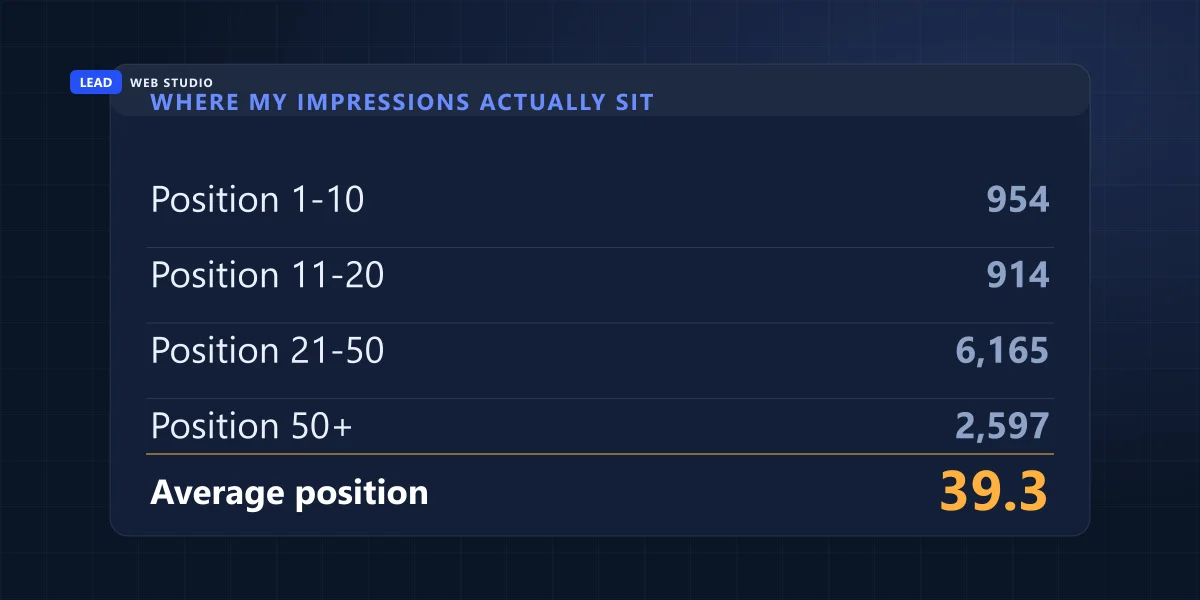
Those are my real numbers, pulled from my own property for 29 July to 26 August 2026. Read the shape of it rather than the total:
| Where I appeared | Search terms | Impressions | What that's worth |
|---|---|---|---|
| Position 1–3 | 63 | 282 | The only rows where a click is realistic |
| Position 4–10 | 33 | 672 | Page one, still in play |
| Position 11–20 | 62 | 914 | Page two. Worth attention |
| Position 21–50 | 411 | 6,165 | Nobody goes here. This is what makes the average 39 |
| Position 50+ | 262 | 2,597 | Noise |
The site-wide average is therefore a fact about my long tail, not about my business. If I deleted every page that ranks 21st or worse, my average position would leap to something impressive, and what I would actually have deleted is the city pages that are still on their way up. That is the whole problem with the number, and it is why I never open a client conversation with it.
What to do instead: filter to the five or six terms that describe what you actually sell, and read their positions. One line of real information beats a dashboard gauge every time.
Average position is the number most likely to make you change something that was working.
And a warning about small rows. Some of my position-1 terms have six impressions behind them. A position calculated from six appearances is too small a sample to tell you anything, in either direction. Before you celebrate or panic about any row, look at the impression count sitting next to it.
Why doesn't my query list add up to my totals?
Because Google deliberately removes rare searches from the table. If only a handful of people ever typed a phrase, showing it to you could identify them, so it's dropped from the list — but still counted in the graph above it. The result is that your rows will always sum to less than your headline number, and nothing is broken.
Google's help page states it directly: "On the query tab in the table, anonymized (rare) results are omitted from the table, but are included in the chart totals unless a query filter is applied." The same page adds a second cause: "The table can display a maximum of 1,000 rows, so some rare or long-tail rows might be omitted from the table, but included in the chart total."
On my property over those 28 days the chart said 15,171 impressions. My 831 query rows added up to 10,630. That's a 4,541-impression gap — about 30% of everything, permanently invisible. I mention it because I have watched people spend an afternoon trying to reconcile those two numbers, assuming they'd made an error in a spreadsheet. You cannot reconcile them. They are not supposed to match. That gap is worth remembering whenever you count something inside the query table — I hit it again while counting how many people price-shop me, where 19,526 query-row impressions sat against 29,573 at page level.
What does "position 1, zero clicks" mean?
Usually it means the results page answered the person without sending them anywhere. Google counts a click only when somebody leaves Google — its documentation is explicit that "clicking a link that stays inside the Google platform is not counted as a click". So a tap on your map card, a phone call from it, or a request for directions is a real customer who never appears in this report.
Sixty-two of my search terms sat at position 3.5 or better with zero clicks. The obvious conclusion — my titles must be terrible — is the one I would have reached if I hadn't gone and looked at the other half of the picture. Over the exact same 28 days, my Google Business Profile recorded 237 views, 28 requests for driving directions, 5 clicks through to the website and 1 phone call.
Twenty-nine of those thirty-four actions are things a person did inside Google. By Google's own definition, not one of them can ever appear in Search Console. That's not a lot of business — I'm not going to dress up 1 call in 28 days as a triumph — but it is the point: the report in front of you is missing an entire category of customer behaviour, and on a local service business that category is often the important one. This is exactly why "near me" searches and the Google 3-pack need to be measured on the profile, not here.
So the honest reading of a zero-click row at position 1 is: I don't know yet. Check the profile's own numbers over the same dates. If they're empty too, then the title is worth looking at. If they're not, leave a working page alone.
My personal favourite row, though, is a different kind of lesson. I rank position 1 for "lead water line replacement", and for "lead pipe replacement", and for "lead pipe replacement mississauga". My company is called Lead Web Studio. Somewhere in Mississauga there is a homeowner with a corroding water line who has been sent, with total confidence, to a Toronto web designer. Eleven impressions between the three of them, zero clicks, and quite right too. A position-1 row is only good news if it's a term you actually want.
Is my site actually in Google?
This is the one report where a bad number is genuinely bad, and it's called Page Indexing. It splits your URLs into indexed and not indexed, and for the second group it gives a reason. Google describes it as showing "how many URLs on your site have been crawled and indexed by Google". Start here whenever something feels wrong, because if a page isn't indexed, nothing else you do to it matters.
The two statuses people bring me most often mean completely different things, and are fixed by completely different work:
| Status | Google's wording | What it really means | What actually fixes it |
|---|---|---|---|
| Crawled — currently not indexed | "The page was crawled by Google but not indexed. It may or may not be indexed in the future; no need to resubmit this URL for crawling." | Google read it and decided it wasn't worth keeping. Usually thin, or too similar to another page of yours. | A content decision. Make the page genuinely worth keeping, or merge it into the page it duplicates. |
| Discovered — currently not indexed | "The page was found by Google, but not crawled yet." | Google knows the URL exists and hasn't bothered. Usually too few links point at it. | A linking decision. Link to it from pages that are already indexed, and from a real place in your navigation. |
Also worth internalising, because it stops a lot of pointless worry: "Don't expect every URL on your site to be indexed." A thank-you page, a duplicate, a filter URL — Google skipping those is correct behaviour, not a fault.
The single-page version of this check is the URL Inspection bar at the top of the screen. Paste any address of yours into it and Google tells you what it currently knows. I ran it on the article I published yesterday while writing this one, and it came back "Submitted and indexed", crawled at 23:40 UTC on 28 August — a few hours after it went live. That is the tool doing exactly what it's for: a direct answer, from Google, about one page.
The ten-minute check, in order
Google's own guidance is that "there is no need to sign in to the tool every day", and to check "around once every month, or when you make changes to the site's content". That matches what's useful. Here is the order I use, and it genuinely takes about ten minutes.
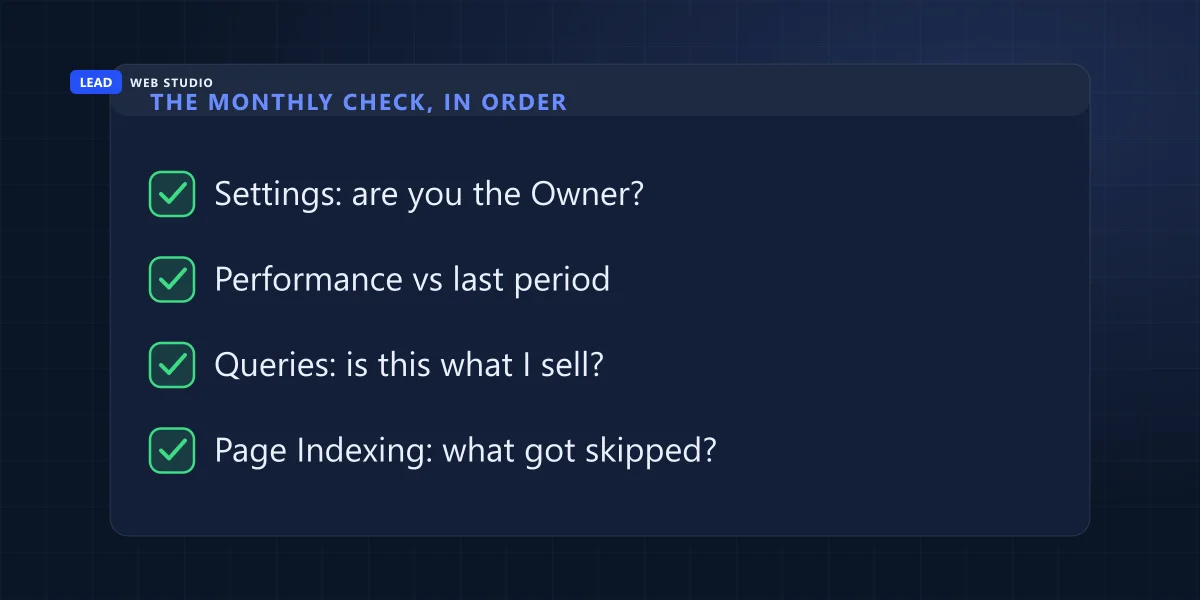
- Settings → Users and permissions. Are you the Owner? Thirty seconds, once. Everything else on this list is worthless if the answer is no.
- Performance → last 3 months, compared to the previous period. Never look at a single period on its own; a number with nothing beside it can only be interpreted by your mood. You're looking for direction, not for a value.
- The Queries tab. Read the top twenty terms and ask one question of each: is this what I sell? This is the highest-value two minutes in the whole tool, and almost nobody spends it. Terms you want but rank badly for are your content plan. Terms you never wanted are telling you what Google currently thinks you do. That same list is also the only honest starting point for working out who your real website competitors are, one search at a time.
- The Pages tab. Which of your pages is Google actually showing? If your money page isn't in the top ten and some old post is, that's a real finding.
- Page Indexing. Read the not-indexed count and the reasons. A number that grew since last month is the one thing on this list worth acting on today.
Do that monthly and you will know more about your own search presence than most people paying for a report about it. If a term you genuinely want is sitting on page two, that's the moment to do something structural about the page — which is what SEO work is for, and it starts from evidence like this rather than from a stranger's audit PDF.
Five numbers that look like problems and aren't
Most of the alarm I get sent is one of these five. Each has a documented, boring explanation, and acting on any of them would mean damaging a page that was fine.
- The last two or three days fell off a cliff. The data isn't finished. Google says "the newest data can be preliminary, meaning it's still being collected and might change", and shows it as a dotted line. Never read the right-hand edge of the graph.
- A sudden dip with no cause. Google publishes a Data Anomalies page listing its own logging errors — there are several logged for 2026 already, including one on 13 August that reduced reported clicks and impressions on the Discover report. Check it before you rebuild anything.
- The same dip as last year. Google's own advice when investigating a drop is to "select Last 16 months" so you can see whether it happens every year. Seasonal businesses see this and panic annually. If yours is one, the off-season has its own playbook.
- A page you just changed hasn't improved. "Some changes can take effect in a few days, while others could take several months." Anything you measure within a few weeks of an edit is still describing the old version.
- A brand-new page ranking badly. New URLs move around for weeks before settling. A three-week-old page is not underperforming; it's still being sorted.
One more that isn't in Google's documentation but is in my inbox constantly: a beautiful upward line in impressions with a flat line in clicks. That is usually not progress. It usually means you have started appearing for a lot more things you can't win — page-three terms multiplying — which is exactly what my own 411-term middle bucket looks like from the outside.
What not to do in here
Search Console has a few buttons that feel productive and mostly aren't.
- Don't hammer "Request Indexing". Google's own text for a crawled-but-unindexed page says there's "no need to resubmit this URL for crawling". Resubmitting doesn't change why it was skipped. Fix the reason; Google recrawls on its own.
- Don't use the Removals tool to hide a page you're embarrassed by. It's for genuine emergencies and it's temporary. A page you don't want in Google needs a noindex tag or deleting, not a six-month curtain.
- Don't rewrite a title because of one week's CTR. One week is weather. And if the page sits below position 20, its click-through rate says nothing about the title — almost nobody saw it.
- Don't chase every "Discovered — not indexed" URL. Check first whether those URLs are pages you actually meant to publish. Half the time they're filter parameters or old drafts, and Google ignoring them is correct.
- Don't take a screenshot of the graph as proof of work. Impressions rise on their own as a site ages. If someone is invoicing you monthly, the things worth asking for are URLs and dates, not a line that goes up.
The tool's honest limit is that it tells you what happened, never why. It will not tell you that your service page has no phone number on it, or that your site takes nine seconds to load on a phone. Those are the causes, and you have to go and look at them yourself. That part is a web design and content job, and if you want a second pair of eyes on what your own data is showing, the pricing page lists what that costs.
Frequently asked questions
Do I need Google Search Console for my business website?+
Yes, and it costs nothing. Google describes it as "a tool from Google that can help anyone with a website to understand how they are performing on Google Search". It's the only place you can see the search terms people typed before your page appeared, and the only place Google tells you directly whether a page is indexed. Google's own advice is that "there is no need to sign in to the tool every day" — check it around once a month, or after you change the site.
What is the difference between an impression and a click?+
An impression means your link appeared on a page of results somebody loaded. Google counts it "whether or not the item is scrolled into view". A click is counted only when somebody leaves Google and lands on your site. So impressions are not visitors — a page can collect thousands of them from the bottom of page four without a single human ever seeing it.
Why is my average position so bad?+
Because it averages every term you appear for, and most sites appear for far more bad terms than good ones. My own site averaged 39.3 over 28 days, because 411 of my 831 search terms sit between position 21 and 50. Filter to the handful of terms you actually sell and read their positions instead. The site-wide average mostly measures how much junk you rank for.
Why don't the numbers in the query table add up?+
This is normal and documented. Google removes rare search terms from the table to protect the privacy of the people who typed them, while still counting them in the chart: "anonymized (rare) results are omitted from the table, but are included in the chart totals". On my property that gap was about 30% of all impressions. The table also shows a maximum of 1,000 rows.
What does position 1 with zero clicks mean?+
Usually that the results page satisfied the person without sending them to your site. Google only counts a click when the visitor leaves Google — "clicking a link that stays inside the Google platform is not counted as a click" — so a tap on your map card, a call, or a directions request never appears here. Check your Google Business Profile numbers over the same dates before blaming your title.
Should I click "Request Indexing" when a page isn't indexed?+
Almost never, and Google says so itself: for a page that was crawled but not indexed, "no need to resubmit this URL for crawling". Resubmitting doesn't change the reason Google skipped it. Fix the cause — usually a thin page, or too few internal links pointing at it — and Google will recrawl on its own.
Sources, all quoted above and worth reading yourself: Google Search Central on getting started with Search Console and on debugging search traffic drops; Search Console Help on the Performance report, on impressions, position and clicks, on data discrepancies, on the Page Indexing report and on data anomalies. All site figures in this article are from my own leadlls.com property for 29 July – 26 August 2026, pulled on 29 August 2026.
Want someone to read yours with you?
Send me a screenshot of your Performance and Page Indexing screens and I'll tell you what's actually in them — in plain English, including "nothing here needs fixing" if that's the answer. Free, no pitch. If it turns out the site underneath is the problem, that's web design and SEO work, and the pricing page says what it costs. Keeping the accounts in your own name is part of ongoing website maintenance and support.
Get My Free Quote
10+ years building websites and looking after Search Console, Analytics and Google Business Profiles for GTA trades, clinics and service businesses — which is why I have a lot of opinions about what these four numbers do and don't prove. Read my full bio · Get in touch