Trucking Company Website Design
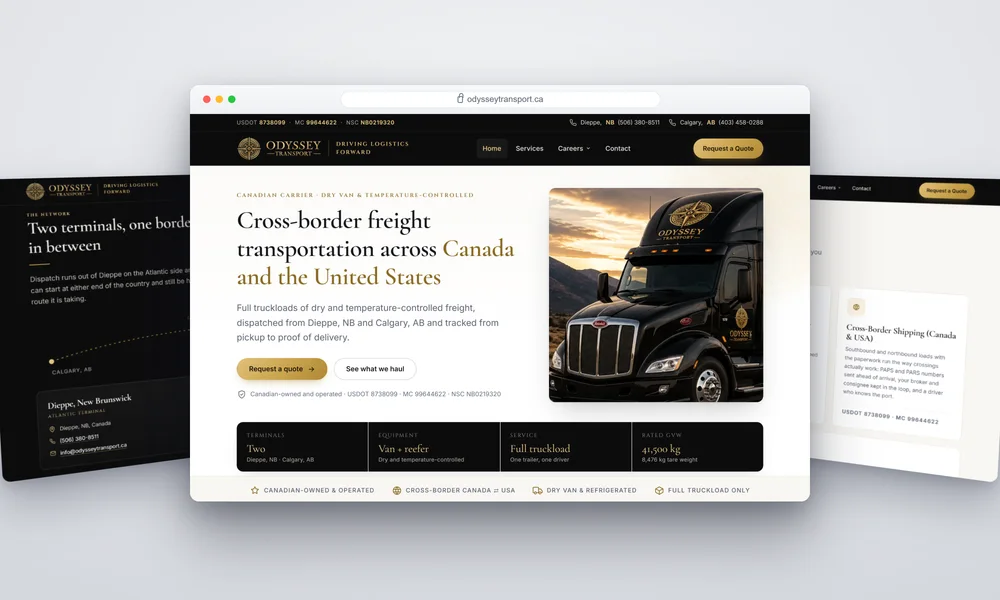
A cross-border freight carrier running dry van and reefer out of two terminals. There was a bare WordPress install and half a header — so I designed and built the whole site from scratch. It scores 100 on desktop Lighthouse on every page.
Short answer
A Canadian freight carrier hauling full truckloads of dry and temperature-controlled goods between Canada and the United States, dispatched from terminals in New Brunswick and Alberta. There was no working site — a bare WordPress install and a half-finished header. Lead Web Studio designed and hand-coded the whole thing from scratch: nine pages, three spam-protected forms, and 100/100 desktop Lighthouse on every page. A build of this scope is $899–$2,999 one-time and goes live in 5–7 days.
The Challenge
Freight is bought on trust and on paperwork. A shipper choosing a carrier wants to know three things before they will send a load: what you haul, where you run, and whether your authority is real and current. A broker checking you out wants the same numbers, faster.
There was nothing to answer them with. The domain pointed at a bare WordPress install with a half-built header — no service pages, no equipment detail, no way to request a quote. And whatever went there had to serve a second, completely different audience at the same time: drivers looking for work, who want pay, equipment and home time, not a shipper's pitch.
What the business needed
- Authority numbers visible on every page, not on an "about" tab
- A shipper path and a driver path that never get in each other's way
- Quote requests that arrive with the lane, the date and the commodity
- Speed on a phone, because half of freight is arranged from a cab
Two Terminals, One Border
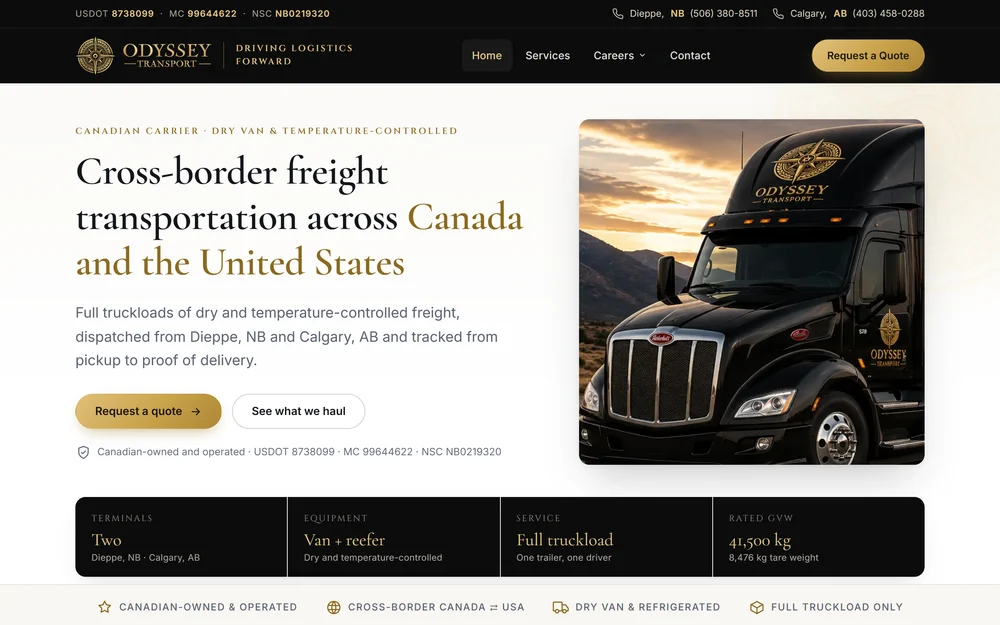
Dispatch runs out of Dieppe on the Atlantic side and Calgary in the west, so a load can start at either end of the country. The site says that plainly and repeats the USDOT, MC and NSC numbers in the top bar, the hero, the equipment table and the footer — because the question a broker asks first is whether the authority checks out.
A Carrier Site Built for Two Audiences
Nine pages, designed and hand-coded from an empty folder — no theme, no page builder, nothing to update or patch later.
For shippers & brokers
Everything needed to qualify a carrier without a phone call.
- USDOT, MC and NSC numbers on every page
- Equipment, trailer types and rated weights in one table
- Service pages for dry van, reefer, cross-border and FTL
- A quote form that asks for the lane and the ready date
- Terminal contacts by region, not one generic inbox
For drivers
A separate path that does not compete with the sales one.
- Split careers section: company drivers and owner-operators
- Application form protected by Turnstile and a honeypot
- Plain answers on equipment and the kind of running
- Mobile-first, because applications come from phones
- Fast on a weak signal at a truck stop
Why a carrier site is really two sites
Most transport websites are built for one visitor and then quietly asked to serve two. The shipper wants capacity, coverage and proof that the authority is current. The driver wants to know what they will be pulling, where it runs and how often they get home. Written as one page, each audience reads half a message and neither is convinced.
So the structure separates them at the navigation and never mixes them again. Services, equipment and the quote form live on the shipper side; careers splits into company drivers and owner-operators, each with its own application. The two paths share a brand and a phone number and nothing else, which is why either visitor can land cold and get to the right form in one click.
Starting from an empty folder rather than a half-finished WordPress install was the easy call, and it is worth saying why. A page-builder site loads its whole framework on every page whether the page uses it or not, so finishing one would have meant inheriting that weight before writing a single useful line. Hand-coded, the site has no plugin to update, no login to defend, and desktop Lighthouse scores of 100 across the board — which on a phone in a truck stop parking lot is the difference between a form submitted and a tab closed.
Questions about a build like this
How long does a trucking company website take?+
Five to seven days of build time once the content is settled. On a carrier site the slow part is never the code — it is confirming the authority numbers, the equipment specs and the lane coverage, because every one of those has to be exact.
Why not just finish the half-built WordPress site?+
Because there was almost nothing there to finish — an install and part of a header. Even when there is more, a page-builder site carries the builder's weight on every page whether you use it or not; hand-coding nine pages takes about the same week and the result loads faster, has no plugin update to forget and no login for anyone to break into.
Do the forms actually stop spam?+
Yes. All three — quote, driver application and contact — run Cloudflare Turnstile plus a honeypot and a per-IP rate limit. A bot that cannot solve the challenge never reaches the mail step, so the inbox stays useful.
What does a website like this cost?+
$899 one-time up to 10 pages, $1,499 for a larger structure with separate service and careers sections, $2,999 where booking, payments or portals are involved. Fixed price agreed in writing before work starts.
More on web design · Website migration · Pricing
Run a carrier in Ontario? This is a niche I specialize in — see website design for trucking companies, or the local page for trucking company web design in Brampton. This build is also the reference project behind my towing and vehicle storage web design pages — the same problem of a stranger verifying a licensed transport business before handing anything over — including towing web design in Cambridge.
The split between the shipper path and the driver path is also the reference for my staffing and recruitment agency web design pages and the Hamilton page, where the same two audiences arrive on one domain and Ontario now writes rules for the job posting itself. I have not built for a licensed staffing agency, and those pages say so. It is also the reference project behind moving company website design and its Ottawa page — household moving is a different customer, but the same job of proving a carrier is real before anyone hands over goods. That is a trade I have not built for yet, and those pages say so.
Running a carrier without a real website?
I design and hand-code the whole thing, brand included — see my packages from $899.
Explore More of My Work
From restaurants and law firms to contractors and clinics — see how I help businesses grow online.
View All ProjectsWeb Design Across Toronto & the GTA
I build websites for clients across Canada and beyond, but I'm based in Toronto. For a planning session or on-site business photos, I'll come to you. Pick your city: