Google business video verification passes when one unbroken recording, made in the Google Maps app, shows three things in order: where the business is, that it really operates, and that you're the one who runs it. Plan the shots before you press record, keep it past 30 seconds, and film nothing you'd mind a stranger seeing.
The message usually arrives at the worst moment. You've just set up your Google Business Profile, you're waiting for the postcard everyone told you about, and instead Google asks for a video. No call option, no postcard, just a button that says it wants to see your business. Owners then do one of two things: film a shaky 20-second clip of the front door, or put it off for a month. Neither gets you on the map.
I treat this video the way you'd treat a short film shoot: a shot list, a rehearsal and a stopwatch. Below are the two shot lists I use, one for a business with a storefront and one for a contractor who works from home, plus what to set out the night before.
What does Google need to see in a verification video?
Google checks a verification video for three proofs: the location, that the business exists, and that you manage it. The video has to be at least 30 seconds, filmed live and uploaded from a phone through your Business Profile, in one take with no edits. Each shot in your plan should serve one of those three.
- 1
Location
Street signs, building numbers, nearby businesses or landmarks, so the reviewer can tie the footage to your address.
- 2
The business exists
For a storefront, signage with a name that matches the profile. For a service business, tools, equipment, products, business cards or branded clothing.
- 3
You manage it
Something only an insider can do: open the locked door with your key, open the till or the back room, open a work van, or show a permit or invoice in the profile's name.
That list comes straight from Google's help page on video verification, which also says a pre-recorded video isn't accepted. Notice what isn't on it: narration, music, a nice intro, or your face. Nobody grades the cinematography. A boring, complete video beats a pretty, incomplete one every time.
A 75-second shot list for a storefront
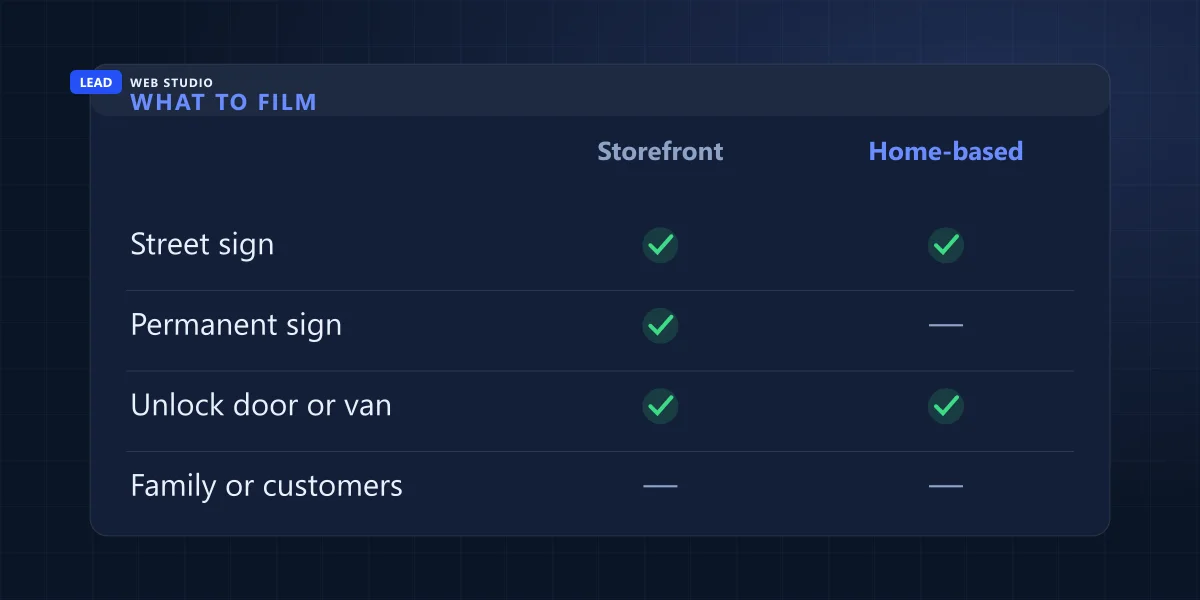
For a shop, office or clinic customers visit, start outside, walk in with your own key and finish at something only staff can open. Seventy-five seconds is comfortably over Google's 30-second minimum and short enough to film in one go without wandering. Walk the route once without recording so you know where to turn.
- 0:00 to 0:12
Stand at the nearest corner and film the street sign, then turn toward your building and hold on the street number.
Location - 0:12 to 0:25
Walk to the entrance and hold for three seconds on the permanent sign, close enough that every letter reads.
Exists - 0:25 to 0:35
Take out your key, open the locked door and walk in. Keep the lock in frame while you turn it.
Manages - 0:35 to 0:55
Pan slowly across what customers see: the counter, the shelves, the treatment chair, the equipment you work with.
Exists - 0:55 to 1:08
Go behind the counter or into the back room. Open the register or wake up the point-of-sale screen.
Manages - 1:08 to 1:15
Hold a business licence, lease or utility bill with the business name on it, account numbers covered. Stop recording.
Manages
If you rent a unit in a plaza with one shared sign by the road, film that sign first and then the name on your own door or window. The name the reviewer sees has to match the name on your profile. If your profile name has extra keywords stuffed in ("Joe's Plumbing Toronto Best Drain Cleaning"), fix the name before you film, because no sign on earth matches it. My guide on choosing Google Business Profile categories explains where those keywords belong instead.
A shot list for a home-based or service-area business
If customers never come to you, the reviewer still needs your area, proof of real work and proof of control. Film the street signs near your address, your branded vehicle or tools, then something only you can open: the van, the trailer, the invoicing app. You don't need to show the inside of your house.
- 0:00 to 0:12
From the sidewalk, film the street sign at your corner and a landmark nearby: a school, a plaza, a church on the next block.
Location - 0:12 to 0:22
Walk to the driveway and show the vehicle with your logo, or the trailer, or the equipment parked there.
Exists - 0:22 to 0:40
Press the key fob, let the van's locks click open, and open the back: ladders, tool cases, the gear of your trade.
Manages - 0:40 to 0:55
Walk into the garage or the room you work from. Show the workbench or desk, a stack of business cards, a branded shirt on a hook.
Exists - 0:55 to 1:10
Open your invoicing or scheduling app, or hold up a permit or invoice in the profile's name with the customer's details covered. Stop.
Manages
Keep these out of the frame
Google asks you to leave out sensitive numbers (bank, tax or ID numbers), private information about you or anyone else, and other people's faces. At home that means the kids in the yard, the neighbour washing a car, the mail on the hall table and the customer's name and address on an invoice. A sticky note over the numbers is fine. Film at a quiet time of day and you'll have less to dodge.
Which kind are you on Google? If customers come to your address during business hours and there's a permanent sign, you're a storefront. If you go to them, you're service-area, and Google's own page says a business without permanent signage on site should be listed that way. I go through that choice in do you need a Google Business Profile.
What to set out the night before
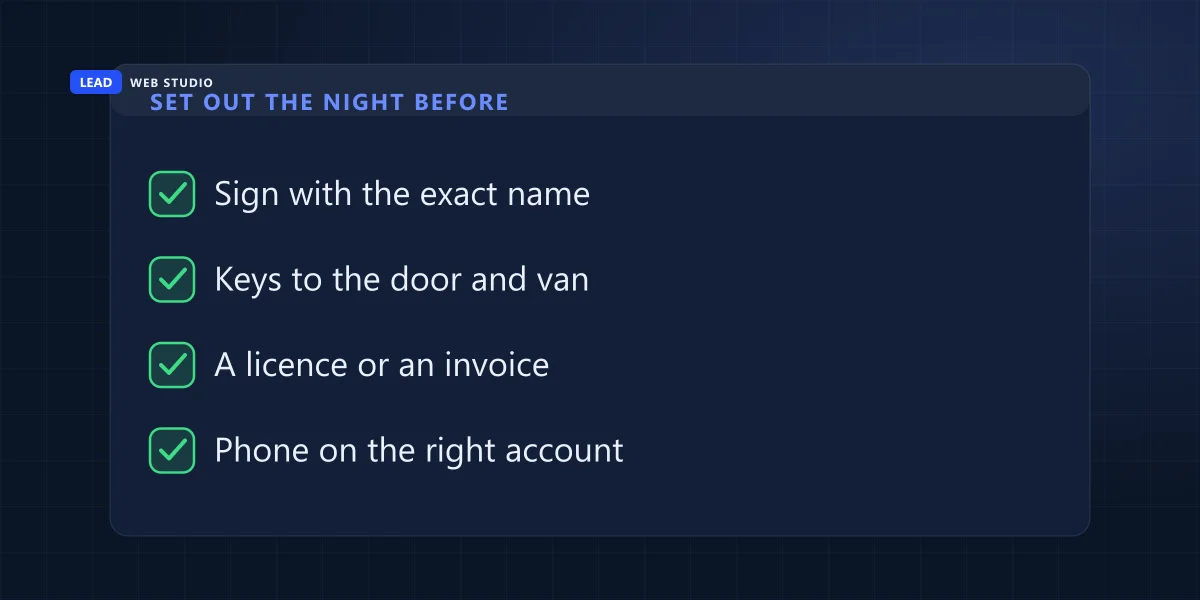
The video fails in the planning more often than in the filming. Before the day, put every prop where the route passes it, charge the phone, and sign in to the Google Maps app with the account that manages the profile. Then the take itself is a walk, not a scavenger hunt.
| Prop | Proof it covers | If you don't have it |
|---|---|---|
| A permanent sign with the exact profile name | The business exists | No sign means you're a service-area business to Google: switch to the tools-and-vehicle list |
| Your keys: front door, back room, van | You manage it | A code you punch into a keypad, a gate fob, a locked cabinet you open |
| Business cards, branded shirt, logo on the vehicle | The business exists | Your actual tools and materials, shown up close |
| A licence, permit, lease, invoice or utility bill in the business name | You manage it | Your invoicing or booking software, open on the business account |
| A phone signed in to the managing Google account, charged, with free storage | None, but nothing uploads without it | Add the person filming as a manager of the profile instead of sharing your password |
A print kit I made for a roofer this week
On 22 October Google asked a roofing company I set up this month for a video, with no phone call offered. The company is new, runs from a small office and had nothing printed yet. So before anyone pressed record, I made a print kit from its logo: a door sign in two sizes, the logo for the office wall, business cards, and a blank invoice template to be filled in by hand only for a real job, never with made-up customers or amounts. Google's page says the storefront name should be on permanent signage, so the door sign went to a printer as a rigid board instead of a sheet of paper and some tape.
The point isn't that you need my kit. It's that an empty office films as an empty office. If your business is a week old, spend the week getting real props in place, and film after that.
What sinks a verification video?
Most rejected videos are missing one of the three proofs, or break one of Google's recording rules: a cut, a clip under 30 seconds, or footage that wasn't filmed live in the app. The other common problem is a name on the sign that doesn't match the profile. Each one has a plain fix you can make before the next take.
You stopped and started again
Google wants an unedited video with no breaks, filmed live. Two clips glued together, or a clip filmed earlier and uploaded later, fails the rule outright. Record inside the app, in one go.
It ran 20 seconds
The minimum is 30. A 20-second clip rarely fits three proofs anyway. Follow a shot list and you'll land somewhere past a minute without trying.
The sign says one name, the profile another
"Smith Bros. Renovations" on the van and "Smith Brothers Renovation Toronto" on Google is two names. Change the one that's wrong first, then film.
It starts indoors
A video that opens at your desk proves you have a desk. Start where the reviewer can see a street sign or a landmark, then walk in.
Nothing only an owner could do
Anyone can film a sign from the sidewalk. Opening the locked door with your key, opening the van or opening the invoicing app is what separates you from a passer-by.
A video won't fix a profile that has other problems. If there are two listings for the same business, sort that out first with how to fix a duplicate Google Business listing. If you've just moved, your new address and your sign need to agree before you film; the order of that is in moving a business to a new address.
What happens after you upload the video?
Google reviews it within up to 5 business days. If it passes, you get a note that the business is verified. If not, a Review issues prompt in your profile lists what was missing, and you record a new video that includes everything from the first one plus the missing part.
- Upload day
- Leave the profile alone. Don't start renaming, recategorising or moving the pin while someone is reviewing it.
- Up to 5 business days
- Google's stated review time. A video sent on a Thursday can take into the following week.
- If it's rejected
- Open the profile and tap Review issues. Read the reasons before you film again.
- The second take
- Same route, same shots, plus the one that was missing. Don't film a shorter "just the fix" clip.
Google may also ask for a second method after the first one worked. Its verification help page says some businesses need more than one, and that Google picks the methods automatically, so you can't switch to a postcard because you'd prefer one. If the profile is suspended rather than unverified, that's a different process, covered in what to do when a Google profile is suspended.
If you'd rather not plan this alone, help with Google's verification is part of my Google Maps setup service, $149, $249 or $299 depending on the package, and in the GTA I'm happy to come on site for it.
Questions owners ask me about the verification video
How long should a Google verification video be?+
Google's minimum is 30 seconds, filmed in one take. I plan storefront videos at about 75 seconds and home-based ones at about 70, which leaves time for every proof without rushing. Longer isn't better: every extra second is another chance to film something private.
Can someone else record the verification video for me?+
Yes, as long as they film it live and upload it through your Business Profile on a phone. That means they need to be signed in with an account that manages the profile. Add them as a manager rather than handing over your Google password.
Do I need a sign if I work from home?+
No. For a service-area business Google accepts professional tools, equipment, products, business cards or branded clothing as proof the business exists, and a branded van or a permit or invoice in the profile's name as proof you manage it. Film the street around your home, not the inside of it.
Why does Google want a video when I already verified by phone?+
Google's verification help says some businesses need to verify with more than one method. It's not a sign you did something wrong. Film the video the same way you would have the first time.
Can I ask for a postcard instead of a video?+
No. Google decides which verification methods your profile is offered, based on business type, public information, region and hours, and they can't be changed. If video is the only option shown, the video is the way through.
Sources, read on 25 October 2026: Google Business Profile help on verifying with a video recording for the three proofs, the 30-second minimum, the one-take rule, what to keep out of frame and the 5-day review; Google Business Profile help on verifying your business for methods chosen by Google and verifying more than once. The shot timings are my own plan, not Google's.
Google asked you for a video?
Send me your profile link and tell me whether customers come to you or you go to them. I'll send back a shot list for your business, and Google Maps setup covers the rest of the profile.
Get My Free Quote
I set up and fix Google Business Profiles for service businesses around Toronto, which lately means a lot of planning short, boring, complete videos for Google's reviewers. Read my full bio · Get in touch